Federal Modernization Workbook
Chapter 01 — Privileged Inventory as Code
You can’t make privilege just-in-time until you can list it: who holds which role, at which scope, standing or eligible, directly or through a group, and in which tier.
The read behind the project plan’s Gate 0, “standing administrative privilege inventoried and classified by tier.” You start with Learn’s own samples for listing Microsoft Entra role assignments, which the repository keeps as a pinned copy, and run them against stand-ins to see what they return and what they miss. Then you build examples/privileged-access for what they leave to you: eligible assignments, group members, Azure role assignment and eligibility schedules, a tier for every row, findings, and a manifest. Lab 1 runs on a laptop with no tenant; Lab 2 uses a test tenant. A table at the end maps each output to the federal requirement it supports.
Jump to a slide (18)
Deck · Narrated deck (about 11 minutes, captions) · Script · Captions. Recorded on November 2, 2026 from the approved chapter.
Goal and audience
Goal. By the end of this chapter you can produce, from code, the inventory the plan’s tasks A0.1 and A0.2 ask for: every Microsoft Entra directory role assignment, active and eligible, and every Azure role assignment and eligibility on the scopes you name, each classified by the program’s tiers, with the findings a reviewer acts on and a manifest that says which calls produced it. You can say, for each rule in the code, whether it is Microsoft’s contract, Microsoft’s sample, or the program’s own design.
Audience. Developers who build the project’s read path, and the identity engineers and ISSOs who review it. You should read PowerShell 7 and know what a role assignment is. You don’t need a tenant until Lab 2.
What the inventory has to hold
A role reaches a person in four ways that look the same on an admin’s screen and very different to an attacker. Learn names them: permanent eligible, permanent active, time-bound eligible and time-bound active, and says to keep zero permanently active assignments for roles other than the emergency access accounts.1 An eligible assignment the holder has activated shows up as active for the activation window. And a role assigned to a role-assignable group reaches every member of it, which is how Book 04 wants it to work: the program assigns roles to PRV-<tier>-<role>[-<scope>] groups, never to a person (Book 04, Chapter 04).
So the inventory reads three Graph collections and two Resource Manager ones:
| What | Where | Why this one |
|---|---|---|
| Role definitions | GET /v1.0/roleManagement/directory/roleDefinitions |
Names and template IDs, including custom roles2 |
| Active assignments | GET /v1.0/roleManagement/directory/roleAssignmentScheduleInstances |
Every active assignment, whether made through PIM or directly, with assignmentType (Assigned or Activated), memberType (Direct, Group or Inherited) and endDateTime3 4 |
| Eligible assignments | GET /v1.0/roleManagement/directory/roleEligibilitySchedules |
Every eligibility, with its expiration5 |
| Group members | GET /v1.0/groups/{id}/members |
Who a role-assignable group passes its role to6 |
| Azure assignments and eligibility | GET {scope}/providers/Microsoft.Authorization/roleAssignmentSchedules and roleEligibilitySchedules, api-version=2020-10-01 |
Active and eligible Azure roles; Learn’s PowerShell for the same list uses the eligibility and assignment schedule cmdlets7 8 |
The tier comes from the program, not from Microsoft. Microsoft marks some Entra roles PRIVILEGED, but the label is a preview and listing it through Graph uses the beta endpoint;9 Book 04 treats it as an input to tiering, not the tier itself. The example keeps Book 04’s tiers in config/tiers.json, keyed by role template ID, which is the same in every tenant (Appendix B). A role that isn’t in the file is reported as unclassified, never assumed safe. Design guidance.
Which cloud, for this read
For the target estate, Microsoft 365 GCC with commercial Azure, every host is a worldwide one: Graph at graph.microsoft.com and Resource Manager at management.azure.com. GCC High uses graph.microsoft.us, DoD dod-graph.microsoft.us, and both use Azure Government’s management.usgovcloudapi.net.10 11 Microsoft Entra ID P1 and P2 for GCC are hosted in the Azure commercial environment,12 and Microsoft Entra ID Governance, which PIM needs, is available in GCC, GCC High and DoD.13 Every Graph call in this chapter lists the global service, US Government L4 and US Government L5 in its national cloud table.14 15 16 17 The code takes gcc as an explicit cloud name and refuses any name it doesn’t know, the pattern the first workbook’s Chapter 02 sets.
Start with Microsoft’s sample
What Microsoft gives you
Learn’s page List Microsoft Entra role assignments is Microsoft’s procedure for this read. It covers the admin center, Microsoft Graph PowerShell and the Graph API: assignments for one role, across all roles, for a principal (direct and, through a beta API, transitive), for a group, and at administrative unit scope.18 Its all-roles PowerShell sample reads every role definition with Get-MgRoleManagementDirectoryRoleDefinition and then lists each role’s assignments with Get-MgRoleManagementDirectoryRoleAssignment. The admin center also downloads all active assignments as a CSV through a bulk operation, which Learn says runs for up to an hour and has limits in large tenants.19
Learn’s Azure page for the same question, Eligible and time-bound role assignments in Azure RBAC, says there’s no single PowerShell command for both kinds and lists eligible assignments with Get-AzRoleEligibilitySchedule and active ones with Get-AzRoleAssignmentSchedule.20 The example’s Resource Manager calls are the REST form of those two cmdlets.
The pinned copy
The samples exist only inside the Learn page, so the repository pins the page’s source, unmodified, in examples/third_party/entra-role-assignments-page: view-assignments.md from MicrosoftDocs/entra-docs at commit 07cb73d (October 30, 2026), retrieved October 30, 2026, with the repository’s MIT licenses.21 snapshot.json records each file’s SHA-256, checked against the upstream git blob hashes, and a unit test checks them. The weekly source watch reports new commits to the page. Updating the copy is a reviewed pull request.
tests/LearnSampleHarness.ps1 extracts the PowerShell samples from the pinned page at test time and runs them unmodified against stand-ins for Connect-MgGraph and the two cmdlets. The stand-ins record their parameters and answer from the fixture tenant’s active assignments, which is what the List unifiedRoleAssignments API returns.22 Nothing is installed and nothing signs in.
What it leaves to you
Running the samples against the fixture tenant shows what they do and what they leave out. Each row is pinned by a test: in tests/MicrosoftSamples.Tests.ps1 for the sample, and in tests/PrivilegedInventory.Tests.ps1 for the example.
| Learn’s sample, as published | Why it matters | What examples/privileged-access adds |
|---|---|---|
| Lists every active assignment across all roles | — | Kept as the model, through roleAssignmentScheduleInstances, which returns the same active assignments with assignmentType and endDateTime23 |
| Sees no eligible assignment: the fixture’s eligible-only holders are missing | Under PIM almost every human holder is eligible, so an active-only list shrinks as the project succeeds and stops being an inventory | Reads roleEligibilitySchedules and reports permanent eligibility (PA-INV-06) |
| One assignment call per role definition, plus one for the definitions | More than a hundred calls for one list, each a chance to be throttled | One paged call per collection |
Passes neither -All nor -PageSize |
The cmdlet’s reference lists -All as the switch that lists all pages, off by default,24 so each call can stop at the first page |
Follows @odata.nextLink and Resource Manager’s nextLink, only on the cloud’s own host, as Learn’s paging guidance asks25 |
| Returns a role-assignable group as one principal and never reads its members | The people who hold the role are invisible | Expands each group once, marks member rows Via Group, and never drops a member it can’t name (PA-INV-09) |
| Prints role definition and principal IDs; no names, no tier | A reviewer can’t act on a GUID | Names from the definitions and the expanded principal, a tier from config/tiers.json, and Unclassified for anything else (PA-INV-05) |
Signs in with Connect-MgGraph and no environment or scopes |
The worldwide cloud and whatever scopes the session already has | An explicit cloud, the call list in config/calls.json with each call’s least-privileged permission, and a refusal of any call the task doesn’t declare |
Reads transitive assignments from beta, on a hard-coded graph.microsoft.com |
Beta can change;26 the host is wrong for GCC High and DoD | v1.0 only, with the host from the cloud table |
| Nothing for Azure | Owner, User Access Administrator and Contributor are privileged too27 | Resource Manager schedules by scope, placed in tiers by role and scope, with PA-INV-07 and PA-INV-08 |
The verdict. Use Learn’s page as the model for what to read and as the admin center’s cross-check (Lab 2 compares the two). Don’t use its all-roles loop for the inventory: it can’t see eligibility, which is the state the project is moving every human assignment into.
The code: examples/privileged-access
examples/privileged-access is new. At this chapter it is one PowerShell module, powershell/PrivilegedAccess/PrivilegedAccess.psm1, two entry scripts, the call list and the tier map; later chapters add their own modules. This chapter’s entry script is Invoke-PaInventory.ps1.
The reader
Every call goes through one reader, built for one task in one cloud: New-PaReader -Cloud gcc -Task inventory -Invoke <script block>. The script block is the only thing that touches the network: New-PaLiveInvoker for a real run, which uses Invoke-MgGraphRequest and Invoke-AzRestMethod and refuses to start if either session is signed in to another cloud, or New-PaFixtureInvoker for labs and tests. The reader enforces four rules:
- Only declared calls.
config/calls.jsonlists each call with its method, version, path, least-privileged permission (or Azure role), stage and Learn page. A call the task doesn’t declare throws before anything is sent. - GET only. The reader refuses any other method, and so does the fake.
- One host. Every URL, including every next link, must start with the cloud’s own Graph or Resource Manager host, or the token isn’t sent.
- Every page. Collections are followed to the end. The fake serves pages of two by default, so the tests exercise paging on every collection.
The inventory’s permissions are the union of its calls:
| Call | Least-privileged permission | Delegated role |
|---|---|---|
| List roleDefinitions | RoleManagement.Read.Directory28 |
Directory Readers, Global Reader or Privileged Role Administrator |
| List roleAssignmentScheduleInstances | RoleAssignmentSchedule.Read.Directory29 |
Global Reader (read) |
| List roleEligibilitySchedules | RoleEligibilitySchedule.Read.Directory30 |
Global Reader (read) |
| List group members | GroupMember.ReadBasic.All, with User.ReadBasic.All so user members come back with names31 32 |
Group owners or members, or a role with members read |
| Azure schedules | Reader on each scope (*/read)33 |
— |
The User.ReadBasic.All row matters. Learn says that when an app can read a group’s membership but not a member’s object type, the member comes back with only its id and @odata.type.34 The example asks for the extra permission, and if a member still comes back unnamed it keeps the row and raises PA-INV-09 rather than dropping someone who holds a role.
The rows
Get-PaPrivilegedInventory returns one row per assignment: plane (Entra or Azure), role, tier, scope, state (ActivePermanent, ActiveTimeBound, Activated, Eligible or EligiblePermanent), end date, principal, and whether it came directly or through a group. Active instances with memberType Group are skipped, because the example expands the group itself and would otherwise count its members twice.35 Azure schedules are read for each scope you list and de-duplicated by ID, because a list at one scope also returns schedules above and below it; schedules with memberType Inherited are skipped for the same reason (research gaps, row 3).
Azure rows get their tier from Book 04, Chapter 04’s placement table: a role that can assign roles at root or management group scope is T0, any privileged administrator role on a subscription you list as control plane (identity, PIM evidence, the log workspace) is T0, Owner or Contributor on a workload subscription is T1, other roles are T2, and Reader is read-only. Learn’s privileged administrator roles are Owner, Contributor, Reservations Administrator, Role Based Access Control Administrator and User Access Administrator.36 Design guidance for the placements.
The findings
Test-PaInventory turns the rows into findings. Two thresholds are Learn’s; the rest are the program’s.
| Rule | Severity | What it flags | Source |
|---|---|---|---|
| PA-INV-01 | Finding (Info when on the exceptions list) | Permanent active T0 or T1, in Entra or Azure, outside exceptions.csv; an exception with no owner doesn’t count |
Learn: zero permanently active assignments except the emergency accounts37 |
| PA-INV-02 | Warn | An Entra role assigned straight to a user | Design guidance (roles reach people through PRV groups); Learn recommends groups for role assignments38 |
| PA-INV-03 | Warn | A group holding a role that isn’t named PRV-<tier>-... for that tier |
Design guidance |
| PA-INV-04 | Finding | Five or more principals with Global Administrator, active or eligible, group members counted; or fewer than two users | Learn: fewer than five;39 CISA’s MS.AAD.7.1v1: at least two40 |
| PA-INV-05 | Warn | A role that isn’t in the tier map | Design guidance |
| PA-INV-06 | Warn | Eligibility with no end date | Design guidance (Appendix B bounds eligibility by tier) |
| PA-INV-07 | Finding | User Access Administrator at root scope (/), which is what elevate access grants |
Learn: a Global Administrator who elevates gets User Access Administrator on all subscriptions;41 Book 04 treats it as a Tier 0 event |
| PA-INV-08 | Finding | More than three Owners on a subscription | Learn: a maximum of three subscription owners42 |
| PA-INV-09 | Warn | A group member returned with ID and type only | Learn: limited information for inaccessible member objects43 |
The run and its manifest
Invoke-PaInventory.ps1 reads, classifies, finds, and writes inventory.json, inventory.csv, findings.json and manifest.json. The manifest records the task, the mode (Fixture or Live), the cloud, the tenant ID if you give one, the permissions the task needs, every request with its time, and the SHA-256 of each file. It names no one; the inventory does, so treat the run’s folder as sensitive.
The tests
Pester 5 under PowerShell 7; the kit runs 330 tests, none needing a module, a tenant or a network. This chapter’s are:
tests/MicrosoftSamples.Tests.ps1, 9 tests in the Chapter 01 block: Learn’s samples, run as published.tests/PrivilegedInventory.Tests.ps1, 33 tests: clouds and the call list, refused calls and hosts, paging with page sizes of 1, 2 and 50, eligible and activated states, group expansion, tiers, Azure de-duplication, each finding, the whole fixture’s counts, and the manifest’s hashes.
The other 7 sample tests and the 29 in tests/EmergencyAccess.Tests.ps1 are Chapter 02’s.
The commands below run Learn’s pinned samples against stand-ins, and the example against a fictional tenant served by a fake. They show what the code does, not that a tenant returns the same shapes. Review the code, and run Lab 2 in a test tenant, before it reads a real one.
Lab 1: fixtures, no tenant
You need PowerShell 7.1 or later with Pester 5. Work in examples/privileged-access.
Every command in this lab, in order, from examples/privileged-access. Each step below says what it does and what to look for.
# Step 1: Run Learn's samples against the stand-ins
Invoke-Pester -Path tests/MicrosoftSamples.Tests.ps1 -FullNameFilter '*Chapter 01*' -Output None -PassThru |
    Select-Object PassedCount, FailedCount, NotRunCount

# Step 2: List the permissions the inventory needs
Import-Module ./powershell/PrivilegedAccess/PrivilegedAccess.psm1
(Get-PaRequiredPermission -Task inventory).GraphPermissions -join ', '

# Step 3: Run the inventory against the fictional tenant
./Invoke-PaInventory.ps1 -FixturePath tests/fixtures/tenant.json -OutputPath out/inventory `
    -AzureScope /subscriptions/11111111-1111-4111-8111-111111111111, /providers/Microsoft.Management/managementGroups/contoso-root, /subscriptions/22222222-2222-4222-8222-222222222222 `
    -ExceptionsPath tests/fixtures/inputs/exceptions.csv -ControlPlaneSubscriptionId 22222222-2222-4222-8222-222222222222

# Step 4: Read the findings
Get-Content out/inventory/findings.json -Raw | ConvertFrom-Json | Where-Object Severity -eq 'Finding' | Format-Table Rule, Object

# Step 5: See the reader refuse
$r = New-PaReader -Cloud gcc -Task inventory -Invoke (New-PaFixtureInvoker -Path tests/fixtures/tenant.json).Invoke
Invoke-PaList -Reader $r -CallId ca-policies
Get-PaCloud GCCHigh

# Step 6: Run the tests
Invoke-Pester -Path tests

# After the steps
Remove-Item -Recurse -Force out
Run Learn’s samples against the stand-ins:
Invoke-Pester -Path tests/MicrosoftSamples.Tests.ps1 -FullNameFilter '*Chapter 01*' -Output None -PassThru |
    Select-Object PassedCount, FailedCount, NotRunCount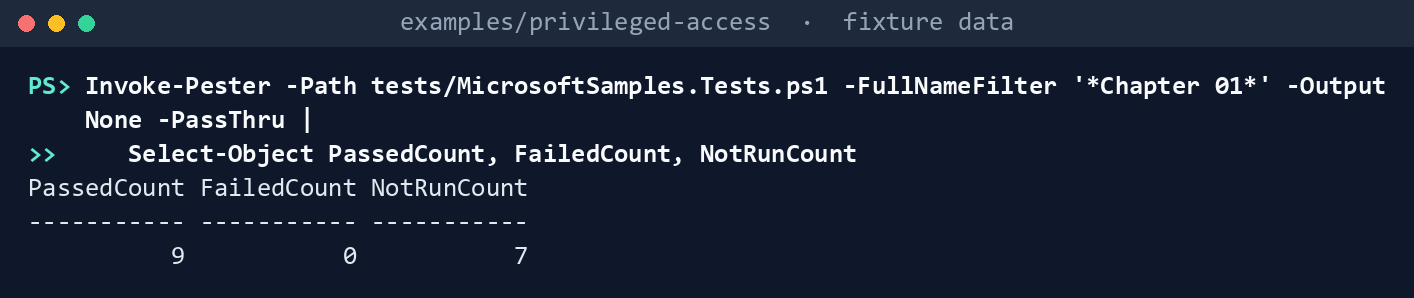
What the terminal shows, run on the kit’s fixtures (the same output as text) PassedCount 9,FailedCount 0,NotRunCount 7(the seven are Chapter 02’s). Open the test file and read the second test: the fixture’s eligible-only holders never appear in the sample’s output.List the permissions the inventory needs:
Import-Module ./powershell/PrivilegedAccess/PrivilegedAccess.psm1
(Get-PaRequiredPermission -Task inventory).GraphPermissions -join ', '
What the terminal shows, run on the kit’s fixtures (the same output as text) GroupMember.ReadBasic.All, RoleAssignmentSchedule.Read.Directory, RoleEligibilitySchedule.Read.Directory, RoleManagement.Read.Directory, User.ReadBasic.All. Nothing ends inReadWrite.Run the inventory against the fictional tenant:
./Invoke-PaInventory.ps1 -FixturePath tests/fixtures/tenant.json -OutputPath out/inventory `
    -AzureScope /subscriptions/11111111-1111-4111-8111-111111111111, /providers/Microsoft.Management/managementGroups/contoso-root, /subscriptions/22222222-2222-4222-8222-222222222222 `
    -ExceptionsPath tests/fixtures/inputs/exceptions.csv -ControlPlaneSubscriptionId 22222222-2222-4222-8222-222222222222
Assignments: 30 rows (Azure T0=4, Azure T1=5, Azure T2=1, Entra T0=8, Entra T1=2, Entra T2=2, Entra Unclassified=1) Findings: 10 Finding, 7 Warn, 1 Info Written to out/inventory (manifest.json lists every request and file hash)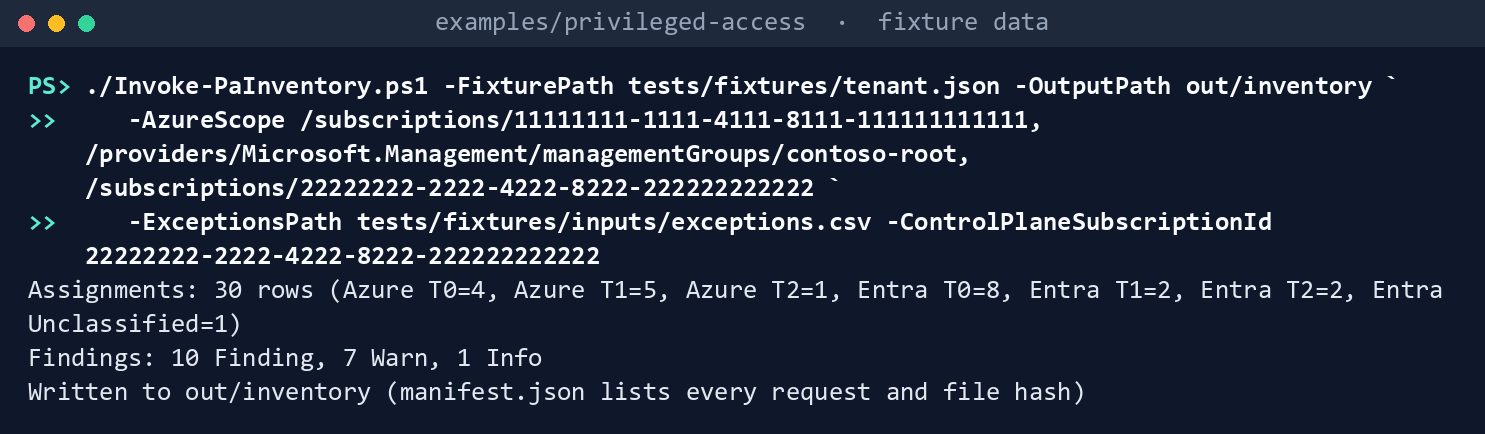
What the terminal shows, run on the kit’s fixtures (the same output as text) Read the findings:
Get-Content out/inventory/findings.json -Raw | ConvertFrom-Json | Where-Object Severity -eq 'Finding' | Format-Table Rule, Object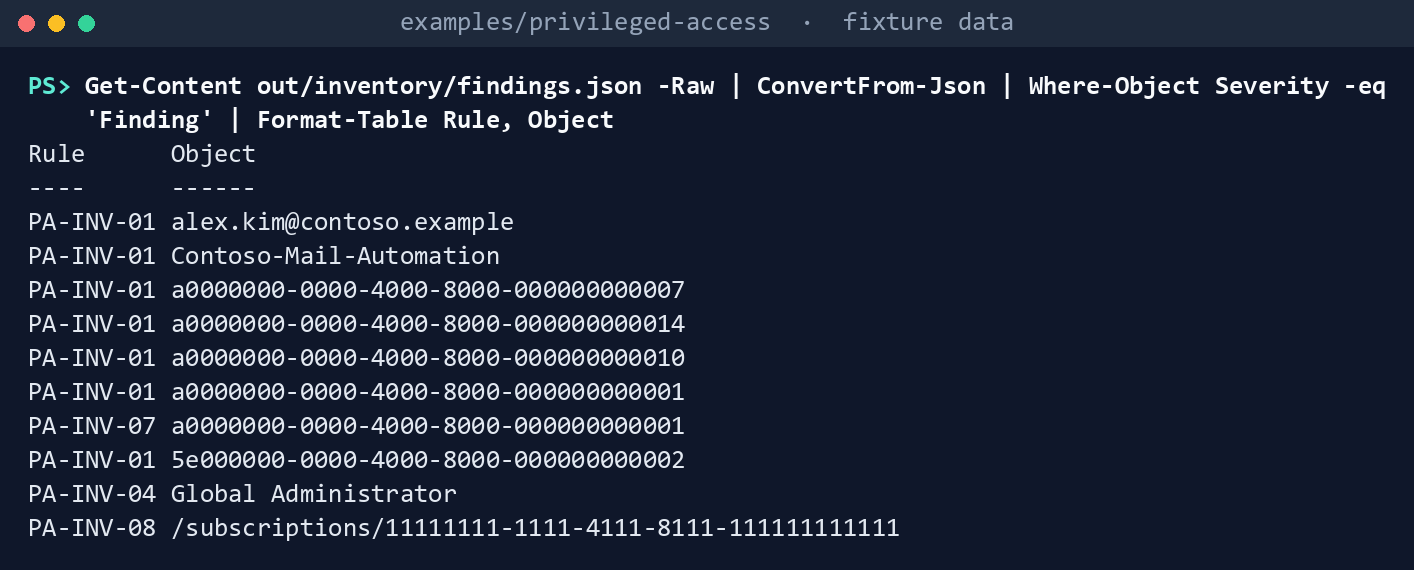
What the terminal shows, run on the kit’s fixtures (the same output as text) Seven PA-INV-01 rows (a standing Global Administrator, the mail automation service principal whose exception has no owner, two standing subscription Owners, a standing User Access Administrator at the management group, the same Global Administrator’s User Access Administrator at root, and a log-export service principal with standing Contributor on the control-plane subscription), PA-INV-07 for the root-scope elevation, PA-INV-04 (five Global Administrators, one of them through
PRV-T0-GlobalAdmin), and PA-INV-08 (five Owners on the workload subscription). Azure rows show object IDs, because Resource Manager returns IDs, not names. The emergency accountea01is Info, not a Finding: it’s on the exceptions list with an owner.See the reader refuse:
$r = New-PaReader -Cloud gcc -Task inventory -Invoke (New-PaFixtureInvoker -Path tests/fixtures/tenant.json).Invoke
Invoke-PaList -Reader $r -CallId ca-policies
Get-PaCloud GCCHigh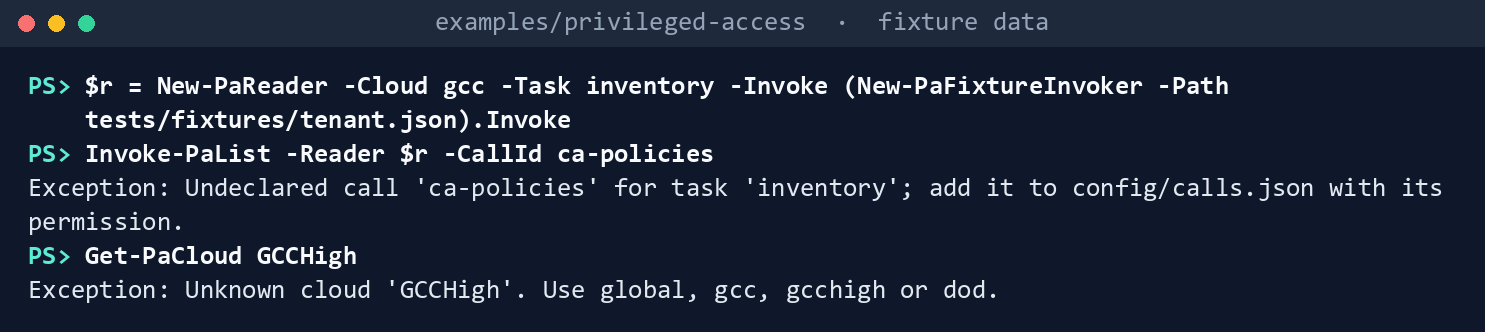
What the terminal shows, run on the kit’s fixtures (the same output as text) Two errors:
Undeclared call 'ca-policies' for task 'inventory'; add it to config/calls.json with its permission.andUnknown cloud 'GCCHigh'. Use global, gcc, gcchigh or dod.Run the tests:
Invoke-Pester -Path tests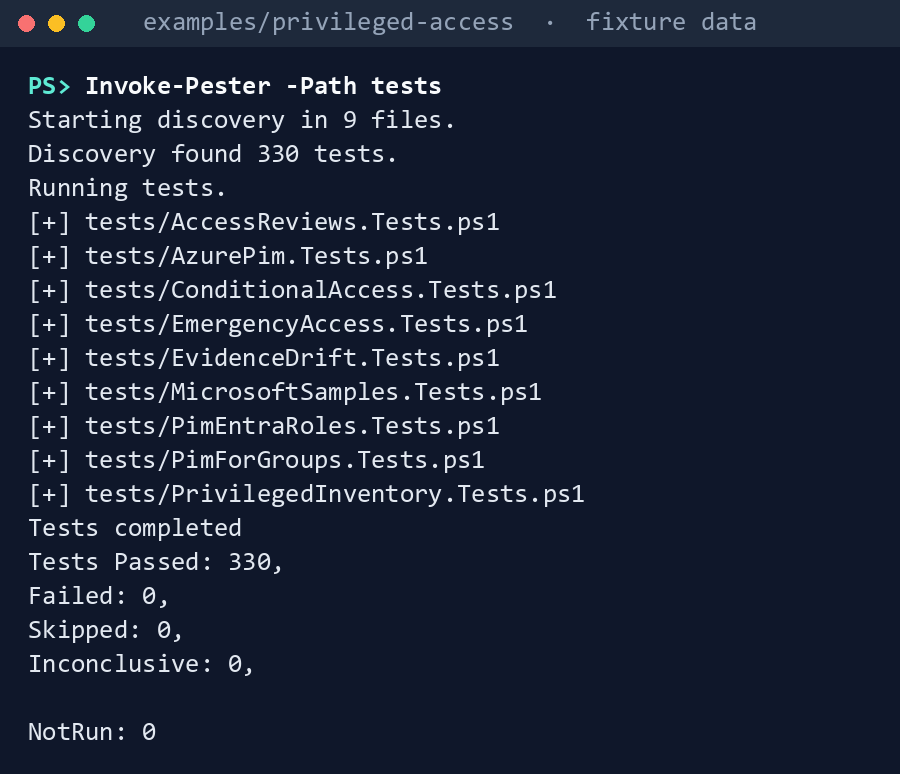
What the terminal shows, run on the kit’s fixtures (the same output as text)
Expected result: 330 tests passing, every row of the gap table seen with your own eyes, and out/inventory/manifest.json listing 24 GET requests.
When you’re done, delete out:
Remove-Item -Recurse -Force out
Lab 2: test tenant
Use a test tenant in the worldwide or GCC cloud with a test Azure subscription, never production, with fictional people. The run only reads. Work in examples/privileged-access. You’ll replace: <tenant-id> (the test tenant’s ID), <app-id> (the application (client) ID of the app you register in step 1), <thumbprint> (the thumbprint of the app’s certificate, installed in your certificate store) and <test-subscription-id> (the test subscription’s ID).
Every command in this lab, in order, from examples/privileged-access. Each step below says what it does and what to look for.
# Step 4: Sign in and run
Connect-MgGraph -Environment Global -TenantId <tenant-id> -ClientId <app-id> -CertificateThumbprint <thumbprint>
Connect-AzAccount -ServicePrincipal -Environment AzureCloud -Tenant <tenant-id> -ApplicationId <app-id> -CertificateThumbprint <thumbprint>
./Invoke-PaInventory.ps1 -Cloud gcc -OutputPath out/inventory-test -AzureScope /subscriptions/<test-subscription-id> -TenantId <tenant-id>

# Step 5: Cross-check against the admin center
Import-Csv out/inventory-test/inventory.csv | Where-Object State -Like 'Active*' | Format-Table RoleName, PrincipalName, State
Import-Csv out/inventory-test/inventory.csv | Where-Object State -Like 'Eligible*' | Format-Table RoleName, PrincipalName, State, Via

# Step 6: Check the two things the fixture assumed
$rows = Get-Content out/inventory-test/inventory.json -Raw | ConvertFrom-Json
$rows | Where-Object { $_.Plane -eq 'Entra' -and $_.PrincipalType -eq 'unknown' } | Format-Table RoleName, State, PrincipalId
$rows | Where-Object Plane -EQ 'Azure' | Group-Object RoleId, Scope, State, PrincipalId | Where-Object Count -GT 1 | Format-Table Count, Name

# Step 7: Back it out
Remove-Item -Recurse -Force out/inventory-test
Register the app in the tenant’s own cloud. For a GCC tenant that’s the worldwide Microsoft Entra admin center. Add a certificate credential, not a secret.
- Open Entra ID > App registrations > New registration, name the app and select Register.
- In the app, open Certificates & secrets > Certificates > Upload certificate and upload the certificate’s public key.
Grant the five application permissions from Lab 1, step 2, and grant admin consent. Nothing else.
- In the app, open API permissions > Add a permission > Microsoft Graph > Application permissions.
- Select
GroupMember.ReadBasic.All,RoleAssignmentSchedule.Read.Directory,RoleEligibilitySchedule.Read.Directory,RoleManagement.Read.DirectoryandUser.ReadBasic.All, then Add permissions. - Select Grant admin consent for your tenant.
Grant Reader to the app’s service principal on the test subscription. In the Azure portal, open Subscriptions > the test subscription > Access control (IAM) > Add > Add role assignment, select Reader, then on Members select the app, and Review + assign.
Sign in and run:
Connect-MgGraph -Environment Global -TenantId <tenant-id> -ClientId <app-id> -CertificateThumbprint <thumbprint>
Connect-AzAccount -ServicePrincipal -Environment AzureCloud -Tenant <tenant-id> -ApplicationId <app-id> -CertificateThumbprint <thumbprint>
./Invoke-PaInventory.ps1 -Cloud gcc -OutputPath out/inventory-test -AzureScope /subscriptions/<test-subscription-id> -TenantId <tenant-id>
Cross-check against the admin center. On Roles and administrators, select Download assignments for all roles, as Learn’s procedure describes.44 Every active row in the CSV should be in
inventory.csv, andinventory.csvshould hold the eligible rows the CSV doesn’t. These list the inventory’s active and eligible rows side by side:Import-Csv out/inventory-test/inventory.csv | Where-Object State -Like 'Active*' | Format-Table RoleName, PrincipalName, State Import-Csv out/inventory-test/inventory.csv | Where-Object State -Like 'Eligible*' | Format-Table RoleName, PrincipalName, State, ViaCheck the two things the fixture assumed. In
inventory.json, rows read with$expand=principalshould have a principal type (research gaps, row 2), and each Azure schedule should appear once. The first command lists Entra rows whose principal type came backunknown(what the example writes when it can’t read one), the second any Azure row that appears more than once; both should print nothing:$rows = Get-Content out/inventory-test/inventory.json -Raw | ConvertFrom-Json $rows | Where-Object { $_.Plane -eq 'Entra' -and $_.PrincipalType -eq 'unknown' } | Format-Table RoleName, State, PrincipalId $rows | Where-Object Plane -EQ 'Azure' | Group-Object RoleId, Scope, State, PrincipalId | Where-Object Count -GT 1 | Format-Table Count, NameBack it out. Remove the Reader assignment (Access control (IAM) > Role assignments, select the app’s row, Remove) and the five permissions, delete the app registration (Entra ID > App registrations > the app > Delete) and its certificate, and delete
out/inventory-test: it holds the tenant’s privileged holders.Remove-Item -Recurse -Force out/inventory-test
Verified facts
| Item | Value | US Government clouds | Stage | Source |
|---|---|---|---|---|
| List roleDefinitions | GET /roleManagement/directory/roleDefinitions; RoleManagement.Read.Directory |
L4 and L5 | v1.0 | 45 |
| List roleAssignmentScheduleInstances | Active assignments made through PIM or directly; RoleAssignmentSchedule.Read.Directory; Global Reader for a delegated read |
L4 and L5 | v1.0 | 46 |
| Active instance properties | assignmentType Assigned or Activated; memberType Inherited, Direct or Group; endDateTime |
— | v1.0 | 47 |
| List roleEligibilitySchedules | RoleEligibilitySchedule.Read.Directory; scheduleInfo.expiration |
L4 and L5 | v1.0 | 48 |
| List unifiedRoleAssignments (Learn’s sample) | Active assignments; RoleManagement.Read.Directory |
L4 and L5 | v1.0 | 49 |
| Transitive role assignments (Learn’s sample) | /beta/roleManagement/directory/transitiveRoleAssignments |
— | Beta | 50 51 |
| List group members | GroupMember.ReadBasic.All; members of unreadable types return id and @odata.type only; User.ReadBasic.All for user members’ basic properties; known issue: v1.0 doesn’t return service principal members |
L4 and L5 | v1.0 | 52 53 54 |
| Privileged label | isPrivileged on role definitions, listed through the beta endpoint |
— | Preview | 55 |
| Global Administrators | Fewer than five | — | — | 56 |
| Permanent active assignments | Zero, except the emergency access accounts | — | — | 57 |
| Azure eligibility and active schedules | Get-AzRoleEligibilitySchedule, Get-AzRoleAssignmentSchedule; no single command lists both |
— | GA | 58 |
| Azure PIM REST types | Role assignment and eligibility schedules GA in 2020-10-01 |
Azure Government host management.usgovcloudapi.net |
GA | 59 60 |
| Azure privileged administrator roles | Owner, Contributor, Reservations Administrator, Role Based Access Control Administrator, User Access Administrator, with their IDs | — | — | 61 |
| Subscription owners | A maximum of three | — | — | 62 |
| Elevate access | A Global Administrator who elevates gets User Access Administrator on all subscriptions | — | — | 63 |
| Licensing and clouds | Entra ID P1 and P2 for GCC hosted in Azure commercial; Entra ID Governance in GCC, GCC High and DoD | GCC High and DoD in Azure Government | — | 64 65 |
No two Learn pages read for this chapter disagree on a fact the code depends on. The paging question first raised on October 30, 2026 (research gaps, row 1) is narrower now: the full reference page for Get-MgRoleManagementDirectoryRoleAssignment lists both -PageSize and -All, and describes -All as listing all pages, with a default of off.66 Learn doesn’t state in words what a call without -All returns; the switch’s default is the evidence that the sample’s loop can stop at the first page of each role. The example doesn’t depend on the answer, because it reads through Graph and follows the next links itself.
One Learn caveat touches the group expansion. The List group members page carries a known issue: on v1.0, the call doesn’t return service principals that are members of the group, and Learn’s workarounds are the beta endpoint or /groups/{id}?$expand=members.67 68 The example reads members through v1.0, so a service principal placed in a role-assignable group isn’t in the inventory and PA-INV-09 doesn’t fire for it. Neither workaround fits the call list as it stands (beta isn’t allowed, and Learn’s query limits say $expand on directory-object relationships returns at most 20 objects with no next link69), so the gap is recorded rather than closed here (research gaps, row 91).
Federal requirements and evidence
The inventory is the evidence for the plan’s Gate 0, “standing administrative privilege inventoried and classified by tier.” Each row names the command or file that shows it. Every control named is in the NIST SP 800-53B Moderate baseline.70
| What the output proves | Requirement it supports | KSI it aligns to | Who keeps it |
|---|---|---|---|
Learn’s sample misses eligible holders, so the kit doesn’t use it as the inventory, and the kit’s own code passes its tests: Lab 1, steps 1 and 6 (Invoke-Pester) |
CM-3(2), testing and validation of changes | KSI-CMT-VTD | The repository’s test runs |
The reader asks for five read permissions and nothing that writes: Lab 1, step 2 (Get-PaRequiredPermission -Task inventory) |
AC-6, least privilege for the identity that reads | KSI-IAM-ELP | Identity engineering, with the app’s consent record |
Every Entra and Azure role assignment, active and eligible, direct or through a group, with a tier: inventory.json and inventory.csv from Lab 1, step 3 |
AC-2, account management (who holds which role), and AC-6(5), privileged accounts restricted to defined roles | KSI-IAM-JIT | The ISSO; the folder names people, so it goes to the access-controlled evidence store |
Standing Tier 0 and Tier 1 privilege outside an owned exception, and root-scope elevation: PA-INV-01 and PA-INV-07 in findings.json, Lab 1, steps 3 and 4 |
AC-6 and AC-6(5); CISA BOD 25-01’s MS.AAD.7.4v1, no permanent active assignment to a highly privileged role, which allows emergency access accounts as an exception71 72 | KSI-IAM-JIT, KSI-IAM-ELP | The ISSO; exceptions.csv stays with the governance office |
Five or more Global Administrators, or fewer than two users, group members counted: PA-INV-04 in findings.json |
AC-6(5), privileged accounts restricted to defined roles; MS.AAD.7.1v1, at least two and at most eight Global Administrators (BOD 25-01);73 the code’s ceiling is Learn’s fewer than five, which is stricter; its floor is the baseline’s two | KSI-IAM-JIT | The ISSO |
Roles held outside PRV groups, unclassified roles, eligibility with no end, more than three subscription Owners, and members returned without a name: PA-INV-02, 03, 05, 06, 08 and 09 in findings.json |
AC-2 and AC-6(5); the PRV-group rule and the tiers are the program’s (design guidance) | KSI-IAM-JIT | Identity engineering, who owns each decision |
Which calls produced the files, when, with which permissions, and the SHA-256 of each file: manifest.json from Lab 1, step 3 |
AU-9, protection of audit information; using hashes to show nothing changed after the run is design guidance | KSI-MLA-OSM | The ISSO, beside the files it lists |
| The reader refuses an undeclared call and an unknown cloud: the two errors in Lab 1, step 5 | AC-6: the read identity can only make the calls the task declares | KSI-IAM-ELP | The repository’s test runs |
A live read of a test tenant, signed in with a certificate, not a secret: Lab 2, step 4 (Connect-MgGraph -CertificateThumbprint, then Invoke-PaInventory.ps1 -Cloud gcc), with Mode Live and the tenant ID in out/inventory-test/manifest.json |
IA-5(2), public key-based authentication, for the reader app | KSI-IAM-SNU | Identity engineering |
The inventory holds every active row the admin center downloads, plus the eligible rows it doesn’t: Lab 2, step 5 (Import-Csv out/inventory-test/inventory.csv) |
AC-2, review of accounts for compliance | KSI-IAM-JIT | The ISSO, with the admin center’s CSV |
| No Entra row lacks a principal type and no Azure schedule is counted twice: Lab 2, step 6, both commands printing nothing | AC-2: a complete inventory with no double counts | KSI-IAM-JIT | Identity engineering |
The lab copies are deleted because they name every privileged holder: Remove-Item after Lab 1 and in Lab 2, step 7 |
No control; handling the folder as sensitive is design guidance | — | — |
AC-2(7), which asks for privileged accounts under a role-based or attribute-based scheme, isn’t in the Moderate baseline;74 an agency that tailors it in can point to the same rows. KSIs are FedRAMP 20x indicators for cloud service providers.75 The agency authorizes its own system and lines this evidence up with what its providers report against those indicators; it doesn’t report KSIs itself (Book 00, Appendix B). Book 04, Chapter 10 carries the control-by-control mapping.
Dangers
| Danger | What happens | The guard |
|---|---|---|
| An active-only inventory | As holders become eligible, the list shrinks and Gate 0 passes on an empty table | Eligibility read and reported; a test pins that the sample misses it |
| A group counted as one holder | The people behind PRV-T0-GlobalAdmin aren’t reviewed or counted |
Groups expanded, members marked Via Group, counted in PA-INV-04 |
| A member dropped because its name wasn’t readable | Someone holds a role and isn’t in the inventory | Rows kept with the ID; PA-INV-09 says which permission is missing. Not guarded: a service principal member, which v1.0 doesn’t return at all (see Verified facts) |
| A custom role treated as harmless | A custom role with privileged permissions sits outside every tier | Unclassified, PA-INV-05, never a default tier |
| An exception list nobody owns | Standing privilege hides behind an “exception” | An exception without an owner doesn’t count (PA-INV-01) |
| Reading only some Azure scopes | A management group or subscription you didn’t list isn’t read | The manifest lists every request, so the reviewer sees the scopes read; discovering every scope is open (research gaps, row 4) |
| Counting an Azure assignment twice | A schedule returned at two scopes inflates Owner counts | De-duplicated by schedule ID; inherited rows skipped |
| The wrong cloud | A GCC High run reads graph.microsoft.com, or the token goes to another host |
Explicit cloud, no default, host checked on every page, live sessions checked before the run |
| A broad permission | Directory.Read.All or a write permission granted “to make it work” |
The call list; the test pins the task’s exact permissions, none ReadWrite |
| The inventory as a leak | The folder names every privileged holder | The manifest names no one; Lab 2 deletes the output |
Checklist
Footnotes
Microsoft Learn, “Plan a Privileged Identity Management deployment,” understand PIM, type of assignments, https://learn.microsoft.com/entra/id-governance/privileged-identity-management/pim-deployment-plan (accessed Oct 30, 2026).↩︎
Microsoft Learn, “List roleDefinitions,” https://learn.microsoft.com/graph/api/rbacapplication-list-roledefinitions?view=graph-rest-1.0 (accessed Oct 30, 2026).↩︎
Microsoft Learn, “List roleAssignmentScheduleInstances,” https://learn.microsoft.com/graph/api/rbacapplication-list-roleassignmentscheduleinstances?view=graph-rest-1.0 (accessed Oct 30, 2026).↩︎
Microsoft Learn, “unifiedRoleAssignmentScheduleInstance resource type,” properties, https://learn.microsoft.com/graph/api/resources/unifiedroleassignmentscheduleinstance?view=graph-rest-1.0 (accessed Oct 30, 2026).↩︎
Microsoft Learn, “List roleEligibilitySchedules,” https://learn.microsoft.com/graph/api/rbacapplication-list-roleeligibilityschedules?view=graph-rest-1.0 (accessed Oct 30, 2026).↩︎
Microsoft Learn, “List group members,” permissions and the known issue for service principals in v1.0, https://learn.microsoft.com/graph/api/group-list-members?view=graph-rest-1.0 (accessed Oct 31, 2026).↩︎
Microsoft Learn, “Eligible and time-bound role assignments in Azure RBAC,” how to list eligible and time-bound role assignments, https://learn.microsoft.com/azure/role-based-access-control/pim-integration (accessed Oct 30, 2026).↩︎
Microsoft Learn, “API versions of Azure RBAC REST APIs,” release notes for 2020-10-01, https://learn.microsoft.com/rest/api/authorization/versions (accessed Oct 30, 2026).↩︎
Microsoft Learn, “Privileged roles and permissions in Microsoft Entra ID (preview),” https://learn.microsoft.com/entra/identity/role-based-access-control/privileged-roles-permissions (accessed Oct 30, 2026).↩︎
Microsoft Learn, “Microsoft Graph national cloud deployments,” https://learn.microsoft.com/graph/deployments (accessed Oct 30, 2026).↩︎
Microsoft Learn, “Compare Azure Government and global Azure,” guidance for developers, https://learn.microsoft.com/azure/azure-government/compare-azure-government-global-azure (accessed Oct 30, 2026; read for the first workbook’s Chapter 02).↩︎
Microsoft Learn, “Enterprise Mobility + Security for US Government service description,” EMS for US GCC customers, https://learn.microsoft.com/enterprise-mobility-security/solutions/ems-govt-service-description (accessed Oct 30, 2026).↩︎
Microsoft Learn, “Microsoft Entra feature availability,” other Microsoft Entra products, https://learn.microsoft.com/entra/identity/authentication/feature-availability (accessed Oct 30, 2026).↩︎
Microsoft Learn, “List roleAssignmentScheduleInstances,” https://learn.microsoft.com/graph/api/rbacapplication-list-roleassignmentscheduleinstances?view=graph-rest-1.0 (accessed Oct 30, 2026).↩︎
Microsoft Learn, “List roleEligibilitySchedules,” https://learn.microsoft.com/graph/api/rbacapplication-list-roleeligibilityschedules?view=graph-rest-1.0 (accessed Oct 30, 2026).↩︎
Microsoft Learn, “List roleDefinitions,” https://learn.microsoft.com/graph/api/rbacapplication-list-roledefinitions?view=graph-rest-1.0 (accessed Oct 30, 2026).↩︎
Microsoft Learn, “List unifiedRoleAssignments,” https://learn.microsoft.com/graph/api/rbacapplication-list-roleassignments?view=graph-rest-1.0 (accessed Oct 30, 2026).↩︎
Microsoft Learn, “List Microsoft Entra role assignments,” https://learn.microsoft.com/entra/identity/role-based-access-control/view-assignments (accessed Oct 30, 2026).↩︎
Microsoft Learn, “List Microsoft Entra role assignments,” https://learn.microsoft.com/entra/identity/role-based-access-control/view-assignments (accessed Oct 30, 2026).↩︎
Microsoft Learn, “Eligible and time-bound role assignments in Azure RBAC,” how to list eligible and time-bound role assignments, https://learn.microsoft.com/azure/role-based-access-control/pim-integration (accessed Oct 30, 2026).↩︎
Microsoft, MicrosoftDocs/entra-docs,
docs/identity/role-based-access-control/view-assignments.mdat commit07cb73d6c6380414eecd040ba5e14c1c94d48b66(October 30, 2026; the page last changed February 24, 2026), MIT License, https://github.com/MicrosoftDocs/entra-docs/blob/07cb73d6c6380414eecd040ba5e14c1c94d48b66/docs/identity/role-based-access-control/view-assignments.md (accessed Oct 30, 2026); pinned copy inexamples/third_party/entra-role-assignments-page.↩︎Microsoft Learn, “List unifiedRoleAssignments,” https://learn.microsoft.com/graph/api/rbacapplication-list-roleassignments?view=graph-rest-1.0 (accessed Oct 30, 2026).↩︎
Microsoft Learn, “List roleAssignmentScheduleInstances,” https://learn.microsoft.com/graph/api/rbacapplication-list-roleassignmentscheduleinstances?view=graph-rest-1.0 (accessed Oct 30, 2026).↩︎
Microsoft Learn, “Get-MgRoleManagementDirectoryRoleAssignment,” syntax and the
-Alland-PageSizeparameters, https://learn.microsoft.com/powershell/module/microsoft.graph.identity.governance/get-mgrolemanagementdirectoryroleassignment (accessed Oct 31, 2026).↩︎Microsoft Learn, “Page through a collection using the Microsoft Graph SDKs,” https://learn.microsoft.com/graph/sdks/paging (accessed Oct 30, 2026; read for the first workbook’s Chapter 02).↩︎
Microsoft Learn, “Versioning, support, and breaking change policies for Microsoft Graph,” https://learn.microsoft.com/graph/versioning-and-support (accessed Oct 30, 2026; read for the first workbook’s Chapter 02).↩︎
Microsoft Learn, “Azure built-in roles,” privileged and general, https://learn.microsoft.com/azure/role-based-access-control/built-in-roles, and “Azure built-in roles for Privileged,” https://learn.microsoft.com/azure/role-based-access-control/built-in-roles/privileged (accessed Oct 30, 2026).↩︎
Microsoft Learn, “List roleDefinitions,” https://learn.microsoft.com/graph/api/rbacapplication-list-roledefinitions?view=graph-rest-1.0 (accessed Oct 30, 2026).↩︎
Microsoft Learn, “List roleAssignmentScheduleInstances,” https://learn.microsoft.com/graph/api/rbacapplication-list-roleassignmentscheduleinstances?view=graph-rest-1.0 (accessed Oct 30, 2026).↩︎
Microsoft Learn, “List roleEligibilitySchedules,” https://learn.microsoft.com/graph/api/rbacapplication-list-roleeligibilityschedules?view=graph-rest-1.0 (accessed Oct 30, 2026).↩︎
Microsoft Learn, “List group members,” permissions and the known issue for service principals in v1.0, https://learn.microsoft.com/graph/api/group-list-members?view=graph-rest-1.0 (accessed Oct 31, 2026).↩︎
Microsoft Learn, “Overview of Microsoft Graph permissions,” limited information returned for inaccessible member objects, https://learn.microsoft.com/graph/permissions-overview (accessed Oct 30, 2026).↩︎
Microsoft Learn, “Azure built-in roles,” privileged and general, https://learn.microsoft.com/azure/role-based-access-control/built-in-roles, and “Azure built-in roles for Privileged,” https://learn.microsoft.com/azure/role-based-access-control/built-in-roles/privileged (accessed Oct 30, 2026).↩︎
Microsoft Learn, “Overview of Microsoft Graph permissions,” limited information returned for inaccessible member objects, https://learn.microsoft.com/graph/permissions-overview (accessed Oct 30, 2026).↩︎
Microsoft Learn, “unifiedRoleAssignmentScheduleInstance resource type,” properties, https://learn.microsoft.com/graph/api/resources/unifiedroleassignmentscheduleinstance?view=graph-rest-1.0 (accessed Oct 30, 2026).↩︎
Microsoft Learn, “Azure built-in roles,” privileged and general, https://learn.microsoft.com/azure/role-based-access-control/built-in-roles, and “Azure built-in roles for Privileged,” https://learn.microsoft.com/azure/role-based-access-control/built-in-roles/privileged (accessed Oct 30, 2026).↩︎
Microsoft Learn, “Plan a Privileged Identity Management deployment,” understand PIM, type of assignments, https://learn.microsoft.com/entra/id-governance/privileged-identity-management/pim-deployment-plan (accessed Oct 30, 2026).↩︎
Microsoft Learn, “Best practices for Microsoft Entra roles,” sections 5 to 7, https://learn.microsoft.com/entra/identity/role-based-access-control/best-practices (accessed Oct 30, 2026).↩︎
Microsoft Learn, “Best practices for Microsoft Entra roles,” sections 5 to 7, https://learn.microsoft.com/entra/identity/role-based-access-control/best-practices (accessed Oct 30, 2026).↩︎
Cybersecurity and Infrastructure Security Agency, ScubaGear Microsoft Entra ID secure configuration baseline (
aad.md), MS.AAD.7.1v1 (two to eight users, active or eligible, group members counted), MS.AAD.7.4v1 and its note that emergency access accounts needing perpetual access are an exception, and the list of highly privileged roles, https://github.com/cisagov/ScubaGear/blob/main/PowerShell/ScubaGear/baselines/aad.md (accessed Nov 2, 2026).↩︎Microsoft Learn, “Azure roles, Microsoft Entra roles, and classic subscription administrator roles,” do Azure roles and Microsoft Entra roles overlap, https://learn.microsoft.com/azure/role-based-access-control/rbac-and-directory-admin-roles (accessed Oct 30, 2026).↩︎
Microsoft Learn, “Best practices for Azure RBAC,” limit the number of subscription owners, https://learn.microsoft.com/azure/role-based-access-control/best-practices (accessed Oct 30, 2026).↩︎
Microsoft Learn, “Overview of Microsoft Graph permissions,” limited information returned for inaccessible member objects, https://learn.microsoft.com/graph/permissions-overview (accessed Oct 30, 2026).↩︎
Microsoft Learn, “List Microsoft Entra role assignments,” https://learn.microsoft.com/entra/identity/role-based-access-control/view-assignments (accessed Oct 30, 2026).↩︎
Microsoft Learn, “List roleDefinitions,” https://learn.microsoft.com/graph/api/rbacapplication-list-roledefinitions?view=graph-rest-1.0 (accessed Oct 30, 2026).↩︎
Microsoft Learn, “List roleAssignmentScheduleInstances,” https://learn.microsoft.com/graph/api/rbacapplication-list-roleassignmentscheduleinstances?view=graph-rest-1.0 (accessed Oct 30, 2026).↩︎
Microsoft Learn, “unifiedRoleAssignmentScheduleInstance resource type,” properties, https://learn.microsoft.com/graph/api/resources/unifiedroleassignmentscheduleinstance?view=graph-rest-1.0 (accessed Oct 30, 2026).↩︎
Microsoft Learn, “List roleEligibilitySchedules,” https://learn.microsoft.com/graph/api/rbacapplication-list-roleeligibilityschedules?view=graph-rest-1.0 (accessed Oct 30, 2026).↩︎
Microsoft Learn, “List unifiedRoleAssignments,” https://learn.microsoft.com/graph/api/rbacapplication-list-roleassignments?view=graph-rest-1.0 (accessed Oct 30, 2026).↩︎
Microsoft Learn, “List Microsoft Entra role assignments,” https://learn.microsoft.com/entra/identity/role-based-access-control/view-assignments (accessed Oct 30, 2026).↩︎
Microsoft Learn, “Versioning, support, and breaking change policies for Microsoft Graph,” https://learn.microsoft.com/graph/versioning-and-support (accessed Oct 30, 2026; read for the first workbook’s Chapter 02).↩︎
Microsoft Learn, “List group members,” permissions and the known issue for service principals in v1.0, https://learn.microsoft.com/graph/api/group-list-members?view=graph-rest-1.0 (accessed Oct 31, 2026).↩︎
Microsoft Learn, “Overview of Microsoft Graph permissions,” limited information returned for inaccessible member objects, https://learn.microsoft.com/graph/permissions-overview (accessed Oct 30, 2026).↩︎
Microsoft Learn, “Known issues in Microsoft Graph,” GET /groups/{id}/members doesn’t return service principals in v1.0, and query parameter limitations for
$expand, https://learn.microsoft.com/graph/known-issues#get-groupsidmembers-doesnt-return-service-principals-in-v10 (accessed Oct 31, 2026).↩︎Microsoft Learn, “Privileged roles and permissions in Microsoft Entra ID (preview),” https://learn.microsoft.com/entra/identity/role-based-access-control/privileged-roles-permissions (accessed Oct 30, 2026).↩︎
Microsoft Learn, “Best practices for Microsoft Entra roles,” sections 5 to 7, https://learn.microsoft.com/entra/identity/role-based-access-control/best-practices (accessed Oct 30, 2026).↩︎
Microsoft Learn, “Plan a Privileged Identity Management deployment,” understand PIM, type of assignments, https://learn.microsoft.com/entra/id-governance/privileged-identity-management/pim-deployment-plan (accessed Oct 30, 2026).↩︎
Microsoft Learn, “Eligible and time-bound role assignments in Azure RBAC,” how to list eligible and time-bound role assignments, https://learn.microsoft.com/azure/role-based-access-control/pim-integration (accessed Oct 30, 2026).↩︎
Microsoft Learn, “API versions of Azure RBAC REST APIs,” release notes for 2020-10-01, https://learn.microsoft.com/rest/api/authorization/versions (accessed Oct 30, 2026).↩︎
Microsoft Learn, “Compare Azure Government and global Azure,” guidance for developers, https://learn.microsoft.com/azure/azure-government/compare-azure-government-global-azure (accessed Oct 30, 2026; read for the first workbook’s Chapter 02).↩︎
Microsoft Learn, “Azure built-in roles,” privileged and general, https://learn.microsoft.com/azure/role-based-access-control/built-in-roles, and “Azure built-in roles for Privileged,” https://learn.microsoft.com/azure/role-based-access-control/built-in-roles/privileged (accessed Oct 30, 2026).↩︎
Microsoft Learn, “Best practices for Azure RBAC,” limit the number of subscription owners, https://learn.microsoft.com/azure/role-based-access-control/best-practices (accessed Oct 30, 2026).↩︎
Microsoft Learn, “Azure roles, Microsoft Entra roles, and classic subscription administrator roles,” do Azure roles and Microsoft Entra roles overlap, https://learn.microsoft.com/azure/role-based-access-control/rbac-and-directory-admin-roles (accessed Oct 30, 2026).↩︎
Microsoft Learn, “Enterprise Mobility + Security for US Government service description,” EMS for US GCC customers, https://learn.microsoft.com/enterprise-mobility-security/solutions/ems-govt-service-description (accessed Oct 30, 2026).↩︎
Microsoft Learn, “Microsoft Entra feature availability,” other Microsoft Entra products, https://learn.microsoft.com/entra/identity/authentication/feature-availability (accessed Oct 30, 2026).↩︎
Microsoft Learn, “Get-MgRoleManagementDirectoryRoleAssignment,” syntax and the
-Alland-PageSizeparameters, https://learn.microsoft.com/powershell/module/microsoft.graph.identity.governance/get-mgrolemanagementdirectoryroleassignment (accessed Oct 31, 2026).↩︎Microsoft Learn, “List group members,” permissions and the known issue for service principals in v1.0, https://learn.microsoft.com/graph/api/group-list-members?view=graph-rest-1.0 (accessed Oct 31, 2026).↩︎
Microsoft Learn, “Known issues in Microsoft Graph,” GET /groups/{id}/members doesn’t return service principals in v1.0, and query parameter limitations for
$expand, https://learn.microsoft.com/graph/known-issues#get-groupsidmembers-doesnt-return-service-principals-in-v10 (accessed Oct 31, 2026).↩︎Microsoft Learn, “Known issues in Microsoft Graph,” GET /groups/{id}/members doesn’t return service principals in v1.0, and query parameter limitations for
$expand, https://learn.microsoft.com/graph/known-issues#get-groupsidmembers-doesnt-return-service-principals-in-v10 (accessed Oct 31, 2026).↩︎National Institute of Standards and Technology, SP 800-53B Moderate baseline, release 5.2.0 OSCAL profile (includes AC-2, AC-6, AC-6(5), AU-9, CM-3(2) and IA-5(2); AC-2(7) isn’t selected), https://github.com/usnistgov/oscal-content/blob/main/nist.gov/SP800-53/rev5/json/NIST_SP-800-53_rev5_MODERATE-baseline_profile.json (accessed Nov 2, 2026).↩︎
Cybersecurity and Infrastructure Security Agency, “BOD 25-01: Implementing Secure Practices for Cloud Services Required Configurations,” Microsoft Entra ID policies MS.AAD.7.1v1 and MS.AAD.7.4v1, https://www.cisa.gov/resources-tools/services/bod-25-01-implementing-secure-practices-cloud-services-required-configurations (accessed Nov 2, 2026).↩︎
Cybersecurity and Infrastructure Security Agency, ScubaGear Microsoft Entra ID secure configuration baseline (
aad.md), MS.AAD.7.1v1 (two to eight users, active or eligible, group members counted), MS.AAD.7.4v1 and its note that emergency access accounts needing perpetual access are an exception, and the list of highly privileged roles, https://github.com/cisagov/ScubaGear/blob/main/PowerShell/ScubaGear/baselines/aad.md (accessed Nov 2, 2026).↩︎Cybersecurity and Infrastructure Security Agency, “BOD 25-01: Implementing Secure Practices for Cloud Services Required Configurations,” Microsoft Entra ID policies MS.AAD.7.1v1 and MS.AAD.7.4v1, https://www.cisa.gov/resources-tools/services/bod-25-01-implementing-secure-practices-cloud-services-required-configurations (accessed Nov 2, 2026).↩︎
National Institute of Standards and Technology, SP 800-53B Moderate baseline, release 5.2.0 OSCAL profile (includes AC-2, AC-6, AC-6(5), AU-9, CM-3(2) and IA-5(2); AC-2(7) isn’t selected), https://github.com/usnistgov/oscal-content/blob/main/nist.gov/SP800-53/rev5/json/NIST_SP-800-53_rev5_MODERATE-baseline_profile.json (accessed Nov 2, 2026).↩︎
FedRAMP, “Key Security Indicators,” FedRAMP Consolidated Rules for 2026, indicator statements and “Related SP 800-53 Controls” for KSI-CMT-VTD, KSI-IAM-ELP, KSI-IAM-JIT, KSI-IAM-SNU and KSI-MLA-OSM, https://www.fedramp.gov/2026/reference/key-security-indicators/ (accessed Nov 2, 2026).↩︎