Federal Modernization Workbook
Chapter 02 — Emergency Access Accounts as Code
The emergency accounts are the one standing privilege the program keeps on purpose, so they get checked every run and watched every minute, by code someone reviewed.
The check and the alert behind the plan’s tasks A0.4 and A1.1: “existing emergency access accounts located and checked against the standard,” then “two emergency accounts built to the standard, excluded by one group, alerted and tested.” You start with Learn’s emergency access page, which sets the standard and gives three sample alert queries, pinned in the repository, and you run the queries offline over fictional log rows to see what they catch and what they miss. Then you use examples/privileged-access for what they leave to you: a check of each account against the standard, and the alert as an ARM template that also sees non-interactive sign-ins and audit events. Lab 1 runs on a laptop with no tenant; Lab 2 uses a test tenant. A table at the end maps each output to the federal requirement it supports.
Jump to a slide (16)
Deck · Narrated deck (about 10 minutes, captions) · Script · Captions. Recorded on November 2, 2026 from the approved chapter.
Goal and audience
Goal. By the end of this chapter you can check, from code, that each emergency access account meets the standard, and produce the alert on their use as a template a reviewer can read and a pipeline can deploy. You can say, for each rule, whether it is Learn’s standard, Learn’s sample, or the program’s own design.
Audience. Developers who build the project’s foundation, the identity engineers who own the accounts, and the security operations staff who receive the alert. You should read PowerShell 7 and KQL. You don’t need a tenant until Lab 2.
Why this comes first
Book 04, Chapter 08’s Step 0 is the only step that can’t move: approval switched on before the emergency accounts exist is the documented lockout, and the project plan’s critical path note says the same (Book 04, Chapter 08). Learn names the case: every Global Administrator and Privileged Role Administrator eligible, approval required, and no approvers selected, so no one can approve and administration is locked.1 The emergency accounts are also the program’s main documented exception to “zero permanently active assignments.”2 Chapter 01’s inventory reports them as Info only because exceptions.csv names them. This chapter makes sure the exception is what it claims to be.
Which cloud, for this check and this alert
The check reads Microsoft Graph: graph.microsoft.com for GCC, graph.microsoft.us for GCC High and dod-graph.microsoft.us for DoD.3 The alert runs in Azure Monitor, over the Log Analytics workspace that receives the tenant’s Entra logs. For Microsoft 365 GCC with commercial Azure, that workspace and the alert sit in a commercial subscription, deployed through management.azure.com. The template the code writes names no host, so the same file deploys in Azure Government for a GCC High or DoD tenant; whether every piece of it is available there wasn’t confirmed (research gaps, row 7). Passkeys (FIDO2) and certificate-based authentication, the two methods Learn names for these accounts, are available in Azure for US Government.4
Start with Microsoft’s sample
What Microsoft gives you
Learn’s page Manage emergency access accounts in Microsoft Entra ID is Microsoft’s standard and procedure.5 It asks for two or more cloud-only accounts on the *.onmicrosoft.com domain, neither federated nor synchronized; passkey (FIDO2) or certificate-based authentication, different from the normal administrator accounts’ methods; Global Administrator assigned as active and permanent in PIM; exclusion from Conditional Access policies that block or restrict sign-in, through a dedicated group, with report-only policies needing no exclusion; credentials and devices that don’t expire; monitoring of sign-in and audit logs with alerts; and validation at least every 90 days, including a check that no one registered MFA or self-service password reset to an individual’s device or personal details.6 Book 04, Chapter 04 adopts the same standard and adds a post-use review (Book 04, Chapter 04); Book 04, Chapter 06 adds dual custody of the credential (Book 04, Chapter 06).
For the alert, the page gives three sample Azure Monitor queries, on one object ID, on two, and on a user principal name, and walks through creating the log search alert rule and its action group in the Azure portal: severity 0, threshold greater than 0.7
The pinned copy
The queries exist only inside the Learn page, so the repository pins the page’s source, unmodified, in examples/third_party/entra-emergency-access-page: security-emergency-access.md from MicrosoftDocs/entra-docs at commit 07cb73d (October 30, 2026), retrieved October 30, 2026, with the repository’s MIT licenses.8 snapshot.json records each file’s SHA-256, checked against the upstream git blob hashes; a unit test checks them, and the weekly source watch reports new commits to the page.
tests/LearnSampleHarness.ps1 extracts the three queries from the pinned page and evaluates their filters over tests/fixtures/signin-export.json, six fictional rows in a workspace’s table shapes, with a small evaluator that handles only the queries’ shape: a table, one where of Column == "value" terms joined by or, and a project. Anything else throws, so a new upstream shape fails the tests instead of being half-read. It isn’t a KQL engine, and nothing is sent to a workspace.
What it leaves to you
Each row is pinned by a test: in tests/MicrosoftSamples.Tests.ps1 for the sample, and in tests/EmergencyAccess.Tests.ps1 for the example.
| Learn’s sample, as published | Why it matters | What examples/privileged-access adds |
|---|---|---|
Three queries, all on SigninLogs, matching UserId |
— | Kept as the model: the first leg of the alert’s query, matched by object ID |
| With real object IDs, catches both interactive sign-ins in the export | — | Kept |
Uses Learn’s placeholder object IDs and user@yourdomain.onmicrosoft.com |
A query copied as published alerts on nothing | IDs come from emergency-access.json; Get-PaEmergencyQuery refuses a UPN and Learn’s placeholder IDs |
| Misses the non-interactive sign-in in the export | A refreshed token in a stolen session is a non-interactive sign-in, a separate log category and table;9 10 and Learn says that since April 11, 2025 new sign-ins that obtain a refresh token with FIDO2 keys are logged as non-interactive,11 the method Learn recommends for these accounts | AADNonInteractiveUserSignInLogs leg12 |
| Misses both audit events: a role change made by an emergency account, and a security method registered on one | The page asks to monitor sign-in and audit logs;13 a method added to the account is the start of a takeover | AuditLogs leg, by InitiatedBy or by TargetResources14 |
| The UPN query misses the account after a rename | Rename, then sign in, and nothing fires | Object IDs only |
| The rule, severity, threshold and action group are portal steps | Nothing to review, diff or redeploy | New-PaEmergencyAlertRule: a scheduledQueryRules template with Learn’s severity and threshold, tested |
| The standard is a checklist in prose | Each item is checked by hand, if at all | Test-PaEmergencyAccess: PA-EA-01 to PA-EA-10, every run |
The verdict. Keep Learn’s object-ID query as the core of the alert, and Learn’s portal settings (severity 0, any result fires) as its values. Don’t deploy the samples as published: they watch one of the three places an emergency account shows up.
The code: examples/privileged-access
This chapter adds Test-PaEmergencyAccess, Get-PaEmergencyQuery, New-PaEmergencyAlertRule and Find-PaEmergencyActivity to the module from Chapter 01, and the entry script Invoke-PaEmergencyCheck.ps1. It uses the same reader: declared calls only, GET only, the cloud’s own host, every page.
The configuration
emergency-access.json names the accounts and the exclusion group by object ID, with optional minimumAccounts (2) and maxValidationAgeDays (90). Read-PaEmergencyConfig refuses a UPN where an ID belongs. emergency-validations.csv records each drill: account, date, result and ticket. Learn’s 90 days and two accounts are the defaults.15
The check
Test-PaEmergencyAccess reads each account, its methods, its active role assignments, the exclusion group and every Conditional Access policy, and reports:
| Rule | Severity | What it flags | Source |
|---|---|---|---|
| PA-EA-01 | Finding | Fewer than two accounts configured | Learn16 |
| PA-EA-02 | Finding | An account not on *.onmicrosoft.com |
Learn17 |
| PA-EA-03 | Finding | An account synchronized from on-premises | Learn18 |
| PA-EA-04 | Finding | A disabled account | Design guidance |
| PA-EA-05 | Finding | Global Administrator not active, permanent and direct: eligible only, time-bound, activated or inherited | Learn19 |
| PA-EA-06 | Finding; Warn | A registered phone, Microsoft Authenticator, software OATH, email or Temporary Access Pass method (Finding); no passkey registered, so confirm certificate-based authentication (Warn) | Learn: passkey or CBA, and no MFA registered to an individual’s device20 |
| PA-EA-07 | Finding | An account not in the exclusion group | Learn21 |
| PA-EA-08 | Finding; Info | An enforced policy that doesn’t exclude an account, through the group or directly (Finding); a report-only policy that doesn’t exclude the group (Info) | Learn: report-only policies need no exclusion;22 Design guidance for treating every enforced policy as one that restricts |
| PA-EA-09 | Finding | No passing validation, or the last one older than 90 days | Learn23 |
| PA-EA-10 | Finding | A member of the exclusion group that isn’t an emergency account | Design guidance: everyone in that group skips every policy |
PA-EA-08 checks every enforced policy rather than deciding which ones “block or restrict,” the same rule Book 04, Chapter 10’s pre-merge check applies to the repository’s policy files (Book 04, Chapter 10). Reading which policies restrict sign-in is a judgment the code shouldn’t make. The two differ on report-only policies: Book 04, Chapter 10’s check fails them too, while Learn and Book 04, Chapter 04 say they need no exclusion. The code follows Learn and reports them as Info (research gaps, row 5).
The check needs six permissions, each the least-privileged for its call:
| Call | Least-privileged permission | Delegated role |
|---|---|---|
Get a user (accountEnabled, onPremisesSyncEnabled) |
User.Read.All; neither property is in the basic profile24 25 |
— |
| List a user’s authentication methods | UserAuthenticationMethod.Read.All26 |
Global Reader, Authentication Administrator or Privileged Authentication Administrator |
| List roleAssignmentScheduleInstances, filtered by principal | RoleAssignmentSchedule.Read.Directory27 |
Global Reader (read) |
| List the exclusion group’s members | GroupMember.ReadBasic.All, with User.ReadBasic.All for members’ names28 |
— |
| List Conditional Access policies | Policy.Read.All29 |
Global Reader or Security Reader |
The alert
Get-PaEmergencyQuery writes one query from the account IDs: Learn’s SigninLogs filter, the same filter on AADNonInteractiveUserSignInLogs, and AuditLogs rows where an account is the initiator or a target. It doesn’t use union isfuzzy=true, so a table that the diagnostic setting doesn’t send makes the query fail rather than return nothing. Design guidance. New-PaEmergencyAlertRule wraps it in an ARM template for Microsoft.Insights/scheduledQueryRules, API version 2023-12-01, kind LogAlert:30 severity 0 and a static threshold of greater than 0, as Learn’s procedure sets;31 a Count aggregation, evaluated every 5 minutes over a 5-minute window (Design guidance; Learn leaves the frequency to you); the workspace as its scope and the action group you name. It checks that the scope is a Log Analytics workspace and the action group is one. It returns the template and deploys nothing: deployment is the reviewed pipeline’s job, and Lab 2’s.
The alert’s data has two prerequisites outside the code. The tenant’s diagnostic setting must send AuditLogs, SignInLogs and NonInteractiveUserSignInLogs to the workspace, which needs at least Security Administrator,32 33 and analyzing sign-in logs in Log Analytics needs Microsoft Entra ID P1 or P2.34
Find-PaEmergencyActivity applies the same match to exported rows offline, for a lab, a drill review or a comparison with another query. It is not a KQL engine; the query itself is first run against a real workspace in Lab 2.
The tests
This chapter’s tests are the 7 in the Chapter 02 block of tests/MicrosoftSamples.Tests.ps1, Learn’s queries as published, and the 29 in tests/EmergencyAccess.Tests.ps1: the configuration, every rule on the fixture and each rule on its own against a tenant brought up to the standard, the query’s tables and refusals, the offline match, the template’s values and refusals, and the entry script’s manifest. The kit’s 330 tests pass under PowerShell 7, with no module, tenant or network.
The commands below run Learn’s pinned queries over fictional rows, and the example against a fictional tenant served by a fake. They show what the code does, not that a workspace or a tenant returns the same shapes. Review the code and the template, and run Lab 2 in a test tenant, before either touches production.
Lab 1: fixtures, no tenant
You need PowerShell 7.1 or later with Pester 5. Work in examples/privileged-access.
Every command in this lab, in order, from examples/privileged-access. Each step below says what it does and what to look for.
# Step 1: Run Learn's queries over the export
Invoke-Pester -Path tests/MicrosoftSamples.Tests.ps1 -FullNameFilter '*Chapter 02*' -Output None -PassThru |
    Select-Object PassedCount, FailedCount

# Step 2: List the permissions the check needs
Import-Module ./powershell/PrivilegedAccess/PrivilegedAccess.psm1
(Get-PaRequiredPermission -Task emergency-access).GraphPermissions -join ', '

# Step 3: Check the fictional tenant's accounts and write the alert template
./Invoke-PaEmergencyCheck.ps1 -FixturePath tests/fixtures/tenant.json -ConfigPath tests/fixtures/inputs/emergency-access.json `
    -ValidationsPath tests/fixtures/inputs/emergency-validations.csv -AsOf 2026-10-30 -OutputPath out/emergency `
    -WorkspaceResourceId /subscriptions/22222222-2222-4222-8222-222222222222/resourceGroups/rg-logs/providers/Microsoft.OperationalInsights/workspaces/law-identity `
    -ActionGroupResourceId /subscriptions/22222222-2222-4222-8222-222222222222/resourceGroups/rg-logs/providers/Microsoft.Insights/actionGroups/ag-soc -Location eastus

# Step 4: Read the findings
Get-Content out/emergency/findings.json -Raw | ConvertFrom-Json | Format-Table Rule, Severity, Object

# Step 5: Match the same export with the example's rule
$rows = (Get-Content tests/fixtures/signin-export.json -Raw | ConvertFrom-Json).rows
Find-PaEmergencyActivity -Rows $rows -AccountId 0e000000-0000-4000-8000-000000000001, 0e000000-0000-4000-8000-000000000002 |
    Format-Table Source, AccountId, OperationName

# Step 6: See the guards
Get-PaEmergencyQuery -AccountId ea01@contosoexample.onmicrosoft.com
$t = Get-Content out/emergency/emergency-alert.json -Raw | ConvertFrom-Json
$t.resources[0].type, $t.resources[0].apiVersion, $t.resources[0].properties.severity -join ' | '

# Step 7: Run the tests
Invoke-Pester -Path tests

# After the steps
Remove-Item -Recurse -Force out
Run Learn’s queries over the export:
Invoke-Pester -Path tests/MicrosoftSamples.Tests.ps1 -FullNameFilter '*Chapter 02*' -Output None -PassThru |
    Select-Object PassedCount, FailedCount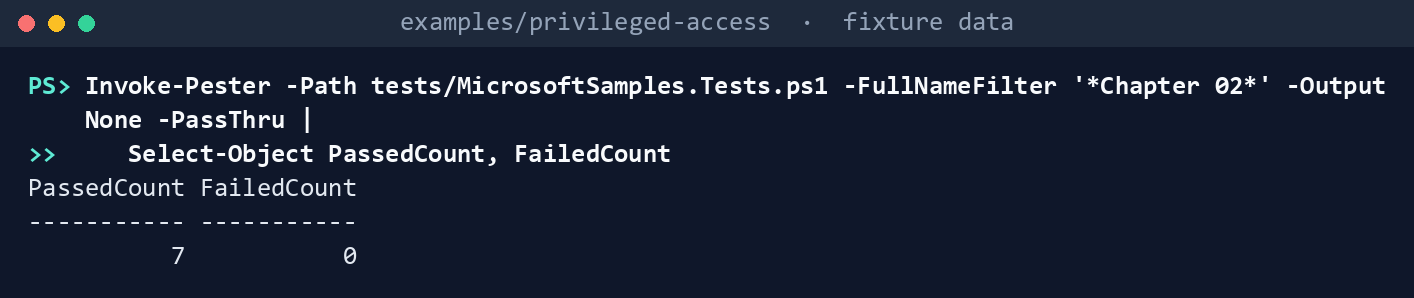
What the terminal shows, run on the kit’s fixtures (the same output as text) PassedCount 7,FailedCount 0. Read the third to fifth tests: of five emergency events in the export, Learn’s two-ID query finds the two interactive sign-ins.List the permissions the check needs:
Import-Module ./powershell/PrivilegedAccess/PrivilegedAccess.psm1
(Get-PaRequiredPermission -Task emergency-access).GraphPermissions -join ', '
What the terminal shows, run on the kit’s fixtures (the same output as text) GroupMember.ReadBasic.All, Policy.Read.All, RoleAssignmentSchedule.Read.Directory, User.Read.All, User.ReadBasic.All, UserAuthenticationMethod.Read.All.Check the fictional tenant’s accounts and write the alert template:
./Invoke-PaEmergencyCheck.ps1 -FixturePath tests/fixtures/tenant.json -ConfigPath tests/fixtures/inputs/emergency-access.json `
    -ValidationsPath tests/fixtures/inputs/emergency-validations.csv -AsOf 2026-10-30 -OutputPath out/emergency `
    -WorkspaceResourceId /subscriptions/22222222-2222-4222-8222-222222222222/resourceGroups/rg-logs/providers/Microsoft.OperationalInsights/workspaces/law-identity `
    -ActionGroupResourceId /subscriptions/22222222-2222-4222-8222-222222222222/resourceGroups/rg-logs/providers/Microsoft.Insights/actionGroups/ag-soc -Location eastus
Emergency access: 9 Finding, 0 Warn, 1 Info Alert rule written to emergency-alert.json for review; deploy it with your reviewed pipeline Written to out/emergency (manifest.json lists every request and file hash)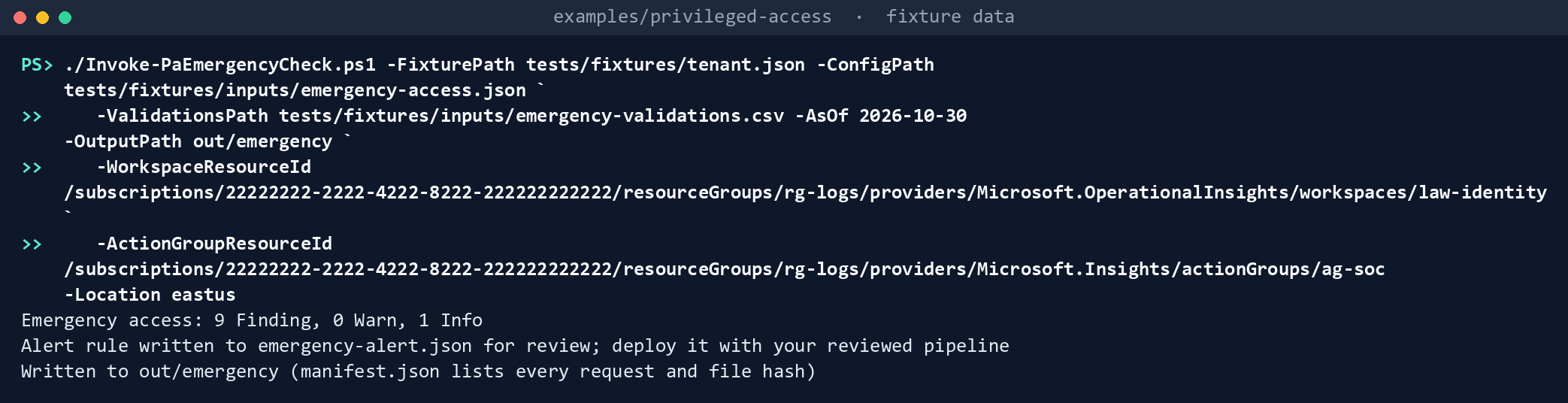
What the terminal shows, run on the kit’s fixtures (the same output as text) Read the findings:
Get-Content out/emergency/findings.json -Raw | ConvertFrom-Json | Format-Table Rule, Severity, Object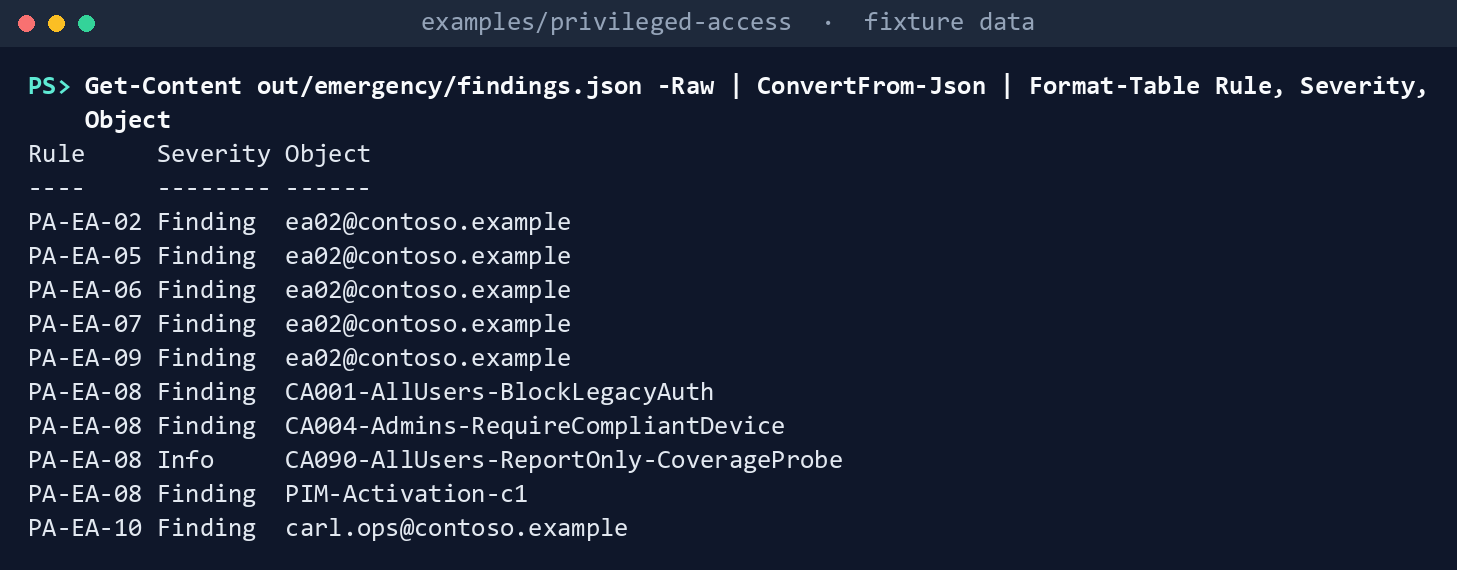
What the terminal shows, run on the kit’s fixtures (the same output as text) ea01passes.ea02fails five ways: PA-EA-02 (it’s oncontoso.example), PA-EA-05 (its Global Administrator assignment ends on December 31), PA-EA-06 (a phone method), PA-EA-07 (not in the exclusion group) and PA-EA-09 (last validated May 1). PA-EA-08 names three enforced policies,CA001-AllUsers-BlockLegacyAuth,CA004-Admins-RequireCompliantDeviceandPIM-Activation-c1, and reports the report-onlyCA090-AllUsers-ReportOnly-CoverageProbeas Info. PA-EA-10 namescarl.ops@contoso.example, who is in the exclusion group and shouldn’t be.Match the same export with the example’s rule:
$rows = (Get-Content tests/fixtures/signin-export.json -Raw | ConvertFrom-Json).rows
Find-PaEmergencyActivity -Rows $rows -AccountId 0e000000-0000-4000-8000-000000000001, 0e000000-0000-4000-8000-000000000002 |
    Format-Table Source, AccountId, OperationName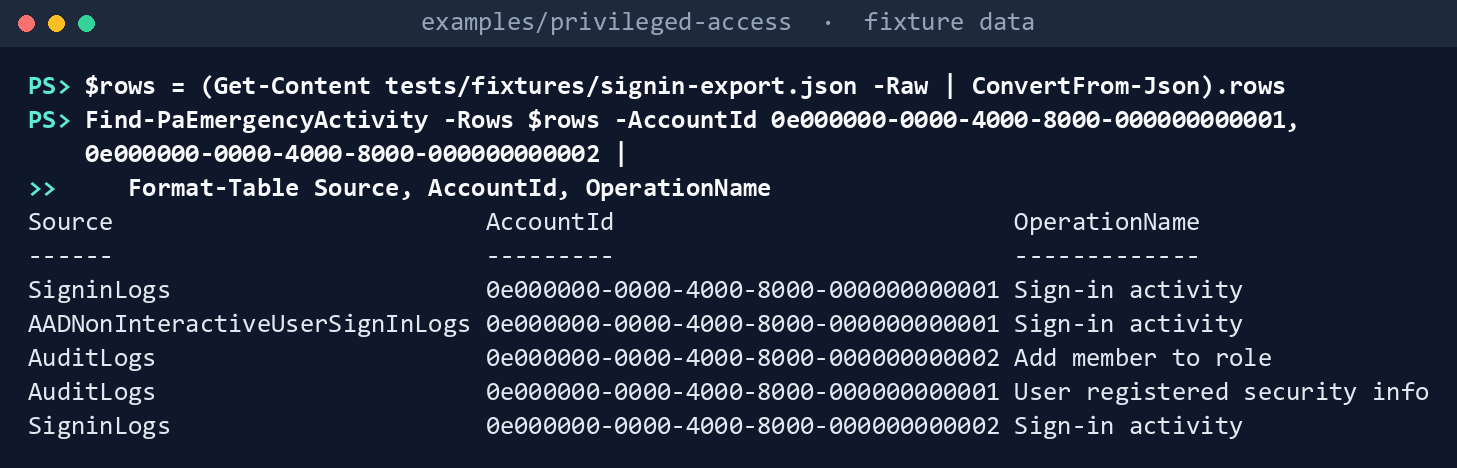
What the terminal shows, run on the kit’s fixtures (the same output as text) Five rows: two from
SigninLogs, one fromAADNonInteractiveUserSignInLogs, and two fromAuditLogs(Add member to role, initiated byea02, andUser registered security info, which targetsea01). Dana’s ordinary sign-in isn’t matched.See the guards:
Get-PaEmergencyQuery -AccountId ea01@contosoexample.onmicrosoft.com
$t = Get-Content out/emergency/emergency-alert.json -Raw | ConvertFrom-Json
$t.resources[0].type, $t.resources[0].apiVersion, $t.resources[0].properties.severity -join ' | '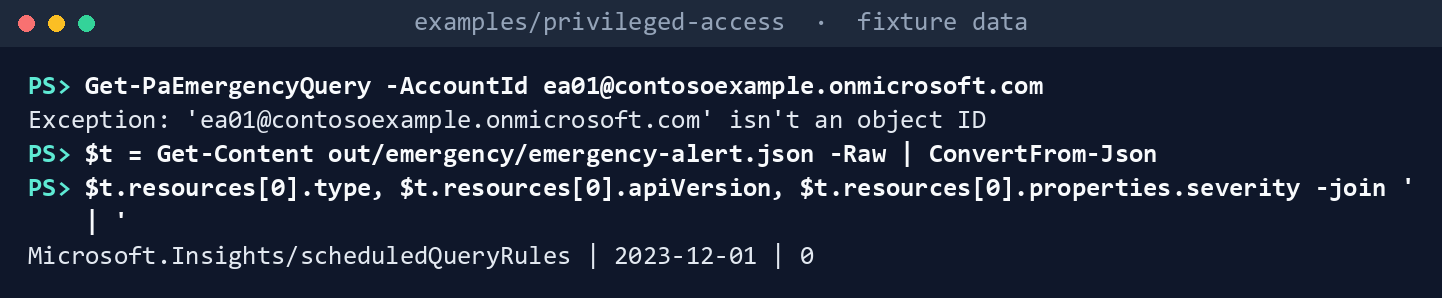
What the terminal shows, run on the kit’s fixtures (the same output as text) 'ea01@contosoexample.onmicrosoft.com' isn't an object ID, thenMicrosoft.Insights/scheduledQueryRules | 2023-12-01 | 0.Run the tests:
Invoke-Pester -Path tests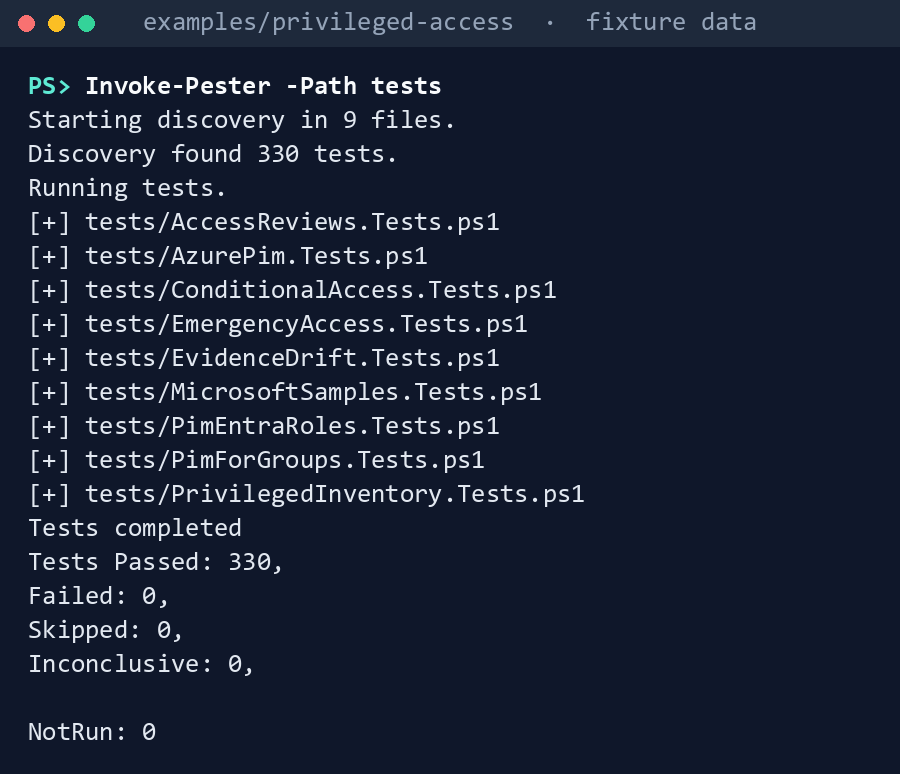
What the terminal shows, run on the kit’s fixtures (the same output as text)
Expected result: 330 tests passing, and each row of the gap table seen with your own eyes.
When you’re done, delete out:
Remove-Item -Recurse -Force out
Lab 2: test tenant
Use a test tenant in the worldwide or GCC cloud with a test Azure subscription, never production. If the test tenant’s emergency accounts are real, treat the drill in step 5 as Learn’s validation drill: tell security operations first, and record it.35 Work in examples/privileged-access. You’ll replace: <tenant-id> (the test tenant’s ID), <app-id> and <thumbprint> (the reader app from step 2 and its certificate’s thumbprint), <ea1-object-id>, <ea1-upn>, <ea2-object-id> and <ea2-upn> (the two test emergency accounts), <exclusion-group-id> (their Conditional Access exclusion group), <ea1-last-validated>, <ea2-last-validated> and <ticket> (each account’s last validation drill, as yyyy-MM-dd, and a ticket), <workspace-resource-id>, <action-group-resource-id>, <region> and <test-rg> (the test workspace, the action group, their region and the resource group to deploy the alert to), and <drill-date> (the date of step 5’s drill).
Every command in this lab, in order, from examples/privileged-access. Each step below says what it does and what to look for.
# Step 3: Run the check
$ea = Get-Content tests/fixtures/inputs/emergency-access.json -Raw | ConvertFrom-Json
$ea.accounts[0].id = '<ea1-object-id>'; $ea.accounts[0].userPrincipalName = '<ea1-upn>'
$ea.accounts[1].id = '<ea2-object-id>'; $ea.accounts[1].userPrincipalName = '<ea2-upn>'
$ea.exclusionGroupId = '<exclusion-group-id>'
$ea | ConvertTo-Json -Depth 5 | Set-Content emergency-access.json
'AccountId,Date,Result,Ticket', '<ea1-object-id>,<ea1-last-validated>,Pass,<ticket>', '<ea2-object-id>,<ea2-last-validated>,Pass,<ticket>' |
    Set-Content emergency-validations.csv

# Step 3: Run the check
Connect-MgGraph -Environment Global -TenantId <tenant-id> -ClientId <app-id> -CertificateThumbprint <thumbprint>
./Invoke-PaEmergencyCheck.ps1 -Cloud gcc -ConfigPath emergency-access.json -ValidationsPath emergency-validations.csv -OutputPath out/emergency-test `
    -WorkspaceResourceId <workspace-resource-id> -ActionGroupResourceId <action-group-resource-id> -Location <region> -TenantId <tenant-id>

# Step 4: Run the query by hand
(Get-Content out/emergency-test/emergency-alert.json -Raw | ConvertFrom-Json).resources[0].properties.criteria.allOf[0].query

# Step 5: Deploy the alert and drill
Connect-AzAccount -Environment AzureCloud -Tenant <tenant-id>
New-AzResourceGroupDeployment -ResourceGroupName <test-rg> -TemplateFile out/emergency-test/emergency-alert.json

# Step 5: Deploy the alert and drill
'<ea1-object-id>,<drill-date>,Pass,<ticket>' | Add-Content emergency-validations.csv
./Invoke-PaEmergencyCheck.ps1 -Cloud gcc -ConfigPath emergency-access.json -ValidationsPath emergency-validations.csv -OutputPath out/emergency-test `
    -WorkspaceResourceId <workspace-resource-id> -ActionGroupResourceId <action-group-resource-id> -Location <region> -TenantId <tenant-id>

# Step 6: Back it out
Remove-Item -Recurse -Force out/emergency-test
Send the logs. As at least Security Administrator, add a diagnostic setting that sends
AuditLogs,SignInLogsandNonInteractiveUserSignInLogsto a test Log Analytics workspace.36 Wait for data to arrive.- Open Entra ID > Monitoring & health > Diagnostic settings > Add diagnostic setting.
- Select
AuditLogs,SignInLogsandNonInteractiveUserSignInLogs, then Send to Log Analytics workspace and the test workspace, and Save.
Register the reader app in the worldwide admin center with a certificate, grant the six application permissions from Lab 1, step 2, with admin consent, and nothing else.
- Open Entra ID > App registrations > New registration, name the app and select Register.
- In the app, open Certificates & secrets > Certificates > Upload certificate and upload the certificate’s public key.
- Open API permissions > Add a permission > Microsoft Graph > Application permissions, select
GroupMember.ReadBasic.All,Policy.Read.All,RoleAssignmentSchedule.Read.Directory,User.Read.All,User.ReadBasic.AllandUserAuthenticationMethod.Read.All, then Add permissions and Grant admin consent for your tenant.
Run the check with the test accounts’ IDs in your own
emergency-access.json. Create the action group first, in the portal as Learn describes, with a test mailbox.37 The first block writes the two input files from the fixture’s: your accounts and exclusion group, and one row per account for its last validation drill. The second runs the check:$ea = Get-Content tests/fixtures/inputs/emergency-access.json -Raw | ConvertFrom-Json $ea.accounts[0].id = '<ea1-object-id>'; $ea.accounts[0].userPrincipalName = '<ea1-upn>' $ea.accounts[1].id = '<ea2-object-id>'; $ea.accounts[1].userPrincipalName = '<ea2-upn>' $ea.exclusionGroupId = '<exclusion-group-id>' $ea | ConvertTo-Json -Depth 5 | Set-Content emergency-access.json 'AccountId,Date,Result,Ticket', '<ea1-object-id>,<ea1-last-validated>,Pass,<ticket>', '<ea2-object-id>,<ea2-last-validated>,Pass,<ticket>' | Set-Content emergency-validations.csvConnect-MgGraph -Environment Global -TenantId <tenant-id> -ClientId <app-id> -CertificateThumbprint <thumbprint> ./Invoke-PaEmergencyCheck.ps1 -Cloud gcc -ConfigPath emergency-access.json -ValidationsPath emergency-validations.csv -OutputPath out/emergency-test ` -WorkspaceResourceId <workspace-resource-id> -ActionGroupResourceId <action-group-resource-id> -Location <region> -TenantId <tenant-id>Run the query by hand. Print the query from
emergency-alert.json, paste it into the workspace’s Logs and run it over the last day. It must run without an error; an error that names a table means the diagnostic setting doesn’t send it (research gaps, row 8).(Get-Content out/emergency-test/emergency-alert.json -Raw | ConvertFrom-Json).resources[0].properties.criteria.allOf[0].queryDeploy the alert and drill. Review
emergency-alert.jsonand deploy it as at least Monitoring Contributor:38Connect-AzAccount -Environment AzureCloud -Tenant <tenant-id> New-AzResourceGroupDeployment -ResourceGroupName <test-rg> -TemplateFile out/emergency-test/emergency-alert.jsonThen sign in with one test emergency account from the designated workstation and perform one administrative read. Within two evaluation periods the action group’s mailbox should receive the alert. Record the drill in
emergency-validations.csvand run the check again:'<ea1-object-id>,<drill-date>,Pass,<ticket>' | Add-Content emergency-validations.csv ./Invoke-PaEmergencyCheck.ps1 -Cloud gcc -ConfigPath emergency-access.json -ValidationsPath emergency-validations.csv -OutputPath out/emergency-test ` -WorkspaceResourceId <workspace-resource-id> -ActionGroupResourceId <action-group-resource-id> -Location <region> -TenantId <tenant-id>PA-EA-09 clears for that account.
Back it out. Delete the alert rule and the action group (Monitor > Alerts > Alert rules, and Monitor > Alerts > Action groups), remove the six permissions, delete the reader app and its certificate, remove the diagnostic setting if you created it for the lab, and delete
out/emergency-test.Remove-Item -Recurse -Force out/emergency-test
Verified facts
| Item | Value | US Government clouds | Stage | Source |
|---|---|---|---|---|
| Emergency access standard | Two or more cloud-only accounts on *.onmicrosoft.com; passkey or CBA, different from normal admin methods; Global Administrator active and permanent; excluded from policies that block or restrict, through one group; report-only needs no exclusion; monitor sign-in and audit logs; validate at least every 90 days |
— | GA | 39 |
| Sample alert | SigninLogs filtered by UserId or UserPrincipalName; severity 0; threshold greater than 0; at least Monitoring Contributor to create |
— | — | 40 |
| Permanent active assignments | Zero, except the emergency access accounts | — | — | 41 |
| Log categories | AuditLogs, SignInLogs, NonInteractiveUserSignInLogs (and others) through a diagnostic setting; Security Administrator to create one |
— | — | 42 43 |
| Non-interactive sign-ins | Done on behalf of a user, for example a token refresh; table AADNonInteractiveUserSignInLogs |
— | — | 44 45 |
AuditLogs |
InitiatedBy and TargetResources are dynamic columns |
— | — | 46 |
| Log Analytics for sign-in logs | Microsoft Entra ID P1 or P2 | — | — | 47 |
| Log search alert rule | Microsoft.Insights/scheduledQueryRules 2023-12-01; criteria.allOf with query, timeAggregation, operator, threshold, failingPeriods |
Not confirmed for Azure Government | GA | 48 |
| Get a user | User.Read.All (application); basic profile excludes accountEnabled and onPremisesSyncEnabled |
— | v1.0 | 49 50 |
| List authentication methods | UserAuthenticationMethod.Read.All for other users; Global Reader, Authentication Administrator or Privileged Authentication Administrator |
Passkey methods list: L4 and L5 | v1.0 | 51 52 |
| List roleAssignmentScheduleInstances | RoleAssignmentSchedule.Read.Directory; filter on principalId |
L4 and L5 | v1.0 | 53 |
| List group members | GroupMember.ReadBasic.All |
— | v1.0 | 54 |
| List Conditional Access policies | Policy.Read.All |
— | v1.0 | 55 |
| Passkeys and CBA | Available in Azure for US Government | Available | GA | 56 |
Two places where the sources differ, recorded so a later edit doesn’t loosen the code:
- Report-only policies. Learn says report-only policies need no exclusion, and Book 04, Chapter 04 agrees; Book 04, Chapter 10’s pre-merge check fails report-only policy files that don’t exclude the group. The code reports them as Info and asks for the exclusion before enforcement (research gaps, row 5). Learn’s report-only page doesn’t mention emergency accounts; it warns that report-only policies requiring a compliant device can prompt users on macOS, iOS and Android to select a device certificate, and says to exclude those platforms from such policies.57
- Individual emergency accounts. Learn allows individual emergency accounts for administrators as an alternative to shared ones.58 Book 04’s standard says the accounts aren’t tied to an individual. The code checks neither, because Graph can’t tell; the program’s position is Book 04’s. Design guidance.
Federal requirements and evidence
The check is the plan’s Gate 1 test, “emergency access accounts tested,” and the alert watches the accounts between drills. Each row names the command or file that shows it. Every control named is in the NIST SP 800-53B Moderate baseline.59
| What the output proves | Requirement it supports | KSI it aligns to | Who keeps it |
|---|---|---|---|
Learn’s queries miss non-interactive sign-ins and audit rows, so the kit adds them, and its own code passes its tests: Lab 1, steps 1 and 7 (Invoke-Pester) |
CM-3(2), testing and validation of changes | KSI-CMT-VTD | The repository’s test runs |
The check asks for six read permissions and nothing that writes: Lab 1, step 2 (Get-PaRequiredPermission -Task emergency-access) |
AC-6, least privilege for the identity that checks | KSI-IAM-ELP | Identity engineering, with the app’s consent record |
At least two cloud-only accounts on *.onmicrosoft.com, enabled, holding Global Administrator active, permanent and direct, and an exclusion group that holds only them: PA-EA-01 to 05, 07 and 10 in findings.json, Lab 1, steps 3 and 4 |
AC-2, emergency accounts as a defined account type with their conditions; MS.AAD.7.3v1, cloud-only privileged accounts (BOD 25-01);60 MS.AAD.7.4v1’s exception for emergency accounts that need perpetual access61 | KSI-IAM-JIT | The ISSO |
No phone, app, OATH, email or Temporary Access Pass method on the accounts, and a passkey or certificate-based authentication instead: PA-EA-06 in findings.json |
IA-2(1), multifactor authentication to privileged accounts; MS.AAD.3.6v1, phishing-resistant MFA for highly privileged roles (BOD 25-01)62 | KSI-IAM-APM | The ISSO |
Every enforced Conditional Access policy excludes the accounts: PA-EA-08 in findings.json |
AC-2: the emergency accounts stay usable under the conditions the account type exists for | KSI-IAM-JIT | The ISSO |
A passing drill within 90 days: PA-EA-09 in findings.json, read from emergency-validations.csv |
AC-2(2): permanent emergency accounts are a documented deviation, and the drills are part of its compensating controls (Book 04, Chapter 02, design guidance) | KSI-IAM-AAM, KSI-IAM-JIT | The ISSO; the drill tickets stay with identity operations |
An alert at severity 0 on any sign-in or audit row for the accounts, every 5 minutes: emergency-alert.json from Lab 1, step 3, and its type, API version and severity in step 6 |
AC-2(4), automated audit actions; AU-6, audit record review; SI-4, system monitoring | KSI-MLA-RVL, KSI-MLA-LET, KSI-IAM-SUS | Identity engineering, in the repository with the template |
The same match applied to exported rows finds the accounts’ sign-ins and audit rows: Lab 1, step 5 (Find-PaEmergencyActivity) |
AU-6, audit record review (a drill review or a cross-check) | KSI-MLA-RVL | Identity operations, with the drill record |
The query is keyed to object IDs and refuses a UPN: the error in Lab 1, step 6 (Get-PaEmergencyQuery given a UPN) |
AU-6: an alert that can’t silently match nothing (design guidance) | KSI-MLA-RVL | The repository’s test runs |
Which calls produced the files, when, with which permissions, and the SHA-256 of each file: manifest.json from Lab 1, step 3 |
AU-9, protection of audit information; using hashes is design guidance | KSI-MLA-OSM | The ISSO, beside the files it lists |
The test tenant’s accounts meet the standard: Lab 2, step 3 (Invoke-PaEmergencyCheck.ps1 -Cloud gcc), out/emergency-test/findings.json with no Finding |
AC-2; the project plan’s Gate 1 | KSI-IAM-JIT | The ISSO |
| The workspace receives the tables the alert reads, and the query returns rows: Lab 2, step 4, the query run by hand | AU-2, event logging (the diagnostic setting’s categories); AU-6 | KSI-MLA-LET, KSI-MLA-RVL | Identity operations |
The alert is deployed from the reviewed template, not built in the portal: Lab 2, step 5 (New-AzResourceGroupDeployment -TemplateFile out/emergency-test/emergency-alert.json) and its deployment record |
CM-3, configuration change control | KSI-CMT-LMC, KSI-CMT-RMV | The deployment history in the resource group |
A drill fires the alert, and the drill is recorded: the alert’s firing in the workspace, then Lab 2, step 5’s row added to emergency-validations.csv and the rerun’s PA-EA-09 cleared |
SI-4 and AU-6; AC-2(2)’s compensating controls (design guidance) | KSI-IAM-SUS, KSI-MLA-RVL | Identity operations, with the drill ticket |
The lab copies are deleted because they name the accounts: Remove-Item after Lab 1 and in Lab 2, step 6 |
No control; handling the folder as sensitive is design guidance | — | — |
KSIs are FedRAMP 20x indicators for cloud service providers.63 The agency authorizes its own system and lines this evidence up with what its providers report against those indicators; it doesn’t report KSIs itself (Book 00, Appendix B). Book 04, Chapter 10 carries the control-by-control mapping.
Dangers
| Danger | What happens | The guard |
|---|---|---|
| Approval switched on before the accounts pass | The documented lockout | The plan’s Gate 1 needs “emergency access accounts tested”; this check is that test, every run |
| An alert copied from Learn with the placeholder IDs | It never fires | Placeholders and UPNs refused; IDs only from the configuration |
| An alert on interactive sign-ins only | A stolen session’s token refreshes, and a method added to the account, go unseen | Non-interactive and audit legs; tests pin the sample’s misses |
| A table the workspace doesn’t receive | A fuzzy union returns nothing, and silence looks like safety | No isfuzzy; Lab 2 runs the query by hand first |
| An exclusion group with extra members | Someone else skips every Conditional Access policy | PA-EA-10 |
| A Global Administrator assignment that expires | The account stops working in the emergency it’s for | PA-EA-05 flags time-bound, activated and inherited assignments |
| A phone or app method on the account | It depends on one person’s device | PA-EA-06 |
| A drill nobody records | No one knows whether the accounts still work | PA-EA-09 from emergency-validations.csv |
| A deployed rule nobody reviewed | The alert is edited in the portal and drifts | The template is code. Chapter 08 doesn’t compare the deployed rule yet; Lab 2 and the checklist compare it by hand |
| Emergency account names in output | Findings name the accounts | The output folder is evidence; delete lab copies |
Checklist
Footnotes
Microsoft Learn, “Manage emergency access accounts in Microsoft Entra ID,” https://learn.microsoft.com/entra/identity/role-based-access-control/security-emergency-access (accessed Oct 30, 2026).↩︎
Microsoft Learn, “Plan a Privileged Identity Management deployment,” type of assignments, https://learn.microsoft.com/entra/id-governance/privileged-identity-management/pim-deployment-plan (accessed Oct 30, 2026).↩︎
Microsoft Learn, “Microsoft Graph national cloud deployments,” https://learn.microsoft.com/graph/deployments (accessed Oct 30, 2026).↩︎
Microsoft Learn, “Microsoft Entra feature availability,” Microsoft Entra ID, authentication, https://learn.microsoft.com/entra/identity/authentication/feature-availability (accessed Oct 30, 2026).↩︎
Microsoft Learn, “Manage emergency access accounts in Microsoft Entra ID,” https://learn.microsoft.com/entra/identity/role-based-access-control/security-emergency-access (accessed Oct 30, 2026).↩︎
Microsoft Learn, “Manage emergency access accounts in Microsoft Entra ID,” https://learn.microsoft.com/entra/identity/role-based-access-control/security-emergency-access (accessed Oct 30, 2026).↩︎
Microsoft Learn, “Manage emergency access accounts in Microsoft Entra ID,” https://learn.microsoft.com/entra/identity/role-based-access-control/security-emergency-access (accessed Oct 30, 2026).↩︎
Microsoft, MicrosoftDocs/entra-docs,
docs/identity/role-based-access-control/security-emergency-access.mdat commit07cb73d6c6380414eecd040ba5e14c1c94d48b66(October 30, 2026; the page last changed June 4, 2026), MIT License, https://github.com/MicrosoftDocs/entra-docs/blob/07cb73d6c6380414eecd040ba5e14c1c94d48b66/docs/identity/role-based-access-control/security-emergency-access.md (accessed Oct 30, 2026); pinned copy inexamples/third_party/entra-emergency-access-page.↩︎Microsoft Learn, “What are non-interactive user sign-ins in Microsoft Entra?,” log details and special considerations, https://learn.microsoft.com/entra/identity/monitoring-health/concept-noninteractive-sign-ins (accessed Oct 31, 2026).↩︎
Microsoft Learn, “What are the identity logs you can stream to an endpoint?,” activity log options, https://learn.microsoft.com/entra/identity/monitoring-health/concept-diagnostic-settings-logs-options (accessed Oct 30, 2026).↩︎
Microsoft Learn, “What are non-interactive user sign-ins in Microsoft Entra?,” log details and special considerations, https://learn.microsoft.com/entra/identity/monitoring-health/concept-noninteractive-sign-ins (accessed Oct 31, 2026).↩︎
Microsoft Learn, “AADNonInteractiveUserSignInLogs” (Azure Monitor table reference), https://learn.microsoft.com/azure/azure-monitor/reference/tables/aadnoninteractiveusersigninlogs (accessed Oct 30, 2026).↩︎
Microsoft Learn, “Manage emergency access accounts in Microsoft Entra ID,” https://learn.microsoft.com/entra/identity/role-based-access-control/security-emergency-access (accessed Oct 30, 2026).↩︎
Microsoft Learn, “AuditLogs” (Azure Monitor table reference), columns, https://learn.microsoft.com/azure/azure-monitor/reference/tables/auditlogs (accessed Oct 30, 2026).↩︎
Microsoft Learn, “Manage emergency access accounts in Microsoft Entra ID,” https://learn.microsoft.com/entra/identity/role-based-access-control/security-emergency-access (accessed Oct 30, 2026).↩︎
Microsoft Learn, “Manage emergency access accounts in Microsoft Entra ID,” https://learn.microsoft.com/entra/identity/role-based-access-control/security-emergency-access (accessed Oct 30, 2026).↩︎
Microsoft Learn, “Manage emergency access accounts in Microsoft Entra ID,” https://learn.microsoft.com/entra/identity/role-based-access-control/security-emergency-access (accessed Oct 30, 2026).↩︎
Microsoft Learn, “Manage emergency access accounts in Microsoft Entra ID,” https://learn.microsoft.com/entra/identity/role-based-access-control/security-emergency-access (accessed Oct 30, 2026).↩︎
Microsoft Learn, “Manage emergency access accounts in Microsoft Entra ID,” https://learn.microsoft.com/entra/identity/role-based-access-control/security-emergency-access (accessed Oct 30, 2026).↩︎
Microsoft Learn, “Manage emergency access accounts in Microsoft Entra ID,” https://learn.microsoft.com/entra/identity/role-based-access-control/security-emergency-access (accessed Oct 30, 2026).↩︎
Microsoft Learn, “Manage emergency access accounts in Microsoft Entra ID,” https://learn.microsoft.com/entra/identity/role-based-access-control/security-emergency-access (accessed Oct 30, 2026).↩︎
Microsoft Learn, “Manage emergency access accounts in Microsoft Entra ID,” https://learn.microsoft.com/entra/identity/role-based-access-control/security-emergency-access (accessed Oct 30, 2026).↩︎
Microsoft Learn, “Manage emergency access accounts in Microsoft Entra ID,” https://learn.microsoft.com/entra/identity/role-based-access-control/security-emergency-access (accessed Oct 30, 2026).↩︎
Microsoft Learn, “Get a user,” permissions, https://learn.microsoft.com/graph/api/user-get?view=graph-rest-1.0 (accessed Oct 30, 2026).↩︎
Microsoft Learn, “Working with users in Microsoft Graph,” user basic profile properties, https://learn.microsoft.com/graph/api/resources/users?view=graph-rest-1.0 (accessed Oct 30, 2026).↩︎
Microsoft Learn, “List methods,” permissions acting on other users, https://learn.microsoft.com/graph/api/authentication-list-methods?view=graph-rest-1.0 (accessed Oct 30, 2026).↩︎
Microsoft Learn, “List roleAssignmentScheduleInstances,” https://learn.microsoft.com/graph/api/rbacapplication-list-roleassignmentscheduleinstances?view=graph-rest-1.0 (accessed Oct 30, 2026).↩︎
Microsoft Learn, “List group members,” permissions, https://learn.microsoft.com/graph/api/group-list-members?view=graph-rest-1.0 (accessed Oct 30, 2026).↩︎
Microsoft Learn, “List policies” (conditionalAccessRoot), https://learn.microsoft.com/graph/api/conditionalaccessroot-list-policies?view=graph-rest-1.0 (accessed Oct 30, 2026; read for the validation kit’s VK-CA-01).↩︎
Microsoft Learn, “Microsoft.Insights scheduledQueryRules 2023-12-01” (ARM template reference), https://learn.microsoft.com/azure/templates/microsoft.insights/2023-12-01/scheduledqueryrules (accessed Oct 30, 2026).↩︎
Microsoft Learn, “Manage emergency access accounts in Microsoft Entra ID,” https://learn.microsoft.com/entra/identity/role-based-access-control/security-emergency-access (accessed Oct 30, 2026).↩︎
Microsoft Learn, “Integrate Microsoft Entra logs with Azure Monitor logs,” prerequisites and send logs to Azure Monitor, https://learn.microsoft.com/entra/identity/monitoring-health/howto-integrate-activity-logs-with-azure-monitor-logs (accessed Oct 30, 2026).↩︎
Microsoft Learn, “What are the identity logs you can stream to an endpoint?,” activity log options, https://learn.microsoft.com/entra/identity/monitoring-health/concept-diagnostic-settings-logs-options (accessed Oct 30, 2026).↩︎
Microsoft Learn, “Analyze Microsoft Entra activity logs with Log Analytics,” prerequisites, https://learn.microsoft.com/entra/identity/monitoring-health/howto-analyze-activity-logs-log-analytics (accessed Oct 30, 2026).↩︎
Microsoft Learn, “Manage emergency access accounts in Microsoft Entra ID,” https://learn.microsoft.com/entra/identity/role-based-access-control/security-emergency-access (accessed Oct 30, 2026).↩︎
Microsoft Learn, “Integrate Microsoft Entra logs with Azure Monitor logs,” prerequisites and send logs to Azure Monitor, https://learn.microsoft.com/entra/identity/monitoring-health/howto-integrate-activity-logs-with-azure-monitor-logs (accessed Oct 30, 2026).↩︎
Microsoft Learn, “Manage emergency access accounts in Microsoft Entra ID,” https://learn.microsoft.com/entra/identity/role-based-access-control/security-emergency-access (accessed Oct 30, 2026).↩︎
Microsoft Learn, “Manage emergency access accounts in Microsoft Entra ID,” https://learn.microsoft.com/entra/identity/role-based-access-control/security-emergency-access (accessed Oct 30, 2026).↩︎
Microsoft Learn, “Manage emergency access accounts in Microsoft Entra ID,” https://learn.microsoft.com/entra/identity/role-based-access-control/security-emergency-access (accessed Oct 30, 2026).↩︎
Microsoft Learn, “Manage emergency access accounts in Microsoft Entra ID,” https://learn.microsoft.com/entra/identity/role-based-access-control/security-emergency-access (accessed Oct 30, 2026).↩︎
Microsoft Learn, “Plan a Privileged Identity Management deployment,” type of assignments, https://learn.microsoft.com/entra/id-governance/privileged-identity-management/pim-deployment-plan (accessed Oct 30, 2026).↩︎
Microsoft Learn, “What are the identity logs you can stream to an endpoint?,” activity log options, https://learn.microsoft.com/entra/identity/monitoring-health/concept-diagnostic-settings-logs-options (accessed Oct 30, 2026).↩︎
Microsoft Learn, “Integrate Microsoft Entra logs with Azure Monitor logs,” prerequisites and send logs to Azure Monitor, https://learn.microsoft.com/entra/identity/monitoring-health/howto-integrate-activity-logs-with-azure-monitor-logs (accessed Oct 30, 2026).↩︎
Microsoft Learn, “What are non-interactive user sign-ins in Microsoft Entra?,” log details and special considerations, https://learn.microsoft.com/entra/identity/monitoring-health/concept-noninteractive-sign-ins (accessed Oct 31, 2026).↩︎
Microsoft Learn, “AADNonInteractiveUserSignInLogs” (Azure Monitor table reference), https://learn.microsoft.com/azure/azure-monitor/reference/tables/aadnoninteractiveusersigninlogs (accessed Oct 30, 2026).↩︎
Microsoft Learn, “AuditLogs” (Azure Monitor table reference), columns, https://learn.microsoft.com/azure/azure-monitor/reference/tables/auditlogs (accessed Oct 30, 2026).↩︎
Microsoft Learn, “Analyze Microsoft Entra activity logs with Log Analytics,” prerequisites, https://learn.microsoft.com/entra/identity/monitoring-health/howto-analyze-activity-logs-log-analytics (accessed Oct 30, 2026).↩︎
Microsoft Learn, “Microsoft.Insights scheduledQueryRules 2023-12-01” (ARM template reference), https://learn.microsoft.com/azure/templates/microsoft.insights/2023-12-01/scheduledqueryrules (accessed Oct 30, 2026).↩︎
Microsoft Learn, “Get a user,” permissions, https://learn.microsoft.com/graph/api/user-get?view=graph-rest-1.0 (accessed Oct 30, 2026).↩︎
Microsoft Learn, “Working with users in Microsoft Graph,” user basic profile properties, https://learn.microsoft.com/graph/api/resources/users?view=graph-rest-1.0 (accessed Oct 30, 2026).↩︎
Microsoft Learn, “List methods,” permissions acting on other users, https://learn.microsoft.com/graph/api/authentication-list-methods?view=graph-rest-1.0 (accessed Oct 30, 2026).↩︎
Microsoft Learn, “List fido2AuthenticationMethod,” https://learn.microsoft.com/graph/api/fido2authenticationmethod-list?view=graph-rest-1.0 (accessed Oct 30, 2026).↩︎
Microsoft Learn, “List roleAssignmentScheduleInstances,” https://learn.microsoft.com/graph/api/rbacapplication-list-roleassignmentscheduleinstances?view=graph-rest-1.0 (accessed Oct 30, 2026).↩︎
Microsoft Learn, “List group members,” permissions, https://learn.microsoft.com/graph/api/group-list-members?view=graph-rest-1.0 (accessed Oct 30, 2026).↩︎
Microsoft Learn, “List policies” (conditionalAccessRoot), https://learn.microsoft.com/graph/api/conditionalaccessroot-list-policies?view=graph-rest-1.0 (accessed Oct 30, 2026; read for the validation kit’s VK-CA-01).↩︎
Microsoft Learn, “Microsoft Entra feature availability,” Microsoft Entra ID, authentication, https://learn.microsoft.com/entra/identity/authentication/feature-availability (accessed Oct 30, 2026).↩︎
Microsoft Learn, “Analyze Conditional Access policy impact” (report-only mode), overview and warning, https://learn.microsoft.com/entra/identity/conditional-access/concept-conditional-access-report-only (accessed Oct 31, 2026).↩︎
Microsoft Learn, “Manage emergency access accounts in Microsoft Entra ID,” https://learn.microsoft.com/entra/identity/role-based-access-control/security-emergency-access (accessed Oct 30, 2026).↩︎
National Institute of Standards and Technology, SP 800-53B Moderate baseline, release 5.2.0 OSCAL profile (includes AC-2, AC-2(2), AC-2(4), AC-6, AU-2, AU-6, AU-9, CM-3, CM-3(2), IA-2(1) and SI-4), https://github.com/usnistgov/oscal-content/blob/main/nist.gov/SP800-53/rev5/json/NIST_SP-800-53_rev5_MODERATE-baseline_profile.json (accessed Nov 2, 2026).↩︎
Cybersecurity and Infrastructure Security Agency, “BOD 25-01: Implementing Secure Practices for Cloud Services Required Configurations,” Microsoft Entra ID policies MS.AAD.3.6v1, MS.AAD.7.3v1 and MS.AAD.7.4v1, https://www.cisa.gov/resources-tools/services/bod-25-01-implementing-secure-practices-cloud-services-required-configurations (accessed Nov 2, 2026).↩︎
Cybersecurity and Infrastructure Security Agency, ScubaGear Microsoft Entra ID secure configuration baseline (
aad.md), MS.AAD.7.4v1 and its note that emergency access accounts needing perpetual access are an exception, and the list of highly privileged roles, https://github.com/cisagov/ScubaGear/blob/main/PowerShell/ScubaGear/baselines/aad.md (accessed Nov 2, 2026).↩︎Cybersecurity and Infrastructure Security Agency, “BOD 25-01: Implementing Secure Practices for Cloud Services Required Configurations,” Microsoft Entra ID policies MS.AAD.3.6v1, MS.AAD.7.3v1 and MS.AAD.7.4v1, https://www.cisa.gov/resources-tools/services/bod-25-01-implementing-secure-practices-cloud-services-required-configurations (accessed Nov 2, 2026).↩︎
FedRAMP, “Key Security Indicators,” FedRAMP Consolidated Rules for 2026, indicator statements and “Related SP 800-53 Controls” for KSI-CMT-LMC, KSI-CMT-RMV, KSI-CMT-VTD, KSI-IAM-AAM, KSI-IAM-APM, KSI-IAM-ELP, KSI-IAM-JIT, KSI-IAM-SUS, KSI-MLA-LET, KSI-MLA-OSM and KSI-MLA-RVL, https://www.fedramp.gov/2026/reference/key-security-indicators/ (accessed Nov 2, 2026).↩︎