Federal Modernization Workbook
Chapter 09 — AI Agent Identities
An agent can act at a speed no person can, so the questions the program asks of every identity (who answers for it, what it holds, how it proves itself, when it ends) are asked before it exists, written down, and checked by code every week.
The checks and the plan behind the project plan’s Phase 6 and Gate 6, “AI identities governed.” You start with Learn’s own Microsoft Entra Agent ID samples (creating a blueprint with a sponsor, owner and credential, inheritable permissions, the agent Conditional Access policies and the Graph list requests), which the repository keeps as pinned copies, and you send them to a fake Graph to see what they do and what they leave out. Then you use examples/non-person-identity for the rest: creation closed (NP6.1), the production handshake as a reviewed record (NP6.2), agent credentials (NP6.3), least privilege (NP6.4), the sponsor mover and leaver rule (NP6.5), agent Conditional Access in report-only (NP6.6) and the AI drift checks (NP6.7), with decision D-NP6 as data. Most of what this chapter touches is new or in preview, and every capability below carries its release stage and its US Government availability. Lab 1 runs on a laptop with no tenant; Lab 2 uses a test tenant.
Jump to a slide (18)
Deck · Narrated deck (about 12 minutes, captions) · Script · Captions. Recorded on November 2, 2026 from the approved chapter.
Goal and audience
Goal. By the end of this chapter you can check, from code, every AI identity the program knows about against the plan’s tasks NP6.1 to NP6.7, fill in and verify the sponsor fields Chapter 02 recorded for NP1.2, list orphaned agents for Chapter 02’s orphan rule (a manual hand-off), and produce the two agent Conditional Access policies as a reviewed, report-only plan. You can say, for each rule, whether it is Learn’s, Learn’s sample, or the program’s design, and which capabilities it depends on in the target cloud.
Audience. Developers who build the project’s AI identity code, the identity governance officer, the Chief AI Officer’s staff who keep the AI use-case inventory, security operations, who own the drift findings, and the ISSOs who review the evidence. You should read PowerShell 7 and know Chapters 01 and 02. You don’t need a tenant until Lab 2.
The context the code depends on
What Microsoft Entra Agent ID is, and its stage
Agent ID gives AI agents their own identities: an agent identity blueprint holds the credentials and creates agent identities, special single-tenant service principals that hold the permissions and appear in the logs; the blueprint acquires tokens on their behalf, so a compromise of its credential affects every agent under it.1 Learn says Agent ID is available for all Microsoft Entra customers, and that extending Entra’s security features to agents (Conditional Access, ID Protection, governance) requires Microsoft Agent 365.2 Learn’s release notes list the Agent ID platform as generally available in April 2026,3 and sponsor lifecycle workflows followed in May 2026 (Book 17, Chapter 04). The pieces this chapter uses are at different stages:
| Capability | Release stage | GCC | GCC High, DoD |
|---|---|---|---|
| Blueprints, agent identities, sponsors and owners (Graph v1.0) | GA; the admin center wizards are labeled preview4 | Agent registry, access packages and sponsor lifecycle policies listed as available5 | Not published: no Agent ID entry on Entra’s Azure Government list6 |
| Conditional Access for agent identities | Preview (the policy builder’s label); Block is the only grant and agent risk the only condition7 | Listed “for agents with delegated access”; app-only agent policies not listed8 | Not published |
| Agent risk, ID Protection for agents | Preview; Entra ID P2 during the preview,9 and Agent 365 with P2 or E5 for risk-based policies;10 Learn’s ID Protection page says Agent 365 will soon be required11 | Listed with Conditional Access, delegated access12 | Not published |
| Agent Conditional Access properties in Graph | Beta only13 | — | — |
| Sponsor tasks in Lifecycle Workflows | GA (May 2026, Book 17, Chapter 05); Agent 365 or Microsoft 365 E714 | Listed as available15 | Not published (Lifecycle Workflows exist there; the agent tasks need Agent 365)16 |
Agent 365’s service description says it meets all FedRAMP High controls its assessor reviewed and that final authorization is pending; its feature table heads the agent features’ plan column “Requires Microsoft 365 E7 / G7 or Agent 365”.17 GCC uses the worldwide endpoints, graph.microsoft.com and login.microsoftonline.com; GCC High and DoD use graph.microsoft.us and dod-graph.microsoft.us.18
Decision D-NP6 as data
The plan’s D-NP6 (the CIO, with the Chief AI Officer) sets which AI identity capabilities the program builds on: agent identities where generally available in the agency’s cloud, with GCC’s documented subset; service principals and managed identities under the same governance where agent identities aren’t available; preview capabilities as watch items. The code holds it as data, config/agent-id-capabilities-ch09.json, with each cloud’s stage and the Learn page that states it, and status Proposed until the decision is made (research gaps, row 86). In gcc and global the code runs in AgentId mode and reads blueprints and agent identities. In gcchigh and dod it runs in Fallback mode: it sends no agent identity read, and the same rules run on the service principals and managed identities the inventory names, with sponsors from the inventory record, because the directory has nowhere to put one (Book 17, Chapter 05). Preview capabilities are reported, never enforced. Design guidance.
The program’s rules the code holds
The design is Book 17’s, Chapters 04 to 07 and 10. The code holds these rules (Design guidance), each as a finding with a stable ID:
- Creation closed (NP6.1). Users can create agent blueprints is set to No, so only administrators and the Agent ID roles can create one (Learn’s delegation page names Agent ID Developer; its blueprint page names Agent ID Developer and Agent ID Administrator),19 20 and Users can register applications stays No, so an agent can’t arrive as an ordinary app registration. Learn’s planning guidance says not to use a service principal for an AI agent,21 so an agent on an app registration is routed to the blueprint path or carries a recorded D-NP6 fallback reason (Book 17, Chapter 06).
- The production handshake (NP6.2) is a reviewed record, made before the agent identity exists: blueprint, federal sponsor and sponsoring group, a technical owner who isn’t the sponsor, the consented permissions, the Conditional Access policies that cover it, its placement, its use case in the AI use-case inventory, its access mode, the reviewer and the date. Learn’s best practices describe the same handshake (Book 17, Chapter 05).
- Credentials (NP6.3). A managed identity as the blueprint’s federated credential, else federation, else a certificate; Learn recommends the managed identity for production and says secrets aren’t recommended there.22 No production blueprint holds a client secret (Book 17, Chapter 06).
- Least privilege (NP6.4). The access mode is chosen first; inheritance is never
allAllowedfor application roles, because that makes any future grant to the blueprint a grant to every agent;23 no AI identity holds a standing privileged role. Microsoft blocks some roles and permissions for agents,24 and that is a floor, not least privilege (Book 17, Chapter 06). - Sponsors (NP1.2, NP6.5). A federal employee mastered in HR, a small sponsoring group, a technical owner who isn’t the sponsor and a matching inventory record. When a sponsor moves or leaves, the sponsorship tasks run in the HR-driven workflows, and the new sponsor confirms within ten business days; an unconfirmed transfer makes the agent orphaned (Book 17, Chapter 05).
- Conditional Access (NP6.6). Two agent policies in report-only: block all agent identities except those approved by a custom security attribute, which only the handshake sets; and block high-risk agents, a preview watch item (Book 17, Chapter 06). Learn’s own pattern is the same: block all agent identities, exclude approved ones by custom security attribute, start in report-only.25
- Drift (NP6.7). An agentic system with no governed identity, a shadow AI identity, an AI identity with no accountable human, and a credential added outside the pipeline (Book 17, Chapter 07), with the priorities Book 17 pins: P1, P1, P2 and P1.
Start with Microsoft’s sample
What Microsoft gives you
Learn’s Create an agent identity blueprint has HTTP samples that create a blueprint with a sponsor and owner, add a managed identity as its federated identity credential, add a password, set an identifier URI and create the blueprint principal.26 Configure inheritable permissions for agent identity blueprints has samples that add, change and delete inheritable scopes and roles.27 Disable agent identities in your tenant has the Microsoft Graph bodies of three agent Conditional Access policies, report-only.28 The Graph API reference has a request sample for listing blueprints, agent identities and each one’s sponsors.29 30 31 32 Microsoft Entra PowerShell also has Agent ID cmdlets, such as Get-EntraAgentIdentity and New-EntraAgentIdentityBlueprint;33 this chapter calls Graph directly with the API reference’s paths, so every request is in its call list.
The pinned copies
The samples exist only inside Learn pages, so the repository pins the pages’ sources, unmodified: examples/third_party/entra-agent-id-pages, three pages from MicrosoftDocs/entra-docs at commit 7f78b50 (October 30, 2026), MIT;34 and examples/third_party/graph-agent-id-api-pages, four API reference pages and the generated permission tables they include, from microsoftgraph/microsoft-graph-docs-contrib at commit bb35043, code MIT and documentation Creative Commons Attribution 4.0.35 Each snapshot.json records every file’s SHA-256 and its git blob hash, checked against the upstream tree, and a unit test checks the hashes. The weekly source watch reports new commits to each of the eleven upstream files. Updating a copy is a reviewed pull request.
tests/AgentIdSampleHarness.ps1 finds each HTTP sample in the page source, parses the method, URL, headers and body, and sends it unmodified to the chapter’s fake Graph (placeholders such as <id> are the only thing replaced, with fixture values). The fake serves the fictional tenant and accepts the samples’ writes so a test can run the chapter’s checks on the result.
What it leaves to you
Each row is pinned by a test in tests/NpiAgentId.Tests.ps1.
| Learn’s sample, as published | Why it matters | What examples/non-person-identity adds |
|---|---|---|
| Lists blueprints and agent identities, one object type each | — | Kept as the model for the reads, every page followed |
| Reads one page; Learn’s maximum is 100 objects a page36 | A tenant with more agents than one page is half-read | Every next link followed, only on the cloud’s own host |
Hard-codes graph.microsoft.com |
The host is wrong for GCC High and DoD | The host from the cloud table, checked on every request |
List agentIdentity sponsors returns directory objects with an ID only, and names only the application permission AgentIdentity.ReadWrite.All |
A write permission for a read, and no way to tell who the sponsor is | Sponsors read with $expand=sponsors($select=id) on the list, under AgentIdentity.Read.All, then each person read once (research gaps, row 82) |
List agentIdentityBlueprint sponsors names Application.Read.All, where the blueprint’s other reads name AgentIdentityBlueprint.Read.All |
Two least-privileged permissions for one object | Both declared, each on its own call (row 83) |
| Creates a blueprint with the same person as sponsor and owner | The person who decides the agent should exist would hold its keys | NPI-AI-09 on any blueprint or agent whose sponsor is also its owner |
| Adds a managed identity as the federated credential, and a password | Learn recommends the first for production and not the second37 | Credential kind read from the blueprint; a secret on a production blueprint is NPI-AI-10 |
Configures inheritable permissions first with allAllowed for scopes and roles |
Every future grant becomes every agent’s | NPI-AI-13: allAllowed roles a finding, allAllowed scopes a warning |
| Puts the type cast before the blueprint’s ID; the API reference puts it after; allows 50 resource apps where Manage agent identities says 10 | Two paths and two limits for one property38 39 | The API reference’s path (row 84) |
Updates and deletes with PATCH and DELETE |
Changes this chapter never makes | The only write is a report-only POST; PATCH, PUT and DELETE are never sent |
| Block agent identity authentication blocks every agent identity, with no exclusion | Enforced, it blocks the approved agents too | The reviewed policy excludes approved agents by the custom security attribute; NPI-AI-18 checks its shape |
| Nothing about sponsors’ lifecycle, the inventory, the handshake, standing roles, workflows or drift | Most of Phase 6 | NPI-AI-01 to NPI-AI-23, below |
The verdict. Use Learn’s list requests as the model for the reads, its managed identity credential as the model for NP6.3, and its report-only block policy as the start of NP6.6. Don’t use the create and inheritance samples as written for production, and don’t enforce the block policy without the exclusion.
The code: what examples/non-person-identity adds
This chapter’s code is powershell/NpiAgentId/NpiAgentId.psm1, two entry scripts (Invoke-NpiAgentId.ps1, which only reads, and Invoke-NpiAgentCaAction.ps1, the write path), its own call list config/calls-ch09.json, the D-NP6 table config/agent-id-capabilities-ch09.json, the program’s rules config/agent-rules-ch09.json, and the two reviewed policies in config/agent-ca-ch09/. It imports NpiCore and NpiOwnership and changes neither: the cloud table and the paged, host-checked reader drive this chapter’s own calls.
The inputs
| File | Who keeps it | What it holds |
|---|---|---|
| Chapter 01’s and Chapter 02’s run folders | The pipeline | The register and ai-sponsor-fields.json, each checked against its manifest, and the ownership run checked against the register it was made from |
ai-use-case-inventory.csv |
The Chief AI Officer’s staff | UseCaseId, Name, Classification, Stage, RecordId, IdentityType, IdentityObjectId, BlueprintAppId, FederalSponsorUpn, SponsoringGroupId, TechnicalOwnerUpn, Placement |
handshakes.json |
The identity governance officer | One reviewed record per production identity: the fields of NP6.2, Environment, CredentialPlan, TimeBoundRoles with end dates, and a FallbackReason where D-NP6 applies |
creation-setting.json |
Identity engineering | The reading of Users can create agent blueprints: value, who read it, when, where, the evidence |
sponsor-events.csv, sponsor-confirmations.csv |
HR, through the identity governance office | Sponsors’ mover and leaver events; each new sponsor’s confirmation, by agent |
pipeline-changes.csv |
The change board | Approved credential changes with their windows |
The reads
Read-NpiAgentEstate reads, through a reader for the agent-id task: the authorization policy; in AgentId mode, the blueprints with their sponsors, owners, federated credentials and inheritable permissions, and the agent identities with their sponsors (expanded), owners, custom security attributes, app role assignments and active directory roles; and, in both modes, the beta Conditional Access policies, the Lifecycle Workflows and their tasks, the last 30 days of application-management audit events, and the directory roles of each service principal the inventory names. Learn documents no Graph property for Users can create agent blueprints (the authorization policy’s defaultUserRolePermissions has allowedToCreateApps, not a blueprint setting), so that setting comes from a dated reading a person makes in the admin center (research gaps, row 81).40
The checks
| Rule | Severity | What it flags | Plan |
|---|---|---|---|
| NPI-AI-01 | Finding | Users can create agent blueprints not read as No in the last 90 days | NP6.1 |
| NPI-AI-02 | Finding | Users can register applications, or user consent beyond the low-risk policy | NP6.1 |
| NPI-AI-03 | Warn / Info | An agent on an ordinary service principal where agent identities are available, with no recorded D-NP6 fallback reason (Info in a fallback cloud; Finding when a record names an agent identity the cloud doesn’t have) | NP6.1, D-NP6 |
| NPI-AI-04 | Finding | An AI identity with a record but no handshake | NP6.2 |
| NPI-AI-05 | Finding | A handshake that is incomplete, names another blueprint, placement or use case, or makes the sponsor the technical owner | NP6.2 |
| NPI-AI-06 | Finding | An agent identity created before its handshake was reviewed | NP6.2 |
| NPI-AI-07 | Finding (P2) / Warn | No accountable human: no sponsor who is an enabled member employee; no sponsoring group (Warn) | NP1.2, NP6.7 |
| NPI-AI-08 | Finding | The record and the directory name different sponsors or groups | NP1.2 |
| NPI-AI-09 | Finding | No technical owner, or the sponsor is also the owner | NP1.2 |
| NPI-AI-10 | Finding / Info | A client secret on a production blueprint or on the app registration of a fallback service principal (Info on a blueprint tagged Development or Test) | NP6.3 |
| NPI-AI-11 | Warn | A production blueprint whose best credential is a certificate | NP6.3 |
| NPI-AI-12 | Finding | No access mode in the handshake | NP6.4 |
| NPI-AI-13 | Finding / Warn | Inheritable roles allAllowed (Finding); inheritable scopes allAllowed (Warn) |
NP6.4 |
| NPI-AI-14 | Finding / Info | An active directory role with no end date recorded in the handshake (Info when time-bound and recorded) | NP6.4 |
| NPI-AI-15 | Warn / Finding | An application permission outside the handshake’s consent list, or on an on-behalf-of agent; a high-privilege Graph permission on a fallback service principal (Finding) | NP6.4 |
| NPI-AI-16 | Finding / Info | A sponsor’s move or leave unconfirmed after ten business days: an orphaned agent (Info, with the due date, inside the window) | NP6.5 |
| NPI-AI-17 | Finding | No enabled mover or leaver workflow with the transfer and manager email tasks | NP6.5 |
| NPI-AI-18 | Finding / Warn | The block-unapproved policy missing or changed; enforced while preview (Warn) | NP6.6 |
| NPI-AI-19 | Warn | The high-risk block missing or changed: a preview watch item | NP6.6 |
| NPI-AI-20 | Finding / Warn | The approval attribute without a complete handshake (Finding); a complete handshake without the attribute (Warn) | NP6.6 |
| NPI-AI-21 | Finding (P1) | An agentic system, deployed or piloted, with no governed identity | NP6.7 |
| NPI-AI-22 | Finding (P1) | A shadow AI identity: an agent identity or blueprint no record or handshake names | NP6.7 |
| NPI-AI-23 | Finding (P1) | A credential added to an AI identity with no matching change record | NP6.7 |
Every finding has a stable ID, <rule>:<object>, as in Chapter 02. Two rules need comment.
The ten business days. Get-NpiBusinessDayDeadline counts weekdays that aren’t federal holidays from the event’s effective date; the holiday list is in agent-rules-ch09.json. A leaver on October 9, 2026 is due on October 26, because October 12 is a holiday. The confirmation comes from the program’s record, because the Lifecycle Workflows task makes the manager the sponsor without asking (Book 17, Chapter 05; research gaps, row 87). This code writes orphan-candidates.json to list orphaned agents, and the hand-off to Chapter 02’s rule is manual: Chapter 02’s check reads no such file and leaves agent identities out of its owner rule, so the identity governance officer confirms from the list, then a person disables. Disabling is never automatic.
Standing privileged roles. Learn marks privileged roles with isPrivileged, on beta and in preview,41 and Authorization in Microsoft Entra Agent ID lists the Microsoft Entra roles an agent identity can be assigned, among them Directory Readers, Global Reader, Reports Reader, Security Reader and Exchange, SharePoint and Teams Administrator; custom roles can be assigned too.42 Several of those are roles Book 17 counts as privileged, so allowed isn’t approved. The code doesn’t decide which roles are privileged: any active directory role on an AI identity is a finding unless the handshake records it with an end date and an approval (research gaps, row 88).
The sponsor fields
Chapter 02 recorded four empty fields for every AI identity it found. This chapter fills them in ai-identities.json (federal sponsor, sponsoring group, technical owner, inventory record, plus the use case, handshake, access mode, approval and sponsor state) for every agent identity, blueprint and fallback service principal, and checks them with NPI-AI-07 to NPI-AI-09. A sponsor counts only if the person is an enabled member whose employeeType is Employee; that attribute as the HR marker is the program’s assumption (research gaps, row 89).
The agent Conditional Access plan and the separate write path
New-NpiAgentCaPlan compares the two reviewed policies with the tenant’s: Create where there’s none of that name, InPlace or Differs where there is, NotAvailable where D-NP6 says agent Conditional Access isn’t published. It refuses a reviewed file that isn’t report-only Block. The plan is written as agent-ca-plan.json with the tenant, cloud and date, and the run prints its SHA-256.
Invoke-NpiAgentCaAction.ps1 is the only code in this chapter that writes. It refuses to run unless the plan’s SHA-256 is the approved one, the plan is for this tenant and cloud and no more than seven days old, every write is a POST to the cloud’s own beta Conditional Access endpoint with state enabledForReportingButNotEnforced and Block alone, and a live run is a person signed in, delegated, with Conditional Access Administrator. Before each write it re-reads the policies and skips if one of that name appeared since review. Without -Apply it reports WouldSend. It never turns a policy on: that is a decision for when the agent targets leave preview in the agency’s cloud.
| Task | Calls | Permissions or role |
|---|---|---|
agent-id (read) |
16 GETs: the authorization policy; blueprints, their sponsors, owners, federated credentials and inheritable permissions; agent identities, their owners, attributes, app role assignments; role assignments; users; Conditional Access policies (beta); workflows and their tasks; directory audits | AgentIdentity.Read.All, AgentIdentityBlueprint.Read.All, Application.Read.All, AuditLog.Read.All, CustomSecAttributeAssignment.Read.All, LifecycleWorkflows-Workflow.Read.All, LifecycleWorkflows-Workflow.ReadBasic.All, Policy.Read.All, RoleManagement.Read.Directory, User.Read.All; a person running it needs Attribute Assignment Reader (or Attribute Assignment Administrator) to see the attributes,43 and Agent ID Administrator unless they own the agent objects, which the agent list pages name as the least-privileged role for nonowners44 45 |
agent-ca-apply (write, delegated only) |
Re-read the policies (beta); POST /identity/conditionalAccess/policies (beta) |
Policy.Read.All and Policy.ReadWrite.ConditionalAccess; Conditional Access Administrator46 |
The tests
Pester 5 under PowerShell 7. This chapter’s are in tests/NpiAgentId.Tests.ps1, 62 tests: 13 send Learn’s pinned samples to the fake as published; 49 cover the call list and its least-privilege test (each task’s declaration equal to the union of its calls, the read task GET only and holding nothing that ends in ReadWrite), D-NP6 in each cloud, the inputs and their manifests, every rule, the business-day count, stable IDs, the plan and its deterministic hash, the writer’s refusals, dry run, -Apply, the precheck, and the entry scripts.
The commands below send Learn’s pinned samples to a fake and run the example against a fictional tenant. -Apply in Lab 1 changes only the fake, in memory. Agent targeting in Conditional Access and agent risk are preview; agent identities aren’t published for GCC High or DoD. Review the code, and run Lab 2 in a test tenant, before it reads a real one.
Lab 1: fixtures, no tenant
You need PowerShell 7.1 or later with Pester 5. Work in examples/non-person-identity. First make Chapter 01’s out/inventory and Chapter 02’s out/ownership (Lab 1 of Chapter 02, step 3):
Every command in this lab, in order, from examples/non-person-identity. Each step below says what it does and what to look for.
./Invoke-NpiInventory.ps1 -Cloud gcc -FixturePath tests/fixtures/estate.json -OutputPath out/inventory
./Invoke-NpiOwnership.ps1 -Cloud gcc -RegisterRun out/inventory -FixturePath tests/fixtures/estate.json -InputPath tests/fixtures/inputs -OutputPath out/ownership

# Step 1: Send Learn's samples to the fake
Invoke-Pester -Path tests/NpiAgentId.Tests.ps1 -FullNameFilter '*Learn*' -Output None -PassThru |
    Select-Object PassedCount, FailedCount, NotRunCount

# Step 2: List what each task needs
Import-Module ./powershell/NpiAgentId/NpiAgentId.psm1
foreach ($t in 'agent-id', 'agent-ca-apply') { $p = Get-NpiAgentRequiredPermission -Task $t; "$t : " + ($p.GraphPermissions -join ', ') }

# Step 3: Read D-NP6 for each cloud
'global','gcc','gcchigh','dod' | ForEach-Object { $c = Get-NpiAgentCapability -Cloud $_
    [pscustomobject]@{ Cloud = $_; Mode = $c.Mode; AgentIdentities = $c.AgentIdentities.stage; AgentCA = $c.AgentConditionalAccess.stage; SponsorWorkflows = $c.SponsorWorkflows.stage } } | Format-Table

# Step 4: Check the AI identities and build the plan
./Invoke-NpiAgentId.ps1 -Cloud gcc -RegisterRun out/inventory -OwnershipRun out/ownership -FixturePath tests/fixtures/ch09/agent-estate.json -InputPath tests/fixtures/ch09/inputs -OutputPath out/agent-id

# Step 5: Read the findings
Get-Content out/agent-id/findings.json -Raw | ConvertFrom-Json | Where-Object Severity -eq 'Finding' | Group-Object Rule | Format-Table Name, Count

# Step 6: Read the sponsor fields Chapter 02 recorded, filled
Get-Content out/agent-id/ai-identities.json -Raw | ConvertFrom-Json | Format-Table Name, FederalSponsor, TechnicalOwner, InventoryRecord, Handshake, SponsorState

# Step 7: Run the D-NP6 fallback in GCC High
./Invoke-NpiInventory.ps1 -Cloud gcchigh -FixturePath tests/fixtures/estate.json -OutputPath out/inventory-gcchigh
./Invoke-NpiOwnership.ps1 -Cloud gcchigh -RegisterRun out/inventory-gcchigh -FixturePath tests/fixtures/estate.json -InputPath tests/fixtures/inputs -OutputPath out/ownership-gcchigh
./Invoke-NpiAgentId.ps1 -Cloud gcchigh -RegisterRun out/inventory-gcchigh -OwnershipRun out/ownership-gcchigh -FixturePath tests/fixtures/ch09/agent-estate.json -InputPath tests/fixtures/ch09/inputs -OutputPath out/agent-id-gcchigh

# Step 8: Dry-run the agent Conditional Access plan with its approved hash
$sha = (Get-FileHash out/agent-id/agent-ca-plan.json -Algorithm SHA256).Hash.ToLower()
./Invoke-NpiAgentCaAction.ps1 -Cloud gcc -PlanPath out/agent-id/agent-ca-plan.json -ApprovedSha256 $sha -FixturePath tests/fixtures/ch09/agent-estate.json -OutputPath out/agent-ca-dryrun

# Step 9: Apply it to the fake, then try a hash nobody approved
./Invoke-NpiAgentCaAction.ps1 -Cloud gcc -PlanPath out/agent-id/agent-ca-plan.json -ApprovedSha256 $sha -FixturePath tests/fixtures/ch09/agent-estate.json -OutputPath out/agent-ca-apply -Apply
./Invoke-NpiAgentCaAction.ps1 -Cloud gcc -PlanPath out/agent-id/agent-ca-plan.json -ApprovedSha256 ('0' * 64) -FixturePath tests/fixtures/ch09/agent-estate.json -OutputPath out/agent-ca-x

# Step 10: Run the tests
Invoke-Pester -Path tests

# After the steps
Remove-Item -Recurse -Force out./Invoke-NpiInventory.ps1 -Cloud gcc -FixturePath tests/fixtures/estate.json -OutputPath out/inventory
./Invoke-NpiOwnership.ps1 -Cloud gcc -RegisterRun out/inventory -FixturePath tests/fixtures/estate.json -InputPath tests/fixtures/inputs -OutputPath out/ownership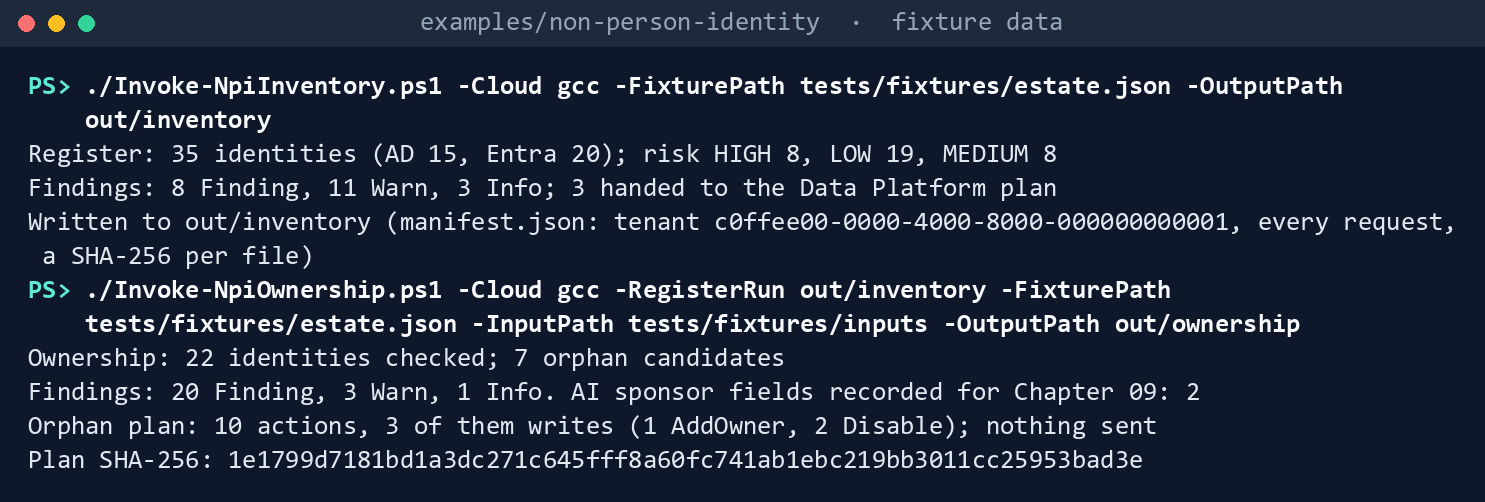
They print the lines of Chapter 01’s step 3 and Chapter 02’s step 3, ending Plan SHA-256: 1e1799d7….
Send Learn’s samples to the fake:
Invoke-Pester -Path tests/NpiAgentId.Tests.ps1 -FullNameFilter '*Learn*' -Output None -PassThru |
    Select-Object PassedCount, FailedCount, NotRunCount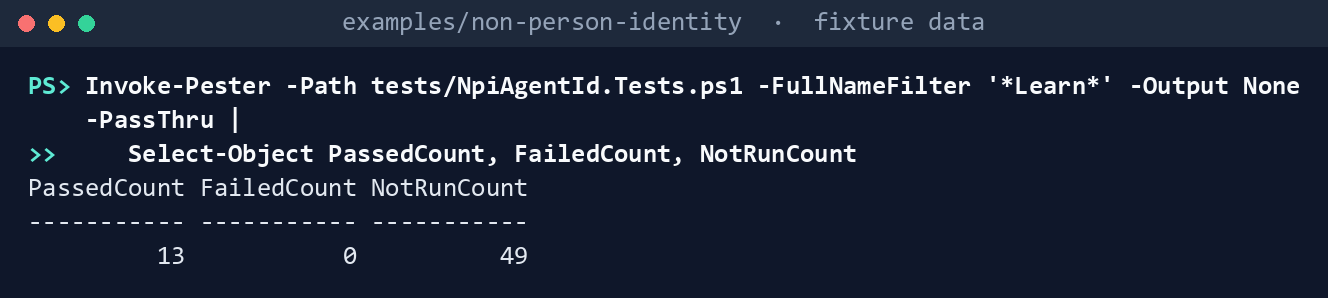
What the terminal shows, run on the kit’s fixtures (the same output as text) PassedCount 13,FailedCount 0,NotRunCount 49. Read the test for Block agent identity authentication: the shape check finds one problem in Learn’s body, “no exclusion for approved agents”.List what each task needs:
Import-Module ./powershell/NpiAgentId/NpiAgentId.psm1
foreach ($t in 'agent-id', 'agent-ca-apply') { $p = Get-NpiAgentRequiredPermission -Task $t; "$t : " + ($p.GraphPermissions -join ', ') }
agent-id : AgentIdentity.Read.All, AgentIdentityBlueprint.Read.All, Application.Read.All, AuditLog.Read.All, CustomSecAttributeAssignment.Read.All, LifecycleWorkflows-Workflow.Read.All, LifecycleWorkflows-Workflow.ReadBasic.All, Policy.Read.All, RoleManagement.Read.Directory, User.Read.All agent-ca-apply : Policy.Read.All, Policy.ReadWrite.ConditionalAccess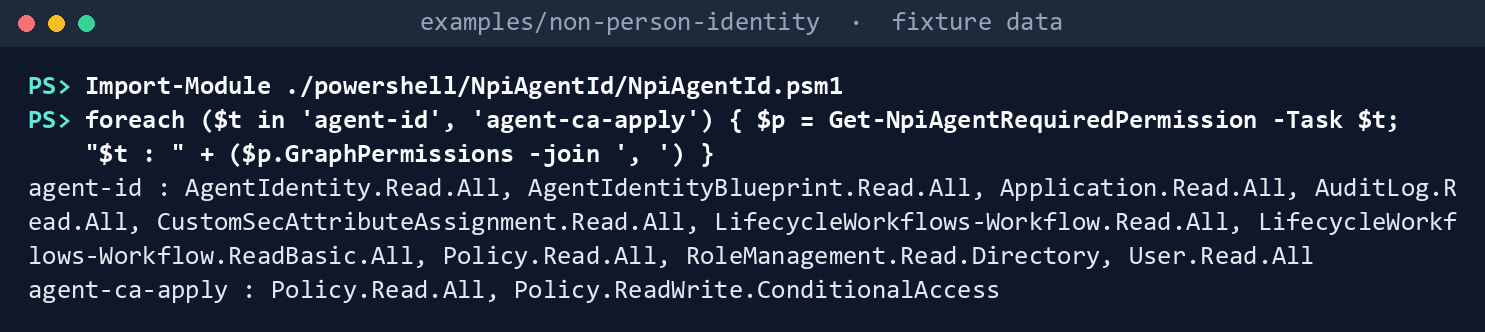
What the terminal shows, run on the kit’s fixtures (the same output as text) Read D-NP6 for each cloud:
'global','gcc','gcchigh','dod' | ForEach-Object { $c = Get-NpiAgentCapability -Cloud $_
    [pscustomobject]@{ Cloud = $_; Mode = $c.Mode; AgentIdentities = $c.AgentIdentities.stage; AgentCA = $c.AgentConditionalAccess.stage; SponsorWorkflows = $c.SponsorWorkflows.stage } } | Format-Table
Cloud Mode AgentIdentities AgentCA SponsorWorkflows ----- ---- --------------- ------- ---------------- global AgentId GA (April 2026) Preview (policy builder label) GA (May 2026) gcc AgentId GA (April 2026) Preview (policy builder label) GA (May 2026) gcchigh Fallback Not published Not published Not published dod Fallback Not published Not published Not published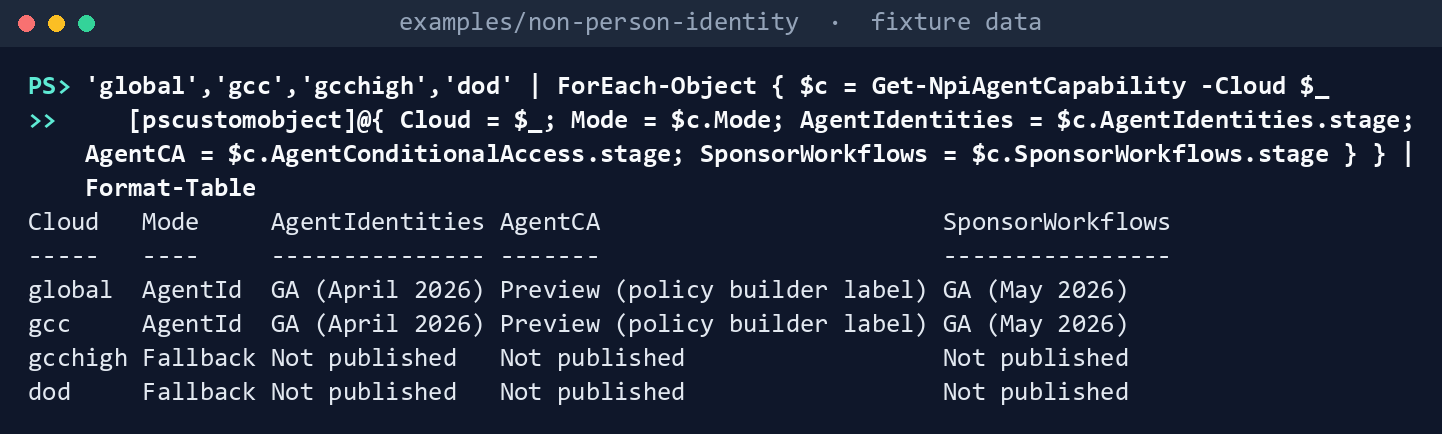
What the terminal shows, run on the kit’s fixtures (the same output as text) Check the AI identities and build the plan:
./Invoke-NpiAgentId.ps1 -Cloud gcc -RegisterRun out/inventory -OwnershipRun out/ownership -FixturePath tests/fixtures/ch09/agent-estate.json -InputPath tests/fixtures/ch09/inputs -OutputPath out/agent-idD-NP6 (Proposed): AgentId mode in cloud 'gcc'; agent Conditional Access Preview (policy builder label); agent risk Preview AI identities: 8 checked (4 AgentIdentity, 3 AgentIdentityBlueprint, 1 ServicePrincipal); Chapter 02 sponsor fields filled: 2 of 2 Findings: 22 Finding (4 P1, 2 P2), 6 Warn, 4 Info. Orphan candidates for Chapter 02: 2 Agent CA plan: Unapproved InPlace, HighRisk Create; nothing sent Plan SHA-256: 5a8002467655390a12ee9f8967a82d52e40234adf3a9a74ea37952b34b14073b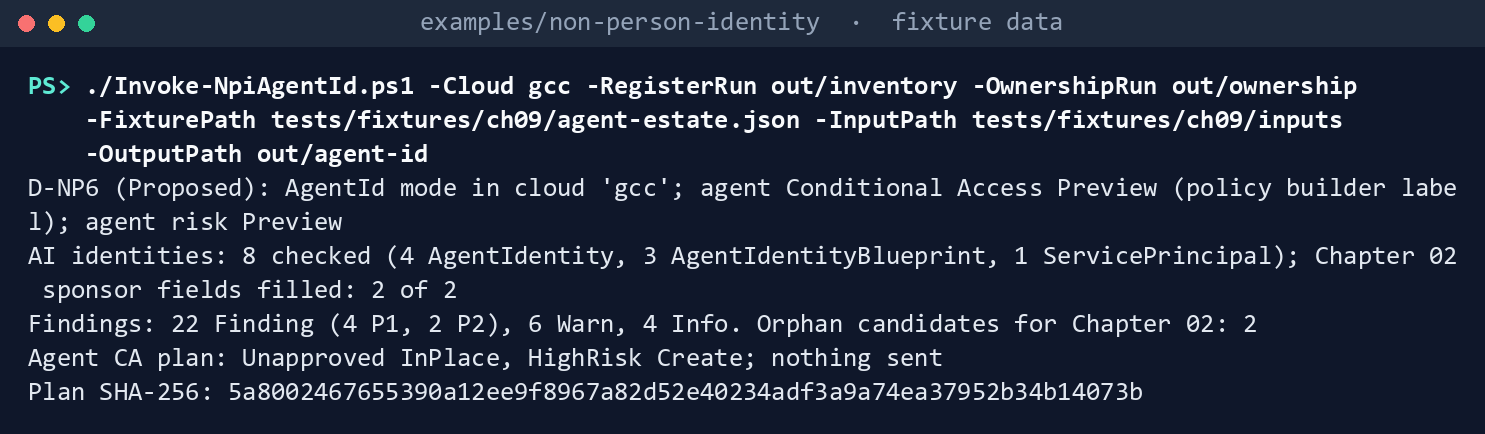
What the terminal shows, run on the kit’s fixtures (the same output as text) The plan’s hash is the same on every run with these inputs.
Read the findings:
Get-Content out/agent-id/findings.json -Raw | ConvertFrom-Json | Where-Object Severity -eq 'Finding' | Group-Object Rule | Format-Table Name, Count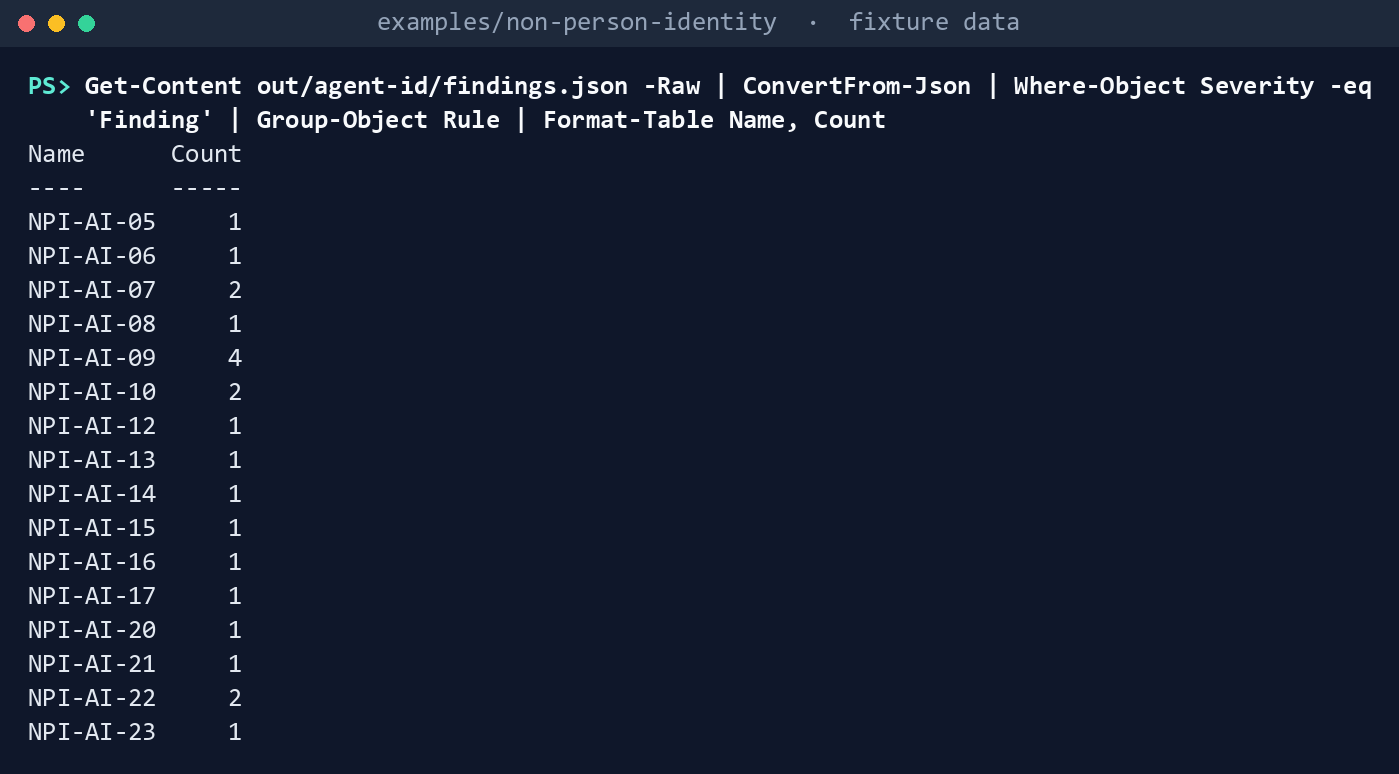
What the terminal shows, run on the kit’s fixtures (the same output as text) NPI-AI-05, -06, -12 and -14 once each, all on Case Triage Agent: its handshake lacks a sponsoring group, Conditional Access coverage and an access mode, names the sponsor as technical owner, was reviewed a month after the agent was created, and the agent holds Exchange Administrator with no end date. NPI-AI-07 twice (P2: Sandbox Helper and Pilot Sandbox Blueprint, whose only sponsor is a contractor), NPI-AI-08 once (Records Search: the record names Bob, the directory Carol), NPI-AI-09 four times, NPI-AI-10 twice (Case Triage Blueprint’s secret; Correspondence Drafting’s app registration), NPI-AI-13 once (Case Triage Blueprint inherits all Graph roles), NPI-AI-15 once (Correspondence Drafting holds
Directory.ReadWrite.All), NPI-AI-16 once (Records Search: Bob left on October 9 and nobody confirmed by October 26), NPI-AI-17 once (the mover workflow has no transfer task), NPI-AI-20 once (Sandbox Helper carries the approval attribute with no handshake), and the P1 drift: NPI-AI-21 (Claims Summarizer, piloted, no identity), NPI-AI-22 twice (Sandbox Helper and Pilot Sandbox Blueprint) and NPI-AI-23 (a secret added to Case Triage Blueprint on October 20 by a person, outside any change window). Benefits Q&A Agent and its blueprint pass every rule.Read the sponsor fields Chapter 02 recorded, filled:
Get-Content out/agent-id/ai-identities.json -Raw | ConvertFrom-Json | Format-Table Name, FederalSponsor, TechnicalOwner, InventoryRecord, Handshake, SponsorStateName FederalSponsor TechnicalOwner InventoryRecord Handshake SponsorState ---- -------------- -------------- --------------- --------- ------------ Benefits Q&A Agent erin@contoso.example alice@contoso.example CMDB-4001 HS-001 None Case Triage Agent carol@contoso.example carol@contoso.example CMDB-4002 HS-002 AwaitingConfirmation until 2026-11-10 Records Search Agent carol@contoso.example alice@contoso.example CMDB-4003 HS-003 Orphaned Sandbox Helper alice@contoso.example None Benefits Agent Blueprint erin@contoso.example alice@contoso.example CMDB-4001 HS-001; HS-003 Case Triage Blueprint carol@contoso.example carol@contoso.example CMDB-4002 HS-002 Pilot Sandbox Blueprint alice@contoso.example Correspondence Drafting erin@contoso.example alice@contoso.example CMDB-1100 HS-004 None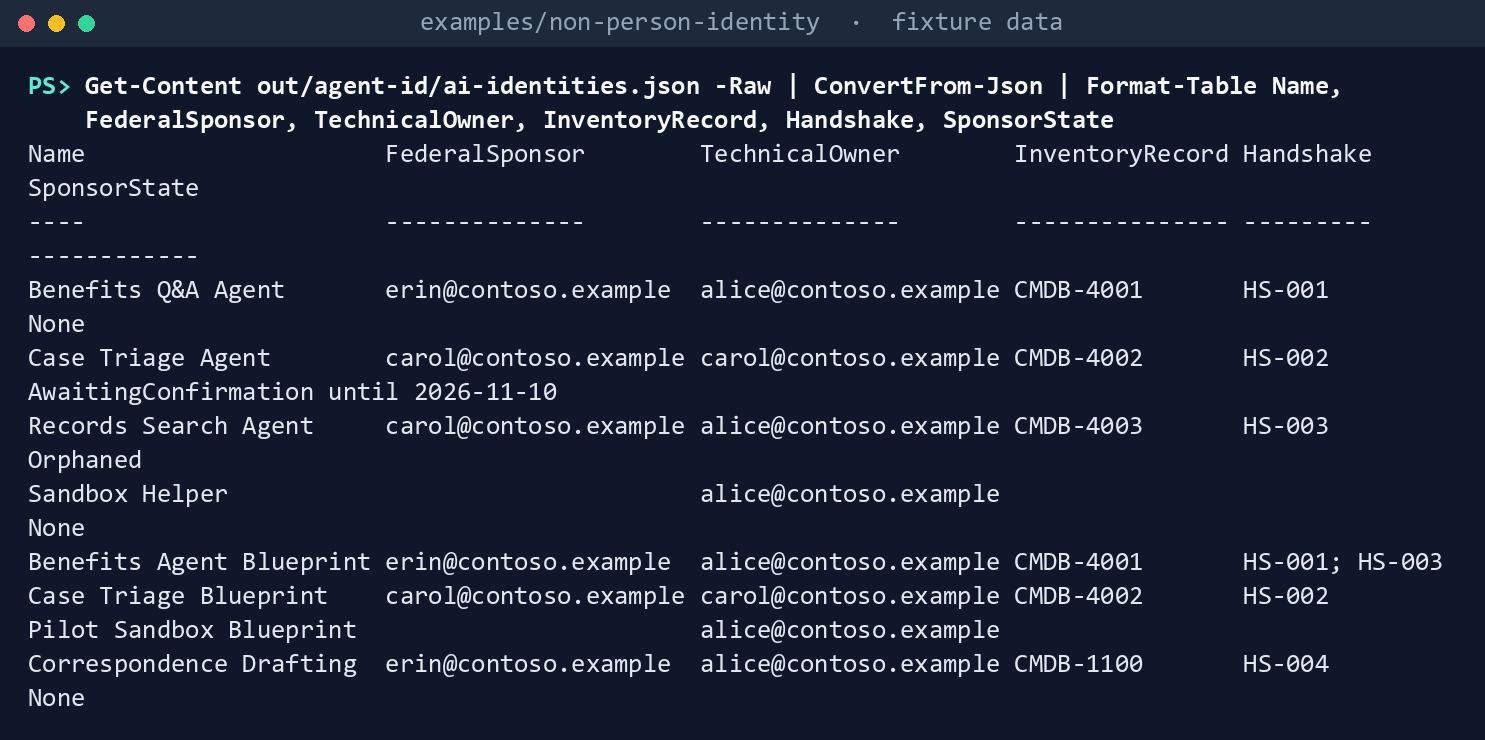
What the terminal shows, run on the kit’s fixtures (the same output as text) Run the D-NP6 fallback in GCC High (Chapters 01 and 02 again, in that cloud):
./Invoke-NpiInventory.ps1 -Cloud gcchigh -FixturePath tests/fixtures/estate.json -OutputPath out/inventory-gcchigh
./Invoke-NpiOwnership.ps1 -Cloud gcchigh -RegisterRun out/inventory-gcchigh -FixturePath tests/fixtures/estate.json -InputPath tests/fixtures/inputs -OutputPath out/ownership-gcchigh
./Invoke-NpiAgentId.ps1 -Cloud gcchigh -RegisterRun out/inventory-gcchigh -OwnershipRun out/ownership-gcchigh -FixturePath tests/fixtures/ch09/agent-estate.json -InputPath tests/fixtures/ch09/inputs -OutputPath out/agent-id-gcchigh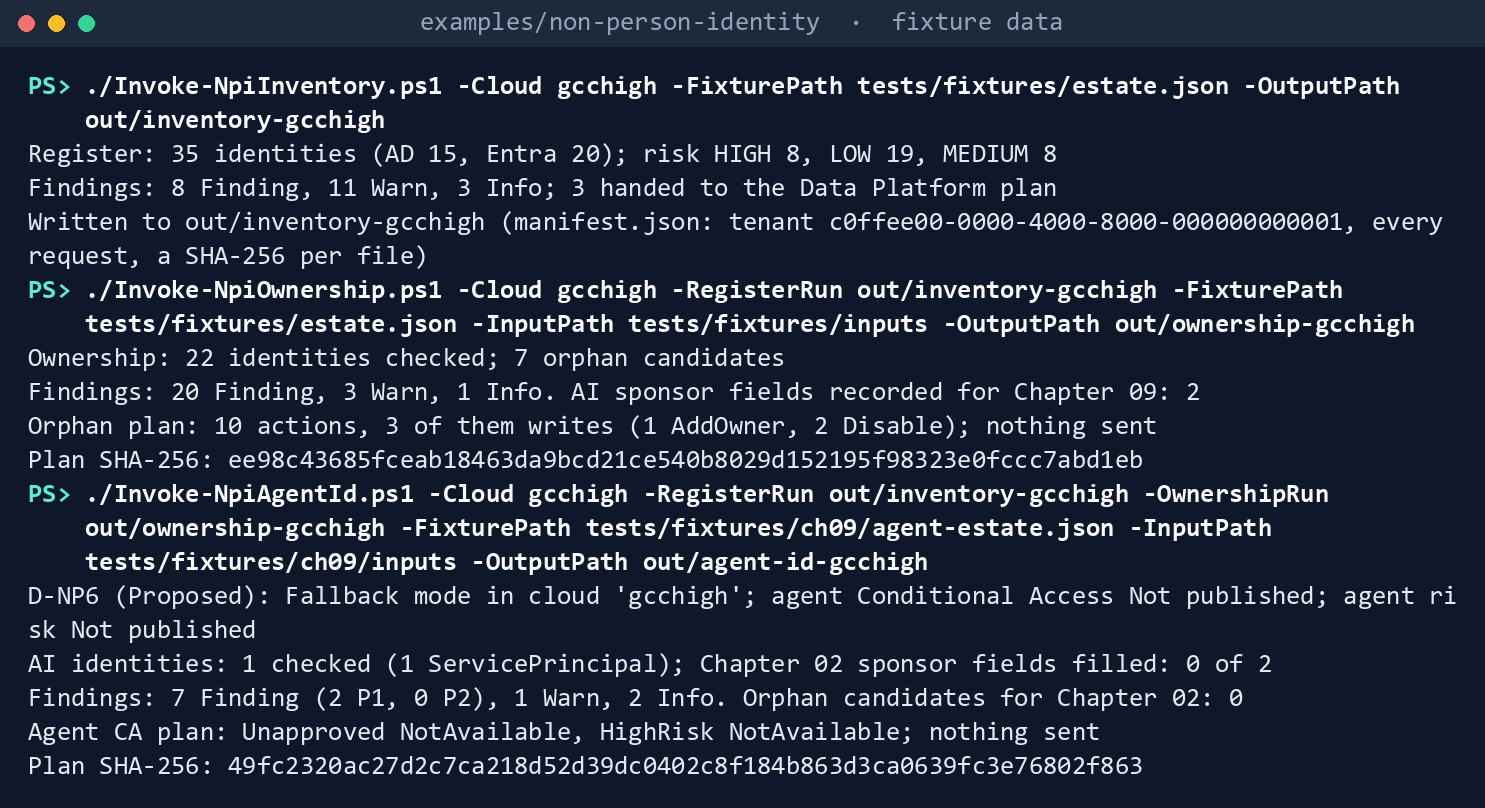
What the terminal shows, run on the kit’s fixtures (the same output as text) The last command prints:
D-NP6 (Proposed): Fallback mode in cloud 'gcchigh'; agent Conditional Access Not published; agent risk Not published
AI identities: 1 checked (1 ServicePrincipal); Chapter 02 sponsor fields filled: 0 of 2
Findings: 7 Finding (2 P1, 0 P2), 1 Warn, 2 Info. Orphan candidates for Chapter 02: 0
Agent CA plan: Unapproved NotAvailable, HighRisk NotAvailable; nothing sent
Plan SHA-256: 11f0e34d16a6bba70be08161df5c42a70f1a6899b28b30a50e2c8d5fff3d7cfe
No agent identity read is sent (
out/agent-id-gcchigh/manifest.jsonlists none). Correspondence Drafting gets the same credential and permission findings as in GCC; three records that name agent identities become NPI-AI-03 findings, because the cloud has none.Dry-run the agent Conditional Access plan with its approved hash:
$sha = (Get-FileHash out/agent-id/agent-ca-plan.json -Algorithm SHA256).Hash.ToLower()
./Invoke-NpiAgentCaAction.ps1 -Cloud gcc -PlanPath out/agent-id/agent-ca-plan.json -ApprovedSha256 $sha -FixturePath tests/fixtures/ch09/agent-estate.json -OutputPath out/agent-ca-dryrun
DryRun: 1 WouldSend WouldSend HighRisk POST https://graph.microsoft.com/beta/identity/conditionalAccess/policies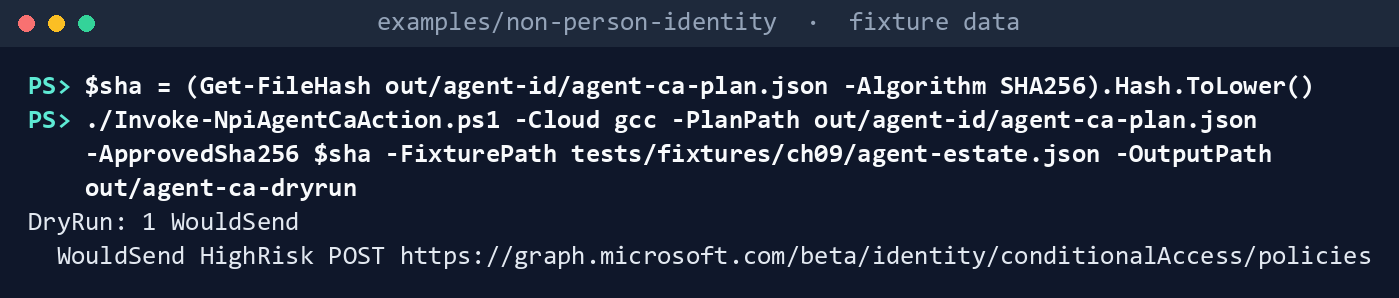
What the terminal shows, run on the kit’s fixtures (the same output as text) Apply it to the fake, then try a hash nobody approved:
./Invoke-NpiAgentCaAction.ps1 -Cloud gcc -PlanPath out/agent-id/agent-ca-plan.json -ApprovedSha256 $sha -FixturePath tests/fixtures/ch09/agent-estate.json -OutputPath out/agent-ca-apply -Apply
./Invoke-NpiAgentCaAction.ps1 -Cloud gcc -PlanPath out/agent-id/agent-ca-plan.json -ApprovedSha256 ('0' * 64) -FixturePath tests/fixtures/ch09/agent-estate.json -OutputPath out/agent-ca-x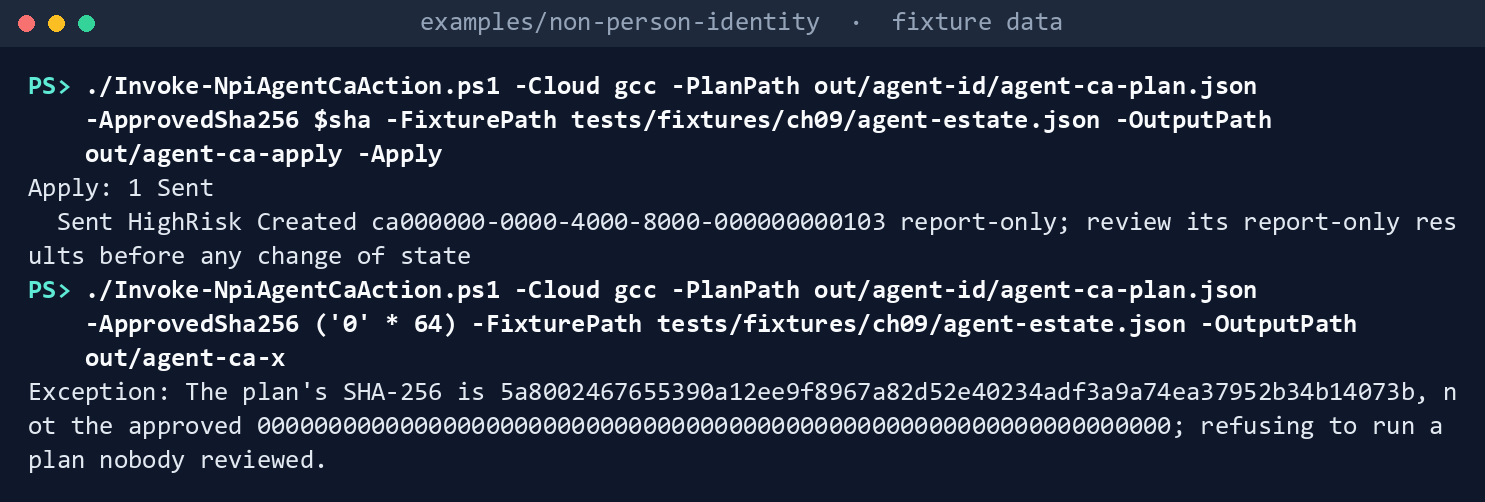
What the terminal shows, run on the kit’s fixtures (the same output as text) Apply: 1 Sent, withCreated ca000000-0000-4000-8000-000000000103 report-only; review its report-only results before any change of state; then the refusal,The plan's SHA-256 is 5a800246…, not the approved 0000…; refusing to run a plan nobody reviewed.Run the tests:
Invoke-Pester -Path tests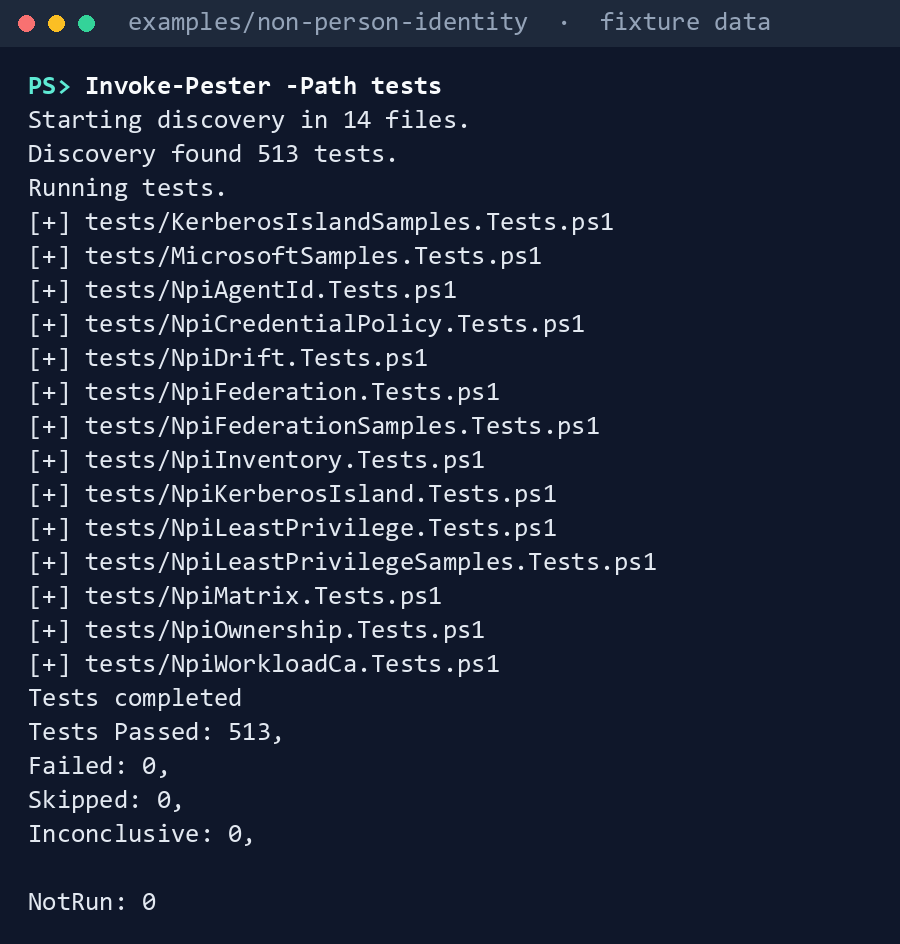
What the terminal shows, run on the kit’s fixtures (the same output as text)
Expected result: 513 tests passing, and out/agent-id/manifest.json listing 45 requests, the D-NP6 mode, the SHA-256 of the register, of Chapter 02’s sponsor fields and of each input. Delete out when you’re done:
Remove-Item -Recurse -Force out
Lab 2: test tenant
Use a test tenant in the worldwide or GCC cloud, never production, with fictional people, licensed for Agent 365 (or Microsoft 365 E7) with Entra ID P1, and P2 for agent risk.47 48 Run Chapters 01 and 02’s Lab 2 first (out/inventory-test, out/ownership-test). Work in examples/non-person-identity on Chapter 01’s test host. You’ll replace: <tenant-id> (the test tenant’s ID), <inventory-app-id> and <inventory-thumbprint> (Chapter 01’s reading app and its certificate), <test-domain> (the test domain’s DNS name), <app-id> and <thumbprint> (an app holding only the agent-id permissions, and its certificate), <inputs> (a folder for this lab’s input files), <your-upn> (your user principal name), <agent-object-id> and <agent-name> (the test agent identity’s object ID and name), <blueprint-app-id> (the test blueprint’s app ID), <sponsor-upn> and <sponsoring-group-id> (its sponsor and sponsoring group), <owner-upn> (its technical owner, not the sponsor), <record-id> (its inventory record), <placement> (its placement), and <sha> (the plan’s SHA-256, as the reviewer passes it to you).
Every command in this lab, in order, from examples/non-person-identity. Each step below says what it does and what to look for.
# Step 1: Read and record the creation setting
New-Item -ItemType Directory -Force <inputs> | Out-Null
foreach ($f in 'ai-use-case-inventory', 'pipeline-changes', 'sponsor-confirmations', 'sponsor-events') { Get-Content tests/fixtures/ch09/inputs/$f.csv -TotalCount 1 | Set-Content <inputs>/$f.csv }
@{ setting = 'Users can create agent blueprints'; value = 'No'; readBy = '<your-upn>'; readOn = (Get-Date -Format yyyy-MM-dd); where = 'Microsoft Entra admin center, Entra ID > Users > User settings'; evidence = 'test tenant' } | ConvertTo-Json | Set-Content <inputs>/creation-setting.json

# Step 2: Make one governed agent
$hs = @{ HandshakeId = 'HS-T01'; IdentityKind = 'AgentIdentity'; IdentityObjectId = '<agent-object-id>'; Name = '<agent-name>'; Environment = 'Production'
    BlueprintAppId = '<blueprint-app-id>'; SponsorUpn = '<sponsor-upn>'; SponsoringGroupId = '<sponsoring-group-id>'; TechnicalOwnerUpn = '<owner-upn>'; Consent = @()
    CaPolicies = @('NPI-AGENT-01 Block agent identities not approved in the handshake (report-only)', 'NPI-AGENT-02 Block high-risk agent identities (report-only, watch item)')
    Placement = '<placement>'; UseCaseId = 'UC-TEST-001'; AccessMode = 'AppOnly'; CredentialPlan = 'ManagedIdentity'; TimeBoundRoles = @(); FallbackReason = ''
    ReviewedBy = '<your-upn>'; ReviewedOn = (Get-Date -Format yyyy-MM-dd) }
ConvertTo-Json @($hs) -Depth 5 | Set-Content <inputs>/handshakes.json
Add-Content <inputs>/ai-use-case-inventory.csv 'UC-TEST-001,<agent-name>,Agentic AI,Deployed,<record-id>,AgentIdentity,<agent-object-id>,<blueprint-app-id>,<sponsor-upn>,<sponsoring-group-id>,<owner-upn>,<placement>'
Connect-MgGraph -Environment Global -TenantId <tenant-id> -ClientId <inventory-app-id> -CertificateThumbprint <inventory-thumbprint>
Connect-AzAccount -ServicePrincipal -Environment AzureCloud -Tenant <tenant-id> -ApplicationId <inventory-app-id> -CertificateThumbprint <inventory-thumbprint>
./Invoke-NpiInventory.ps1 -Cloud gcc -TenantId <tenant-id> -Domain <test-domain> -OutputPath out/inventory-test

# Step 3: Run the check
Connect-MgGraph -Environment Global -TenantId <tenant-id> -ClientId <app-id> -CertificateThumbprint <thumbprint>
./Invoke-NpiAgentId.ps1 -Cloud gcc -RegisterRun out/inventory-test -OwnershipRun out/ownership-test -InputPath <inputs> -OutputPath out/agent-id-test
Get-Content out/agent-id-test/ai-identities.json -Raw | ConvertFrom-Json | Format-Table Name, FederalSponsor, TechnicalOwner, InventoryRecord, Handshake, SponsorState

# Step 3: Run the check
Get-Content out/agent-id-test/agent-ca-plan.json -Raw
(Get-FileHash out/agent-id-test/agent-ca-plan.json -Algorithm SHA256).Hash.ToLower()

# Step 4: Check the policy JSON against the admin center
Connect-MgGraph -Environment Global -TenantId <tenant-id> -Scopes Policy.Read.All
(Invoke-MgGraphRequest -Uri https://graph.microsoft.com/beta/identity/conditionalAccess/policies).value | ConvertTo-Json -Depth 20
Get-ChildItem config/agent-ca-ch09 | ForEach-Object { $_.Name; Get-Content $_.FullName -Raw }

# Step 5: Dry-run, then apply
Connect-MgGraph -Environment Global -TenantId <tenant-id> -Scopes Policy.Read.All, Policy.ReadWrite.ConditionalAccess
./Invoke-NpiAgentCaAction.ps1 -Cloud gcc -PlanPath out/agent-id-test/agent-ca-plan.json -ApprovedSha256 <sha> -OutputPath out/agent-ca-test
./Invoke-NpiAgentCaAction.ps1 -Cloud gcc -PlanPath out/agent-id-test/agent-ca-plan.json -ApprovedSha256 <sha> -OutputPath out/agent-ca-test-apply -Apply

# Step 6: Back it out
Remove-Item -Recurse -Force out/agent-id-test, out/agent-ca-test, out/agent-ca-test-apply
Read and record the creation setting. In the admin center, Entra ID > Users > User settings, read Users can create agent blueprints as at least a Cloud Application Administrator,49 set it to No in the test tenant, and record the reading in
creation-setting.json. These commands make the inputs folder, with the fixture’s CSV headers, and record the reading in the fixture’s format, dated today:New-Item -ItemType Directory -Force <inputs> | Out-Null foreach ($f in 'ai-use-case-inventory', 'pipeline-changes', 'sponsor-confirmations', 'sponsor-events') { Get-Content tests/fixtures/ch09/inputs/$f.csv -TotalCount 1 | Set-Content <inputs>/$f.csv } @{ setting = 'Users can create agent blueprints'; value = 'No'; readBy = '<your-upn>'; readOn = (Get-Date -Format yyyy-MM-dd); where = 'Microsoft Entra admin center, Entra ID > Users > User settings'; evidence = 'test tenant' } | ConvertTo-Json | Set-Content <inputs>/creation-setting.jsonMake one governed agent. With Agent ID Developer, create a test blueprint from Learn’s Graph sample with a sponsor who is not the owner, add a managed identity as its federated credential, create its principal and one agent identity,50 write its handshake record and inventory row, and set the approval attribute (
AgentAttributes,AgentApprovalStatus,Production_Approved) as an Attribute Assignment Administrator.51 These commands write the handshake record and the inventory row in the fixture’s formats (HS-001 is the model), with no permission consented, and read the register again so it holds the agent:$hs = @{ HandshakeId = 'HS-T01'; IdentityKind = 'AgentIdentity'; IdentityObjectId = '<agent-object-id>'; Name = '<agent-name>'; Environment = 'Production' BlueprintAppId = '<blueprint-app-id>'; SponsorUpn = '<sponsor-upn>'; SponsoringGroupId = '<sponsoring-group-id>'; TechnicalOwnerUpn = '<owner-upn>'; Consent = @() CaPolicies = @('NPI-AGENT-01 Block agent identities not approved in the handshake (report-only)', 'NPI-AGENT-02 Block high-risk agent identities (report-only, watch item)') Placement = '<placement>'; UseCaseId = 'UC-TEST-001'; AccessMode = 'AppOnly'; CredentialPlan = 'ManagedIdentity'; TimeBoundRoles = @(); FallbackReason = '' ReviewedBy = '<your-upn>'; ReviewedOn = (Get-Date -Format yyyy-MM-dd) } ConvertTo-Json @($hs) -Depth 5 | Set-Content <inputs>/handshakes.json Add-Content <inputs>/ai-use-case-inventory.csv 'UC-TEST-001,<agent-name>,Agentic AI,Deployed,<record-id>,AgentIdentity,<agent-object-id>,<blueprint-app-id>,<sponsor-upn>,<sponsoring-group-id>,<owner-upn>,<placement>' Connect-MgGraph -Environment Global -TenantId <tenant-id> -ClientId <inventory-app-id> -CertificateThumbprint <inventory-thumbprint> Connect-AzAccount -ServicePrincipal -Environment AzureCloud -Tenant <tenant-id> -ApplicationId <inventory-app-id> -CertificateThumbprint <inventory-thumbprint> ./Invoke-NpiInventory.ps1 -Cloud gcc -TenantId <tenant-id> -Domain <test-domain> -OutputPath out/inventory-testRun the check with an app holding only the
agent-idpermissions:Connect-MgGraph -Environment Global -TenantId <tenant-id> -ClientId <app-id> -CertificateThumbprint <thumbprint> ./Invoke-NpiAgentId.ps1 -Cloud gcc -RegisterRun out/inventory-test -OwnershipRun out/ownership-test -InputPath <inputs> -OutputPath out/agent-id-test Get-Content out/agent-id-test/ai-identities.json -Raw | ConvertFrom-Json | Format-Table Name, FederalSponsor, TechnicalOwner, InventoryRecord, Handshake, SponsorStateConfirm that
$expand=sponsorsreturns sponsors underAgentIdentity.Read.All(research gaps, row 82), and thatagent-ca-plan.jsonlists both policies asCreate. The reviewer reads the plan and computes the hash they pass you:Get-Content out/agent-id-test/agent-ca-plan.json -Raw (Get-FileHash out/agent-id-test/agent-ca-plan.json -Algorithm SHA256).Hash.ToLower()Check the policy JSON against the admin center. Create the block-unapproved policy once in the admin center, report-only, read it back from the beta endpoint, and compare the
agentIdServicePrincipalFilterrule and the property’s location withconfig/agent-ca-ch09/(row 85). Delete that hand-made policy. The read, signed in as in step 5:Connect-MgGraph -Environment Global -TenantId <tenant-id> -Scopes Policy.Read.All (Invoke-MgGraphRequest -Uri https://graph.microsoft.com/beta/identity/conditionalAccess/policies).value | ConvertTo-Json -Depth 20 Get-ChildItem config/agent-ca-ch09 | ForEach-Object { $_.Name; Get-Content $_.FullName -Raw }Dry-run, then apply, signed in as a person with Conditional Access Administrator:
Connect-MgGraph -Environment Global -TenantId <tenant-id> -Scopes Policy.Read.All, Policy.ReadWrite.ConditionalAccess
./Invoke-NpiAgentCaAction.ps1 -Cloud gcc -PlanPath out/agent-id-test/agent-ca-plan.json -ApprovedSha256 <sha> -OutputPath out/agent-ca-test
./Invoke-NpiAgentCaAction.ps1 -Cloud gcc -PlanPath out/agent-id-test/agent-ca-plan.json -ApprovedSha256 <sha> -OutputPath out/agent-ca-test-apply -Apply
The two policies appear as Report-only. Review their report-only results for the test agent.
Back it out. As a person in the admin center: delete the two policies, remove the attribute, disable then delete the test agent identity and blueprint, set the creation setting back if the tenant needs it, and delete the
outfolders: they name people. The code deletes nothing. The last of these, on the test host:Remove-Item -Recurse -Force out/agent-id-test, out/agent-ca-test, out/agent-ca-test-apply
Verified facts
| Item | Value | US Government clouds | Stage | Source |
|---|---|---|---|---|
| Users can create agent blueprints | Admin center user setting; default: users can create blueprints; No restricts creation to administrators and Agent ID Developer (delegation page) or Agent ID Developer and Agent ID Administrator (blueprint page) | — | GA | 52 53 |
| Authorization policy | GET /policies/authorizationPolicy, Policy.Read.All; allowedToCreateApps is Users can register applications; no blueprint property on v1.0 or beta |
L4 and L5 | v1.0 | 54 |
| List blueprints | GET /applications/microsoft.graph.agentIdentityBlueprint; AgentIdentityBlueprint.Read.All; nonowners need Agent ID Administrator, delegated |
Not stated on the page | v1.0 | 55 |
| Blueprint sponsors; owners | Sponsors: Application.Read.All; owners: AgentIdentityBlueprint.Read.All |
Owners: L4 and L5; sponsors: not stated | v1.0 | 56 57 |
| Blueprint credentials | Managed identity as federated credential recommended for production; secrets and certificates not recommended for production; Agent ID Administrator needed to add a secret or certificate | — | v1.0; admin center wizard preview | 58 |
| Inheritable permissions | GET /applications/{id}/microsoft.graph.agentIdentityBlueprint/inheritablePermissions, AgentIdentityBlueprint.Read.All; allAllowed includes future grants; 50 resource apps (procedure) or 10 (Manage agent identities) |
— | v1.0 | 59 60 61 |
| List agent identities | GET /servicePrincipals/microsoft.graph.agentIdentity; AgentIdentity.Read.All; page size 100; agentIdentityBlueprintId, servicePrincipalType ServiceIdentity |
Not stated | v1.0 | 62 63 |
| Agent identity sponsors; owners | Sponsors: application AgentIdentity.ReadWrite.All only, delegated not supported; owners: AgentIdentity.Read.All |
Not stated | v1.0 | 64 65 |
| Custom security attributes | $select=customSecurityAttributes; CustomSecAttributeAssignment.Read.All and Application.Read.All; Attribute Assignment Reader |
— | v1.0 | 66 |
| App role assignments | GET /servicePrincipals/{id}/appRoleAssignments, Application.Read.All |
L4 and L5 | v1.0 | 67 |
| Directory role assignments | GET /roleManagement/directory/roleAssignments, RoleManagement.Read.Directory; isPrivileged on role definitions is beta, preview |
L4 and L5 | v1.0; isPrivileged beta |
68 69 |
| Roles and permissions blocked for agents | Global Administrator, Privileged Role Administrator, User Administrator; Application.ReadWrite.All, RoleManagement.ReadWrite.All, User.ReadWrite.All, Directory.AccessAsUser.All among others; no role-assignable groups; the roles that can be assigned are listed (Global Reader and Exchange, SharePoint and Teams Administrator among them), and custom roles |
— | — | 70 |
| Conditional Access for agents | Block only; agent risk the only condition for agent identities; not applied when a blueprint gets a Graph token to create agents; Agent 365 with Entra ID P1, or E7 | GCC: delegated access listed; GCC High, DoD: not published | Preview | 71 72 73 |
| Agent CA properties | includeAgentIdServicePrincipals, excludeAgentIdServicePrincipals, agentIdServicePrincipalFilter, agentIdRiskLevels |
— | Beta | 74 75 |
| Read and create CA policies | List: Policy.Read.All; create: Policy.Read.All and Policy.ReadWrite.ConditionalAccess; Conditional Access Administrator |
L4 and L5 | v1.0 (agent properties beta) | 76 77 |
| ID Protection for agents | Risky agents report; riskyAgents, agentRiskDetections; detections kept 90 days; Entra ID P2 during preview (Manage agent identities); Agent 365 required soon (ID Protection for agents) |
GCC: delegated access listed | Preview | 78 79 |
| Sponsor tasks | Transfer agent identity sponsorships to manager b8f4c3d5-9e7a-4b1c-8f2d-6a5e8b9c7f4a; manager email b8c4e1f9-3a7d-4b2e-9c5f-8d6a9b1c2e3f; cosponsor email ad3b85cd-75b1-43e7-b4b9-0e52faba3944; mover and leaver only; Agent 365 or E7 |
GCC: listed | GA | 80 81 82 |
| List workflows; tasks | LifecycleWorkflows-Workflow.ReadBasic.All; tasks LifecycleWorkflows-Workflow.Read.All |
L4 and L5 | v1.0 | 83 |
| Directory audits | AuditLog.Read.All; agent objects under the base type’s activities, with agentType on targets |
L4 and L5 | v1.0 | 84 85 |
| Agent 365 | GCC column: registry, access packages, sponsor lifecycle policies, CA and identity protection for delegated access available; Purview audit and DLP for agents not; FedRAMP High authorization pending; plan column “Requires Microsoft 365 E7 / G7 or Agent 365” | GCC only | GA for the commercial segment (May 1, 2026) | 86 87 |
Where Learn’s pages differ: List agentIdentity sponsors names a write permission for a read, while the agent identity’s other reads name AgentIdentity.Read.All (research gaps, row 82); the blueprint’s sponsor page names Application.Read.All where its other reads name AgentIdentityBlueprint.Read.All (row 83); the inheritable permissions procedure and Manage agent identities give different limits and the procedure and API reference different paths (row 84); and Graph’s change log puts the agent properties on conditionalAccessApplications while Learn’s sample puts them under clientApplications (row 85). The code follows the stricter reading or the API reference, and Lab 2 confirms.
Federal requirements and evidence
The AI identity checks are the guide’s AI agents additions to its gates: a federal sponsor, a technical owner and a record for every agent, gated creation, blueprint credentials in the Step 3 order, and no shadow AI identity. Each row names the file or command that is the evidence. The NIST SP 800-53 Rev. 5 controls are in the Moderate baseline.88 The SCuBA policies are as Book 17, Chapter 06 records them, and the OMB M-25-21 duties as Book 17, Appendix A does.
| What the output proves | Requirement it supports | KSI it aligns to | Who keeps it |
|---|---|---|---|
Learn’s Agent ID samples, sent as published, are the models the code keeps, and each gap is pinned by a test (Lab 1, step 1: NpiAgentId.Tests.ps1, Learn’s blocks) |
AC-2 Account Management (account types) | KSI-IAM-SNU | The repository’s tests; the pinned copies |
The read task sends only GETs and holds nothing ending in ReadWrite; the write task is separate and delegated (Lab 1, step 2, and Lab 2, step 3: Get-NpiAgentRequiredPermission for agent-id and agent-ca-apply) |
AC-6 Least Privilege; CM-5 Access Restrictions for Change | KSI-IAM-ELP, KSI-IAM-JIT (AC-6); KSI-CMT-RVP (CM-5) | Identity engineering; the ISSO keeps the consent record |
Which agent features each cloud offers, at which release stage, is data the run reads, not an assumption (Lab 1, step 3: Get-NpiAgentCapability; config/agent-id-capabilities-ch09.json) |
SA-9 External System Services (the provider’s service as published) | KSI-SCR-MIT, KSI-SCR-MON | Identity engineering (D-NP6) |
Users can create agent blueprints is read as No, and users can’t register apps or consent beyond the low-risk policy (Lab 2, step 1: creation-setting.json; findings.json, NPI-AI-01 and -02) |
AC-6; SCuBA MS.AAD.5.1v1 and 5.2v1 (BOD 25-01 required), with the blueprint setting as their agent analog (design guidance) | KSI-IAM-ELP | Identity engineering; the ScubaGear report |
Every agent identity, blueprint and fallback service principal has its federal sponsor, sponsoring group, technical owner and record filled in (Lab 1, step 6: ai-identities.json) |
AC-2 (account managers); OMB M-25-21, section 3(b)(v) (the use-case inventory) | KSI-IAM-SNU | The identity governance officer |
A missing or incomplete handshake, no accountable human, a sponsor who is also the owner, or a record and directory that disagree: each is a finding (Lab 1, step 5: findings.json, NPI-AI-03 to -09) |
AC-2; AC-5 Separation of Duties (the sponsor isn’t the technical owner) | KSI-IAM-SNU; KSI-IAM-JIT (AC-5) | The identity governance officer |
A secret on a production blueprint, a certificate where federation fits, no access mode, inheritable permissions allAllowed, a standing directory role, or a permission outside the handshake: each is a finding (findings.json, NPI-AI-10 to -15) |
IA-5(2) Public Key-based Authentication; AC-6; AC-6(5) Privileged Accounts | KSI-IAM-SNU, KSI-SVC-ASM; KSI-IAM-ELP, KSI-IAM-JIT | Application owners; identity engineering |
A sponsor’s move or leave is confirmed within ten business days, and the HR-driven workflow that starts the transfer exists (findings.json, NPI-AI-16 and -17) |
AC-2 (aligned with personnel transfer and termination) | KSI-IAM-AAM, KSI-IAM-SNU | The identity governance office; HR |
Agents whose sponsor left unconfirmed are listed in orphan-candidates.json for the identity governance officer to take to Chapter 02’s orphan rule by hand; this code disables nothing |
AC-2(3) Disable Accounts | KSI-IAM-AAM | The identity governance officer |
The block-unapproved and high-risk policies are present and unchanged, and the approval attribute matches a complete handshake (findings.json, NPI-AI-18 to -20) |
AC-3 Access Enforcement; SCuBA MS.AAD.9.1v1 (risky agents blocked; marked a BOD 25-01 requirement in ScubaGear, not on CISA’s page) | KSI-IAM-ELP, KSI-IAM-JIT | Identity engineering |
No agentic system without a governed identity, no shadow agent identity, and no credential added without a change record (findings.json, NPI-AI-21 to -23) |
CM-8 System Component Inventory; AC-2(4) Automated Audit Actions; OMB M-25-21, section 3(b)(v) | KSI-PIY-GIV (CM-8); KSI-MLA-LET, KSI-MLA-RVL (AC-2(4)) | The Chief AI Officer’s staff; the identity governance officer |
Where the cloud has no agent identities, the run reads none and holds the agents on ordinary service principals to the same rules (Lab 1, step 7: no agent identity read in out/agent-id-gcchigh/manifest.json; NPI-AI-03) |
SA-9; AC-2 | KSI-SCR-MIT, KSI-SCR-MON; KSI-IAM-SNU | Identity engineering (D-NP6) |
The agent Conditional Access plan creates only report-only Block policies; the write path stops after its prechecks without -Apply and refuses a hash nobody approved (Lab 1, steps 8 and 9, and Lab 2, step 5: agent-ca-plan.json; results.json and manifest.json in out/agent-ca-dryrun and out/agent-ca-apply; the refusal text) |
AC-3; CM-3 Configuration Change Control; CM-5 | KSI-IAM-ELP; KSI-CMT-LMC, KSI-CMT-RVP | The reviewer; the ISSO |
| The reviewed policy JSON matches what the admin center makes (Lab 2, step 4: the beta read-back compared with the reviewed file) | CM-6 Configuration Settings | KSI-SVC-ACM, KSI-MLA-EVC | Identity engineering |
| One governed agent exists with a sponsor who isn’t its owner and a managed identity as its credential (Lab 2, step 2: the blueprint, its principal and the agent identity, read back by the step 3 run) | AC-2; AC-5; IA-5(2) | KSI-IAM-SNU; KSI-IAM-JIT; KSI-SVC-ASM | The sponsor; identity engineering |
Every run records the tenant, the cloud, the D-NP6 mode, every request, and the SHA-256 of the register, of Chapter 02’s sponsor fields and of each input (manifest.json in each output folder) |
AU-9 Protection of Audit Information; SI-7 Software, Firmware, and Information Integrity | KSI-MLA-OSM (AU-9); KSI-SVC-VRI (SI-7) | The ISSO |
The code passes its tests (Lab 1, step 10: Invoke-Pester -Path tests, 513 passed) |
CM-3(2) Testing, Validation, and Documentation of Changes | KSI-CMT-VTD | The repository; the pull request’s checks |
KSIs are FedRAMP 20x indicators for cloud service providers. The KSI column names the indicators whose related controls, as FedRAMP lists them, include the row’s control or one of its enhancements; which output supports which indicator is the program’s mapping (design guidance), and the SCuBA and M-25-21 rows are mapped through their controls.89 The agency authorizes its own system and lines this evidence up with what its providers report against KSIs; it doesn’t report KSIs itself (Book 00, Appendix B). Lab steps that only run Chapters 01 and 02, back out test objects by hand or delete out have no row. The track-wide mapping is the guide’s Evidence table.
Dangers
| Danger | What happens | The guard |
|---|---|---|
| Anyone can create a blueprint | Agents arrive with whoever built them as sponsor and owner | NPI-AI-01 on a reading older than 90 days or not No; NPI-AI-02 on app registrations |
| An agent created before anyone reviewed it | An identity with access and no record | NPI-AI-04 and NPI-AI-06; NPI-AI-22 for one nobody declared |
| The approval attribute set outside the handshake | The block policy lets an unreviewed agent through | NPI-AI-20; the attribute is checked against a complete handshake |
| A secret on a production blueprint | One leaked secret is every agent made from it | NPI-AI-10; NPI-AI-23 when a credential appears outside a change window |
allAllowed role inheritance |
A later grant to the blueprint reaches every agent at once | NPI-AI-13 |
| A standing privileged role | An administrator that can’t be asked for MFA | NPI-AI-14 unless time-bound and recorded |
| A sponsor leaves and nobody notices | An agent nobody answers for | NPI-AI-16 after ten business days; orphan candidates to Chapter 02; NPI-AI-17 if the workflows lack the tasks |
| A preview policy enforced | Agents blocked on a feature that can change, or not available in the cloud | Report-only only; NPI-AI-18 warns on an enforced policy; the writer refuses any other state; NotAvailable where D-NP6 says so |
| A block policy with no exclusion | Every approved agent blocked when enforced | The reviewed policy’s shape is checked, in the plan and in the tenant |
| Agent features assumed in GCC High or DoD | Code that reads objects the cloud doesn’t have | D-NP6 as data; Fallback mode sends no agent read and applies the same rules to service principals |
| A plan changed after review | Different policies from the ones approved | Approved SHA-256, tenant, cloud, seven days, body checks, re-read before write |
| An unattended app that writes Conditional Access | A standing permission to change every policy | The write path is delegated only, Conditional Access Administrator; the read path holds no ReadWrite permission |
Checklist
Footnotes
Microsoft Learn, “Agent identities, service principals, and applications,” key differences, https://learn.microsoft.com/entra/agent-id/agent-service-principals (accessed Oct 30, 2026).↩︎
Microsoft Learn, “What is Microsoft Entra Agent ID?,” how to get started, https://learn.microsoft.com/entra/agent-id/what-is-microsoft-entra-agent-id (accessed Oct 30, 2026).↩︎
Microsoft Learn, “Microsoft Entra releases and announcements,” April 2026, General Availability - Microsoft Entra Agent ID platform, https://learn.microsoft.com/entra/fundamentals/whats-new#april-2026, and “What’s new in Microsoft Entra Agent ID,” https://learn.microsoft.com/entra/agent-id/whats-new-agent-id (both accessed Oct 31, 2026). The older overview at
entra/agent-id/identity-professional/microsoft-entra-agent-identities-for-ai-agentscarried a preview notice; that address now opens the current overview, which has none.↩︎Microsoft Learn, “Create an agent identity blueprint,” prerequisites; create; configure credentials, https://learn.microsoft.com/entra/agent-id/create-blueprint (accessed Oct 30, 2026).↩︎
Microsoft Learn, “Microsoft Agent 365” service description, feature availability (GCC column) and FedRAMP note, https://learn.microsoft.com/office365/servicedescriptions/microsoft-agent-365/microsoft-agent-365 (accessed Oct 31, 2026).↩︎
Microsoft Learn, “Microsoft Entra feature availability” (Azure for US Government), https://learn.microsoft.com/entra/identity/authentication/feature-availability (accessed Oct 30, 2026).↩︎
Microsoft Learn, “Target agent identities in Microsoft Entra Conditional Access policies,” conditions, https://learn.microsoft.com/entra/identity/conditional-access/howto-target-agent-identities (accessed Oct 30, 2026).↩︎
Microsoft Learn, “Microsoft Agent 365” service description, feature availability (GCC column) and FedRAMP note, https://learn.microsoft.com/office365/servicedescriptions/microsoft-agent-365/microsoft-agent-365 (accessed Oct 31, 2026).↩︎
Microsoft Learn, “Manage agent identities in your organization,” inheritable permissions; sponsor oversight; detect and remediate agent risk, https://learn.microsoft.com/entra/agent-id/manage-agent-identities-admin (accessed Oct 30, 2026).↩︎
Microsoft Learn, “Secure autonomous agents with Conditional Access,” prerequisites; allow only specific agents; block high-risk agent identities, https://learn.microsoft.com/entra/identity/conditional-access/policy-autonomous-agents (accessed Oct 31, 2026).↩︎
Microsoft Learn, “ID Protection for agents,” licensing, https://learn.microsoft.com/entra/id-protection/concept-risky-agents (accessed Oct 31, 2026).↩︎
Microsoft Learn, “Microsoft Agent 365” service description, feature availability (GCC column) and FedRAMP note, https://learn.microsoft.com/office365/servicedescriptions/microsoft-agent-365/microsoft-agent-365 (accessed Oct 31, 2026).↩︎
Microsoft Learn, “Microsoft Graph what’s new history,” November 2025, identity and sign-in (preview), https://learn.microsoft.com/graph/whats-new-earlier (accessed Oct 30, 2026).↩︎
Microsoft Learn, “Agent identity sponsor tasks in Lifecycle Workflows,” https://learn.microsoft.com/entra/id-governance/agent-sponsor-tasks (accessed Oct 30, 2026).↩︎
Microsoft Learn, “Microsoft Agent 365” service description, feature availability (GCC column) and FedRAMP note, https://learn.microsoft.com/office365/servicedescriptions/microsoft-agent-365/microsoft-agent-365 (accessed Oct 31, 2026).↩︎
Microsoft Learn, “Microsoft Entra ID Governance licensing fundamentals,” features by license, https://learn.microsoft.com/entra/id-governance/licensing-fundamentals (accessed Oct 30, 2026).↩︎
Microsoft Learn, “Microsoft Agent 365” service description, feature availability (GCC column) and FedRAMP note, https://learn.microsoft.com/office365/servicedescriptions/microsoft-agent-365/microsoft-agent-365 (accessed Oct 31, 2026).↩︎
Microsoft Learn, “Microsoft Graph national cloud deployments,” https://learn.microsoft.com/graph/deployments (accessed Oct 30, 2026).↩︎
Microsoft Learn, “Delegate app registration permissions in Microsoft Entra ID,” restrict who can create applications and agents, https://learn.microsoft.com/entra/identity/role-based-access-control/delegate-app-roles (accessed Oct 31, 2026).↩︎
Microsoft Learn, “Create an agent identity blueprint,” prerequisites; create; configure credentials, https://learn.microsoft.com/entra/agent-id/create-blueprint (accessed Oct 30, 2026).↩︎
Microsoft Learn, “Plan your agent identity architecture,” step 1, https://learn.microsoft.com/entra/agent-id/how-to-plan-agent-identity-architecture (accessed Oct 30, 2026).↩︎
Microsoft Learn, “Create an agent identity blueprint,” prerequisites; create; configure credentials, https://learn.microsoft.com/entra/agent-id/create-blueprint (accessed Oct 30, 2026).↩︎
Microsoft Learn, “Configure inheritable permissions for agent identity blueprints,” inheritance patterns and limitations, https://learn.microsoft.com/entra/agent-id/configure-inheritable-permissions-blueprints (accessed Oct 30, 2026).↩︎
Microsoft Learn, “Authorization in Microsoft Entra Agent ID,” role assignments; Microsoft Entra roles allowed for agents; Graph permissions, https://learn.microsoft.com/entra/agent-id/authorization-agent-id (accessed Oct 31, 2026).↩︎
Microsoft Learn, “Secure autonomous agents with Conditional Access,” prerequisites; allow only specific agents; block high-risk agent identities, https://learn.microsoft.com/entra/identity/conditional-access/policy-autonomous-agents (accessed Oct 31, 2026).↩︎
Microsoft Learn, “Create an agent identity blueprint,” prerequisites; create; configure credentials, https://learn.microsoft.com/entra/agent-id/create-blueprint (accessed Oct 30, 2026).↩︎
Microsoft Learn, “Configure inheritable permissions for agent identity blueprints,” inheritance patterns and limitations, https://learn.microsoft.com/entra/agent-id/configure-inheritable-permissions-blueprints (accessed Oct 30, 2026).↩︎
Microsoft Learn, “Disable agent identities in your tenant,” Conditional Access policies and blocking creation, https://learn.microsoft.com/entra/agent-id/disable-agent-identities (accessed Oct 30, 2026).↩︎
Microsoft Learn, “List agentIdentityBlueprint objects,” https://learn.microsoft.com/graph/api/agentidentityblueprint-list?view=graph-rest-1.0 (accessed Oct 31, 2026).↩︎
Microsoft Learn, “List agentIdentity objects,” https://learn.microsoft.com/graph/api/agentidentity-list?view=graph-rest-1.0 (accessed Oct 31, 2026).↩︎
Microsoft Learn, “List agentIdentityBlueprint sponsors,” https://learn.microsoft.com/graph/api/agentidentityblueprint-list-sponsors?view=graph-rest-1.0 (accessed Oct 30, 2026).↩︎
Microsoft Learn, “List agentIdentity sponsors,” https://learn.microsoft.com/graph/api/agentidentity-list-sponsors?view=graph-rest-1.0 (accessed Oct 30, 2026).↩︎
Microsoft Learn, “Get-EntraAgentIdentity” (Microsoft.Entra.Applications), https://learn.microsoft.com/powershell/module/microsoft.entra.applications/get-entraagentidentity?view=entra-powershell (accessed Oct 30, 2026).↩︎
Microsoft, MicrosoftDocs/entra-docs,
docs/agent-id/create-blueprint.md,configure-inheritable-permissions-blueprints.mdanddisable-agent-identities.mdat commit7f78b50dce9d8cf119de57cbd6fd66e24a6c58d4(October 30, 2026), MIT License, https://github.com/MicrosoftDocs/entra-docs/tree/7f78b50dce9d8cf119de57cbd6fd66e24a6c58d4/docs/agent-id (accessed Oct 30, 2026); pinned copy inexamples/third_party/entra-agent-id-pages.↩︎Microsoft, microsoftgraph/microsoft-graph-docs-contrib,
api-reference/v1.0/api/agentidentityblueprint-list.md,agentidentity-list.md,agentidentityblueprint-list-sponsors.md,agentidentity-list-sponsors.mdand theirincludes/permissionstables at commitbb35043c742d4406d73ccae904c05fbfca7c7428(October 31, 2026, UTC), code MIT License, documentation Creative Commons Attribution 4.0, https://github.com/microsoftgraph/microsoft-graph-docs-contrib/tree/bb35043c742d4406d73ccae904c05fbfca7c7428/api-reference/v1.0 (accessed Oct 30, 2026); pinned copy inexamples/third_party/graph-agent-id-api-pages.↩︎Microsoft Learn, “List agentIdentity objects,” https://learn.microsoft.com/graph/api/agentidentity-list?view=graph-rest-1.0 (accessed Oct 31, 2026).↩︎
Microsoft Learn, “Create an agent identity blueprint,” prerequisites; create; configure credentials, https://learn.microsoft.com/entra/agent-id/create-blueprint (accessed Oct 30, 2026).↩︎
Microsoft Learn, “Configure inheritable permissions for agent identity blueprints,” inheritance patterns and limitations, https://learn.microsoft.com/entra/agent-id/configure-inheritable-permissions-blueprints (accessed Oct 30, 2026).↩︎
Microsoft Learn, “Manage agent identities in your organization,” inheritable permissions; sponsor oversight; detect and remediate agent risk, https://learn.microsoft.com/entra/agent-id/manage-agent-identities-admin (accessed Oct 30, 2026).↩︎
Microsoft Learn, “Get authorizationPolicy,” https://learn.microsoft.com/graph/api/authorizationpolicy-get?view=graph-rest-1.0, and “defaultUserRolePermissions resource type” (v1.0 and beta), https://learn.microsoft.com/graph/api/resources/defaultuserrolepermissions?view=graph-rest-beta (accessed Oct 30, 2026).↩︎
Microsoft Learn, “Privileged roles and permissions in Microsoft Entra ID (preview),” https://learn.microsoft.com/entra/identity/role-based-access-control/privileged-roles-permissions (accessed Oct 30, 2026).↩︎
Microsoft Learn, “Authorization in Microsoft Entra Agent ID,” role assignments; Microsoft Entra roles allowed for agents; Graph permissions, https://learn.microsoft.com/entra/agent-id/authorization-agent-id (accessed Oct 31, 2026).↩︎
Microsoft Learn, “Manage custom security attribute assignments,” prerequisites, https://learn.microsoft.com/graph/custom-security-attributes-examples (accessed Oct 31, 2026).↩︎
Microsoft Learn, “List agentIdentityBlueprint objects,” https://learn.microsoft.com/graph/api/agentidentityblueprint-list?view=graph-rest-1.0 (accessed Oct 31, 2026).↩︎
Microsoft Learn, “List agentIdentity objects,” https://learn.microsoft.com/graph/api/agentidentity-list?view=graph-rest-1.0 (accessed Oct 31, 2026).↩︎
Microsoft Learn, “Create conditionalAccessPolicy,” https://learn.microsoft.com/graph/api/conditionalaccessroot-post-policies?view=graph-rest-1.0 (accessed Oct 30, 2026).↩︎
Microsoft Learn, “Conditional Access for agents,” requirements and licensing; boundaries and limitations, https://learn.microsoft.com/entra/identity/conditional-access/agent-id (accessed Oct 30, 2026).↩︎
Microsoft Learn, “Manage agent identities in your organization,” inheritable permissions; sponsor oversight; detect and remediate agent risk, https://learn.microsoft.com/entra/agent-id/manage-agent-identities-admin (accessed Oct 30, 2026).↩︎
Microsoft Learn, “Delegate app registration permissions in Microsoft Entra ID,” restrict who can create applications and agents, https://learn.microsoft.com/entra/identity/role-based-access-control/delegate-app-roles (accessed Oct 31, 2026).↩︎
Microsoft Learn, “Create an agent identity blueprint,” prerequisites; create; configure credentials, https://learn.microsoft.com/entra/agent-id/create-blueprint (accessed Oct 30, 2026).↩︎
Microsoft Learn, “Secure autonomous agents with Conditional Access,” prerequisites; allow only specific agents; block high-risk agent identities, https://learn.microsoft.com/entra/identity/conditional-access/policy-autonomous-agents (accessed Oct 31, 2026).↩︎
Microsoft Learn, “Delegate app registration permissions in Microsoft Entra ID,” restrict who can create applications and agents, https://learn.microsoft.com/entra/identity/role-based-access-control/delegate-app-roles (accessed Oct 31, 2026).↩︎
Microsoft Learn, “Create an agent identity blueprint,” prerequisites; create; configure credentials, https://learn.microsoft.com/entra/agent-id/create-blueprint (accessed Oct 30, 2026).↩︎
Microsoft Learn, “Get authorizationPolicy,” https://learn.microsoft.com/graph/api/authorizationpolicy-get?view=graph-rest-1.0, and “defaultUserRolePermissions resource type” (v1.0 and beta), https://learn.microsoft.com/graph/api/resources/defaultuserrolepermissions?view=graph-rest-beta (accessed Oct 30, 2026).↩︎
Microsoft Learn, “List agentIdentityBlueprint objects,” https://learn.microsoft.com/graph/api/agentidentityblueprint-list?view=graph-rest-1.0 (accessed Oct 31, 2026).↩︎
Microsoft Learn, “List agentIdentityBlueprint sponsors,” https://learn.microsoft.com/graph/api/agentidentityblueprint-list-sponsors?view=graph-rest-1.0 (accessed Oct 30, 2026).↩︎
Microsoft Learn, “List agentIdentityBlueprint owners,” https://learn.microsoft.com/graph/api/agentidentityblueprint-list-owners?view=graph-rest-1.0 (accessed Oct 30, 2026).↩︎
Microsoft Learn, “Create an agent identity blueprint,” prerequisites; create; configure credentials, https://learn.microsoft.com/entra/agent-id/create-blueprint (accessed Oct 30, 2026).↩︎
Microsoft Learn, “List inheritablePermission objects,” https://learn.microsoft.com/graph/api/agentidentityblueprint-list-inheritablepermissions?view=graph-rest-1.0 (accessed Oct 30, 2026).↩︎
Microsoft Learn, “Configure inheritable permissions for agent identity blueprints,” inheritance patterns and limitations, https://learn.microsoft.com/entra/agent-id/configure-inheritable-permissions-blueprints (accessed Oct 30, 2026).↩︎
Microsoft Learn, “Manage agent identities in your organization,” inheritable permissions; sponsor oversight; detect and remediate agent risk, https://learn.microsoft.com/entra/agent-id/manage-agent-identities-admin (accessed Oct 30, 2026).↩︎
Microsoft Learn, “List agentIdentity objects,” https://learn.microsoft.com/graph/api/agentidentity-list?view=graph-rest-1.0 (accessed Oct 31, 2026).↩︎
Microsoft Learn, “agentIdentity resource type,” https://learn.microsoft.com/graph/api/resources/agentidentity?view=graph-rest-1.0 (accessed Oct 30, 2026).↩︎
Microsoft Learn, “List agentIdentity sponsors,” https://learn.microsoft.com/graph/api/agentidentity-list-sponsors?view=graph-rest-1.0 (accessed Oct 30, 2026).↩︎
Microsoft Learn, “List agentIdentity owners,” https://learn.microsoft.com/graph/api/agentidentity-list-owners?view=graph-rest-1.0 (accessed Oct 30, 2026).↩︎
Microsoft Learn, “Manage custom security attribute assignments,” prerequisites, https://learn.microsoft.com/graph/custom-security-attributes-examples (accessed Oct 31, 2026).↩︎
Microsoft Learn, “List appRoleAssignments granted to a service principal,” https://learn.microsoft.com/graph/api/serviceprincipal-list-approleassignments?view=graph-rest-1.0 (accessed Oct 30, 2026).↩︎
Microsoft Learn, “List unifiedRoleAssignments,” https://learn.microsoft.com/graph/api/rbacapplication-list-roleassignments?view=graph-rest-1.0 (accessed Oct 30, 2026).↩︎
Microsoft Learn, “Privileged roles and permissions in Microsoft Entra ID (preview),” https://learn.microsoft.com/entra/identity/role-based-access-control/privileged-roles-permissions (accessed Oct 30, 2026).↩︎
Microsoft Learn, “Authorization in Microsoft Entra Agent ID,” role assignments; Microsoft Entra roles allowed for agents; Graph permissions, https://learn.microsoft.com/entra/agent-id/authorization-agent-id (accessed Oct 31, 2026).↩︎
Microsoft Learn, “Conditional Access for agents,” requirements and licensing; boundaries and limitations, https://learn.microsoft.com/entra/identity/conditional-access/agent-id (accessed Oct 30, 2026).↩︎
Microsoft Learn, “Target agent identities in Microsoft Entra Conditional Access policies,” conditions, https://learn.microsoft.com/entra/identity/conditional-access/howto-target-agent-identities (accessed Oct 30, 2026).↩︎
Microsoft Learn, “Microsoft Agent 365” service description, feature availability (GCC column) and FedRAMP note, https://learn.microsoft.com/office365/servicedescriptions/microsoft-agent-365/microsoft-agent-365 (accessed Oct 31, 2026).↩︎
Microsoft Learn, “Microsoft Graph what’s new history,” November 2025, identity and sign-in (preview), https://learn.microsoft.com/graph/whats-new-earlier (accessed Oct 30, 2026).↩︎
Microsoft Learn, “Disable agent identities in your tenant,” Conditional Access policies and blocking creation, https://learn.microsoft.com/entra/agent-id/disable-agent-identities (accessed Oct 30, 2026).↩︎
Microsoft Learn, “List policies” (conditionalAccessRoot), https://learn.microsoft.com/graph/api/conditionalaccessroot-list-policies?view=graph-rest-1.0 (accessed Oct 30, 2026).↩︎
Microsoft Learn, “Create conditionalAccessPolicy,” https://learn.microsoft.com/graph/api/conditionalaccessroot-post-policies?view=graph-rest-1.0 (accessed Oct 30, 2026).↩︎
Microsoft Learn, “ID Protection for agents,” licensing, https://learn.microsoft.com/entra/id-protection/concept-risky-agents (accessed Oct 31, 2026).↩︎
Microsoft Learn, “Manage agent identities in your organization,” inheritable permissions; sponsor oversight; detect and remediate agent risk, https://learn.microsoft.com/entra/agent-id/manage-agent-identities-admin (accessed Oct 30, 2026).↩︎
Microsoft Learn, “Lifecycle Workflow built-in tasks,” supported tasks and task details, https://learn.microsoft.com/entra/id-governance/lifecycle-workflow-tasks (accessed Oct 30, 2026).↩︎
Microsoft Learn, “Agent identity sponsor tasks in Lifecycle Workflows,” https://learn.microsoft.com/entra/id-governance/agent-sponsor-tasks (accessed Oct 30, 2026).↩︎
Microsoft Learn, “Microsoft Agent 365” service description, feature availability (GCC column) and FedRAMP note, https://learn.microsoft.com/office365/servicedescriptions/microsoft-agent-365/microsoft-agent-365 (accessed Oct 31, 2026).↩︎
Microsoft Learn, “List workflows,” https://learn.microsoft.com/graph/api/identitygovernance-lifecycleworkflowscontainer-list-workflows?view=graph-rest-1.0, and “List tasks (in Lifecycle Workflows),” https://learn.microsoft.com/graph/api/identitygovernance-workflow-list-task?view=graph-rest-1.0 (accessed Oct 30, 2026).↩︎
Microsoft Learn, “List directoryAudits,” https://learn.microsoft.com/graph/api/directoryaudit-list?view=graph-rest-1.0 (accessed Oct 30, 2026).↩︎
Microsoft Learn, “Microsoft Entra Agent ID logs,” audit logs and agentType, https://learn.microsoft.com/entra/agent-id/sign-in-audit-logs-agents (accessed Oct 30, 2026).↩︎
Microsoft Learn, “Microsoft Agent 365” service description, feature availability (GCC column) and FedRAMP note, https://learn.microsoft.com/office365/servicedescriptions/microsoft-agent-365/microsoft-agent-365 (accessed Oct 31, 2026).↩︎
Microsoft Learn, “Overview of Microsoft Agent 365,” availability and prerequisites, https://learn.microsoft.com/microsoft-agent-365/overview (accessed Oct 30, 2026).↩︎
National Institute of Standards and Technology, SP 800-53B Moderate baseline, release 5.2.0 OSCAL profile (includes AC-2, AC-2(3), AC-2(4), AC-3, AC-5, AC-6, AC-6(5), AU-9, CM-3, CM-3(2), CM-5, CM-6, CM-8, IA-5(2), SA-9 and SI-7), https://github.com/usnistgov/oscal-content/blob/main/nist.gov/SP800-53/rev5/json/NIST_SP-800-53_rev5_MODERATE-baseline_profile.json (read November 2, 2026).↩︎
FedRAMP, “Key Security Indicators,” FedRAMP Consolidated Rules for 2026, indicator statements and “Related SP 800-53 Controls,” https://www.fedramp.gov/2026/reference/key-security-indicators/ (read November 2, 2026). KSI-SCR-MIT and KSI-SCR-MON for SA-9 are as Book 13’s Appendix A maps them.↩︎