Federal Modernization Workbook
Chapter 03 — The Migration Path Matrix as Code
A matrix in a book proposes; an owner decides; a gate checks that every account has both, and that is three different things to hold in code.
The decisions behind the project plan’s Gate 2, “every account has a decision.” You start with Learn’s own decision tables for choosing a service account on premises and in Microsoft Entra ID, and its Workload ID FAQ, which the repository keeps as pinned copies, and you evaluate them as published against the fixture estate to see what they decide and what they leave to you. Then you use examples/non-person-identity for the rest: Book 02’s migration path matrix as reviewed data, a proposed target for every identity in Chapter 01’s register, the application owner’s disposition checked against it, the conversion waves with HIGH-risk accounts first and a rollback per wave, and the Workload ID Premium scope as a decision file. The code reads two things from the tenant and writes nothing. Lab 1 runs on a laptop with no tenant; Lab 2 uses a test tenant.
Jump to a slide (18)
Deck · Narrated deck (about 11 minutes, captions) · Script · Captions. Recorded on November 2, 2026 from the approved chapter.
Goal and audience
Goal. By the end of this chapter you can produce, from code, what the plan’s tasks and decisions for Phase 2 ask for: NP2.1, “target set per account from the migration path matrix: app registration, managed identity, gMSA or dMSA, or retirement”; D-NP3, “retire, re-platform or keep, account by account”; NP2.2, “conversion waves sequenced: HIGH-risk accounts first (password never expires, over-privileged); rollback recorded per wave”; and D-NP4, the Workload ID Premium licensing scope. You can show the ISSO, for Gate 2, which accounts still lack a decision and why. You can say, for each rule, whether it is Learn’s, Learn’s table, or the program’s design.
Audience. Developers who build the project’s decision records, the identity engineers who propose targets, the application owners who decide, the CISO who decides D-NP4, and the ISSO who approves Gate 2. You should read PowerShell 7 and know Chapters 01 and 02. You don’t need a tenant until Lab 2.
The decisions the code holds
Three things are easy to blur, and the code keeps them apart:
- The proposal (NP2.1) comes from the matrix: a target for each account, decided by its type, where its workload runs and what credential it holds. Book 02’s migration path matrix and the implementation guide’s Step 2 give the rule: no stored secrets; managed identities for Azure-hosted workloads; federation where the workload already has a trusted issuer; certificates only where neither applies; on premises, a gMSA, or a dMSA on a Windows Server 2025 domain. Design guidance.
- The disposition (D-NP3) is the application owner’s, account by account: retire (unused or unowned); re-platform to a managed identity, a gMSA or dMSA, or an app registration with a federated credential or certificate; or keep on Kerberos with an SPN, islanded with an end date the authorizing official accepts. An owner may choose a target the matrix didn’t propose, with a reason on the record.
- The gate (Gate 2) is the ISSO’s: “every account in the register has a disposition (retire, re-platform, or keep with an end date) and a target from the matrix; HIGH-risk accounts in the first wave; every kept Kerberos account has an SPN owner; waves and their rollback recorded.”
Learn’s own guidance agrees on the order of preference. On premises, use a gMSA whenever possible, an sMSA if not, and a computer or user account only if no managed service account will run the service; test the service with a managed service account first.1 2 In Microsoft Entra ID, use a managed identity for a service hosted in Azure if the service supports one, a service principal otherwise, and never a user account.3 Windows Server’s own account guide adds the dMSA, for a single server and for high-security scenarios that must prevent credential harvesting.4 A dMSA supersedes a traditional account and disables its password, but you can’t migrate a managed service account or a gMSA to one, every machine that uses the account must support dMSAs, unconstrained delegation stops working once the migration completes, and each service account needs its own dMSA.5 6 Workload identity federation lets an app registration or a user-assigned managed identity trust an external issuer, including an app on Azure compute that authenticates as an app registration by trusting a user-assigned managed identity.7
Workload ID Premium (D-NP4). Learn lists what Premium adds over the free edition: access reviews for service principals in privileged roles, app health recommendations, Conditional Access for workload identities and ID Protection for workload identities.8 Conditional Access covers only single-tenant service principals registered in the tenant; Microsoft and third-party SaaS apps, multitenant apps and managed identities aren’t covered, and creating or changing such a policy needs Workload ID Premium licenses.9 ID Protection covers single-tenant and multitenant apps but not managed identities.10 The program’s position is to license the single-tenant service principals the identity governance officer classified Tier 1 (Book 04, Chapter 05; Chapter 06); the plan’s options are Tier 1, wider, or none with app management policies and owner reviews in its place. Design guidance.
Which cloud, for these reads
The matrix is offline logic over Chapters 01 and 02’s files. Its two reads go to Graph at graph.microsoft.com for the target estate, Microsoft 365 GCC; GCC High and DoD use graph.microsoft.us and dod-graph.microsoft.us.11 List subscribedSkus lists the global service, US Government L4 and US Government L5.12 Workload ID Premium is available to Azure Government customers through their account manager, and its free trial isn’t available in the Azure Government clouds.13 A GCC tenant signs in to the worldwide cloud, so the trial question for it is a Lab 2 check (research gaps, row 28).
Start with Microsoft’s sample
What Microsoft gives you
Learn’s service account series has two decision tables. Securing on-premises service accounts has “Choose the right type of service account”: for each criterion (a single server, several servers, a load balancer, Windows Server 2008 R2 or 2012, a requirement to restrict the account to one server) it says whether a gMSA, an sMSA, a computer account or a user account will do, and the page says to use gMSAs whenever possible.14 Securing cloud-based service accounts has the same for the cloud: a managed identity, a service principal or a user account, by whether the service is hosted in Azure or is multitenant.15 For D-NP4, the Workload ID FAQ has the Free and Premium capability table and the licensing answers.16 Microsoft publishes no code that applies these tables to an inventory; the tables are the sample.
The pinned copy
The tables exist only inside the Learn pages, so the repository pins the pages’ source, unmodified, in examples/third_party/entra-service-account-choice-pages: service-accounts-on-premises.md, secure-service-accounts.md and workload-identities-faqs.md from MicrosoftDocs/entra-docs at commit 7f78b50 (October 30, 2026), the commit Chapter 01 pinned, retrieved October 30, 2026, with the repository’s MIT licenses.17 snapshot.json records each file’s SHA-256, checked against the upstream git blob hashes, and a unit test checks them. The weekly source watch reports new commits to each of the three pages. Updating the copy is a reviewed pull request.
tests/NpiMatrixSampleHarness.ps1 reads each table from the pinned page at test time and evaluates it as published: on premises, a column is admissible when every criterion that applies says “Yes”, and the first admissible column in the page’s order is the choice; in the cloud, the column marked “Recommended” wins. Nothing is installed and nothing signs in.
What it leaves to you
Each row is pinned by a test in tests/NpiMatrix.Tests.ps1: the twelve in its three “Chapter 03” blocks for the tables, the rest for the example.
| Learn’s table, as published | Why it matters | What examples/non-person-identity adds |
|---|---|---|
| Chooses a gMSA for a single-server or load-balanced app; a managed identity in Azure, a service principal outside it | — | Kept as the model: the Kerberos rows and the Entra rows of config/migration-matrix.json follow the same order |
| Has no dMSA column; Windows Server’s own guide has one18 | A Windows Server 2025 domain’s best target for a traditional account never comes out of the table | Row M06: a traditional Kerberos account goes to a dMSA when the workload facts record a Windows Server 2025 domain controller and dMSA-capable hosts, with Learn’s cautions on the proposal |
| Admits a user account in every situation (“Use an MSA if possible”) | The table never says to move off one | No matrix row targets a traditional account; keeping one is KeepKerberos, an exception with an end date, the authorizing official’s acceptance and an SPN owner |
| Has no retire outcome, and no criterion for an owner or for use | An unowned or disabled account gets a new account type | Retire is proposed for an orphan candidate from Chapter 02 (unless excepted or claimed) and for a disabled account, with a stale-lead caution |
| Decides by servers, load balancer and Windows Server 2008 R2 or 2012, not by the account’s type, credential or risk | The facts it needs aren’t in any register, and HIGH-risk accounts get no priority | The account’s type and credential from Chapter 01, workload facts from the owner (workloads.csv), and waves with HIGH first |
| “Recommended if the service supports a Managed Identity” | Whether it does is left to you | MiSupported is a required fact for an Azure workload; without it, no proposal (NPI-MAT-02); with No, an app registration trusting a user-assigned managed identity19 |
| Offers a service principal only client certificates and client secrets | Federation, Book 02’s preference over a certificate, is missing | Rows M04, M10 and M15 propose a federated credential where the workload has an OIDC issuer |
| Recommends a service principal for a multitenant service, without saying Conditional Access can’t cover it20 | A multitenant app can be put in the Workload ID Premium scope and buy nothing | The D-NP4 scope checks each Tier 1 identity is a single-tenant service principal registered in the tenant (NPI-MAT-09) |
| The FAQ lists what Premium adds, and says both “one license in the tenant unlocks all features for all workload identities” and that only eligible identities need licensing | The count to buy isn’t stated as a rule | The scope counts eligible identities now and after conversion, compares them with the tenant’s enabled units, and warns; the count stays open (research gaps, row 26) |
| Nothing records a decision, an end date, an SPN owner, a wave or a rollback | Gate 2 is left to you | All of them, as files a reviewer reads, with findings NPI-MAT-01 to -09 and Gate 2’s criteria |
The verdict. Use Learn’s tables as the definition of preference: gMSA before anything else on premises, managed identity before a service principal in Azure, never a user account. Don’t use them as the matrix: they miss the dMSA and federation, never retire anything, and know nothing about the account in front of them.
The code: what examples/non-person-identity adds
This chapter’s code is powershell/NpiMatrix/NpiMatrix.psm1, the entry script Invoke-NpiMatrix.ps1, the matrix config/migration-matrix.json, its own call list config/calls-ch03.json, and the inputs under tests/fixtures/ch03. It imports Chapter 02’s module for Import-NpiRegister and changes neither earlier chapter.
The inputs
| File | Who keeps it | What it holds |
|---|---|---|
| Chapter 01’s run folder | The pipeline | register.json and manifest.json; refused if the register’s SHA-256 isn’t the manifest’s |
| Chapter 02’s run folder | The pipeline | ownership.json, orphan-plan.json and manifest.json; refused if a file’s SHA-256 isn’t the manifest’s, or if the run checked a different register |
config/migration-matrix.json |
Identity engineering, in a reviewed pull request | The matrix rows (type, workload location, credential kind, facts, target, source), the targets with their rollback, the disposition vocabulary, the combinations never allowed |
workloads.csv |
Application owners | For each account: Location (Azure, ArcServer, OidcIssuer, EntraApiNoIssuer, OnPremKerberos, Hybrid), MiSupported, Dmsa, Issuer |
dispositions.csv |
Application owners (D-NP3) | Disposition (Retire, Replatform, Keep, KeepKerberos), Target, Wave, DecidedBy, DecidedOn, EndDate, AoAcceptedBy, SpnOwnerUpn, Reason |
waves.csv |
Identity engineering (NP2.2) | Wave, Name, Starts, ParallelRunDays, RollbackOwnerUpn, RollbackReviewedOn |
program-dates.json |
The program master schedule | D08 (end dates for legacy authentication), program G5 (AD retired) and D11 (the provisional end state). It is the one program dates file: Chapter 06 reads the same file and refuses a copy whose SHA-256 isn’t the one this run recorded |
workload-id-premium.json |
The CISO (D-NP4) | decision (Tier1, Wide or None), decidedBy, decidedOn, the Tier 1 identities, compensating controls |
The proposal (NP2.1)
Get-NpiMatrixProposal gives every row of the register a scope and, in scope, a proposal. SQL Server accounts are handed off to the Data Platform plan and not counted against Gate 2 (research gaps, row 25); service principals of the tenant’s own apps are covered by their app registration’s row; external service principals and AI agents are out of scope with a reason; an account found only by a password that never expires waits for confirmation. For the rest, Retire comes first, for an account Chapter 02 found unowned (and nobody claimed or excepted) or one already disabled. Otherwise the first matrix row that matches the account’s type, its workload’s location and facts, and its credential kind proposes the target:
| Rows | Account | Where | Proposed target | Source |
|---|---|---|---|---|
| M01 to M05 | Traditional | Azure, Arc-enabled server, OIDC issuer, Entra API with no issuer | Managed identity; app registration with a federated credential; app registration with a certificate | Book 02; the guide; Learn21 22 |
| M06, M07 | Traditional | On premises, Kerberos | dMSA where the domain and hosts allow it; otherwise gMSA | Book 02; Learn23 24 |
| M08 to M13 | MSA, gMSA, dMSA | On premises, hybrid, moving to the cloud | MSA to gMSA; keep a gMSA or dMSA; gMSA plus an app registration; managed identity or federation once moved | Book 02 |
| M14 to M18 | App registration, legacy service principal | Any | A secret goes to a managed identity, then federation, then a certificate; a certificate or federated credential stays, except that a certificate on Azure hosting with MiSupported Yes goes to a managed identity (M14) |
Book 02; Book 04 |
| M19 | Managed identity | Azure | Keep | Book 02 |
A proposal carries Learn’s cautions where they apply: every host must support dMSAs, unconstrained delegation stops working under one,25 and an Arc-enabled server’s identity is the server’s, shared by every app its administrators let request tokens.26 27 Learn’s cloud service account page says managed identities can’t be used for services hosted outside Azure; its Arc pages give every Arc-enabled server one. The code proposes it with the caution (research gaps, row 23).
The disposition (D-NP3) and the waves (NP2.2)
Test-NpiMigrationDecision reads each owner’s row and turns what’s missing or wrong into findings with stable IDs (<rule>:<identity>, or <rule>:wave-N):
| Rule | Severity | What it flags | Source |
|---|---|---|---|
| NPI-MAT-01 | Finding (Info for an account to confirm first) | No disposition recorded, or one the code doesn’t know | D-NP3; Gate 2 |
| NPI-MAT-02 | Finding | No proposal: the workload facts are missing or incomplete, or no row matches | NP2.1 |
| NPI-MAT-03 | Finding (Warn for delegation) | A target that doesn’t belong to the disposition; an MSA or gMSA sent to a dMSA; a dMSA without the facts that allow one; unconstrained delegation under a dMSA | Learn28 29 (research gaps, row 29) |
| NPI-MAT-04 | Warn (Finding with no reason) | The owner chose a target the matrix didn’t propose | Design guidance |
| NPI-MAT-05 | Finding (Warn with no program dates) | An account kept in Active Directory with no end date, one past, or one after program G5; one kept on Kerberos after D08 or without the authorizing official’s acceptance | D-NP3; NP3.6; NP7.3 (Design guidance; research gaps, row 24) |
| NPI-MAT-06 | Finding | An account kept on Kerberos, or a kept account with an SPN, with no SPN owner who is an enabled member | Gate 2; Chapter 02’s owner rule |
| NPI-MAT-07 | Finding (Warn when kept) | A HIGH-risk account re-platformed outside wave 1; a HIGH-risk account kept, whose risk stays until its privilege is cut | NP2.2; Book 02, Chapter 10 |
| NPI-MAT-08 | Finding | A wave with members and no rollback owner who is an enabled member, no review date, or a parallel run under 30 days | NP2.2; the guide’s Step 5 |
| NPI-MAT-09 | Finding, Warn or Info | The D-NP4 scope: no decision; a Tier 1 identity Conditional Access can’t cover; one whose decision takes it out of scope; no license or too few enabled units; None without compensating controls |
D-NP4; Learn30 31 |
Each SPN owner and rollback owner is read once, with GET /users/{id} and $select=id,userPrincipalName,userType,accountEnabled, and counts only as an enabled member, Chapter 02’s rule.32 A re-platformed account the owner left without a wave goes to wave 1 if it is HIGH-risk and wave 2 otherwise, marked as proposed. Each wave’s rollback is assembled from its members’ targets in config/migration-matrix.json: re-enable the legacy account and revert the application’s configuration (Book 02’s Phase 4), and for a dMSA, Learn’s Undo-ADServiceAccountMigration, with the superseded account kept, which Learn says never to delete.33 34
Gate 2
Test-NpiGate2 reports Gate 2’s five criteria, each with its open findings, and is met only when no finding of severity Finding is open. The run writes proposals.json, decisions.json, waves.json, workload-id-premium.json, findings.json, gate2.json and manifest.json, which records the task, the cloud, the tenant, the two permissions, every request, and the SHA-256 of the register, of Chapter 02’s files, of the matrix, of each input and of each file written. The same inputs give the same decisions, byte for byte.
| Task | Calls | Permissions, role or right |
|---|---|---|
migration-matrix (read, config/calls-ch03.json) |
GET /users/{id}; GET /subscribedSkus |
User.Read.All;38 LicenseAssignment.Read.All39 |
The tests
Pester 5 under PowerShell 7. This chapter’s are 43 in tests/NpiMatrix.Tests.ps1: 12 for Learn’s tables, run as published, and 31 for the call list (the task’s declaration equals the union of its calls, GET only, no id that collides with config/calls.json), the inputs’ hashes, each matrix row family, each rule, the waves and their rollback, the D-NP4 scope and its one read, Gate 2, stable IDs and the entry script.
The commands below evaluate Learn’s pinned tables and run the example against a fictional estate served by fakes. They show what the code does, not that a tenant returns the same shapes. Review the code, and run Lab 2 in a test tenant, before it reads a real one.
Lab 1: fixtures, no tenant
You need PowerShell 7.1 or later with Pester 5. Work in examples/non-person-identity.
Every command in this lab, in order, from examples/non-person-identity. Each step below says what it does and what to look for.
# Step 1: Evaluate Learn's tables as published
Invoke-Pester -Path tests/NpiMatrix.Tests.ps1 -FullNameFilter '*Chapter 03*' -Output None -PassThru |
    Select-Object PassedCount, FailedCount, NotRunCount

# Step 2: List what the task needs
Import-Module ./powershell/NpiMatrix/NpiMatrix.psm1
$p = Get-NpiMatrixRequiredPermission; $p.GraphPermissions -join ', '; $p.Methods -join ', '

# Step 3: Run Chapters 01 and 02, then the matrix
./Invoke-NpiInventory.ps1 -Cloud gcc -FixturePath tests/fixtures/estate.json -OutputPath out/inventory | Out-Null
./Invoke-NpiOwnership.ps1 -Cloud gcc -RegisterRun out/inventory -FixturePath tests/fixtures/estate.json -InputPath tests/fixtures/inputs -OutputPath out/ownership | Out-Null
./Invoke-NpiMatrix.ps1 -Cloud gcc -RegisterRun out/inventory -OwnershipRun out/ownership -InputPath tests/fixtures/ch03/inputs -FixturePath tests/fixtures/estate.json -SkuFixturePath tests/fixtures/ch03/subscribed-skus.json -OutputPath out/matrix

# Step 4: Read the proposals
Get-Content out/matrix/proposals.json -Raw | ConvertFrom-Json | Where-Object Scope -eq 'Matrix' | Format-Table Name, Risk, Location, MatrixRow, Proposed

# Step 5: Read the findings
Get-Content out/matrix/findings.json -Raw | ConvertFrom-Json | Format-Table Rule, Severity, Object

# Step 6: Read the waves and their rollback
Get-Content out/matrix/waves.json -Raw | ConvertFrom-Json | ForEach-Object { "Wave $($_.Wave): $(@($_.Members.Name) -join ', '); rollback owner '$($_.RollbackOwner)'"; $_.Rollback | ForEach-Object { "  $_" } }

# Step 7: Read the Workload ID Premium scope
$s = Get-Content out/matrix/workload-id-premium.json -Raw | ConvertFrom-Json
$s.conditionalAccessEligibleNow.Count; $s.conditionalAccessEligibleAfter.Count; $s.options | ConvertTo-Json -Compress

# Step 8: Run the tests
Invoke-Pester -Path tests

# After the steps
Remove-Item -Recurse -Force out
Evaluate Learn’s tables as published:
Invoke-Pester -Path tests/NpiMatrix.Tests.ps1 -FullNameFilter '*Chapter 03*' -Output None -PassThru |
    Select-Object PassedCount, FailedCount, NotRunCount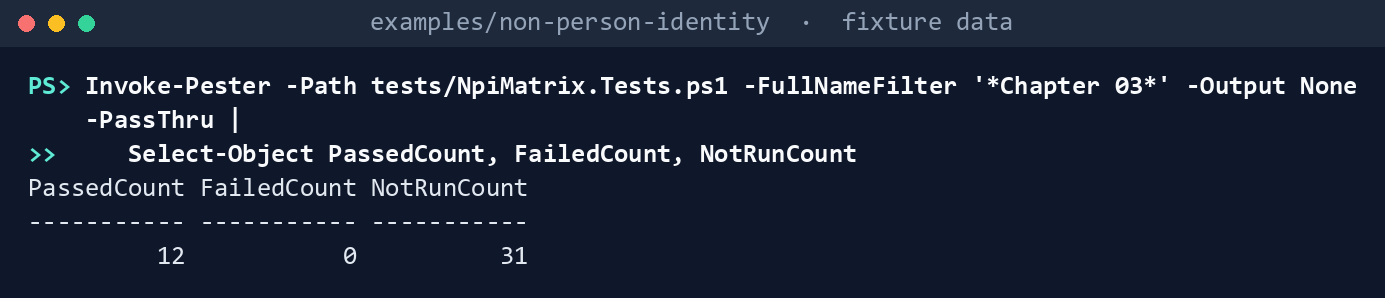
What the terminal shows, run on the kit’s fixtures (the same output as text) PassedCount 12,FailedCount 0,NotRunCount 31(the 31 are the example’s). Read the test “admits a user account in every situation”: Learn’s table never rules one out.List what the task needs:
Import-Module ./powershell/NpiMatrix/NpiMatrix.psm1
$p = Get-NpiMatrixRequiredPermission; $p.GraphPermissions -join ', '; $p.Methods -join ', '
LicenseAssignment.Read.All, User.Read.All GET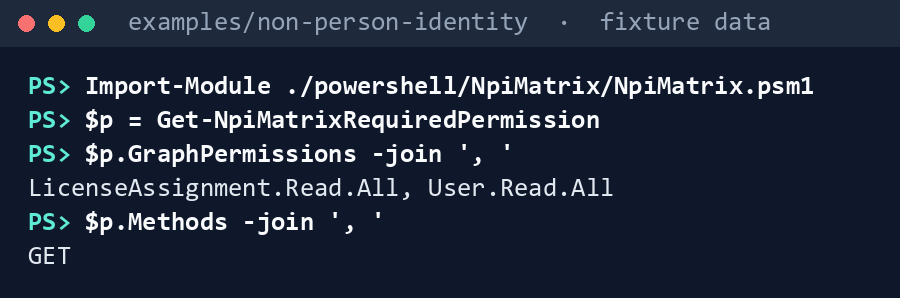
What the terminal shows, run on the kit’s fixtures (the same output as text) Run Chapters 01 and 02, then the matrix:
./Invoke-NpiInventory.ps1 -Cloud gcc -FixturePath tests/fixtures/estate.json -OutputPath out/inventory | Out-Null
./Invoke-NpiOwnership.ps1 -Cloud gcc -RegisterRun out/inventory -FixturePath tests/fixtures/estate.json -InputPath tests/fixtures/inputs -OutputPath out/ownership | Out-Null
./Invoke-NpiMatrix.ps1 -Cloud gcc -RegisterRun out/inventory -OwnershipRun out/ownership -InputPath tests/fixtures/ch03/inputs -FixturePath tests/fixtures/estate.json -SkuFixturePath tests/fixtures/ch03/subscribed-skus.json -OutputPath out/matrix
Matrix: 21 identities in scope, 20 proposed (1 AppRegistrationFederated, 2 dMSA, 2 gMSA, 7 Keep, 2 ManagedIdentity, 6 Retire); 3 handed off, 1 to confirm first, 10 out of scope Dispositions: 18 decided of 22; waves 1 (1, 1 HIGH), 2 (4, 1 HIGH) Workload ID Premium (D-NP4): Tier1, 2 in scope; tenant holds 2 enabled units Findings: 7 Finding, 4 Warn, 1 Info Gate 2: not met (Every account has a disposition and a target from the matrix: 3; HIGH-risk accounts in the first wave: 1; Every kept Kerberos account has an SPN owner: 1; Waves and their rollback recorded: 1; Workload ID Premium scope decided (D-NP4): 1)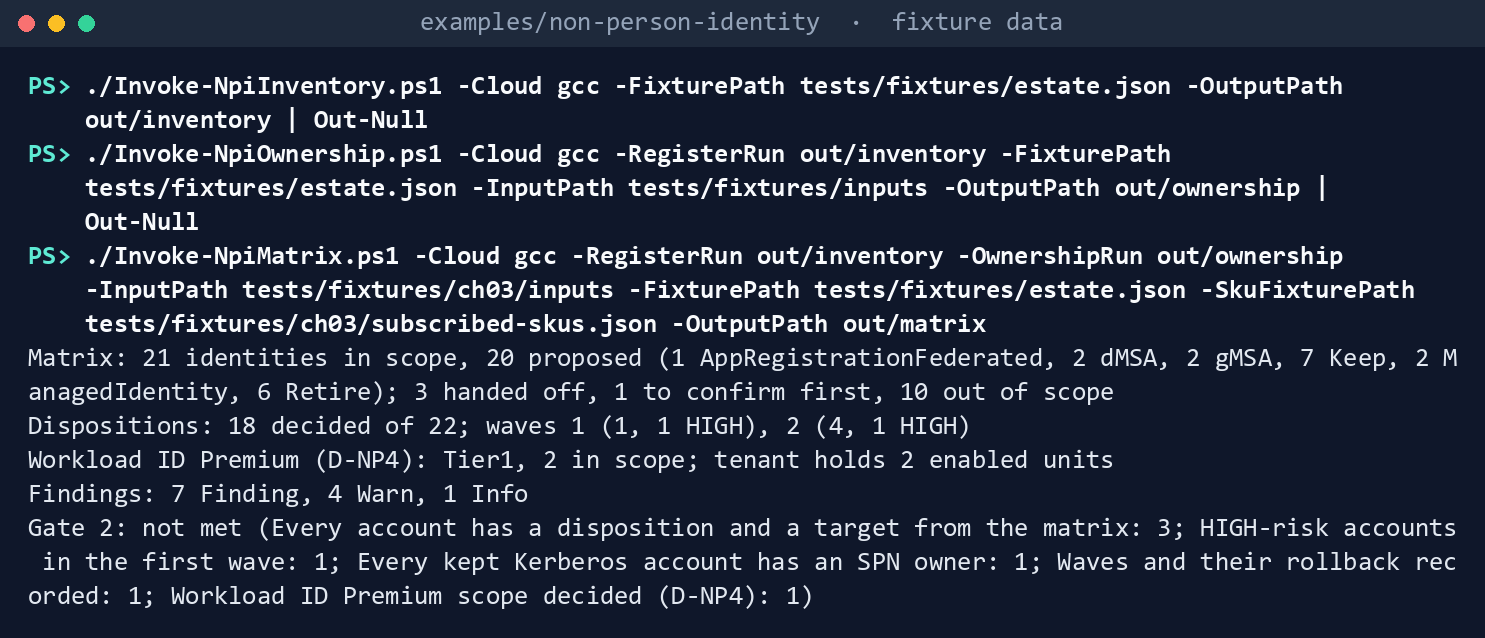
What the terminal shows, run on the kit’s fixtures (the same output as text) Read the proposals:
Get-Content out/matrix/proposals.json -Raw | ConvertFrom-Json | Where-Object Scope -eq 'Matrix' | Format-Table Name, Risk, Location, MatrixRow, Proposed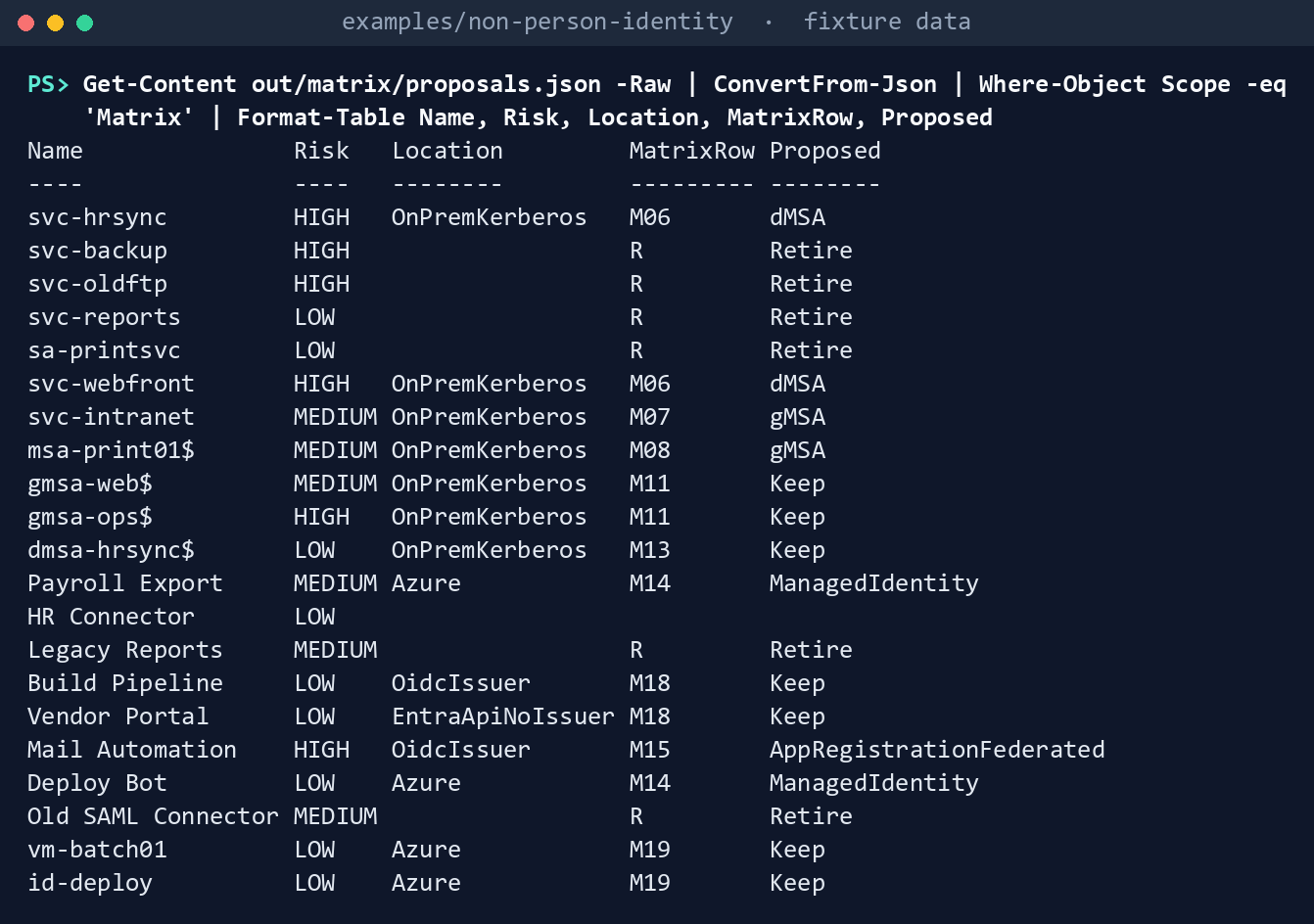
What the terminal shows, run on the kit’s fixtures (the same output as text) Six Retire (
svc-backup,svc-oldftp,svc-reports,sa-printsvc, Legacy Reports and Old SAML Connector: Chapter 02’s orphans and the disabled accounts);svc-hrsyncandsvc-webfrontto a dMSA (M06);svc-intranetandmsa-print01$to a gMSA;gmsa-web$,gmsa-ops$(under a dated exception, so not retired),dmsa-hrsync$, Build Pipeline, Vendor Portal and both managed identities kept; Payroll Export and Deploy Bot to a managed identity (M14); Mail Automation to a federated credential (M15). HR Connector has no proposal: nobody recorded where it runs.Read the findings:
Get-Content out/matrix/findings.json -Raw | ConvertFrom-Json | Format-Table Rule, Severity, ObjectRule Severity Object ---- -------- ------ NPI-MAT-07 Finding svc-hrsync (Traditional) NPI-MAT-01 Finding svc-oldftp (Traditional) NPI-MAT-01 Info jdoe (Traditional) NPI-MAT-06 Finding svc-webfront (Traditional) NPI-MAT-07 Warn svc-webfront (Traditional) NPI-MAT-07 Warn gmsa-ops$ (gMSA) NPI-MAT-05 Finding dmsa-hrsync$ (dMSA) NPI-MAT-02 Finding HR Connector (AppRegistration) NPI-MAT-04 Warn Deploy Bot (AppRegistration) NPI-MAT-08 Finding Wave 2 NPI-MAT-09 Warn Payroll Export (AppRegistration) NPI-MAT-09 Finding Vendor Portal (AppRegistration)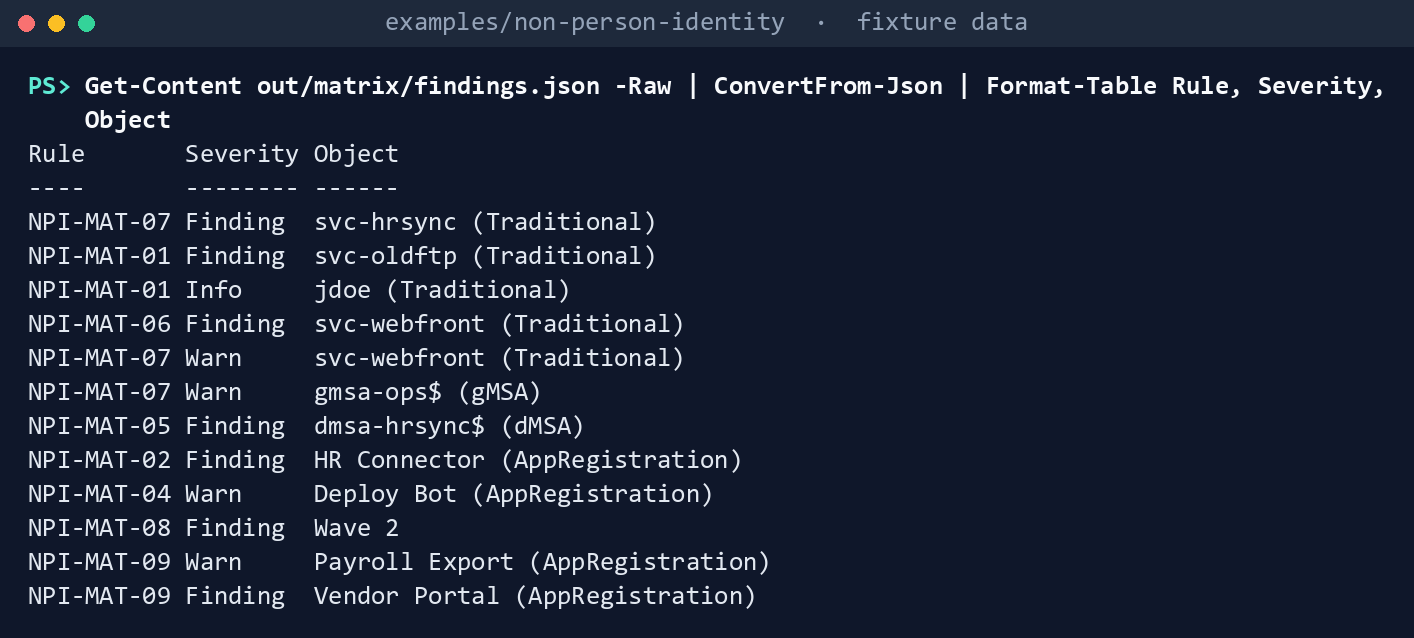
What the terminal shows, run on the kit’s fixtures (the same output as text) svc-hrsyncis HIGH-risk but scheduled in wave 2.svc-webfrontis kept on Kerberos with the authorizing official’s acceptance but no SPN owner.dmsa-hrsync$is kept with no end date before program G5. Deploy Bot’s owner kept its certificate, with a reason, where the matrix proposed a managed identity. Payroll Export is on the Tier 1 list but its own decision moves it to a managed identity, which Conditional Access can’t cover; Vendor Portal is multitenant and can’t be covered at all. Chapter 06 reads these decisions from this run, with the authorizing official’s acceptance (AoAcceptedByindecisions.json), and adds only what a conversion needs; Chapter 08 runs on a fixture of its own, so the same account can have a different scope there.Read the waves and their rollback:
Get-Content out/matrix/waves.json -Raw | ConvertFrom-Json | ForEach-Object { "Wave $($_.Wave): $(@($_.Members.Name) -join ', '); rollback owner '$($_.RollbackOwner)'"; $_.Rollback | ForEach-Object { " $_" } }Wave 1: Mail Automation; rollback owner 'carol@contoso.example' AppRegistrationFederated: Re-enable the legacy account or credential; revert the application's configuration; remove the federated credential Wave 2: svc-hrsync, svc-intranet, msa-print01$, Payroll Export; rollback owner '' dMSA: Undo-ADServiceAccountMigration (Learn's undo for a dMSA migration); the superseded account is kept, never deleted gMSA: Re-enable the legacy account; set the service back to it ManagedIdentity: Re-enable the legacy account; revert the application's configuration to it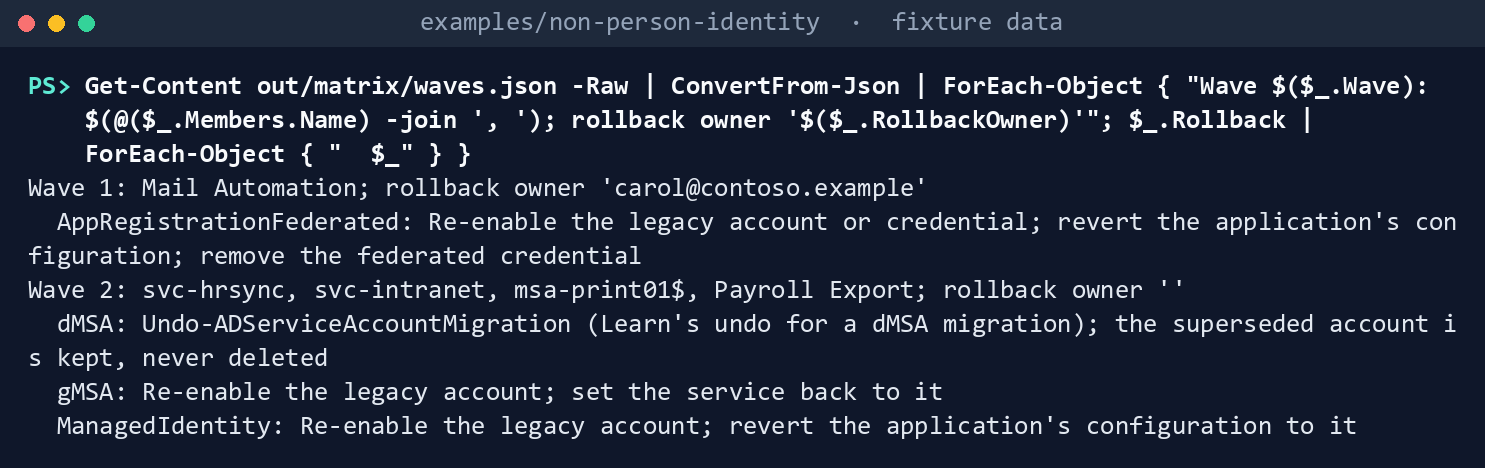
What the terminal shows, run on the kit’s fixtures (the same output as text) Read the Workload ID Premium scope:
$s = Get-Content out/matrix/workload-id-premium.json -Raw | ConvertFrom-Json
$s.conditionalAccessEligibleNow.Count; $s.conditionalAccessEligibleAfter.Count; $s.options | ConvertTo-Json -Compress
6 4 {"Tier1":2,"Wide":4,"None":0}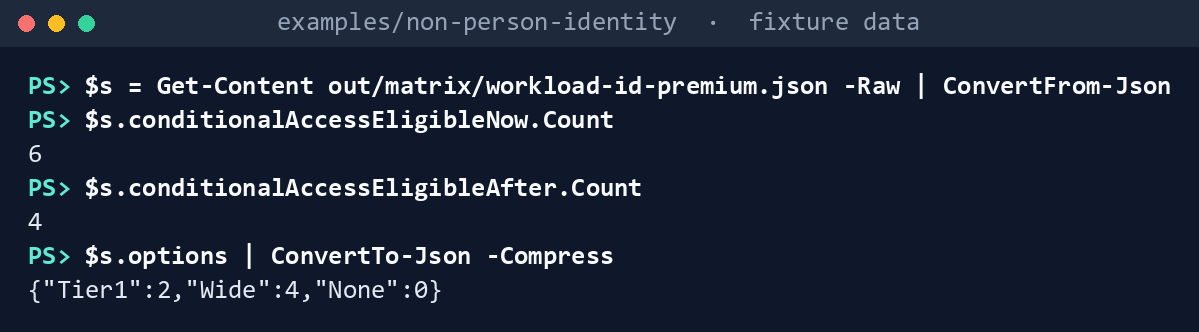
What the terminal shows, run on the kit’s fixtures (the same output as text) Six single-tenant app registrations can be covered today; four after conversion, because Payroll Export moves to a managed identity and Legacy Reports is retired.
Run the tests:
Invoke-Pester -Path tests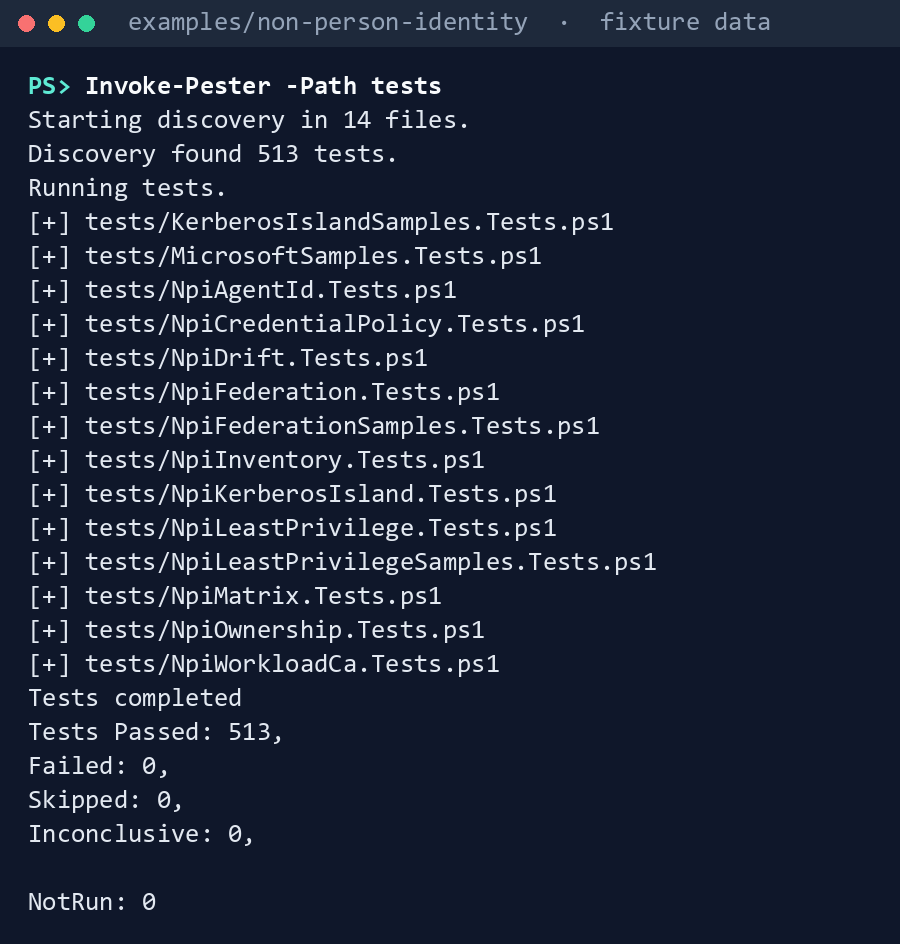
What the terminal shows, run on the kit’s fixtures (the same output as text)
Expected result: 513 tests passing, and out/matrix/manifest.json listing three requests, all GET: two user reads (the SPN owner and the rollback owner) and one read of the subscriptions. Delete out when you’re done: it names accounts and owners:
Remove-Item -Recurse -Force out
Lab 2: test tenant
Use a test tenant in the worldwide or GCC cloud, never production, with fictional people, and the Lab 2 runs of Chapters 01 and 02 (out/inventory-test, out/ownership-test). The run only reads. Work in examples/non-person-identity on Chapter 01’s test host. You’ll replace: <tenant-id> (the test tenant’s ID), <app-id> and <thumbprint> (the app Chapter 01’s Lab 2 registered, and its certificate), <inputs> (a folder for this lab’s input files), <identity-id> (a test account’s IdentityId in out/inventory-test/register.csv), <location>, <mi-supported>, <dmsa>, <issuer>, <disposition> and <target> (that account’s values, as the fixture’s files in tests/fixtures/ch03/inputs use them), <your-upn> (your user principal name), <decided-on> (today, yyyy-MM-dd), <wave-start> (the wave’s start date), <rollback-owner-upn> (an enabled test user), <tier1-app-id> (the IdentityId of one single-tenant test app), <d08-date>, <g5-date> and <island-eol> (your test program’s D08 and program G5 dates, and the end of life of its Kerberos island under D11, yyyy-MM-dd).
Every command in this lab, in order, from examples/non-person-identity. Each step below says what it does and what to look for.
# Step 2: Write the inputs
New-Item -ItemType Directory -Force <inputs> | Out-Null
foreach ($f in 'workloads', 'dispositions', 'waves') { Get-Content tests/fixtures/ch03/inputs/$f.csv -TotalCount 1 | Set-Content <inputs>/$f.csv }
$d = Get-Content tests/fixtures/ch03/inputs/program-dates.json -Raw | ConvertFrom-Json; $d.d08LegacyAuthEndDate = '<d08-date>'; $d.g5AdRetired = '<g5-date>'; $d.d11.islandEndOfLife = '<island-eol>'; $d | ConvertTo-Json -Depth 5 | Set-Content <inputs>/program-dates.json

# Step 2: Write the inputs
Add-Content <inputs>/workloads.csv '<identity-id>,<location>,<mi-supported>,<dmsa>,<issuer>,<your-upn>'
Add-Content <inputs>/dispositions.csv '<identity-id>,<disposition>,<target>,1,<your-upn>,<decided-on>,,,,'

# Step 2: Write the inputs
Add-Content <inputs>/waves.csv '1,Test wave,<wave-start>,30,<rollback-owner-upn>,<decided-on>'
@{ decision = 'Tier1'; decidedBy = '<your-upn>'; decidedOn = '<decided-on>'; tier1 = @('<tier1-app-id>'); compensatingControls = @() } | ConvertTo-Json | Set-Content <inputs>/workload-id-premium.json

# Step 3: Run it
Connect-MgGraph -Environment Global -TenantId <tenant-id> -ClientId <app-id> -CertificateThumbprint <thumbprint>
./Invoke-NpiMatrix.ps1 -Cloud gcc -RegisterRun out/inventory-test -OwnershipRun out/ownership-test -InputPath <inputs> -OutputPath out/matrix-test

# Step 4: Check the license read
(Get-Content out/matrix-test/workload-id-premium.json -Raw | ConvertFrom-Json).tenant | ConvertTo-Json -Depth 10

# Step 6: Back it out
Remove-Item -Recurse -Force out/matrix-test
Grant the two application permissions from Lab 1, step 2, to the app Chapter 01’s Lab 2 registered, with admin consent. Nothing else:
- Entra ID > App registrations, open the app, then API permissions > Add a permission > Microsoft Graph > Application permissions.
- Select
LicenseAssignment.Read.AllandUser.Read.All, then Add permissions. - Select Grant admin consent for your tenant, and confirm.
Write the inputs for the test accounts: a
workloads.csvrow and adispositions.csvrow for each, awaves.csvwith one wave and a rollback owner who is an enabled test user,program-dates.json, and aworkload-id-premium.jsonlisting one single-tenant test app as Tier 1. The first commands make the three CSV files with the fixture’s headers and writeprogram-dates.jsonfrom the fixture’s, with your test program’s three dates:New-Item -ItemType Directory -Force <inputs> | Out-Null foreach ($f in 'workloads', 'dispositions', 'waves') { Get-Content tests/fixtures/ch03/inputs/$f.csv -TotalCount 1 | Set-Content <inputs>/$f.csv } $d = Get-Content tests/fixtures/ch03/inputs/program-dates.json -Raw | ConvertFrom-Json; $d.d08LegacyAuthEndDate = '<d08-date>'; $d.g5AdRetired = '<g5-date>'; $d.d11.islandEndOfLife = '<island-eol>'; $d | ConvertTo-Json -Depth 5 | Set-Content <inputs>/program-dates.jsonThen, once for each test account, add its two rows:
Add-Content <inputs>/workloads.csv '<identity-id>,<location>,<mi-supported>,<dmsa>,<issuer>,<your-upn>'
Add-Content <inputs>/dispositions.csv '<identity-id>,<disposition>,<target>,1,<your-upn>,<decided-on>,,,,'
And the wave and the D-NP4 record:
Add-Content <inputs>/waves.csv '1,Test wave,<wave-start>,30,<rollback-owner-upn>,<decided-on>'
@{ decision = 'Tier1'; decidedBy = '<your-upn>'; decidedOn = '<decided-on>'; tier1 = @('<tier1-app-id>'); compensatingControls = @() } | ConvertTo-Json | Set-Content <inputs>/workload-id-premium.json
Run it, signed in as in Chapter 01:
Connect-MgGraph -Environment Global -TenantId <tenant-id> -ClientId <app-id> -CertificateThumbprint <thumbprint>
./Invoke-NpiMatrix.ps1 -Cloud gcc -RegisterRun out/inventory-test -OwnershipRun out/ownership-test -InputPath <inputs> -OutputPath out/matrix-test
Check the license read. Record what
workload-id-premium.json’stenantsection shows: theskuPartNumberand service plans of any Workload ID subscription, or none, and whether a trial appears (research gaps, row 28):(Get-Content out/matrix-test/workload-id-premium.json -Raw | ConvertFrom-Json).tenant | ConvertTo-Json -Depth 10Check eligibility against the admin center. On Conditional Access, start a new policy, choose Workload identities, and confirm the single-tenant test app can be selected and a managed identity can’t; check whether a legacy service principal is offered (row 27). Discard the draft.
Back it out. Remove the two permissions, and delete
out/matrix-test: it lists the accounts kept on Kerberos and who owns them.Entra ID > App registrations, open the app, then API permissions. For
LicenseAssignment.Read.Alland thenUser.Read.All, open the row’s … menu, select Remove permission, and confirm.On the test host:
Remove-Item -Recurse -Force out/matrix-test
Verified facts
| Item | Value | US Government clouds | Stage | Source |
|---|---|---|---|---|
| On-premises choice | gMSA whenever possible; sMSA if not; computer or user account only without an MSA; test the service first; no privileged groups | n/a (Active Directory) | GA | 40 41 |
| Cloud choice | Managed identity in Azure if the service supports one; service principal otherwise; never a user account; certificates over secrets | — | — | 42 |
| dMSA | Windows Server 2025; can’t migrate an MSA or gMSA to one; every machine must support it; unconstrained delegation stops working; one dMSA per account; a Windows Server 2025 domain controller needed; never delete the superseded account; Undo-ADServiceAccountMigration |
n/a | GA | 43 44 45 46 |
| Workload identity federation | App registration or user-assigned managed identity; GitHub Actions, Kubernetes, other clouds, other OIDC issuers; an app on Azure compute trusting a user-assigned managed identity | — | GA | 47 |
| Managed identity on an Arc-enabled server | System-assigned, one per server; local administrators and the extension applications group can request tokens | — | GA | 48 49 |
| Workload ID Premium | Standalone; adds access reviews of privileged service principals, app health recommendations, Conditional Access and ID Protection for workload identities; no per-identity assignment | Available through the account manager; no free trial in Azure Government | GA | 50 |
| Conditional Access for workload identities | Single-tenant service principals registered in the tenant only; not managed identities or multitenant apps; assigned directly, not through a group; Premium licenses to create or change | Not stated on the page read | GA | 51 |
| ID Protection for workload identities | Single-tenant, SaaS and multitenant apps; not managed identities | Not stated on the page read | GA | 52 |
| List subscribedSkus | GET /subscribedSkus; LicenseAssignment.Read.All; $select only, no $filter; Global Reader or Directory Readers for delegated access |
L4 and L5 | v1.0 | 53 |
| Workload ID service plans | AAD_WRKLDID_P1 (84c289f0-…), AAD_WRKLDID_P2 (7dc0e92d-…); products Workload_Identities_P2 and Workload_Identities_Premium_CN |
— | — | 54 |
| Get a user | Application User.Read.All; $select for userType and accountEnabled |
— | v1.0 | 55 |
| Graph hosts | GCC worldwide; GCC High graph.microsoft.us; DoD dod-graph.microsoft.us |
— | — | 56 |
Where Learn’s pages differ: the on-premises table has no dMSA column where Windows Server’s guide has one (research gaps, row 21); the cloud table offers a service principal only certificates and secrets where the federation page offers federated credentials (row 22); the cloud page says managed identities can’t be used outside Azure where the Arc pages give every Arc-enabled server one (row 23); and the Workload ID FAQ says one license unlocks every workload identity, that only eligible identities need licenses, and that Premium is priced per workload identity (row 26). The code follows the stricter reading or holds the point open, and a test pins each.
Federal requirements and evidence
The matrix, the owners’ dispositions and the waves are what the guide’s G2 Decision gate checks: every identity has a target, a decide-by date and a named decider, and HIGH-risk accounts go first. Each row names the file or command that is the evidence. The controls are in the NIST SP 800-53 Rev. 5 Moderate baseline.57
| What the output proves | Requirement it supports | KSI it aligns to | Who keeps it |
|---|---|---|---|
Learn’s decision tables, evaluated as published against the fixture estate, agree with the matrix where they overlap, and each gap is pinned by a test (Lab 1, step 1: NpiMatrix.Tests.ps1, Chapter 03 blocks) |
AC-2 Account Management (account types and the conditions for each) | KSI-IAM-SNU | The repository’s tests; the pinned copies |
The task holds two read permissions and sends only GETs (Lab 1, step 2, and Lab 2, step 1: Get-NpiMatrixRequiredPermission; config/calls-ch03.json) |
AC-6 Least Privilege | KSI-IAM-ELP, KSI-IAM-JIT | Identity engineering; the ISSO keeps the consent record |
Every row of the register has a scope and, in scope, a proposed target from Book 02’s matrix, with Learn’s cautions (Lab 1, steps 3 and 4: proposals.json; config/migration-matrix.json) |
AC-2; IA-5 Authenticator Management (a secret moves to a managed identity, then federation, then a certificate) | KSI-IAM-SNU | Identity engineering, in a reviewed pull request |
Each owner’s disposition is recorded with who decided and when (decisions.json, built from dispositions.csv) |
AC-2 (approval of account conditions); CM-3 Configuration Change Control (decisions documented) | KSI-IAM-SNU (AC-2); KSI-CMT-LMC (CM-3) | Application owners (D-NP3) |
Every gap against Gate 2 is a finding with a stable ID: no disposition, no proposal, a target that doesn’t fit, an AD end date missing or past program G5, no SPN owner, a HIGH-risk account outside wave 1 (Lab 1, step 5: findings.json, NPI-MAT-01 to -09) |
AC-2; AC-6(5) Privileged Accounts (HIGH-risk first) | KSI-IAM-SNU, KSI-IAM-JIT | The identity governance office |
Each wave has a rollback owner who is an enabled member, a review date, a parallel run of at least 30 days and a rollback assembled from its targets (Lab 1, step 6: waves.json) |
CM-3 (changes planned and reviewed, with their rollback) | KSI-CMT-RVP | Identity engineering (NP2.2) |
Which identities Conditional Access for workload identities can cover now and after conversion, against the CISO’s D-NP4 decision and the tenant’s licenses (Lab 1, step 7, and Lab 2, step 4: workload-id-premium.json) |
AC-3 Access Enforcement | KSI-IAM-ELP, KSI-IAM-JIT | The CISO (D-NP4) |
Gate 2’s five criteria, each with its open findings, and met only with no open Finding (gate2.json) |
CA-7 Continuous Monitoring (status reporting) | KSI-MLA-EVC | The ISSO; the gate owner |
The run records the tenant, the cloud, every request, and the SHA-256 of the register, of Chapter 02’s files, of the matrix, of each input and of each file written (manifest.json) |
AU-9 Protection of Audit Information; SI-7 Software, Firmware, and Information Integrity | KSI-MLA-OSM (AU-9); KSI-SVC-VRI (SI-7) | The ISSO, with the run’s folder |
The code passes its tests (Lab 1, step 8: Invoke-Pester -Path tests, 513 passed) |
CM-3(2) Testing, Validation, and Documentation of Changes | KSI-CMT-VTD | The repository; the pull request’s checks |
The owners’ inputs for the test accounts are the run’s inputs, hashed into its manifest (Lab 2, steps 2 and 3: workloads.csv, dispositions.csv, waves.csv, program-dates.json, workload-id-premium.json; out/matrix-test/manifest.json) |
AC-2; CM-3 | KSI-IAM-SNU; KSI-CMT-LMC | Application owners; identity engineering |
The admin center agrees with the code on which principals Conditional Access can target (Lab 2, step 5: the Workload identities picker, recorded against workload-id-premium.json) |
AC-3 | KSI-IAM-ELP | Identity engineering |
| The lab’s read permissions are removed when the lab ends (Lab 2, step 6: the app’s API permissions page) | AC-6 | KSI-IAM-JIT | Identity engineering |
KSIs are FedRAMP 20x indicators for cloud service providers. The KSI column names the indicators whose related controls, as FedRAMP lists them, include the row’s control or one of its enhancements; which output supports which indicator is the program’s mapping (design guidance).58 The agency authorizes its own system and lines this evidence up with what its providers report against KSIs; it doesn’t report KSIs itself (Book 00, Appendix B). Lab steps that only run Chapters 01 and 02 or delete out have no row. The track-wide mapping is the guide’s Evidence table.
Dangers
| Danger | What happens | The guard |
|---|---|---|
| The matrix’s proposal treated as the decision | Accounts are converted without an owner who agreed | The proposal and the disposition are separate files; NPI-MAT-01 until the owner records one, with who and when |
| A guess at where the workload runs | A managed identity proposed for a service that can’t use one | No proposal without the owner’s workload facts (NPI-MAT-02); MiSupported, Dmsa and Issuer required where they decide |
| An MSA or gMSA sent to a dMSA | The migration can’t be done; the wave stalls | Never allowed (NPI-MAT-03), from Learn |
| A dMSA where a host can’t use it, or with unconstrained delegation | Authentication fails once the old account is disabled; delegation stops | Proposed only with Dmsa recorded; both cautions on the proposal; NPI-MAT-03 |
| A Kerberos account kept forever | It outlives the domain, and the program’s SPN retirement has no list | KeepKerberos needs an end date by D08, the authorizing official and an SPN owner; any account kept in AD needs an end date by program G5 (NPI-MAT-05, -06) |
| HIGH-risk accounts left for later | The riskiest credentials live longest | HIGH re-platformed outside wave 1 is a Finding; HIGH kept is a Warning naming the privilege to cut (NPI-MAT-07) |
| A wave with no way back | A failed conversion becomes an outage | Each wave’s rollback from its members’ targets, a named rollback owner who is an enabled member, a review date and a 30-day parallel run (NPI-MAT-08) |
| Workload ID Premium bought for identities it can’t cover | Money spent on managed identities or multitenant apps; Tier 1 apps left unprotected after conversion | Eligibility from the register; Tier 1 entries checked now and after conversion; units compared (NPI-MAT-09) |
| Inputs that changed after review | A decision on evidence the ISSO never saw | Register and ownership files checked against their manifests; every input’s SHA-256 in this run’s manifest |
| Retirement by this code | An account deleted on a proposal | Nothing here writes; Retire goes through Chapter 02’s orphan rule and the reviewed decommission process |
Checklist
Footnotes
Microsoft Learn, “Securing on-premises service accounts,” types of on-premises service accounts; choose the right type of service account, https://learn.microsoft.com/entra/architecture/service-accounts-on-premises (accessed Oct 30, 2026).↩︎
Microsoft Learn, “Secure group managed service accounts,” using gMSAs, https://learn.microsoft.com/entra/architecture/service-accounts-group-managed (accessed Oct 30, 2026).↩︎
Microsoft Learn, “Securing cloud-based service accounts,” types of Microsoft Entra service accounts; service principals, https://learn.microsoft.com/entra/architecture/secure-service-accounts (accessed Oct 30, 2026).↩︎
Microsoft Learn, “Service accounts” (Windows Server), choosing your service account, https://learn.microsoft.com/windows-server/identity/ad-ds/manage/understand-service-accounts (accessed Oct 30, 2026).↩︎
Microsoft Learn, “Delegated Managed Service Accounts overview,” migration flow for dMSA, https://learn.microsoft.com/windows-server/identity/ad-ds/manage/delegated-managed-service-accounts/delegated-managed-service-accounts-overview (accessed Oct 30, 2026).↩︎
Microsoft Learn, “Delegated Managed Service Accounts FAQ,” general; migration, https://learn.microsoft.com/windows-server/identity/ad-ds/manage/delegated-managed-service-accounts/delegated-managed-service-accounts-faq (accessed Oct 30, 2026).↩︎
Microsoft Learn, “Workload identity federation concepts,” supported scenarios, https://learn.microsoft.com/entra/workload-id/workload-identity-federation (accessed Oct 30, 2026).↩︎
Microsoft Learn, “Frequently asked questions about Microsoft Entra Workload ID,” https://learn.microsoft.com/entra/workload-id/workload-identities-faqs (accessed Oct 30, 2026).↩︎
Microsoft Learn, “Conditional Access for workload identities,” overview, https://learn.microsoft.com/entra/identity/conditional-access/workload-identity (accessed Oct 30, 2026).↩︎
Microsoft Learn, “Securing workload identities” (Microsoft Entra ID Protection), https://learn.microsoft.com/entra/id-protection/concept-workload-identity-risk (accessed Oct 30, 2026).↩︎
Microsoft Learn, “Microsoft Graph national cloud deployments,” https://learn.microsoft.com/graph/deployments (accessed Oct 30, 2026).↩︎
Microsoft Learn, “List subscribedSkus,” national cloud table, permissions, optional query parameters, https://learn.microsoft.com/graph/api/subscribedsku-list?view=graph-rest-1.0 (accessed Oct 30, 2026).↩︎
Microsoft Learn, “Frequently asked questions about Microsoft Entra Workload ID,” https://learn.microsoft.com/entra/workload-id/workload-identities-faqs (accessed Oct 30, 2026).↩︎
Microsoft Learn, “Securing on-premises service accounts,” types of on-premises service accounts; choose the right type of service account, https://learn.microsoft.com/entra/architecture/service-accounts-on-premises (accessed Oct 30, 2026).↩︎
Microsoft Learn, “Securing cloud-based service accounts,” types of Microsoft Entra service accounts; service principals, https://learn.microsoft.com/entra/architecture/secure-service-accounts (accessed Oct 30, 2026).↩︎
Microsoft Learn, “Frequently asked questions about Microsoft Entra Workload ID,” https://learn.microsoft.com/entra/workload-id/workload-identities-faqs (accessed Oct 30, 2026).↩︎
Microsoft, MicrosoftDocs/entra-docs,
docs/architecture/service-accounts-on-premises.md,docs/architecture/secure-service-accounts.mdanddocs/workload-id/workload-identities-faqs.mdat commit7f78b50dce9d8cf119de57cbd6fd66e24a6c58d4(October 30, 2026; the architecture pages last changed February 25, 2026, the FAQ June 15, 2026), MIT License, https://github.com/MicrosoftDocs/entra-docs/tree/7f78b50dce9d8cf119de57cbd6fd66e24a6c58d4/docs (accessed Oct 30, 2026); pinned copy inexamples/third_party/entra-service-account-choice-pages.↩︎Microsoft Learn, “Service accounts” (Windows Server), choosing your service account, https://learn.microsoft.com/windows-server/identity/ad-ds/manage/understand-service-accounts (accessed Oct 30, 2026).↩︎
Microsoft Learn, “Workload identity federation concepts,” supported scenarios, https://learn.microsoft.com/entra/workload-id/workload-identity-federation (accessed Oct 30, 2026).↩︎
Microsoft Learn, “Conditional Access for workload identities,” overview, https://learn.microsoft.com/entra/identity/conditional-access/workload-identity (accessed Oct 30, 2026).↩︎
Microsoft Learn, “Securing cloud-based service accounts,” types of Microsoft Entra service accounts; service principals, https://learn.microsoft.com/entra/architecture/secure-service-accounts (accessed Oct 30, 2026).↩︎
Microsoft Learn, “Workload identity federation concepts,” supported scenarios, https://learn.microsoft.com/entra/workload-id/workload-identity-federation (accessed Oct 30, 2026).↩︎
Microsoft Learn, “Securing on-premises service accounts,” types of on-premises service accounts; choose the right type of service account, https://learn.microsoft.com/entra/architecture/service-accounts-on-premises (accessed Oct 30, 2026).↩︎
Microsoft Learn, “Delegated Managed Service Accounts overview,” migration flow for dMSA, https://learn.microsoft.com/windows-server/identity/ad-ds/manage/delegated-managed-service-accounts/delegated-managed-service-accounts-overview (accessed Oct 30, 2026).↩︎
Microsoft Learn, “Delegated Managed Service Accounts overview,” migration flow for dMSA, https://learn.microsoft.com/windows-server/identity/ad-ds/manage/delegated-managed-service-accounts/delegated-managed-service-accounts-overview (accessed Oct 30, 2026).↩︎
Microsoft Learn, “Access Azure resources by using managed identity on Azure Arc-enabled servers,” https://learn.microsoft.com/azure/azure-arc/servers/managed-identity-authentication (accessed Oct 30, 2026).↩︎
Microsoft Learn, “Identity and authorization” (Azure Arc-enabled servers), Microsoft Entra ID managed identity, https://learn.microsoft.com/azure/azure-arc/servers/security-identity-authorization (accessed Oct 30, 2026).↩︎
Microsoft Learn, “Delegated Managed Service Accounts overview,” migration flow for dMSA, https://learn.microsoft.com/windows-server/identity/ad-ds/manage/delegated-managed-service-accounts/delegated-managed-service-accounts-overview (accessed Oct 30, 2026).↩︎
Microsoft Learn, “Delegated Managed Service Accounts FAQ,” general; migration, https://learn.microsoft.com/windows-server/identity/ad-ds/manage/delegated-managed-service-accounts/delegated-managed-service-accounts-faq (accessed Oct 30, 2026).↩︎
Microsoft Learn, “Conditional Access for workload identities,” overview, https://learn.microsoft.com/entra/identity/conditional-access/workload-identity (accessed Oct 30, 2026).↩︎
Microsoft Learn, “Frequently asked questions about Microsoft Entra Workload ID,” https://learn.microsoft.com/entra/workload-id/workload-identities-faqs (accessed Oct 30, 2026).↩︎
Microsoft Learn, “Get a user,” permissions, https://learn.microsoft.com/graph/api/user-get?view=graph-rest-1.0 (accessed Oct 30, 2026; read for Chapter 02).↩︎
Microsoft Learn, “Setting up delegated Managed Service Accounts,” migrate to a dMSA; complete account migration, https://learn.microsoft.com/windows-server/identity/ad-ds/manage/delegated-managed-service-accounts/delegated-managed-service-accounts-set-up-dmsa (accessed Oct 30, 2026).↩︎
Microsoft Learn, “Delegated Managed Service Accounts FAQ,” general; migration, https://learn.microsoft.com/windows-server/identity/ad-ds/manage/delegated-managed-service-accounts/delegated-managed-service-accounts-faq (accessed Oct 30, 2026).↩︎
Microsoft Learn, “List subscribedSkus,” national cloud table, permissions, optional query parameters, https://learn.microsoft.com/graph/api/subscribedsku-list?view=graph-rest-1.0 (accessed Oct 30, 2026).↩︎
Microsoft Learn, “Product names and service plan identifiers for licensing,” Microsoft Entra Workload ID and Workload Identities Premium, https://learn.microsoft.com/entra/identity/users/licensing-service-plan-reference (accessed Oct 30, 2026).↩︎
Microsoft Learn, “Frequently asked questions about Microsoft Entra Workload ID,” https://learn.microsoft.com/entra/workload-id/workload-identities-faqs (accessed Oct 30, 2026).↩︎
Microsoft Learn, “Get a user,” permissions, https://learn.microsoft.com/graph/api/user-get?view=graph-rest-1.0 (accessed Oct 30, 2026; read for Chapter 02).↩︎
Microsoft Learn, “List subscribedSkus,” national cloud table, permissions, optional query parameters, https://learn.microsoft.com/graph/api/subscribedsku-list?view=graph-rest-1.0 (accessed Oct 30, 2026).↩︎
Microsoft Learn, “Securing on-premises service accounts,” types of on-premises service accounts; choose the right type of service account, https://learn.microsoft.com/entra/architecture/service-accounts-on-premises (accessed Oct 30, 2026).↩︎
Microsoft Learn, “Secure group managed service accounts,” using gMSAs, https://learn.microsoft.com/entra/architecture/service-accounts-group-managed (accessed Oct 30, 2026).↩︎
Microsoft Learn, “Securing cloud-based service accounts,” types of Microsoft Entra service accounts; service principals, https://learn.microsoft.com/entra/architecture/secure-service-accounts (accessed Oct 30, 2026).↩︎
Microsoft Learn, “Service accounts” (Windows Server), choosing your service account, https://learn.microsoft.com/windows-server/identity/ad-ds/manage/understand-service-accounts (accessed Oct 30, 2026).↩︎
Microsoft Learn, “Delegated Managed Service Accounts overview,” migration flow for dMSA, https://learn.microsoft.com/windows-server/identity/ad-ds/manage/delegated-managed-service-accounts/delegated-managed-service-accounts-overview (accessed Oct 30, 2026).↩︎
Microsoft Learn, “Setting up delegated Managed Service Accounts,” migrate to a dMSA; complete account migration, https://learn.microsoft.com/windows-server/identity/ad-ds/manage/delegated-managed-service-accounts/delegated-managed-service-accounts-set-up-dmsa (accessed Oct 30, 2026).↩︎
Microsoft Learn, “Delegated Managed Service Accounts FAQ,” general; migration, https://learn.microsoft.com/windows-server/identity/ad-ds/manage/delegated-managed-service-accounts/delegated-managed-service-accounts-faq (accessed Oct 30, 2026).↩︎
Microsoft Learn, “Workload identity federation concepts,” supported scenarios, https://learn.microsoft.com/entra/workload-id/workload-identity-federation (accessed Oct 30, 2026).↩︎
Microsoft Learn, “Access Azure resources by using managed identity on Azure Arc-enabled servers,” https://learn.microsoft.com/azure/azure-arc/servers/managed-identity-authentication (accessed Oct 30, 2026).↩︎
Microsoft Learn, “Identity and authorization” (Azure Arc-enabled servers), Microsoft Entra ID managed identity, https://learn.microsoft.com/azure/azure-arc/servers/security-identity-authorization (accessed Oct 30, 2026).↩︎
Microsoft Learn, “Frequently asked questions about Microsoft Entra Workload ID,” https://learn.microsoft.com/entra/workload-id/workload-identities-faqs (accessed Oct 30, 2026).↩︎
Microsoft Learn, “Conditional Access for workload identities,” overview, https://learn.microsoft.com/entra/identity/conditional-access/workload-identity (accessed Oct 30, 2026).↩︎
Microsoft Learn, “Securing workload identities” (Microsoft Entra ID Protection), https://learn.microsoft.com/entra/id-protection/concept-workload-identity-risk (accessed Oct 30, 2026).↩︎
Microsoft Learn, “List subscribedSkus,” national cloud table, permissions, optional query parameters, https://learn.microsoft.com/graph/api/subscribedsku-list?view=graph-rest-1.0 (accessed Oct 30, 2026).↩︎
Microsoft Learn, “Product names and service plan identifiers for licensing,” Microsoft Entra Workload ID and Workload Identities Premium, https://learn.microsoft.com/entra/identity/users/licensing-service-plan-reference (accessed Oct 30, 2026).↩︎
Microsoft Learn, “Get a user,” permissions, https://learn.microsoft.com/graph/api/user-get?view=graph-rest-1.0 (accessed Oct 30, 2026; read for Chapter 02).↩︎
Microsoft Learn, “Microsoft Graph national cloud deployments,” https://learn.microsoft.com/graph/deployments (accessed Oct 30, 2026).↩︎
National Institute of Standards and Technology, SP 800-53B Moderate baseline, release 5.2.0 OSCAL profile (includes AC-2, AC-3, AC-6, AC-6(5), AU-9, CA-7, CM-3, CM-3(2), IA-5 and SI-7), https://github.com/usnistgov/oscal-content/blob/main/nist.gov/SP800-53/rev5/json/NIST_SP-800-53_rev5_MODERATE-baseline_profile.json (read November 2, 2026).↩︎
FedRAMP, “Key Security Indicators,” FedRAMP Consolidated Rules for 2026, indicator statements and “Related SP 800-53 Controls,” https://www.fedramp.gov/2026/reference/key-security-indicators/ (read November 2, 2026).↩︎