Federal Modernization Workbook
Chapter 03 — Conditional Access for Administrators and the Activation Gate
The administrator policies and the activation gate are the program’s first writes to a tenant, so they are files a reviewer reads, and the code that writes them does nothing until it is told to.
The policies behind the plan’s tasks A1.5, A2.3, A2.5 and A2.6: phishing-resistant authentication for administrators, the PIM activation gate through authentication context c1, and the administrator policies of Book 04’s Wave 2. You start with Microsoft’s own Conditional Access template for administrators, as Microsoft Graph returns it, pinned in the repository, and check it offline to see what it leaves out. Then you use examples/privileged-access for what it leaves to you: the policies as reviewed JSON, a pre-merge check, a diff against the tenant and a dry run, with every new policy created report-only. Lab 1 runs on a laptop with no tenant; Lab 2 uses a test tenant. A table at the end maps each output to the federal requirement it supports.
Jump to a slide (18)
Deck · Narrated deck (about 11 minutes, captions) · Script · Captions. Recorded on November 2, 2026 from the approved chapter.
Goal and audience
Goal. By the end of this chapter you can keep the administrator policies, the privileged authentication strength and the authentication contexts as files, check them before they merge, and see exactly what a run would change in a tenant before it changes anything. You can say, for each rule, whether it is Learn’s guidance, Microsoft’s template, or the program’s own design.
Audience. Developers who build the project’s foundation, and the identity engineers and ISSOs who review Conditional Access changes. You should read PowerShell 7 and the Graph conditionalAccessPolicy JSON. You don’t need a tenant until Lab 2.
The context the code depends on
Three pieces of Book 04 meet here. Chapter 07’s Wave 2 is the administrator policy set: CA003 (phishing-resistant MFA by group and by role), CA004 (compliant device), CA005 (trusted networks), CA025 (PAW only), CA026 (server and Arc administration) and CA027 (Azure management for operators only). This chapter’s kit has files for all of them except CA026, which isn’t a file yet, so plan task A2.5 isn’t complete here (Book 04, Chapter 07). Chapter 08’s Step 2 is the activation gate: authentication context c1 and its policy PIM-Activation-c1, which demand a fresh phishing-resistant proof from a compliant device at the moment of elevation (Book 04, Chapter 08). Appendix A has the JSON for both, and the custom strength FMP-Privileged-SeparateDevice (Appendix A).
Learn sets the order. Create and enable the Conditional Access policy for an authentication context before you select that context in PIM. If no policy targets the context, PIM falls back to requiring MFA, but that fallback doesn’t trigger when the policy is off, in report-only mode, or excludes the eligible user. Don’t scope the policy to both the context and a directory role: at activation the user doesn’t hold the role yet, so the policy wouldn’t apply.1 And whoever can edit Conditional Access can weaken the gate, so Learn says to treat those roles as highly privileged.2
So this chapter builds the gate and leaves it unselected. Chapter 04 selects c1 in PIM’s role settings, and only after this chapter’s run shows PIM-Activation-c1 is On.
Which cloud, for these calls
Every call in this chapter is Microsoft Graph v1.0, apart from the protected actions API, which is beta. For Microsoft 365 GCC the host is the worldwide graph.microsoft.com; GCC High uses graph.microsoft.us and DoD dod-graph.microsoft.us.3 The methods for policies, contexts, strengths and templates list the global service, US Government L4 and US Government L5 in their national cloud tables.4 5 6 7 8 9 10 Conditional Access and PIM are available in Azure for US Government.11 The code takes gcc as an explicit cloud name and has no default. In Azure Government, a policy that targets Azure management names a different application than the Windows Azure Service Management API that CA025 and CA027 use (Book 04, Chapter 07); a GCC High program changes those two files.
Start with Microsoft’s sample
What Microsoft gives you
Learn publishes Conditional Access templates in the admin center, grouped by scenario. The “Protect administrator” group includes “Require phishing-resistant multifactor authentication for administrators.”12 That policy’s Learn page is the procedure: include at least fourteen directory roles, exclude the emergency access accounts, require the built-in phishing-resistant MFA strength, and create it in report-only before you turn it on.13 It also warns that role targeting covers built-in roles only, and that administrators must register phishing-resistant methods first or you risk locking yourself out.14
The same templates are in Microsoft Graph. GET /identity/conditionalAccess/templates/{id} returns a template’s conditions and controls as policy JSON, with Policy.Read.All.15 Learn’s page for that method shows one in full: “Require multifactor authentication for admins,” Microsoft’s template for administrators.16 It is the only Conditional Access policy JSON for administrators that Microsoft publishes on Learn in Graph form. The Create method’s examples cover Exchange Online, not administrators,17 and the policy pages give admin center steps.
The repository’s search on October 30, 2026 found no other Microsoft sample to start from. Azure-Samples has no Conditional Access policy repository. microsoft/ConditionalAccessforZeroTrustResources holds Microsoft365DSC and Terraform examples, not Graph JSON, and hasn’t changed since February 2024; it wasn’t used.
The pinned copy
The template exists only inside the Learn page, so the repository pins the page’s source, unmodified, in examples/third_party/conditional-access-template-page: conditionalaccesstemplate-get.md from microsoftgraph/microsoft-graph-docs-contrib at commit a693031 (October 30, 2026), retrieved October 30, 2026, with the repository’s licenses (documentation CC BY 4.0, code MIT).18 snapshot.json records each file’s SHA-256, checked against the upstream git blob hashes; a unit test checks them, and the weekly source watch reports new commits to the page.
Read-PaCaTemplatePage extracts the example response from the pinned page, unmodified. ConvertFrom-PaCaTemplate turns a template into a policy body, adding only its name and report-only state, and fixes nothing. Then the pre-merge check reads it as if it were a file in the repository. Nothing is sent to a tenant.
What it leaves to you
Each row is pinned by a test in tests/ConditionalAccess.Tests.ps1: the first block for the template as published, the others for the example.
| Microsoft’s template, as published | Why it matters | What examples/privileged-access adds |
|---|---|---|
| Targets administrators by role, all resources, all client apps | — | Kept as the model: CA003 targets roles and all resources |
| Learn marks the response as possibly shortened, and it lists 2 roles | Learn’s procedure names 14 roles at a minimum;19 a copy of the example covers two | CA003 lists Book 04’s 15 (Learn’s 14 and Hybrid Identity Administrator); PA-CA-07 warns on any policy that targets roles and leaves one of the 14 out |
| Grants plain MFA, with no authentication strength | Learn’s admin page recommends the phishing-resistant strength;20 plain MFA and a strength can’t be combined in one policy21 | FMP-Privileged-SeparateDevice as a reviewed file; PA-CA-06 |
| Excludes “Current administrator will be excluded,” display text where an object ID belongs | Not an object ID; the admin center replaces it, a script doesn’t | PA-CA-03 fails any user target that isn’t an object ID or a Graph keyword |
| Doesn’t exclude the emergency access group | The emergency accounts must stay out of every policy that blocks or restricts22 | PA-CA-01, before merge; Invoke-PaCaPlan refuses to write a policy without it |
| Carries no state | Nothing in it says to start in report-only | Every new policy is created report-only, whatever its file says; enforcing needs -AllowEnforce |
| Targets no authentication context | The activation gate isn’t in it | Contexts c1 and c2, PIM-Activation-c1 and ProtectedActions-c2, with PA-CA-04, PA-CA-05 and PA-CA-08 |
| A read; nothing compares it with a tenant or writes it | A policy changed in the portal drifts unseen | Get-PaCaPlan: a diff by property, a dry run, and writes only with -Apply |
The verdict. Keep Microsoft’s template as the model for CA003’s targeting. Don’t create it as published: it would land with no emergency exclusion, text where an ID belongs, and plain MFA.
The code: examples/privileged-access
This chapter adds its own module, powershell/PaConditionalAccess, which imports Get-PaCloud from Chapter 01’s module for the cloud table. It adds its own call list config/calls-ch03.json, the policy files in ca-policies/, the entry script Invoke-PaCaAdmin.ps1 and notes in docs/ch03.md. Unlike Chapters 01 and 02, it can write. Design guidance: it writes only with -Apply, creates every new policy report-only, enforces only with -AllowEnforce, and has no delete.
The files
ca-policies/ holds one JSON file per object, as Book 04, Chapter 10 asks (Book 04, Chapter 10):
| Folder | Files | Source |
|---|---|---|
contexts/ |
c1 (FMP-PIM-Activation), c2 (FMP-ProtectedActions) |
Book 04, Chapter 08, Steps 2 and 6 |
strengths/ |
FMP-Privileged-SeparateDevice: FIDO2 keys from an approved list, or multifactor certificate-based authentication |
Appendix A |
policies/ |
CA003, CA004, CA005, CA025, CA027 | Appendix A, Wave 2 |
policies/ |
PIM-Activation-c1: all users but the emergency group, context c1, the strength and a compliant device, sign-in frequency every time |
Book 04, Chapter 08, Step 2; Learn’s PIM settings23 |
policies/ |
ProtectedActions-c2: the same controls on context c2 |
Book 04, Chapter 08, Step 6 |
Placeholders such as {group:CA-Exclude-EmergencyAccess} are Appendix A’s. A per-tenant map resolves them. {strength:FMP-Privileged-SeparateDevice} isn’t in the map: the plan resolves it from the tenant by name, so a policy can’t point at a strength that doesn’t exist yet. CA026 isn’t a file yet; it reuses CA003 with Appendix A’s differences.
The pre-merge check
Test-PaCaRepository reads the files only, and runs in the pull request pipeline:
| Rule | Severity | What it flags | Source |
|---|---|---|---|
| PA-CA-01 | Finding; Info | A policy that isn’t disabled and doesn’t exclude the emergency group (Finding); a named report-only instrument without it (Info) | Learn24; Design guidance for report-only files (see below) |
| PA-CA-02 | Finding | A report-only instrument set to enabled | Design guidance |
| PA-CA-03 | Finding | An unresolved placeholder, or a user target that isn’t an object ID or a Graph keyword | Design guidance |
| PA-CA-04 | Warn | An authentication context policy that isn’t On | Learn: report-only doesn’t trigger PIM’s fallback25 or satisfy a protected action26 |
| PA-CA-05 | Finding | An authentication context policy that also targets directory roles | Learn27 |
| PA-CA-06 | Finding; Warn | MFA and an authentication strength together (Finding); administrator roles with plain MFA (Warn) | Learn28 29 |
| PA-CA-07 | Warn | A policy targeting roles that leaves out any of the 14 Learn recommends | Learn30 |
| PA-CA-08 | Finding | A context outside c1 to c25, or a policy naming a context the repository doesn’t define |
Learn’s stricter range31 |
| PA-CA-09 | Warn | A report-only policy requiring a compliant device that doesn’t exclude Android, iOS and macOS | Learn32 (research gaps, row 37) |
On the repository as merged, the check passes with five Warn: the two context policies are still report-only, and three report-only policies require a compliant device. Those are the decisions the rollout makes, not mistakes in the files.
Report-only policies and the emergency exclusion
Book 04 disagrees with itself here, and research gaps row 5 records it. Learn’s emergency access page says it three times: exclude the emergency accounts from policies that block or restrict sign-in, and report-only policies don’t block access and don’t need the exclusion.33 Book 04, Chapter 04 says the same. Book 04, Chapter 10’s pre-merge check fails any enabled or report-only policy file that doesn’t exclude the group (Book 04, Chapter 10). That check would also fail Book 04, Chapter 07’s CA090, the report-only probe that excludes nobody on purpose.
The finding. Learn doesn’t require the exclusion on a report-only policy. Chapter 10’s rule is stricter than Learn, not in conflict with it. The two Learn pages read for this chapter agree with each other.34 35
What the code does. Design guidance: every policy file carries the exclusion whatever its state, because a file is enforced by changing one word, its state, and the exclusion must already be there when that happens. That is Chapter 10’s rule, and it costs nothing Learn requires. The one exception is a policy named in ca-config.json as a report-only instrument, like CA090: it may leave the group in scope, as Learn allows, it is reported as Info, and PA-CA-02 fails it the moment it is set to enabled. Chapter 02’s tenant check, PA-EA-08, still reports a report-only policy without the group as Info. Whether Chapter 10’s script should gain the instrument exception is the owner’s decision; this chapter doesn’t change Book 04 or row 5 (research gaps, row 31).
The plan, the dry run and the writes
Get-PaCaTenant reads the tenant’s policies, authentication contexts and strengths: three GETs, every page, only on the cloud’s own host. Get-PaCaPlan compares each file with the tenant, property by property, and only on the properties the file sets, so the nulls and empty lists Graph returns don’t show as changes. It plans in Learn’s order, contexts and the strength before the policies that use them:
| Action | When |
|---|---|
| Create | Not in the tenant. A policy is always created report-only |
| Update | Differs; the PATCH carries only the changed top-level properties, as Learn advises36 |
| NoChange | Matches |
| Blocked | The policy needs a strength or context the tenant doesn’t have yet; the next run creates it |
| Held | The file says enabled, the tenant doesn’t, and -AllowEnforce wasn’t given |
| Differs | A strength that differs; the code doesn’t update strengths (research gaps, row 36) |
| NotInRepository | In the tenant, not in the files; reported, never deleted |
Invoke-PaCaPlan turns the plan into requests. Without -Apply it returns them with Sent false, and the client it runs under can’t send a write. With -Apply it refuses to start if the pre-merge check has a Finding, or if any policy it would write leaves out the emergency group. Policies are matched by display name, so a rename in the portal shows as one Create and one NotInRepository. Rollback follows Book 04, Chapter 07: change the file’s state to report-only or disabled and apply; never delete (Book 04, Chapter 07).
Least privilege
| Call | Least-privileged permission | Delegated role | Task |
|---|---|---|---|
| List policies | Policy.Read.All37 |
Global Reader or Security Reader | read |
| List authentication contexts | AuthenticationContext.Read.All38 |
Global Reader or Security Reader | read |
| List authentication strengths | Policy.Read.AuthenticationMethod39 |
Security Reader | read |
| Get a template | Policy.Read.All40 |
Global Reader or Security Reader | read |
| Create or update a policy | Policy.Read.All and Policy.ReadWrite.ConditionalAccess41 42 |
Conditional Access Administrator or Security Administrator | -Apply |
| Create or update an authentication context | AuthenticationContext.ReadWrite.All43 |
Conditional Access Administrator or Security Administrator | -Apply |
| Create an authentication strength | Policy.ReadWrite.ConditionalAccess44 |
Conditional Access Administrator or Security Administrator | -Apply |
The read task needs three read permissions. Policy.Read.All alone isn’t listed for authentication contexts, and is a higher-privileged choice for strengths, so the code declares the narrower two. -Apply adds Policy.ReadWrite.ConditionalAccess and AuthenticationContext.ReadWrite.All, and nothing else. Learn’s create and update pages, and the create-or-update page for authentication contexts, note a known issue that may require consent to more permissions;45 46 Lab 2 records whether it does (research gaps, row 35). A test keeps each task’s permissions equal to the union of its calls.
The tests
This chapter’s tests are the 35 in tests/ConditionalAccess.Tests.ps1: 7 on Microsoft’s template as published, then the calls and clouds, each rule on the repository and on a file changed in memory, the plan and the dry run, two applies against the fake, the refusals, and the entry script’s manifest and exit code. The kit’s 330 tests pass under PowerShell 7, with no module, tenant or network.
The commands below check Microsoft’s pinned template and the repository’s files, and plan against a fictional tenant served by a fake. They show what the code does, not that a tenant accepts the same JSON. This code writes Conditional Access policies when given -Apply. Review it and the files, and run Lab 2 in a test tenant, before it goes near production.
Lab 1: fixtures, no tenant
You need PowerShell 7.1 or later with Pester 5. Work in examples/privileged-access.
Every command in this lab, in order, from examples/privileged-access. Each step below says what it does and what to look for.
# Step 1: Check Microsoft's template as published
Invoke-Pester -Path tests/ConditionalAccess.Tests.ps1 -FullNameFilter '*Get conditionalAccessTemplate*' -Output None -PassThru |
    Select-Object PassedCount, FailedCount

# Step 2: List the permissions each task needs
Import-Module ./powershell/PaConditionalAccess/PaConditionalAccess.psm1
(Get-PaCaRequiredPermission -Task ca-read).GraphPermissions -join ', '
(Get-PaCaRequiredPermission -Task ca-apply).GraphPermissions -join ', '

# Step 3: Run the pre-merge check on the repository's files
./Invoke-PaCaAdmin.ps1 -CheckOnly -MapPath tests/fixtures/ch03/tenant-map.json

# Step 4: Run the same check on Microsoft's template
$t = Read-PaCaTemplatePage -Path ../third_party/conditional-access-template-page/conditionalaccesstemplate-get.md
$repo = Read-PaCaRepository -Path ca-policies -MapPath tests/fixtures/ch03/tenant-map.json
Test-PaCaPolicyBody -Body (ConvertFrom-PaCaTemplate -Template $t) -Repository $repo | Format-Table Rule, Severity

# Step 5: Plan against the fictional tenant, sending nothing
./Invoke-PaCaAdmin.ps1 -Cloud gcc -MapPath tests/fixtures/ch03/tenant-map.json -FixturePath tests/fixtures/ch03/tenant.json -OutputPath out/ca
Get-Content out/ca/plan.json -Raw | ConvertFrom-Json | Format-Table Kind, Name, Action

# Step 6: Apply against the fake, three times
$fake = New-PaCaFixtureInvoker -Path tests/fixtures/ch03/tenant.json -Cloud gcc
$findings = Test-PaCaRepository -Repository $repo
foreach ($run in 1..3) {
    $client = New-PaCaClient -Cloud gcc -Invoke $fake.Invoke -Apply
    $plan = Get-PaCaPlan -Repository $repo -Tenant (Get-PaCaTenant -Client $client)
    $sent = @(Invoke-PaCaPlan -Client $client -Plan $plan -Findings $findings -EmergencyGroupId $repo.EmergencyGroupId | Where-Object Sent)
    "Run ${run}: $($sent.Count) sent"
}
($fake.Tenant.policies | Where-Object displayName -EQ 'PIM-Activation-c1').state

# Step 7: Run the tests
Invoke-Pester -Path tests

# After the steps
Remove-Item -Recurse -Force out
Check Microsoft’s template as published:
Invoke-Pester -Path tests/ConditionalAccess.Tests.ps1 -FullNameFilter '*Get conditionalAccessTemplate*' -Output None -PassThru |
    Select-Object PassedCount, FailedCount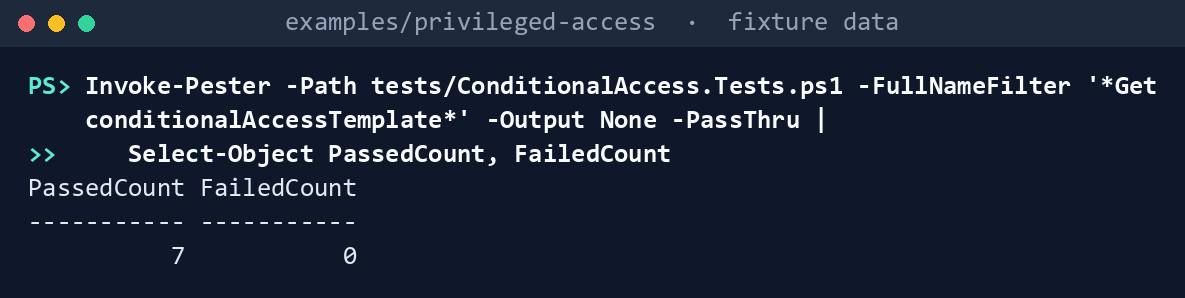
What the terminal shows, run on the kit’s fixtures (the same output as text) PassedCount 7,FailedCount 0.List the permissions each task needs:
Import-Module ./powershell/PaConditionalAccess/PaConditionalAccess.psm1
(Get-PaCaRequiredPermission -Task ca-read).GraphPermissions -join ', '
(Get-PaCaRequiredPermission -Task ca-apply).GraphPermissions -join ', '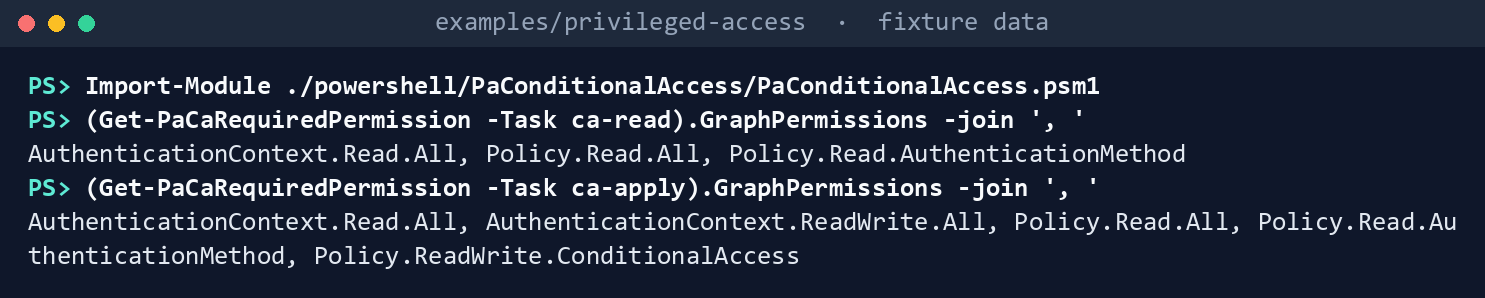
What the terminal shows, run on the kit’s fixtures (the same output as text) AuthenticationContext.Read.All, Policy.Read.All, Policy.Read.AuthenticationMethod, then the same three withAuthenticationContext.ReadWrite.AllandPolicy.ReadWrite.ConditionalAccess.Run the pre-merge check on the repository’s files:
./Invoke-PaCaAdmin.ps1 -CheckOnly -MapPath tests/fixtures/ch03/tenant-map.json
What the terminal shows, run on the kit’s fixtures (the same output as text) Pre-merge check: 0 Finding, 5 Warn, 0 Info. A Finding would print its rule and file and exit with code 1, which fails the pipeline.Run the same check on Microsoft’s template:
$t = Read-PaCaTemplatePage -Path ../third_party/conditional-access-template-page/conditionalaccesstemplate-get.md
$repo = Read-PaCaRepository -Path ca-policies -MapPath tests/fixtures/ch03/tenant-map.json
Test-PaCaPolicyBody -Body (ConvertFrom-PaCaTemplate -Template $t) -Repository $repo | Format-Table Rule, Severity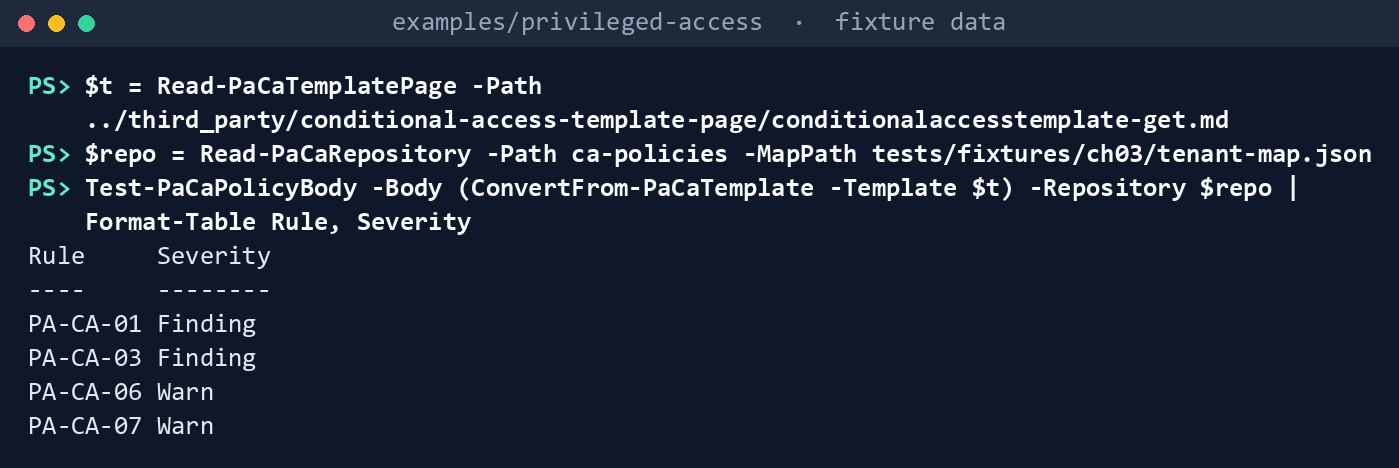
What the terminal shows, run on the kit’s fixtures (the same output as text) Four rows: PA-CA-01 Finding (no emergency exclusion), PA-CA-03 Finding (the display text in
excludeUsers), PA-CA-06 Warn (plain MFA) and PA-CA-07 Warn (12 of Learn’s 14 roles missing).Plan against the fictional tenant, sending nothing:
./Invoke-PaCaAdmin.ps1 -Cloud gcc -MapPath tests/fixtures/ch03/tenant-map.json -FixturePath tests/fixtures/ch03/tenant.json -OutputPath out/ca
Get-Content out/ca/plan.json -Raw | ConvertFrom-Json | Format-Table Kind, Name, Action
Pre-merge check: 0 Finding, 5 Warn, 0 Info Plan: 3 Blocked, 4 Create, 1 NoChange, 1 NotInRepository, 2 Update Dry run: 6 request(s) written to requests.json, none sent; rerun with -Apply to send them Written to out/ca (manifest.json lists every request and file hash)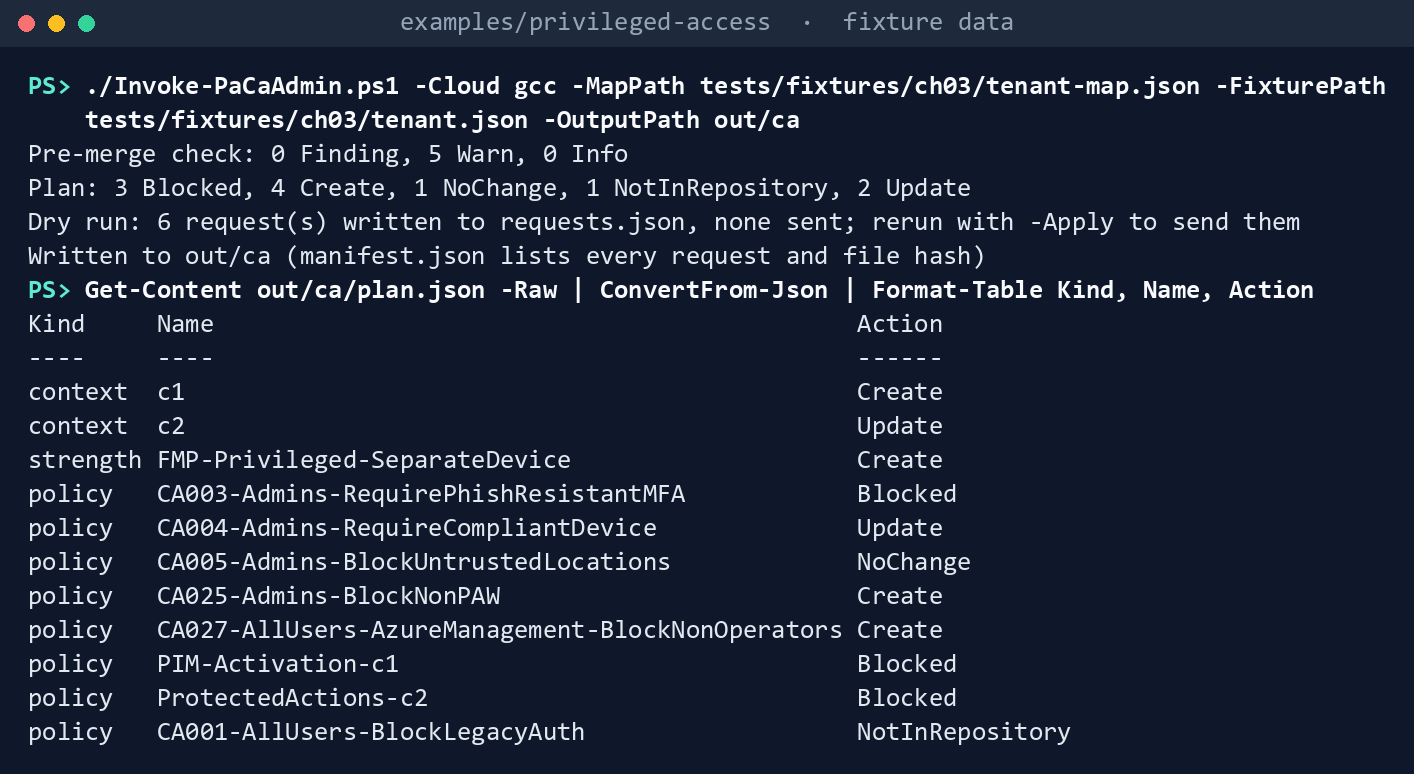
What the terminal shows, run on the kit’s fixtures (the same output as text) Context
c1and the strength are Create;c2is Update (its description). CA004 is Update (its persistent browser control), CA005 is NoChange, and CA025 and CA027 are Create. CA003,PIM-Activation-c1andProtectedActions-c2are Blocked: the strength, and for the context policiesc1, don’t exist yet. CA001 is NotInRepository.manifest.jsonlists five GETs and no write.Apply against the fake, three times:
$fake = New-PaCaFixtureInvoker -Path tests/fixtures/ch03/tenant.json -Cloud gcc
$findings = Test-PaCaRepository -Repository $repo
foreach ($run in 1..3) {
    $client = New-PaCaClient -Cloud gcc -Invoke $fake.Invoke -Apply
    $plan = Get-PaCaPlan -Repository $repo -Tenant (Get-PaCaTenant -Client $client)
    $sent = @(Invoke-PaCaPlan -Client $client -Plan $plan -Findings $findings -EmergencyGroupId $repo.EmergencyGroupId | Where-Object Sent)
    "Run ${run}: $($sent.Count) sent"
}
($fake.Tenant.policies | Where-Object displayName -EQ 'PIM-Activation-c1').state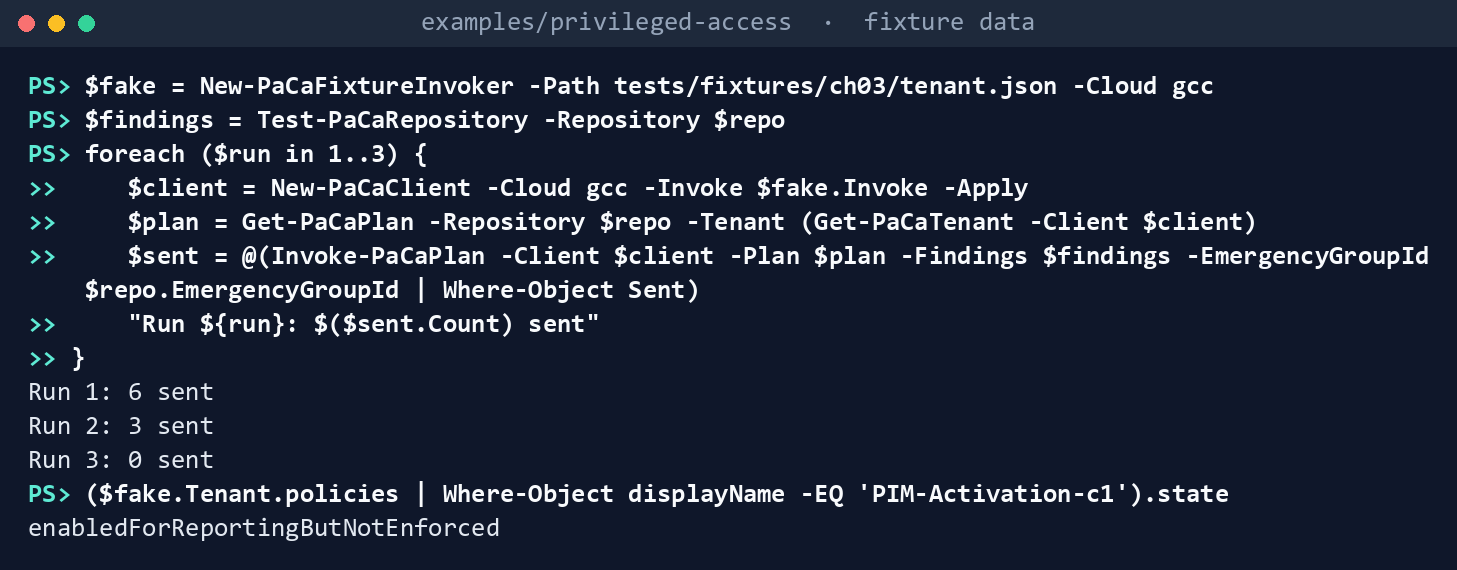
What the terminal shows, run on the kit’s fixtures (the same output as text) Run 1: 6 sent,Run 2: 3 sent,Run 3: 0 sent, thenenabledForReportingButNotEnforced. The first run creates the contexts and the strength; the second the three policies that needed them, report-only; the third finds nothing to do. CA001 is still there.Run the tests:
Invoke-Pester -Path tests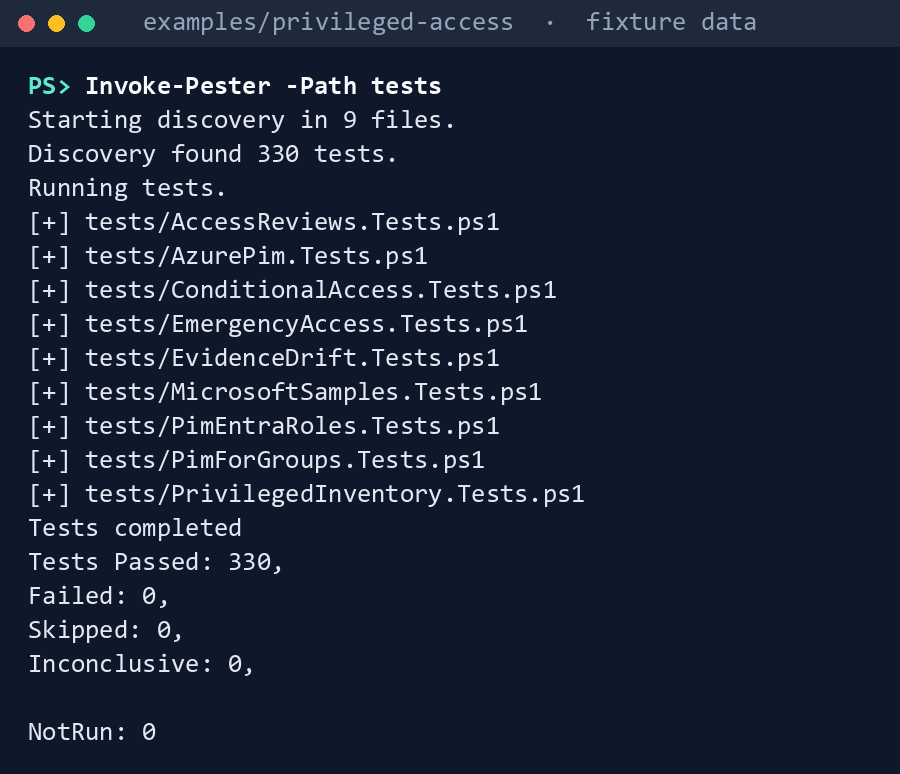
What the terminal shows, run on the kit’s fixtures (the same output as text)
Expected result: 330 tests passing, and each row of the gap table seen with your own eyes.
When you’re done, delete out:
Remove-Item -Recurse -Force out
Lab 2: test tenant
Use a test tenant in the worldwide or GCC cloud with Microsoft Entra ID P1, never production. Build Chapter 02’s emergency accounts and exclusion group first, and confirm one emergency account can sign in. Register at least one phishing-resistant method for each test administrator before any policy here is enforced: Learn warns that enabling the policy first risks locking you out.47 Don’t select c1 in PIM in this lab; Chapter 04 does that. Work in examples/privileged-access. You’ll replace: <tenant-id> (the test tenant’s ID), <app-id> and <thumbprint> (the app from step 2 and its certificate’s thumbprint), <emergency-group-id>, <admins-group-id> and <azure-operators-group-id> (the emergency exclusion group, the admins persona group and the Azure operators group), <trusted-location-id> (the trusted named location) and <key-model-1-aaguid> and <key-model-2-aaguid> (your approved security key models).
Every command in this lab, in order, from examples/privileged-access. Each step below says what it does and what to look for.
# Step 1: Write your map
$map = Get-Content tests/fixtures/ch03/tenant-map.json -Raw | ConvertFrom-Json
$map.'{group:CA-Exclude-EmergencyAccess}' = '<emergency-group-id>'
$map.'{group:CA-Persona-Admins}' = '<admins-group-id>'
$map.'{group:CA-Access-AzureOperators}' = '<azure-operators-group-id>'
$map.'{location:NL-TrustedNetworks}' = '<trusted-location-id>'
$map.'{aaguid:approved-key-model-1}' = '<key-model-1-aaguid>'
$map.'{aaguid:approved-key-model-2}' = '<key-model-2-aaguid>'
$map | ConvertTo-Json | Set-Content my-map.json

# Step 3: Plan, sending nothing
Connect-MgGraph -Environment Global -TenantId <tenant-id> -ClientId <app-id> -CertificateThumbprint <thumbprint>
./Invoke-PaCaAdmin.ps1 -Cloud gcc -MapPath my-map.json -OutputPath out/ca-test -TenantId <tenant-id>

# Step 3: Plan, sending nothing
Get-Content out/ca-test/plan.json -Raw | ConvertFrom-Json | Format-Table Kind, Name, Action, @{ n = 'Changes'; e = { $_.Changes -join ', ' } }
Get-Content out/ca-test/requests.json

# Step 4: Apply, report-only
Connect-MgGraph -Environment Global -TenantId <tenant-id> -ClientId <app-id> -CertificateThumbprint <thumbprint>
./Invoke-PaCaAdmin.ps1 -Cloud gcc -MapPath my-map.json -OutputPath out/ca-test-apply1 -TenantId <tenant-id> -Apply
./Invoke-PaCaAdmin.ps1 -Cloud gcc -MapPath my-map.json -OutputPath out/ca-test-apply2 -TenantId <tenant-id> -Apply

# Step 6: Enforce the gate alone
$f = 'ca-policies/policies/PIM-Activation-c1.json'
(Get-Content $f -Raw) -replace '"state":\s*"[^"]+"', '"state": "enabled"' | Set-Content $f -NoNewline
./Invoke-PaCaAdmin.ps1 -Cloud gcc -MapPath my-map.json -OutputPath out/ca-test-enforce -TenantId <tenant-id> -Apply -AllowEnforce

# Step 7: Back it out
$made = Get-Content out/ca-test/plan.json -Raw | ConvertFrom-Json | Where-Object { $_.Kind -eq 'policy' -and $_.Action -in 'Create', 'Blocked' } | ForEach-Object Name
foreach ($n in $made) { $f = "ca-policies/policies/$n.json"; (Get-Content $f -Raw) -replace '"state":\s*"[^"]+"', '"state": "disabled"' | Set-Content $f -NoNewline }
foreach ($f in 'ca-policies/contexts/c1.json', 'ca-policies/contexts/c2.json') { (Get-Content $f -Raw) -replace '"isAvailable":\s*true', '"isAvailable": false' | Set-Content $f -NoNewline }
./Invoke-PaCaAdmin.ps1 -Cloud gcc -MapPath my-map.json -OutputPath out/ca-test-backout -TenantId <tenant-id> -Apply

# Step 7: Back it out
Remove-Item -Recurse -Force out/ca-test*
Write your map. Copy
tests/fixtures/ch03/tenant-map.jsonand put in the test tenant’s object IDs: the emergency group, the admins persona group, the Azure operators group, the trusted network location and your key models’ AAGUIDs.$map = Get-Content tests/fixtures/ch03/tenant-map.json -Raw | ConvertFrom-Json $map.'{group:CA-Exclude-EmergencyAccess}' = '<emergency-group-id>' $map.'{group:CA-Persona-Admins}' = '<admins-group-id>' $map.'{group:CA-Access-AzureOperators}' = '<azure-operators-group-id>' $map.'{location:NL-TrustedNetworks}' = '<trusted-location-id>' $map.'{aaguid:approved-key-model-1}' = '<key-model-1-aaguid>' $map.'{aaguid:approved-key-model-2}' = '<key-model-2-aaguid>' $map | ConvertTo-Json | Set-Content my-map.jsonRegister the app in the worldwide admin center with a certificate, and grant only the three read permissions from Lab 1, step 2, with admin consent.
- Open Entra ID > App registrations > New registration, name the app and select Register.
- In the app, open Certificates & secrets > Certificates > Upload certificate and upload the certificate’s public key.
- Open API permissions > Add a permission > Microsoft Graph > Application permissions, select
AuthenticationContext.Read.All,Policy.Read.AllandPolicy.Read.AuthenticationMethod, then Add permissions and Grant admin consent for your tenant.
Plan, sending nothing:
Connect-MgGraph -Environment Global -TenantId <tenant-id> -ClientId <app-id> -CertificateThumbprint <thumbprint>
./Invoke-PaCaAdmin.ps1 -Cloud gcc -MapPath my-map.json -OutputPath out/ca-test -TenantId <tenant-id>
Read
plan.jsonandrequests.json. Every policy that already exists should show only the changes you expect.Get-Content out/ca-test/plan.json -Raw | ConvertFrom-Json | Format-Table Kind, Name, Action, @{ n = 'Changes'; e = { $_.Changes -join ', ' } } Get-Content out/ca-test/requests.jsonApply, report-only. Add
Policy.ReadWrite.ConditionalAccessandAuthenticationContext.ReadWrite.Allto the app (API permissions > Add a permission > Microsoft Graph > Application permissions, then Grant admin consent for your tenant), reconnect, and apply twice: the first run creates the contexts and the strength, the second the policies that needed them.Connect-MgGraph -Environment Global -TenantId <tenant-id> -ClientId <app-id> -CertificateThumbprint <thumbprint> ./Invoke-PaCaAdmin.ps1 -Cloud gcc -MapPath my-map.json -OutputPath out/ca-test-apply1 -TenantId <tenant-id> -Apply ./Invoke-PaCaAdmin.ps1 -Cloud gcc -MapPath my-map.json -OutputPath out/ca-test-apply2 -TenantId <tenant-id> -ApplyConfirm in the admin center (Entra ID > Conditional Access > Policies) that every new policy is Report-only. Record whether Graph accepted
PIM-Activation-c1’s every-time sign-in frequency (research gaps, row 32) and whether any create asked for another permission (row 35).Watch report-only. Sign in as a test administrator and as an emergency account, then read each policy’s report-only result in the sign-in log and the policy impact view (preview).48 Book 04, Chapter 07 asks for at least seven days before enforcement (Book 04, Chapter 07).
Enforce the gate alone. In a separate change, set
PIM-Activation-c1’s file toenabledand run with-AllowEnforce. The first command edits the file’sstate; the second applies:$f = 'ca-policies/policies/PIM-Activation-c1.json' (Get-Content $f -Raw) -replace '"state":\s*"[^"]+"', '"state": "enabled"' | Set-Content $f -NoNewline ./Invoke-PaCaAdmin.ps1 -Cloud gcc -MapPath my-map.json -OutputPath out/ca-test-enforce -TenantId <tenant-id> -Apply -AllowEnforceThe plan shows it as Update with the state change; everything else stays as it was. PA-CA-04 clears for that policy.
Back it out. Set each file this lab created to
disabledand the contexts’isAvailableto false, then apply (turning a policy off needs no-AllowEnforce); or turn them off in the admin center. The first command reads the policies step 3 planned to create (Create or Blocked) from itsplan.json:$made = Get-Content out/ca-test/plan.json -Raw | ConvertFrom-Json | Where-Object { $_.Kind -eq 'policy' -and $_.Action -in 'Create', 'Blocked' } | ForEach-Object Name foreach ($n in $made) { $f = "ca-policies/policies/$n.json"; (Get-Content $f -Raw) -replace '"state":\s*"[^"]+"', '"state": "disabled"' | Set-Content $f -NoNewline } foreach ($f in 'ca-policies/contexts/c1.json', 'ca-policies/contexts/c2.json') { (Get-Content $f -Raw) -replace '"isAvailable":\s*true', '"isAvailable": false' | Set-Content $f -NoNewline } ./Invoke-PaCaAdmin.ps1 -Cloud gcc -MapPath my-map.json -OutputPath out/ca-test-backout -TenantId <tenant-id> -ApplyThe code doesn’t delete; if you delete the policies by hand in the test tenant, Learn’s 30-day restore applies (Book 04, Chapter 07). Remove the two write permissions, delete the app and its certificate, and delete the
out/ca-testfolders.Remove-Item -Recurse -Force out/ca-test*
Verified facts
| Item | Value | US Government clouds | Stage | Source |
|---|---|---|---|---|
| Conditional Access templates | In the admin center by scenario; “Protect administrator” includes phishing-resistant MFA for administrators | — | GA | 49 |
| Get a template | GET /identity/conditionalAccess/templates/{id}; Policy.Read.All |
L4 and L5 | v1.0 | 50 |
| Phishing-resistant MFA for administrators | At least 14 roles; exclude emergency accounts; built-in phishing-resistant strength; report-only first; built-in roles only | — | GA | 51 |
| List policies | Policy.Read.All |
L4 and L5 | v1.0 | 52 |
| Create a policy | POST /identity/conditionalAccess/policies; Policy.Read.All and Policy.ReadWrite.ConditionalAccess; known consent issue |
L4 and L5 | v1.0 | 53 |
| Update a policy | PATCH .../policies/{id}; same permissions; send only changed values |
L4 and L5 | v1.0 | 54 |
| List authentication contexts | AuthenticationContext.Read.All |
L4 and L5 | v1.0 | 55 |
| Create or update an authentication context | PATCH .../authenticationContextClassReferences/{id} creates when missing; AuthenticationContext.ReadWrite.All; known consent issue, as for policies |
L4 and L5 | v1.0 | 56 |
| Authentication context IDs | c1 to c25 (Graph create, beta); up to 99, c1 to c99 (admin center) |
L4 and L5 | — | 57 58 |
| List authentication strengths | Policy.Read.AuthenticationMethod; built-in and custom |
L4 and L5 | v1.0 | 59 |
| Create an authentication strength | Policy.ReadWrite.ConditionalAccess |
L4 and L5 | v1.0 | 60 |
| Built-in phishing-resistant strength | Windows Hello for Business or platform credential, FIDO2 security key, multifactor CBA; can’t combine with “Require MFA” | — | GA | 61 |
| PIM and authentication context | Policy enabled before selection; fallback MFA not triggered by off, report-only or excluded; don’t scope to roles; every-time sign-in frequency; 10-minute window | Conditional Access and PIM available | GA | 62 63 |
Sign-in frequency everyTime |
Graph: for risky users, risky sign-ins and Intune enrollment; Learn’s PIM page: on the authentication context policy | — | v1.0 | 64 65 66 |
| Report-only | Evaluated, not enforced; not for user actions; compliant-device checks can prompt Mac, iOS and Android users; policy impact view is preview | — | GA; impact view preview | 67 |
| Emergency exclusion | Exclude from policies that block or restrict; report-only doesn’t need it | — | GA | 68 |
| Protected actions | Conditional Access on permissions such as policy create, update and delete; exclude an emergency account; P1; a policy that is off or report-only is never satisfied; assigning through Graph is beta | Not stated | GA (no preview label on the page); Graph API beta | 69 70 |
Where the sources differ, recorded so a later edit doesn’t loosen the code:
- Report-only and the emergency exclusion. Learn and Book 04, Chapter 04: not needed. Book 04, Chapter 10: needed. The code follows Chapter 10 for every file and exempts only a named report-only instrument (research gaps, rows 5 and 31).
- Every-time sign-in frequency. The Graph resource page lists
everyTimefor risky users, risky sign-ins and Intune device enrollment;71 Learn’s PIM pages and the session lifetime page say to use it on the authentication context policy.72 73 The file follows the PIM page; Lab 2 confirms Graph accepts it (research gaps, row 32). - Authentication context IDs. The Graph create method allows
c1toc25;74 the admin center allows 99.75 PA-CA-08 follows the stricter range (row 33). - Protected actions’ stage. The workbook’s outline calls protected actions a preview. Learn’s overview page, read on October 30, 2026, carries no preview label, and assigning them through Graph is documented under beta only.76 77 The code defines
c2and its policy but doesn’t assign protected actions (rows 34 and 38). - The brief’s
Policy.Read.All. Learn lists narrower permissions for reading contexts and strengths, and the code uses them.78 79
Federal requirements and evidence
The policy files, the check and the plan are the evidence for the plan’s tasks A1.5, A2.3, A2.5 and A2.6. Each row names the command or file that shows it. Every control named is in the NIST SP 800-53B Moderate baseline.80
| What the output proves | Requirement it supports | KSI it aligns to | Who keeps it |
|---|---|---|---|
Microsoft’s template behaves as the kit expects, and the kit’s own code passes its tests: Lab 1, steps 1 and 7 (Invoke-Pester) |
CM-3(2), testing and validation of changes | KSI-CMT-VTD | The repository’s test runs |
Reading needs three read permissions; applying adds two write permissions and nothing else: Lab 1, step 2 (Get-PaCaRequiredPermission) |
AC-6, least privilege for the identity that plans and the one that applies | KSI-IAM-ELP | Identity engineering, with each app’s consent record |
The repository’s files pass the pre-merge check, with five Warn and no Finding: Lab 1, step 3 (Invoke-PaCaAdmin.ps1 -CheckOnly), exit code 0 |
CM-3(2), changes tested before they are finalized; CM-6, configuration settings | KSI-CMT-VTD, KSI-CMT-LMC | The pull request’s check run |
Administrators must use the phishing-resistant strength, FIDO2 keys from an approved list or multifactor certificate-based authentication, never plain MFA: ca-policies/strengths/FMP-Privileged-SeparateDevice.json and CA003-Admins-RequirePhishResistantMFA.json, with PA-CA-06 and PA-CA-07 in the check’s output |
IA-2(1), multifactor authentication to privileged accounts; OMB M-22-09, phishing-resistant MFA;81 MS.AAD.3.6v1, phishing-resistant MFA for highly privileged roles (BOD 25-01)82 | KSI-IAM-APM | Identity engineering, in the repository |
Administrators sign in only from a compliant device, a trusted network and a privileged access workstation, and only operators reach the Azure management plane: CA004, CA005, CA025 and CA027 in ca-policies/policies/ |
AC-3, access enforcement | KSI-IAM-ELP | Identity engineering, in the repository |
PIM activation asks again for the strength and a compliant device, every time, and protected actions do once Book 04’s Step 6 is done by hand: PIM-Activation-c1.json, ProtectedActions-c2.json and the two contexts, with PA-CA-04, PA-CA-05 and PA-CA-08 in the check’s output |
AC-6(1), authorize access to security functions; AC-6(10), non-privileged users can’t run privileged functions | KSI-IAM-JIT | Identity engineering, in the repository |
| Every policy file excludes the emergency group, whatever its state: PA-CA-01 in the check’s output | AC-2: the emergency accounts stay usable when a policy is enforced; keeping the exclusion on report-only files is design guidance | KSI-IAM-JIT | The pull request’s check run |
Microsoft’s own template fails the program’s rules where they are stricter: Lab 1, step 4 (Test-PaCaPolicyBody) |
CM-6: a common secure configuration adopted with its deviations documented | KSI-CMT-LMC, KSI-MLA-EVC | Identity engineering |
What a run would change, and the exact requests, with nothing sent: plan.json and requests.json from Lab 1, step 5 |
CM-3, configuration change control: the change is reviewed before it is made | KSI-CMT-LMC, KSI-CMT-RMV | The pull request, with the plan attached |
| Three applies against the fake send the creates once, then nothing, and the gate stays report-only: Lab 1, step 6 | CM-3(2), testing the change before it reaches a tenant | KSI-CMT-VTD | The repository’s test runs |
Which calls each run made, its mode (dry run or apply), and the SHA-256 of each file: manifest.json in each output folder |
CM-3, records of changes kept | KSI-CMT-LMC | The ISSO, beside the files it lists |
The reviewed files carry no tenant’s IDs; the map holds them: Lab 2, step 1 (my-map.json) |
No control; one set of files for every tenant is design guidance | — | Identity engineering, per tenant |
A live plan of the test tenant, as the reader: Lab 2, step 3, out/ca-test/plan.json and requests.json |
CM-3 | KSI-CMT-LMC | Identity engineering |
The contexts, the strength and the policies are created report-only, in order: Lab 2, step 4 (two runs with -Apply), out/ca-test-apply1 and out/ca-test-apply2, and the tenant’s audit log |
CM-3, approved changes implemented and recorded | KSI-CMT-LMC, KSI-CMT-RMV | The ISSO, with the Entra audit records |
Enforcing the gate is its own change, which needs -AllowEnforce: Lab 2, step 6, out/ca-test-enforce |
CM-3; IA-2(1) once the gate is On | KSI-CMT-LMC, KSI-IAM-APM | The pull request that changed the file’s state |
The back-out turns policies off and deletes nothing: Lab 2, step 7, out/ca-test-backout, then the output folders removed |
CM-3: the rollback is a recorded change | KSI-CMT-RMV | Identity engineering |
Lab 2, step 5, reading report-only results in the sign-in log before enforcement, has no command; it is the impact analysis CM-4 asks for, and the sign-in log is its record. KSIs are FedRAMP 20x indicators for cloud service providers.83 The agency authorizes its own system and lines this evidence up with what its providers report against those indicators; it doesn’t report KSIs itself (Book 00, Appendix B). Book 04, Chapter 10 carries the control-by-control mapping.
Dangers
| Danger | What happens | The guard |
|---|---|---|
| A policy enforced before the emergency accounts work | The documented lockout, by Conditional Access instead of PIM | Chapter 02 first; PA-CA-01 before merge; -Apply refuses a write without the exclusion |
| Microsoft’s template created as published | No emergency exclusion, display text where an ID belongs, plain MFA | PA-CA-01, PA-CA-03, PA-CA-06; the template is a model, not a file |
| A policy switched straight to On | Users blocked with no measurement | Every Create is report-only; enforcement needs -AllowEnforce in its own change |
c1 selected in PIM while its policy is report-only |
No gate, and no MFA fallback either | PA-CA-04 warns until it is On; Chapter 04 requires a person to state that the policy is On (-ActivationGateChecked) before it selects c1 |
| The gate scoped to a directory role | It never applies at activation | PA-CA-05 |
| Administrators without a phishing-resistant method when CA003 is enforced | They can’t sign in | Lab 2’s registration step; the report-only week; Book 04’s readiness gate |
| A pipeline that deletes a policy no file names | A portal-made policy, perhaps a needed one, disappears | No DELETE in the call list; NotInRepository is reported only |
| A compliant-device policy in report-only | Mac, iOS and Android users prompted for a certificate | PA-CA-09 warns; exclude those platforms in the report-only phase if the prompts matter |
| Whoever edits Conditional Access edits the gate | The gate is weakened or removed | Protected actions on c2, which need Book 04, Chapter 08’s Step 6 done by hand because the kit only defines c2; Chapter 03’s own plan, run on a schedule, reports where the tenant differs from these files; Chapter 08 doesn’t read Conditional Access yet (research gaps, row 88) |
| The write permission left on the app | A standing write path to Conditional Access | Grant it only for -Apply runs, from the pipeline identity; Lab 2 removes it |
Checklist
Footnotes
Microsoft Learn, “Configure Microsoft Entra role settings in Privileged Identity Management,” on activation, require Microsoft Entra Conditional Access authentication context, https://learn.microsoft.com/entra/id-governance/privileged-identity-management/pim-how-to-change-default-settings (accessed Oct 30, 2026).↩︎
Microsoft Learn, “Configure Microsoft Entra role settings in Privileged Identity Management,” on activation, require Microsoft Entra Conditional Access authentication context, https://learn.microsoft.com/entra/id-governance/privileged-identity-management/pim-how-to-change-default-settings (accessed Oct 30, 2026).↩︎
Microsoft Learn, “Microsoft Graph national cloud deployments,” https://learn.microsoft.com/graph/deployments (accessed Oct 30, 2026).↩︎
Microsoft Learn, “List policies” (conditionalAccessRoot), https://learn.microsoft.com/graph/api/conditionalaccessroot-list-policies?view=graph-rest-1.0 (accessed Oct 30, 2026).↩︎
Microsoft Learn, “Create conditionalAccessPolicy,” permissions and examples, https://learn.microsoft.com/graph/api/conditionalaccessroot-post-policies?view=graph-rest-1.0 (accessed Oct 30, 2026).↩︎
Microsoft Learn, “Update conditionalaccesspolicy,” permissions and request body, https://learn.microsoft.com/graph/api/conditionalaccesspolicy-update?view=graph-rest-1.0 (accessed Oct 30, 2026).↩︎
Microsoft Learn, “List authenticationContextClassReferences,” https://learn.microsoft.com/graph/api/conditionalaccessroot-list-authenticationcontextclassreferences?view=graph-rest-1.0 (accessed Oct 30, 2026).↩︎
Microsoft Learn, “Create or Update authenticationContextClassReference,” https://learn.microsoft.com/graph/api/authenticationcontextclassreference-update?view=graph-rest-1.0 (accessed Oct 31, 2026).↩︎
Microsoft Learn, “List authenticationStrengthPolicies,” https://learn.microsoft.com/graph/api/authenticationstrengthroot-list-policies?view=graph-rest-1.0 (accessed Oct 30, 2026).↩︎
Microsoft Learn, “Get conditionalAccessTemplate,” https://learn.microsoft.com/graph/api/conditionalaccesstemplate-get?view=graph-rest-1.0 (accessed Oct 30, 2026).↩︎
Microsoft Learn, “Microsoft Entra feature availability,” Microsoft Entra ID, authorization and Conditional Access, and identity governance, https://learn.microsoft.com/entra/identity/authentication/feature-availability (accessed Oct 30, 2026).↩︎
Microsoft Learn, “Conditional Access policy templates,” template categories, https://learn.microsoft.com/entra/identity/conditional-access/concept-conditional-access-policy-common (accessed Oct 30, 2026).↩︎
Microsoft Learn, “Require phishing-resistant multifactor authentication for administrators,” https://learn.microsoft.com/entra/identity/conditional-access/policy-admin-phish-resistant-mfa (accessed Oct 30, 2026).↩︎
Microsoft Learn, “Require phishing-resistant multifactor authentication for administrators,” https://learn.microsoft.com/entra/identity/conditional-access/policy-admin-phish-resistant-mfa (accessed Oct 30, 2026).↩︎
Microsoft Learn, “Get conditionalAccessTemplate,” https://learn.microsoft.com/graph/api/conditionalaccesstemplate-get?view=graph-rest-1.0 (accessed Oct 30, 2026).↩︎
Microsoft Learn, “Get conditionalAccessTemplate,” https://learn.microsoft.com/graph/api/conditionalaccesstemplate-get?view=graph-rest-1.0 (accessed Oct 30, 2026).↩︎
Microsoft Learn, “Create conditionalAccessPolicy,” permissions and examples, https://learn.microsoft.com/graph/api/conditionalaccessroot-post-policies?view=graph-rest-1.0 (accessed Oct 30, 2026).↩︎
Microsoft, microsoftgraph/microsoft-graph-docs-contrib,
api-reference/v1.0/api/conditionalaccesstemplate-get.mdat commita69303123e9701eecbf56568d152ece936a97f1e(October 30, 2026; the page last changed July 22, 2025), CC BY 4.0 (documentation) and MIT (code), https://github.com/microsoftgraph/microsoft-graph-docs-contrib/blob/a69303123e9701eecbf56568d152ece936a97f1e/api-reference/v1.0/api/conditionalaccesstemplate-get.md (accessed Oct 30, 2026); pinned copy inexamples/third_party/conditional-access-template-page.↩︎Microsoft Learn, “Require phishing-resistant multifactor authentication for administrators,” https://learn.microsoft.com/entra/identity/conditional-access/policy-admin-phish-resistant-mfa (accessed Oct 30, 2026).↩︎
Microsoft Learn, “Require phishing-resistant multifactor authentication for administrators,” https://learn.microsoft.com/entra/identity/conditional-access/policy-admin-phish-resistant-mfa (accessed Oct 30, 2026).↩︎
Microsoft Learn, “Conditional Access authentication strengths,” built-in strengths and limitations, https://learn.microsoft.com/entra/identity/authentication/concept-authentication-strengths (accessed Oct 30, 2026).↩︎
Microsoft Learn, “Manage emergency access accounts in Microsoft Entra ID,” Conditional Access considerations, https://learn.microsoft.com/entra/identity/role-based-access-control/security-emergency-access (accessed Oct 30, 2026).↩︎
Microsoft Learn, “Configure Microsoft Entra role settings in Privileged Identity Management,” on activation, require Microsoft Entra Conditional Access authentication context, https://learn.microsoft.com/entra/id-governance/privileged-identity-management/pim-how-to-change-default-settings (accessed Oct 30, 2026).↩︎
Microsoft Learn, “Manage emergency access accounts in Microsoft Entra ID,” Conditional Access considerations, https://learn.microsoft.com/entra/identity/role-based-access-control/security-emergency-access (accessed Oct 30, 2026).↩︎
Microsoft Learn, “Configure Microsoft Entra role settings in Privileged Identity Management,” on activation, require Microsoft Entra Conditional Access authentication context, https://learn.microsoft.com/entra/id-governance/privileged-identity-management/pim-how-to-change-default-settings (accessed Oct 30, 2026).↩︎
Microsoft Learn, “Add, test, or remove protected actions in Microsoft Entra ID,” Microsoft Graph, https://learn.microsoft.com/entra/identity/role-based-access-control/protected-actions-add (accessed Oct 30, 2026).↩︎
Microsoft Learn, “Configure Microsoft Entra role settings in Privileged Identity Management,” on activation, require Microsoft Entra Conditional Access authentication context, https://learn.microsoft.com/entra/id-governance/privileged-identity-management/pim-how-to-change-default-settings (accessed Oct 30, 2026).↩︎
Microsoft Learn, “Conditional Access authentication strengths,” built-in strengths and limitations, https://learn.microsoft.com/entra/identity/authentication/concept-authentication-strengths (accessed Oct 30, 2026).↩︎
Microsoft Learn, “Require phishing-resistant multifactor authentication for administrators,” https://learn.microsoft.com/entra/identity/conditional-access/policy-admin-phish-resistant-mfa (accessed Oct 30, 2026).↩︎
Microsoft Learn, “Require phishing-resistant multifactor authentication for administrators,” https://learn.microsoft.com/entra/identity/conditional-access/policy-admin-phish-resistant-mfa (accessed Oct 30, 2026).↩︎
Microsoft Learn, “Create authenticationContextClassReference” (beta), request body, https://learn.microsoft.com/graph/api/conditionalaccessroot-post-authenticationcontextclassreferences?view=graph-rest-beta (accessed Oct 30, 2026).↩︎
Microsoft Learn, “Analyze Conditional Access policy impact,” https://learn.microsoft.com/entra/identity/conditional-access/concept-conditional-access-report-only (accessed Oct 30, 2026).↩︎
Microsoft Learn, “Manage emergency access accounts in Microsoft Entra ID,” Conditional Access considerations, https://learn.microsoft.com/entra/identity/role-based-access-control/security-emergency-access (accessed Oct 30, 2026).↩︎
Microsoft Learn, “Manage emergency access accounts in Microsoft Entra ID,” Conditional Access considerations, https://learn.microsoft.com/entra/identity/role-based-access-control/security-emergency-access (accessed Oct 30, 2026).↩︎
Microsoft Learn, “Analyze Conditional Access policy impact,” https://learn.microsoft.com/entra/identity/conditional-access/concept-conditional-access-report-only (accessed Oct 30, 2026).↩︎
Microsoft Learn, “Update conditionalaccesspolicy,” permissions and request body, https://learn.microsoft.com/graph/api/conditionalaccesspolicy-update?view=graph-rest-1.0 (accessed Oct 30, 2026).↩︎
Microsoft Learn, “List policies” (conditionalAccessRoot), https://learn.microsoft.com/graph/api/conditionalaccessroot-list-policies?view=graph-rest-1.0 (accessed Oct 30, 2026).↩︎
Microsoft Learn, “List authenticationContextClassReferences,” https://learn.microsoft.com/graph/api/conditionalaccessroot-list-authenticationcontextclassreferences?view=graph-rest-1.0 (accessed Oct 30, 2026).↩︎
Microsoft Learn, “List authenticationStrengthPolicies,” https://learn.microsoft.com/graph/api/authenticationstrengthroot-list-policies?view=graph-rest-1.0 (accessed Oct 30, 2026).↩︎
Microsoft Learn, “Get conditionalAccessTemplate,” https://learn.microsoft.com/graph/api/conditionalaccesstemplate-get?view=graph-rest-1.0 (accessed Oct 30, 2026).↩︎
Microsoft Learn, “Create conditionalAccessPolicy,” permissions and examples, https://learn.microsoft.com/graph/api/conditionalaccessroot-post-policies?view=graph-rest-1.0 (accessed Oct 30, 2026).↩︎
Microsoft Learn, “Update conditionalaccesspolicy,” permissions and request body, https://learn.microsoft.com/graph/api/conditionalaccesspolicy-update?view=graph-rest-1.0 (accessed Oct 30, 2026).↩︎
Microsoft Learn, “Create or Update authenticationContextClassReference,” https://learn.microsoft.com/graph/api/authenticationcontextclassreference-update?view=graph-rest-1.0 (accessed Oct 31, 2026).↩︎
Microsoft Learn, “Create authenticationStrengthPolicy,” https://learn.microsoft.com/graph/api/authenticationstrengthroot-post-policies?view=graph-rest-1.0 (accessed Oct 30, 2026).↩︎
Microsoft Learn, “Create conditionalAccessPolicy,” permissions and examples, https://learn.microsoft.com/graph/api/conditionalaccessroot-post-policies?view=graph-rest-1.0 (accessed Oct 30, 2026).↩︎
Microsoft Learn, “Create or Update authenticationContextClassReference,” https://learn.microsoft.com/graph/api/authenticationcontextclassreference-update?view=graph-rest-1.0 (accessed Oct 31, 2026).↩︎
Microsoft Learn, “Require phishing-resistant multifactor authentication for administrators,” https://learn.microsoft.com/entra/identity/conditional-access/policy-admin-phish-resistant-mfa (accessed Oct 30, 2026).↩︎
Microsoft Learn, “Analyze Conditional Access policy impact,” https://learn.microsoft.com/entra/identity/conditional-access/concept-conditional-access-report-only (accessed Oct 30, 2026).↩︎
Microsoft Learn, “Conditional Access policy templates,” template categories, https://learn.microsoft.com/entra/identity/conditional-access/concept-conditional-access-policy-common (accessed Oct 30, 2026).↩︎
Microsoft Learn, “Get conditionalAccessTemplate,” https://learn.microsoft.com/graph/api/conditionalaccesstemplate-get?view=graph-rest-1.0 (accessed Oct 30, 2026).↩︎
Microsoft Learn, “Require phishing-resistant multifactor authentication for administrators,” https://learn.microsoft.com/entra/identity/conditional-access/policy-admin-phish-resistant-mfa (accessed Oct 30, 2026).↩︎
Microsoft Learn, “List policies” (conditionalAccessRoot), https://learn.microsoft.com/graph/api/conditionalaccessroot-list-policies?view=graph-rest-1.0 (accessed Oct 30, 2026).↩︎
Microsoft Learn, “Create conditionalAccessPolicy,” permissions and examples, https://learn.microsoft.com/graph/api/conditionalaccessroot-post-policies?view=graph-rest-1.0 (accessed Oct 30, 2026).↩︎
Microsoft Learn, “Update conditionalaccesspolicy,” permissions and request body, https://learn.microsoft.com/graph/api/conditionalaccesspolicy-update?view=graph-rest-1.0 (accessed Oct 30, 2026).↩︎
Microsoft Learn, “List authenticationContextClassReferences,” https://learn.microsoft.com/graph/api/conditionalaccessroot-list-authenticationcontextclassreferences?view=graph-rest-1.0 (accessed Oct 30, 2026).↩︎
Microsoft Learn, “Create or Update authenticationContextClassReference,” https://learn.microsoft.com/graph/api/authenticationcontextclassreference-update?view=graph-rest-1.0 (accessed Oct 31, 2026).↩︎
Microsoft Learn, “Create authenticationContextClassReference” (beta), request body, https://learn.microsoft.com/graph/api/conditionalaccessroot-post-authenticationcontextclassreferences?view=graph-rest-beta (accessed Oct 30, 2026).↩︎
Microsoft Learn, “Conditional Access: Target resources,” authentication context, https://learn.microsoft.com/entra/identity/conditional-access/concept-conditional-access-cloud-apps (accessed Oct 30, 2026).↩︎
Microsoft Learn, “List authenticationStrengthPolicies,” https://learn.microsoft.com/graph/api/authenticationstrengthroot-list-policies?view=graph-rest-1.0 (accessed Oct 30, 2026).↩︎
Microsoft Learn, “Create authenticationStrengthPolicy,” https://learn.microsoft.com/graph/api/authenticationstrengthroot-post-policies?view=graph-rest-1.0 (accessed Oct 30, 2026).↩︎
Microsoft Learn, “Conditional Access authentication strengths,” built-in strengths and limitations, https://learn.microsoft.com/entra/identity/authentication/concept-authentication-strengths (accessed Oct 30, 2026).↩︎
Microsoft Learn, “Configure Microsoft Entra role settings in Privileged Identity Management,” on activation, require Microsoft Entra Conditional Access authentication context, https://learn.microsoft.com/entra/id-governance/privileged-identity-management/pim-how-to-change-default-settings (accessed Oct 30, 2026).↩︎
Microsoft Learn, “Microsoft Entra feature availability,” Microsoft Entra ID, authorization and Conditional Access, and identity governance, https://learn.microsoft.com/entra/identity/authentication/feature-availability (accessed Oct 30, 2026).↩︎
Microsoft Learn, “signInFrequencySessionControl resource type,” https://learn.microsoft.com/graph/api/resources/signinfrequencysessioncontrol?view=graph-rest-1.0 (accessed Oct 30, 2026).↩︎
Microsoft Learn, “Configure Microsoft Entra role settings in Privileged Identity Management,” on activation, require Microsoft Entra Conditional Access authentication context, https://learn.microsoft.com/entra/id-governance/privileged-identity-management/pim-how-to-change-default-settings (accessed Oct 30, 2026).↩︎
Microsoft Learn, “Conditional Access adaptive session lifetime policies,” user sign-in frequency, https://learn.microsoft.com/entra/identity/conditional-access/concept-session-lifetime (accessed Oct 30, 2026).↩︎
Microsoft Learn, “Analyze Conditional Access policy impact,” https://learn.microsoft.com/entra/identity/conditional-access/concept-conditional-access-report-only (accessed Oct 30, 2026).↩︎
Microsoft Learn, “Manage emergency access accounts in Microsoft Entra ID,” Conditional Access considerations, https://learn.microsoft.com/entra/identity/role-based-access-control/security-emergency-access (accessed Oct 30, 2026).↩︎
Microsoft Learn, “What are protected actions in Microsoft Entra ID?,” https://learn.microsoft.com/entra/identity/role-based-access-control/protected-actions-overview (accessed Oct 30, 2026).↩︎
Microsoft Learn, “Add, test, or remove protected actions in Microsoft Entra ID,” Microsoft Graph, https://learn.microsoft.com/entra/identity/role-based-access-control/protected-actions-add (accessed Oct 30, 2026).↩︎
Microsoft Learn, “signInFrequencySessionControl resource type,” https://learn.microsoft.com/graph/api/resources/signinfrequencysessioncontrol?view=graph-rest-1.0 (accessed Oct 30, 2026).↩︎
Microsoft Learn, “Configure Microsoft Entra role settings in Privileged Identity Management,” on activation, require Microsoft Entra Conditional Access authentication context, https://learn.microsoft.com/entra/id-governance/privileged-identity-management/pim-how-to-change-default-settings (accessed Oct 30, 2026).↩︎
Microsoft Learn, “Conditional Access adaptive session lifetime policies,” user sign-in frequency, https://learn.microsoft.com/entra/identity/conditional-access/concept-session-lifetime (accessed Oct 30, 2026).↩︎
Microsoft Learn, “Create authenticationContextClassReference” (beta), request body, https://learn.microsoft.com/graph/api/conditionalaccessroot-post-authenticationcontextclassreferences?view=graph-rest-beta (accessed Oct 30, 2026).↩︎
Microsoft Learn, “Conditional Access: Target resources,” authentication context, https://learn.microsoft.com/entra/identity/conditional-access/concept-conditional-access-cloud-apps (accessed Oct 30, 2026).↩︎
Microsoft Learn, “What are protected actions in Microsoft Entra ID?,” https://learn.microsoft.com/entra/identity/role-based-access-control/protected-actions-overview (accessed Oct 30, 2026).↩︎
Microsoft Learn, “Add, test, or remove protected actions in Microsoft Entra ID,” Microsoft Graph, https://learn.microsoft.com/entra/identity/role-based-access-control/protected-actions-add (accessed Oct 30, 2026).↩︎
Microsoft Learn, “List authenticationContextClassReferences,” https://learn.microsoft.com/graph/api/conditionalaccessroot-list-authenticationcontextclassreferences?view=graph-rest-1.0 (accessed Oct 30, 2026).↩︎
Microsoft Learn, “List authenticationStrengthPolicies,” https://learn.microsoft.com/graph/api/authenticationstrengthroot-list-policies?view=graph-rest-1.0 (accessed Oct 30, 2026).↩︎
National Institute of Standards and Technology, SP 800-53B Moderate baseline, release 5.2.0 OSCAL profile (includes AC-2, AC-3, AC-6, AC-6(1), AC-6(10), CM-3, CM-3(2), CM-4, CM-6 and IA-2(1)), https://github.com/usnistgov/oscal-content/blob/main/nist.gov/SP800-53/rev5/json/NIST_SP-800-53_rev5_MODERATE-baseline_profile.json (accessed Nov 2, 2026).↩︎
Office of Management and Budget, M-22-09, Moving the U.S. Government Toward Zero Trust Cybersecurity Principles, January 26, 2022, https://www.whitehouse.gov/wp-content/uploads/2022/01/M-22-09.pdf (accessed Oct 20, 2026; carried from Book 02, Chapter 10).↩︎
Cybersecurity and Infrastructure Security Agency, “BOD 25-01: Implementing Secure Practices for Cloud Services Required Configurations,” Microsoft Entra ID policies MS.AAD.3.6v1, https://www.cisa.gov/resources-tools/services/bod-25-01-implementing-secure-practices-cloud-services-required-configurations (accessed Nov 2, 2026).↩︎
FedRAMP, “Key Security Indicators,” FedRAMP Consolidated Rules for 2026, indicator statements and “Related SP 800-53 Controls” for KSI-CMT-LMC, KSI-CMT-RMV, KSI-CMT-VTD, KSI-IAM-APM, KSI-IAM-ELP, KSI-IAM-JIT and KSI-MLA-EVC, https://www.fedramp.gov/2026/reference/key-security-indicators/ (accessed Nov 2, 2026).↩︎