Federal Modernization Workbook
Chapter 01 — The Notice Record and Azure Service Health
Five providers publish the same kinds of news in five shapes. The first job is one shape, so a reader can ask “what needs action, by when, and who owns it” once.
The record every notice becomes, and the Azure collector that fills it, behind the guide’s G1 Azure Service Health. You start with what Microsoft Learn gives you: sample Resource Graph queries over the ServiceHealthResources table, a role that unlocks security advisories’ sensitive fields, and a built-in policy that creates Service Health alerts in every subscription. Then you read the kit’s record (schema/notice.schema.json), its fingerprint, and how the Azure normalizer maps each event type to a kind and decides what needs action. Lab 1 collects the fixture subscriptions, reads the records, shows that a second read leaves every fingerprint unchanged, and plans the alert policy without changing anything. Lab 2 does the same in an Azure test subscription, applies the policy with its approved hash, and backs it out.
Goal and audience
Goal. By the end of this chapter you can read every Service Health event for the subscriptions in scope, with the least-privileged role, into records that say what kind of notice each is, whether it needs action and by when, who said so, and which resources it names. You can plan Service Health alerts at scale as a file a reviewer approves by its hash before anything changes.
Audience. Developers who build or maintain the kit, the cloud platform lead who owns G1, and the ISSO who keeps its evidence. You should read PowerShell 7. You don’t need a tenant until Lab 2.
Start with Microsoft’s documentation
What Microsoft gives you
Learn publishes Resource Graph sample queries for Service Health: all active events, health advisories (whose mitigation time is the advisory’s end), upcoming retirements (health advisories with EventSubType Retirement) and planned maintenance, each with links to the Azure portal and the Azure Government portal.1 A second page gives the impacted-resources query, which splits the tracking ID out of each impacted resource’s ID.2 Reader on a subscription is enough to see its Service Health events.3 The sensitive fields of a security advisory, and its impacted resources, need Service Health Security Reader (or a role with the three actions it holds); Reader and Monitoring Reader can’t see them.4 For alerting between collections, Learn’s Deploy Service Health alerts at scale using Azure Policy names a built-in definition, Configure subscriptions to enable Service Health Monitoring Alert Rules, assigned at a management group or subscription, with a remediation task so existing subscriptions get the alert rule too.5
What it leaves to you
Each row is pinned by a test in tests/Collectors.Tests.ps1, tests/Normalizer.Tests.ps1 or deploy/tests/Deploy.Tests.ps1.
| Learn’s material, as published | Why it matters | What the kit adds |
|---|---|---|
| One sample per question, each returning different columns | Five queries to run and merge | One events query built from the all-active sample, with the retirement sample’s EventSubType and the advisory sample’s time conversion, projecting named columns; the impacted-resources query as published, ordered for paging |
| One row per event per subscription | The same notice counted once per subscription | Rows merged by tracking ID into one notice |
| Event types, not what to do about them | HealthAdvisory covers both a retirement and a general advisory |
Six kinds; a HealthAdvisory with EventSubType Retirement is a retirement |
| No field that says action is required | A retirement reads like any other advisory | A stated kit rule: a retirement is action required, due at the advisory’s end; a security advisory is action required with no date, for the ISSO to review. The record says the rule, so nobody mistakes it for Microsoft’s |
Raw times in Learn’s samples are converted with todatetime(tolong(...)); LastUpdateTime’s format isn’t shown |
A time compared as text is wrong | Every time as UTC ISO 8601; the kit accepts ISO, epoch seconds or milliseconds, or ticks for LastUpdateTime (not yet specified) |
| Portal steps for the alert policy | Nothing a reviewer can approve before it runs | A plan file with the two Azure CLI commands, its SHA-256 printed, applied only with -Apply and that hash; the definition’s name checked before planning |
| Nothing about other providers | Five shapes, five reports | One record, schema/notice.schema.json, for every provider, with a fingerprint |
The verdict. Keep Learn’s queries as the model, and the policy as Learn describes it. Build the record, the merge, the kind mapping and the action rule, because Learn leaves those to you.
The code
The record
Every notice from every provider becomes one record, fmp-provider-notice/1, defined in schema/notice.schema.json (JSON Schema 2020-12) and built by New-PnNotice:
| Field | What it holds |
|---|---|
noticeId |
<provider>:<sourceId>, the key the router de-duplicates on |
provider, cloud, sourceId, sourceRef, sourceUrl |
Where it came from, in which cloud, and the provider’s own ID and link |
kind |
One of maintenance, retirement, advisory, security, change, incident |
status |
open or closed |
title, summary |
Plain text, markup removed, the summary at most 2,000 characters |
windowStart, windowEnd |
The impact window, UTC |
services, regions, resources |
What it names, sorted and de-duplicated |
actionRequired, actionRequiredBy, actionBasis |
Whether action is needed, by when, and who said so: provider: <field> or rule: <the kit's rule> |
providerSeverity |
The provider’s own level or priority, as text |
published, lastUpdated, firstSeen |
When the provider published and changed it, and when the kit first read it |
fingerprint |
SHA-256 of the record without firstSeen and fingerprint |
The fingerprint is the reason the router can tell a changed notice from one it has already seen: a provider’s edit changes it, and reading the same notice again a week later doesn’t. Test-PnNotice applies the schema’s rules in code, so the check runs on PowerShell 7.1 as well as on 7.4 and later, where the tests also validate with Test-Json. The collector refuses to write a run with an invalid record.
The Azure collector
Get-PnProviderNotice -Provider azure makes two declared calls, azure-service-health-events and azure-impacted-resources, each an az graph query in live mode and a file in fixture mode. ConvertTo-PnAzureNotice then:
EventType |
Kind | Action required |
|---|---|---|
ServiceIssue, RCA |
incident | No |
PlannedMaintenance |
maintenance | No |
HealthAdvisory with EventSubType Retirement |
retirement | Yes, by the kit’s rule, due at the advisory’s end time |
HealthAdvisory |
advisory | No |
SecurityAdvisory |
security | Yes, by the kit’s rule, no date |
Anything else (Billing) |
left out and counted | — |
Services and regions come from the Impact column; resources from the impacted-resources rows with the same tracking ID; the source link is the event on the cloud’s own Resource Manager host (management.azure.com, or management.usgovcloudapi.net for AzureUSGovernment). An unknown cloud name throws; there is no default.
The alert policy
deploy/New-PnAlertPolicy.ps1 reads the built-in definition 98903777-a9f6-47f5-90a9-acaf62ab01a8, checks its display name, and writes plan.json with two steps: az policy assignment create at the settings scope with a system-assigned managed identity holding the definition’s role (--role and --identity-scope, because only the portal grants the role automatically),6 and az policy remediation create for the subscriptions that already exist. It refuses a resource group scope, which the policy doesn’t support.7 It prints the plan’s SHA-256 and changes nothing unless it is run again with -Apply and that hash. In fixture mode it never applies.
The tests
Pester 5 under PowerShell 7. This chapter’s are the Azure Service Health block of tests/Collectors.Tests.ps1 (9 tests), and The notice record, The fingerprint and Times and text in tests/Normalizer.Tests.ps1; the alert policy’s are in deploy/tests/Deploy.Tests.ps1.
Lab 1 reads fictional fixtures and plans the policy against a fictional definition; nothing signs in and nothing leaves the machine. The kit has been tested against fixtures and stand-in tools, not against a live subscription. Review the code, and run Lab 2 in a test subscription, before it reads or changes a real one.
Lab 1: fixtures, no tenant
You need PowerShell 7.1 or later with Pester 5. Work in examples/provider-notices. The fixtures are two weeks of fictional notices from every provider, tests/fixtures/day1 and day2, and tests/fixtures/settings.lab.json names fictional subscriptions in AzureCloud.
Every command in this lab, in order, from examples/provider-notices. Each step below says what it does and what to look for.
# Step 1: List what Azure needs
Import-Module ./powershell/ProviderNotices/ProviderNotices.psm1
Get-PnRequiredPermission -Provider azure | Format-List

# Step 2: Read the kit's events query
Get-PnAzureQuery -Name events

# Step 3: Collect Azure from the day-one fixtures
./Invoke-PnCollect.ps1 -SettingsPath tests/fixtures/settings.lab.json -FixturePath tests/fixtures/day1 -Provider azure -AsOf 2026-11-09T12:00:00Z -OutputPath out/azure

# Step 4: Read the records
Import-Csv out/azure/notices.csv | Format-Table kind, status, actionRequired, actionRequiredBy, title

# Step 5: Read the retirement in full
(Read-PnJson -Path out/azure/notices.json).notices | Where-Object { $_.kind -eq 'retirement' } | ForEach-Object { [pscustomobject]$_ } | Format-List noticeId, windowStart, windowEnd, actionRequiredBy, actionBasis, resources, sourceUrl, fingerprint

# Step 6: Read the same fixtures a day later and compare the fingerprints
./Invoke-PnCollect.ps1 -SettingsPath tests/fixtures/settings.lab.json -FixturePath tests/fixtures/day1 -Provider azure -AsOf 2026-11-10T12:00:00Z -OutputPath out/azure-again
'Fingerprints that differ: ' + @(Compare-Object @((Read-PnJson -Path out/azure/notices.json).notices | ForEach-Object { $_.fingerprint }) @((Read-PnJson -Path out/azure-again/notices.json).notices | ForEach-Object { $_.fingerprint })).Count

# Step 7: Plan the Service Health alert policy
./deploy/New-PnAlertPolicy.ps1 -SettingsPath deploy/tests/fixtures/settings.production.json -FixturePath deploy/tests/fixtures/environment-production.json -OutputPath out/alerts -AsOf 2026-11-16T12:00:00Z

# Step 8: Try to apply it in fixture mode
./deploy/New-PnAlertPolicy.ps1 -SettingsPath deploy/tests/fixtures/settings.production.json -FixturePath deploy/tests/fixtures/environment-production.json -OutputPath out/alerts -AsOf 2026-11-16T12:00:00Z -Apply -ApprovedSha256 ('0' * 64)

# Step 9: Run this chapter's tests
Invoke-Pester -Path tests/Collectors.Tests.ps1, tests/Normalizer.Tests.ps1 -FullNameFilter 'Azure Service Health*', 'The notice record*', 'The fingerprint*', 'Times and text*' -Output None -PassThru | Select-Object PassedCount, FailedCount

# After the steps
Remove-Item -Recurse -Force out
List what Azure needs. The kit declares every call with the least-privileged role its provider documents; this is what a reviewer reads before granting anything:
Import-Module ./powershell/ProviderNotices/ProviderNotices.psm1
Get-PnRequiredPermission -Provider azure | Format-List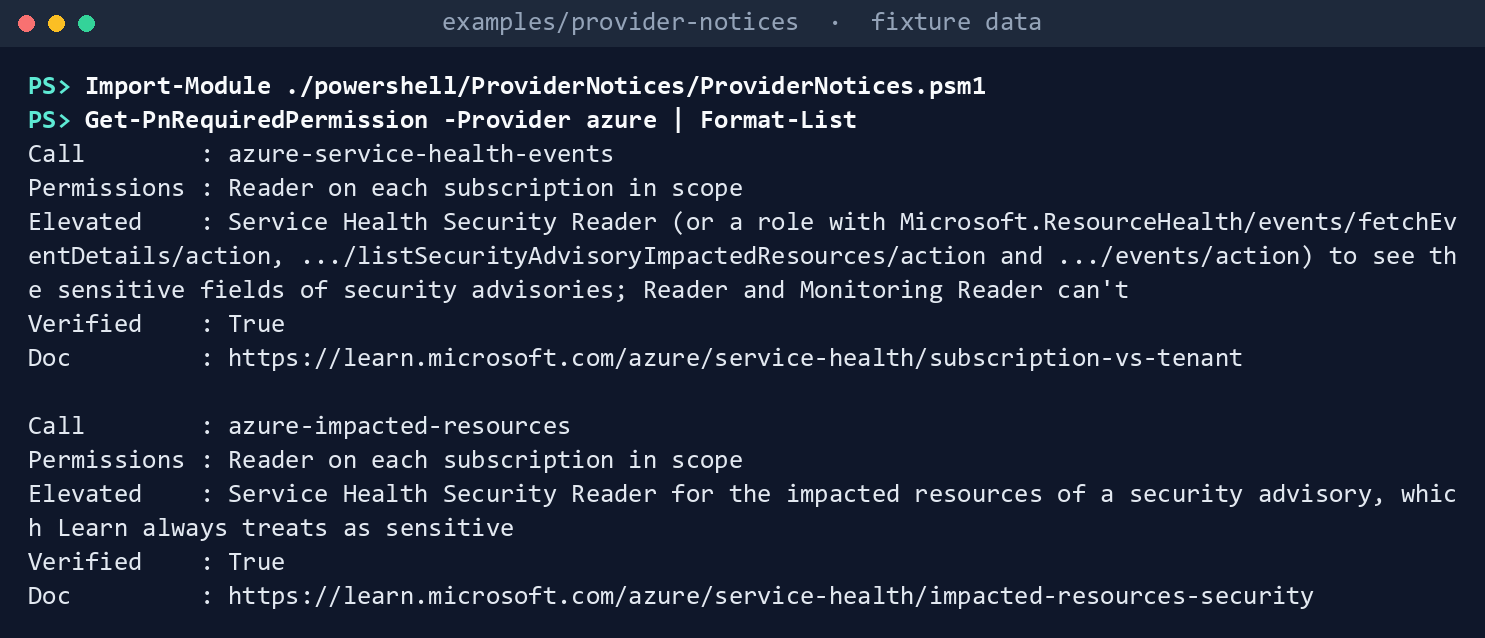
What the terminal shows, run on the kit’s fixtures (the same output as text) Two calls, each needing Reader on each subscription in scope, with Service Health Security Reader named as the elevated role for security advisories.
Read the kit’s events query. Compare it with Learn’s all-active sample: the same filter, with the retirement sample’s
EventSubTypeadded and the times converted:Get-PnAzureQuery -Name events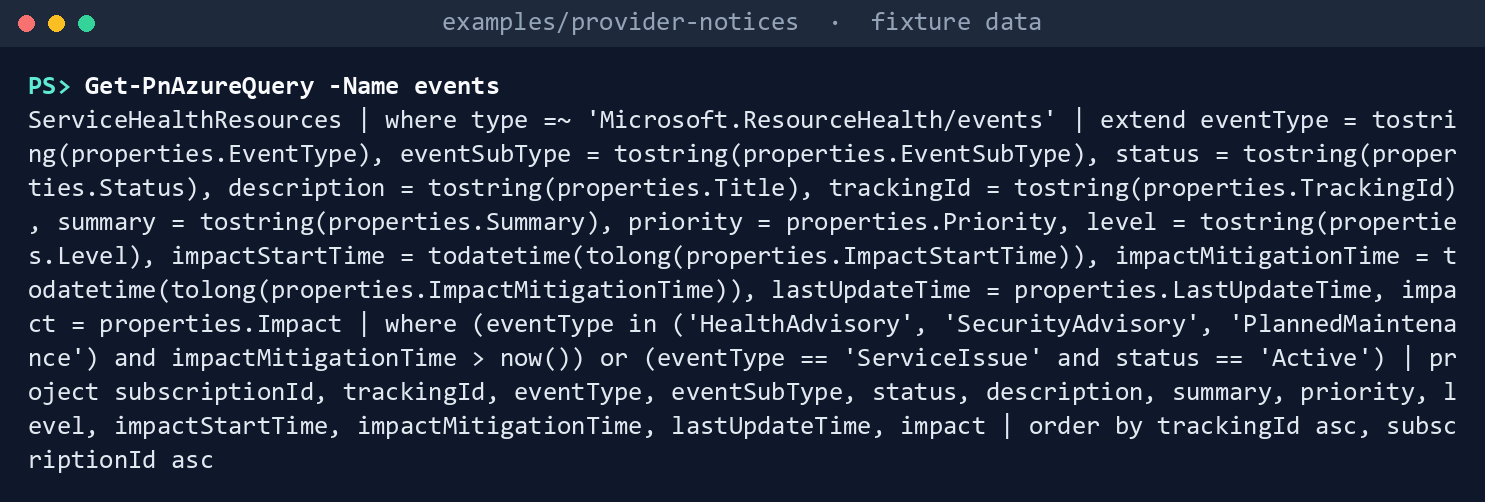
What the terminal shows, run on the kit’s fixtures (the same output as text) Collect Azure from the day-one fixtures:
./Invoke-PnCollect.ps1 -SettingsPath tests/fixtures/settings.lab.json -FixturePath tests/fixtures/day1 -Provider azure -AsOf 2026-11-09T12:00:00Z -OutputPath out/azureCollected as of 2026-11-09T12:00:00Z (Fixture mode, environment lab) Provider Cloud Notices Open Action By kind azure AzureCloud 5 5 2 advisory 1, incident 1, maintenance 1, retirement 1, security 1 5 notices, each valid against schema/notice.schema.json. Written to out/azure: notices.json, notices.csv, raw/, manifest.json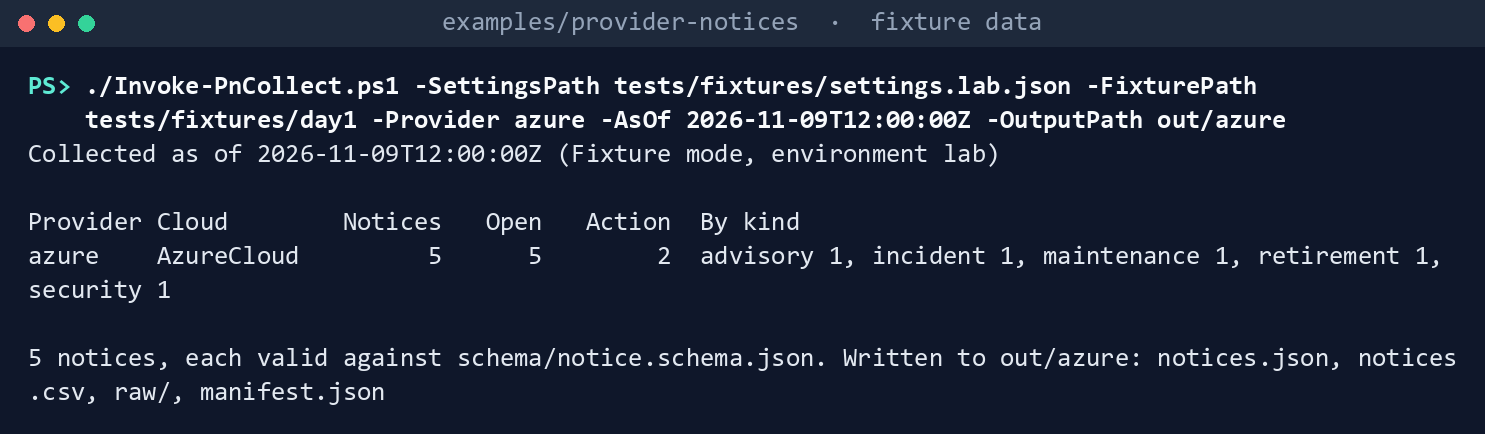
What the terminal shows, run on the kit’s fixtures (the same output as text) Five notices from six rows: the incident’s rows from two subscriptions are one notice.
Read the records:
Import-Csv out/azure/notices.csv | Format-Table kind, status, actionRequired, actionRequiredBy, title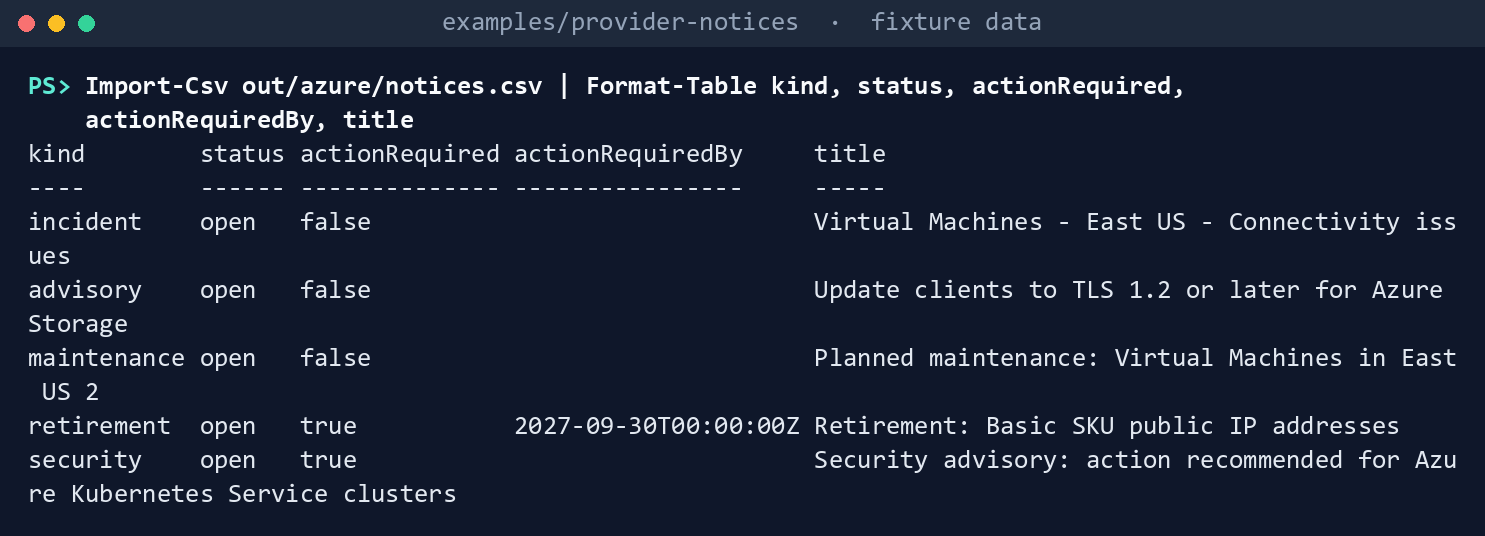
What the terminal shows, run on the kit’s fixtures (the same output as text) The retirement is action required by September 30, 2027; the security advisory is action required with no date.
Read the retirement in full. Look at
actionBasis: it names the kit’s rule, not Microsoft, as the reason the notice needs action:(Read-PnJson -Path out/azure/notices.json).notices | Where-Object { $_.kind -eq 'retirement' } | ForEach-Object { [pscustomobject]$_ } | Format-List noticeId, windowStart, windowEnd, actionRequiredBy, actionBasis, resources, sourceUrl, fingerprint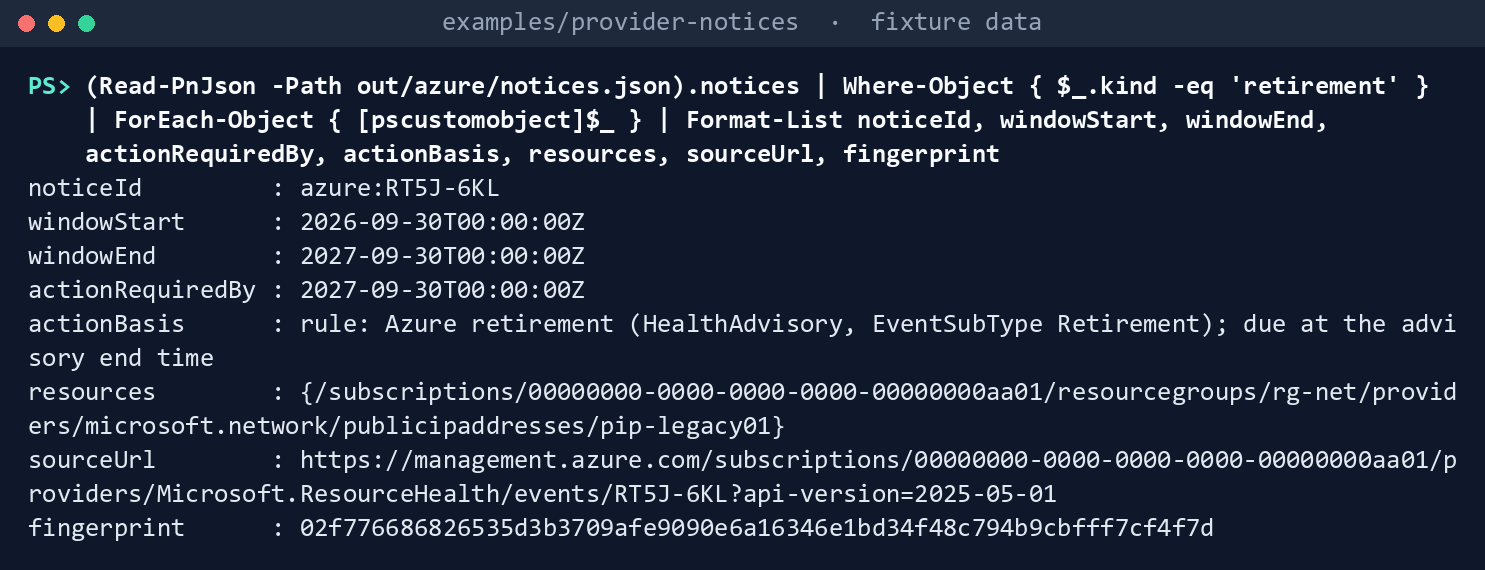
What the terminal shows, run on the kit’s fixtures (the same output as text) Read the same fixtures a day later and compare the fingerprints. A second read changes
firstSeenin the run but no notice’s fingerprint, so the router will see nothing new:./Invoke-PnCollect.ps1 -SettingsPath tests/fixtures/settings.lab.json -FixturePath tests/fixtures/day1 -Provider azure -AsOf 2026-11-10T12:00:00Z -OutputPath out/azure-again 'Fingerprints that differ: ' + @(Compare-Object @((Read-PnJson -Path out/azure/notices.json).notices | ForEach-Object { $_.fingerprint }) @((Read-PnJson -Path out/azure-again/notices.json).notices | ForEach-Object { $_.fingerprint })).Count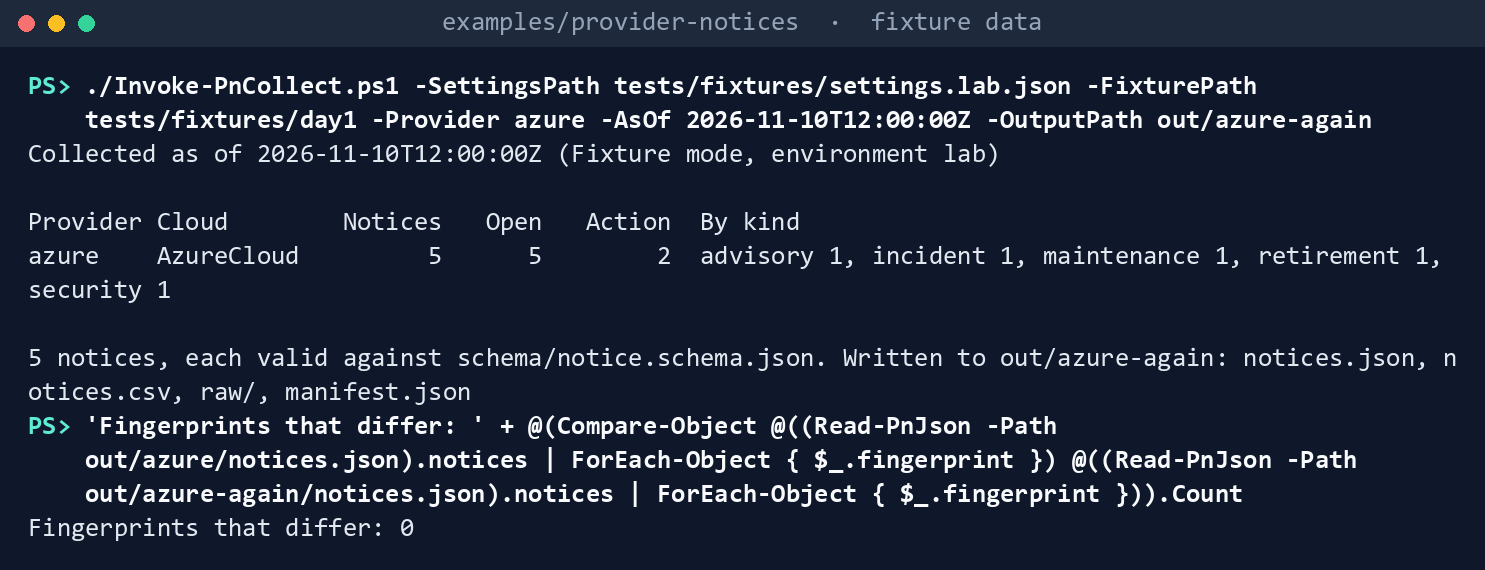
What the terminal shows, run on the kit’s fixtures (the same output as text) The last line is
Fingerprints that differ: 0.Plan the Service Health alert policy. The production fixture names a management group; the plan assigns the built-in definition there and remediates the existing subscriptions:
./deploy/New-PnAlertPolicy.ps1 -SettingsPath deploy/tests/fixtures/settings.production.json -FixturePath deploy/tests/fixtures/environment-production.json -OutputPath out/alerts -AsOf 2026-11-16T12:00:00Z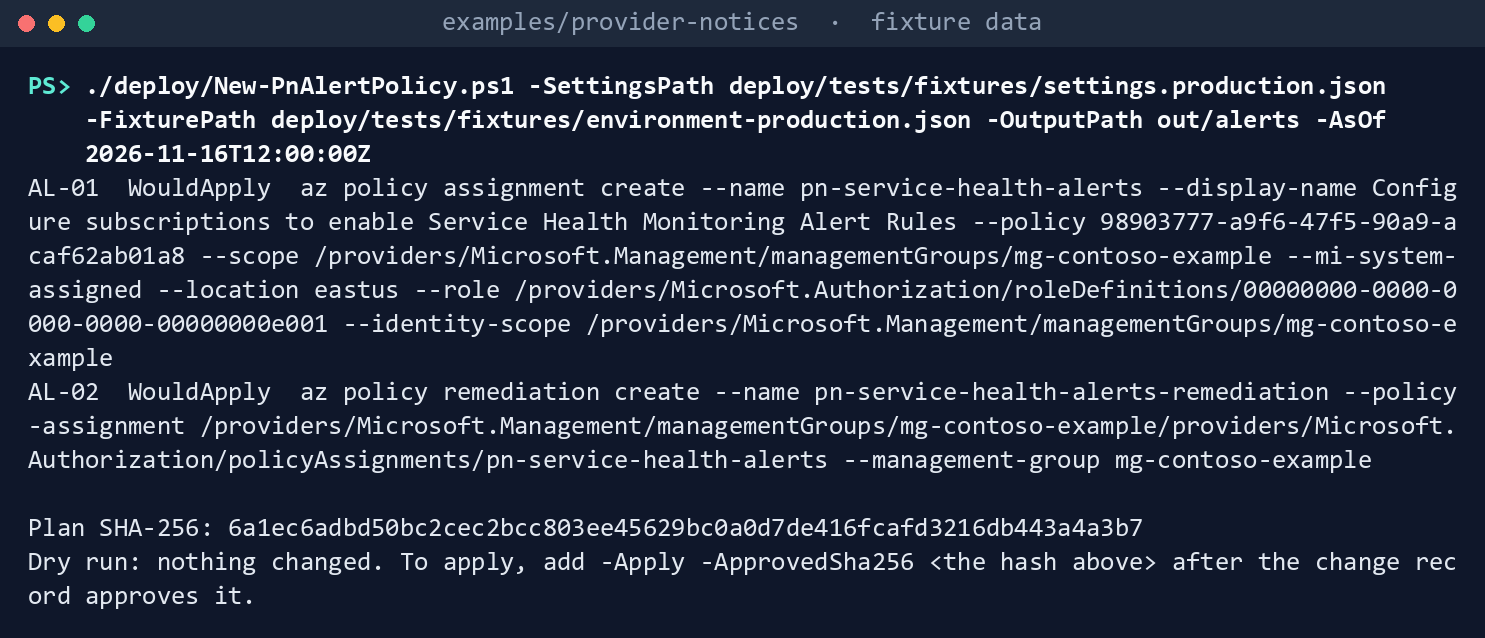
What the terminal shows, run on the kit’s fixtures (the same output as text) Two
WouldApplysteps,AL-01andAL-02, the plan’s SHA-256, andDry run: nothing changed.The role ID in the fixture’s definition is made up; Lab 2 reads the real one.Try to apply it in fixture mode. The script refuses before it reads the hash:
./deploy/New-PnAlertPolicy.ps1 -SettingsPath deploy/tests/fixtures/settings.production.json -FixturePath deploy/tests/fixtures/environment-production.json -OutputPath out/alerts -AsOf 2026-11-16T12:00:00Z -Apply -ApprovedSha256 ('0' * 64)
What the terminal shows, run on the kit’s fixtures (the same output as text) Run this chapter’s tests:
Invoke-Pester -Path tests/Collectors.Tests.ps1, tests/Normalizer.Tests.ps1 -FullNameFilter 'Azure Service Health*', 'The notice record*', 'The fingerprint*', 'Times and text*' -Output None -PassThru | Select-Object PassedCount, FailedCount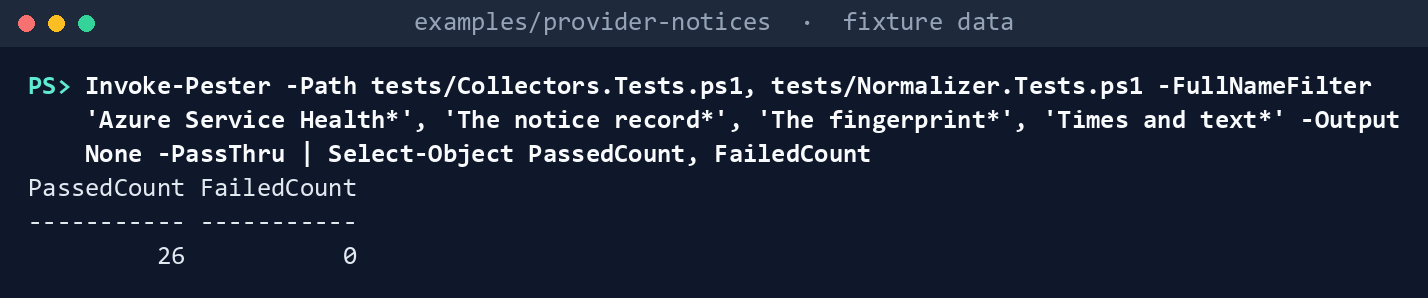
What the terminal shows, run on the kit’s fixtures (the same output as text)
Expected result: PassedCount 26 and FailedCount 0, and out/azure/manifest.json listing the two calls with their roles and the SHA-256 of every file in the run. Delete out when you’re done:
Remove-Item -Recurse -Force out
Lab 2: a test subscription
Use an Azure test subscription in a test tenant, never production; it may have no Service Health events, which is a valid result. Work in examples/provider-notices. You’ll replace: <subscription-id> (the test subscription), <reader-object-id> (the object ID of the identity that reads), <settings-file> (your copy of deploy/settings.template.json with environment test, only azure enabled, the subscription in providers.azure.subscriptions, a test outputRoot, schedule.taskName empty, and azurePolicy enabled with scope /subscriptions/<subscription-id> and a location), <plan-sha256> (the alert plan’s SHA-256, as the reviewer approved it) and <rollback-sha256> (the rollback plan’s).
Every command in this lab, in order, from examples/provider-notices. Each step below says what it does and what to look for.
# Step 1: Grant the reader its roles
az role assignment create --assignee <reader-object-id> --role "Reader" --scope /subscriptions/<subscription-id>
az role assignment create --assignee <reader-object-id> --role "Service Health Security Reader" --scope /subscriptions/<subscription-id>

# Step 2: Sign in as the reader, in the right cloud, with the Resource Graph extension
az cloud set --name AzureCloud
az login
az extension add --name resource-graph

# Step 3: Cross-check with Learn's own query, then collect
az graph query -q "ServiceHealthResources | where type =~ 'Microsoft.ResourceHealth/events' | extend eventType = properties.EventType, status = properties.Status, impactMitigationTime = properties.ImpactMitigationTime | where (eventType in ('HealthAdvisory', 'SecurityAdvisory', 'PlannedMaintenance') and impactMitigationTime > now()) or (eventType == 'ServiceIssue' and status == 'Active') | summarize count() by tostring(eventType)" --subscriptions <subscription-id>
./Invoke-PnCollect.ps1 -SettingsPath <settings-file> -Provider azure -OutputPath out/azure-test
Import-Csv out/azure-test/notices.csv | Group-Object kind | Format-Table Name, Count

# Step 4: Plan the alert policy at the test subscription
az policy definition show --name 98903777-a9f6-47f5-90a9-acaf62ab01a8 --query "{name: displayName, roles: policyRule.then.details.roleDefinitionIds}"
./deploy/New-PnAlertPolicy.ps1 -SettingsPath <settings-file> -OutputPath out/alerts-test

# Step 5: Apply it with the approved hash, and check the remediation and the alert rule
./deploy/New-PnAlertPolicy.ps1 -SettingsPath <settings-file> -OutputPath out/alerts-test -Apply -ApprovedSha256 <plan-sha256>
az policy remediation show --name pn-service-health-alerts-remediation
az monitor activity-log alert list --resource-group rg-serviceHealthAlert --output table

# Step 6: Back it out
./deploy/Invoke-PnRollback.ps1 -SettingsPath <settings-file> -OutputPath out/rollback-test
./deploy/Invoke-PnRollback.ps1 -SettingsPath <settings-file> -OutputPath out/rollback-test -Apply -ApprovedSha256 <rollback-sha256>
az group delete --name rg-serviceHealthAlert --yes
az role assignment delete --assignee <reader-object-id> --role "Service Health Security Reader" --scope /subscriptions/<subscription-id>
az role assignment delete --assignee <reader-object-id> --role "Reader" --scope /subscriptions/<subscription-id>
Remove-Item -Recurse -Force out/azure-test, out/alerts-test, out/rollback-test
Grant the reader its roles, as a subscription Owner:
az role assignment create --assignee <reader-object-id> --role "Reader" --scope /subscriptions/<subscription-id>
az role assignment create --assignee <reader-object-id> --role "Service Health Security Reader" --scope /subscriptions/<subscription-id>
Sign in as the reader, in the right cloud, with the Resource Graph extension:
az cloud set --name AzureCloud
az login
az extension add --name resource-graph
Cross-check with Learn’s own query, then collect. The two counts should agree, once the kit’s merge of one event across subscriptions is taken into account:
az graph query -q "ServiceHealthResources | where type =~ 'Microsoft.ResourceHealth/events' | extend eventType = properties.EventType, status = properties.Status, impactMitigationTime = properties.ImpactMitigationTime | where (eventType in ('HealthAdvisory', 'SecurityAdvisory', 'PlannedMaintenance') and impactMitigationTime > now()) or (eventType == 'ServiceIssue' and status == 'Active') | summarize count() by tostring(eventType)" --subscriptions <subscription-id>
./Invoke-PnCollect.ps1 -SettingsPath <settings-file> -Provider azure -OutputPath out/azure-test
Import-Csv out/azure-test/notices.csv | Group-Object kind | Format-Table Name, Count
If a security advisory’s summary is empty, the reader lacks Service Health Security Reader.
Plan the alert policy at the test subscription, signed in as a person who can create policy and role assignments there. Read the real definition’s role, then have a second person approve the plan’s hash:
az policy definition show --name 98903777-a9f6-47f5-90a9-acaf62ab01a8 --query "{name: displayName, roles: policyRule.then.details.roleDefinitionIds}"
./deploy/New-PnAlertPolicy.ps1 -SettingsPath <settings-file> -OutputPath out/alerts-test
Apply it with the approved hash, and check the remediation and the alert rule:
./deploy/New-PnAlertPolicy.ps1 -SettingsPath <settings-file> -OutputPath out/alerts-test -Apply -ApprovedSha256 <plan-sha256>
az policy remediation show --name pn-service-health-alerts-remediation
az monitor activity-log alert list --resource-group rg-serviceHealthAlert --output table
Learn says the remediation creates
rg-serviceHealthAlert, the alert ruleServiceHealthSubscriptionAlertRuleand the action groupag-ServiceHealthAlertActionGroup, emailing subscription owners;8 Service Health alerts are activity log alerts.9 Confirm the rule appears, and record what the remediation reports.Back it out. Plan the rollback, have the reviewer approve its hash, apply it, delete what the remediation created in this test subscription, and remove the reader’s roles:
./deploy/Invoke-PnRollback.ps1 -SettingsPath <settings-file> -OutputPath out/rollback-test
./deploy/Invoke-PnRollback.ps1 -SettingsPath <settings-file> -OutputPath out/rollback-test -Apply -ApprovedSha256 <rollback-sha256>
az group delete --name rg-serviceHealthAlert --yes
az role assignment delete --assignee <reader-object-id> --role "Service Health Security Reader" --scope /subscriptions/<subscription-id>
az role assignment delete --assignee <reader-object-id> --role "Reader" --scope /subscriptions/<subscription-id>
Remove-Item -Recurse -Force out/azure-test, out/alerts-test, out/rollback-test
Deleting the assignment doesn’t delete the resources its remediation made, which is why the resource group is deleted separately here; in production the change record decides.
Verified facts
| Item | Value | US Government | Source |
|---|---|---|---|
| Service Health in Resource Graph | ServiceHealthResources, type microsoft.resourcehealth/events; impacted resources .../events/impactedresources |
Learn’s samples link the Azure Government portal; an explicit availability statement is not yet specified | 10 11 |
| Retirements | Health advisories with EventSubType Retirement; an advisory’s mitigation time is its end |
— | 12 |
| Reader | Reader on a subscription to view its Service Health events | — | 13 |
| Security advisories | Sensitive fields and impacted resources need Service Health Security Reader; Reader and Monitoring Reader can’t see them | — | 14 |
| Alert policy | Built-in definition 98903777-a9f6-47f5-90a9-acaf62ab01a8; management group or subscription, not a resource group; remediation for existing subscriptions; default resources; hand edits may be overwritten |
— | 15 |
| Assignment from the CLI | --mi-system-assigned, --location, --role, --identity-scope; roles granted automatically only through the portal |
— | 16 |
| Service Health alerts | Activity log alerts | — | 17 |
| Azure Government | az cloud set --name AzureUSGovernment; Resource Manager management.usgovcloudapi.net |
Yes | 18 |
Not yet specified, as the guide’s list has it: the full ServiceHealthResources column schema and LastUpdateTime‘s format; whether Resource Graph redacts security advisories’ sensitive fields for a Reader as the REST list does; the table’s availability in Azure Government in so many words; the az graph query output keys (data, skip_token); and the policy’s parameter names for a parameters file. Lab 2 step 4 reads the definition before any parameters file is written.
Federal requirements and evidence
The collection and the alert policy are what the guide’s G1 checks. Each row names the file or command that is the evidence. The mappings are the kit’s config/requirements.json, which the guide verified against NIST’s OSCAL catalog and FedRAMP’s KSI pages.19 20
| What the output proves | Requirement it supports | KSI it aligns to | Who keeps it |
|---|---|---|---|
| The reader holds Reader, and Service Health Security Reader for security advisories, and nothing that writes (Lab 1, step 1; Lab 2, step 1) | SA-9 c (monitor the provider’s control compliance) | KSI-SCR-MIT, KSI-SCR-MON | The cloud platform lead; the ISSO keeps the role assignments |
Every Service Health event for the subscriptions in scope was read, with the calls and their roles recorded (Lab 1, step 3; Lab 2, step 3: raw/azure.json, manifest.json) |
SA-9 c; SI-5 a (receive advisories) | KSI-SCR-MIT, KSI-SCR-MON | The ISSO, with the run folder |
Each notice is one record, valid against the schema, with its kind, window, resources and action basis (Lab 1, steps 4 and 5: notices.json, notices.csv) |
SI-5; CA-7 (continuous monitoring) | KSI-SCR-MON, KSI-MLA-EVC | The ISSO |
| A re-read changes no fingerprint, so a notice is routed once (Lab 1, step 6) | CA-7 | KSI-MLA-EVC | The repository’s tests |
The alert path between collections is planned, approved by its hash and applied (Lab 1, steps 7 and 8; Lab 2, steps 4 and 5: plan.json, results.json, the change record) |
SI-5; CA-7 | KSI-SCR-MON, KSI-MLA-EVC | The cloud platform lead; the change record holds the approved hash |
| The policy assignment was removed by an approved rollback (Lab 2, step 6) | CM-3 (configuration change control); CP-2 | KSI-CMT-LMC, KSI-RPL-ARP | The change record |
KSIs are FedRAMP 20x indicators for cloud service providers. The KSI column names the indicators whose related SP 800-53 controls, as FedRAMP lists them, include the row’s control; which output supports which indicator is the program’s mapping (design guidance). The agency authorizes its own system and lines this evidence up with what its providers report against KSIs; it doesn’t report KSIs itself (Book 00, Appendix B). The kit’s records support these controls; the agency’s assessor decides them. Lab steps that only list or delete files have no row.
Dangers
| Danger | What happens | The guard |
|---|---|---|
| Security advisories read with Reader alone | The advisory is listed, but its summary and impacted resources aren’t | Service Health Security Reader named in config/calls.json; an empty summary on a security notice is the sign |
| A reader in the wrong cloud | Azure Government subscriptions read from the commercial cloud return nothing, and the gate passes on an empty list | The settings name the cloud; the live invoker refuses an Azure CLI set to another cloud |
| One event counted per subscription | The same outage becomes five tasks | Rows merged by tracking ID |
| A retirement read as an advisory | The deadline passes unnoticed | EventSubType Retirement makes it a retirement, action required by the kit’s rule, due at the advisory’s end |
| A kit rule mistaken for Microsoft’s | Someone argues with Microsoft about a date Microsoft never set | actionBasis says rule: or provider: |
| The alert policy applied unreviewed | Resource groups and action groups appear in every subscription | A plan with a hash; -Apply refuses any other hash; fixture mode never applies |
| Alert rules edited by hand | Remediation may overwrite the edit21 | Change the assignment’s parameters and remediate again |
Checklist
Footnotes
Microsoft Learn, “Azure Resource Graph sample queries for Azure Service Health,” https://learn.microsoft.com/azure/service-health/resource-graph-samples (read November 9, 2026; carried from the provider notices guide’s verification log).↩︎
Microsoft Learn, “Resource Graph sample queries for impacted resources,” https://learn.microsoft.com/azure/service-health/resource-graph-impacted-samples (read November 9, 2026).↩︎
Microsoft Learn, “Subscription versus tenant level events,” https://learn.microsoft.com/azure/service-health/subscription-vs-tenant (read November 9, 2026).↩︎
Microsoft Learn, “Access to sensitive information in security advisories,” https://learn.microsoft.com/azure/service-health/impacted-resources-security, and “Elevated access for viewing security advisories,” https://learn.microsoft.com/azure/service-health/security-advisories-elevated-access (read November 9, 2026).↩︎
Microsoft Learn, “Deploy Service Health alerts at scale using Azure Policy,” https://learn.microsoft.com/azure/service-health/service-health-alert-deploy-policy (read November 9, 2026).↩︎
Microsoft Learn, “Remediate non-compliant resources with Azure Policy,” https://learn.microsoft.com/azure/governance/policy/how-to/remediate-resources, and the Azure CLI references for
az policy assignmentandaz policy remediation(create,show), https://learn.microsoft.com/cli/azure/policy/assignment and https://learn.microsoft.com/cli/azure/policy/remediation (read November 9, 2026).↩︎Microsoft Learn, “Deploy Service Health alerts at scale using Azure Policy,” https://learn.microsoft.com/azure/service-health/service-health-alert-deploy-policy (read November 9, 2026).↩︎
Microsoft Learn, “Deploy Service Health alerts at scale using Azure Policy,” https://learn.microsoft.com/azure/service-health/service-health-alert-deploy-policy (read November 9, 2026).↩︎
Microsoft Learn, “Monitor Azure App Service,” types of alerts (“Resource Health alerts and Service Health alerts are activity log alerts”), https://learn.microsoft.com/azure/app-service/monitor-app-service#alerts, and the Azure CLI reference for
az monitor activity-log alert list, https://learn.microsoft.com/cli/azure/monitor/activity-log/alert (read November 9, 2026).↩︎Microsoft Learn, “Azure Resource Graph sample queries for Azure Service Health,” https://learn.microsoft.com/azure/service-health/resource-graph-samples (read November 9, 2026; carried from the provider notices guide’s verification log).↩︎
Microsoft Learn, “Resource Graph sample queries for impacted resources,” https://learn.microsoft.com/azure/service-health/resource-graph-impacted-samples (read November 9, 2026).↩︎
Microsoft Learn, “Azure Resource Graph sample queries for Azure Service Health,” https://learn.microsoft.com/azure/service-health/resource-graph-samples (read November 9, 2026; carried from the provider notices guide’s verification log).↩︎
Microsoft Learn, “Subscription versus tenant level events,” https://learn.microsoft.com/azure/service-health/subscription-vs-tenant (read November 9, 2026).↩︎
Microsoft Learn, “Access to sensitive information in security advisories,” https://learn.microsoft.com/azure/service-health/impacted-resources-security, and “Elevated access for viewing security advisories,” https://learn.microsoft.com/azure/service-health/security-advisories-elevated-access (read November 9, 2026).↩︎
Microsoft Learn, “Deploy Service Health alerts at scale using Azure Policy,” https://learn.microsoft.com/azure/service-health/service-health-alert-deploy-policy (read November 9, 2026).↩︎
Microsoft Learn, “Remediate non-compliant resources with Azure Policy,” https://learn.microsoft.com/azure/governance/policy/how-to/remediate-resources, and the Azure CLI references for
az policy assignmentandaz policy remediation(create,show), https://learn.microsoft.com/cli/azure/policy/assignment and https://learn.microsoft.com/cli/azure/policy/remediation (read November 9, 2026).↩︎Microsoft Learn, “Monitor Azure App Service,” types of alerts (“Resource Health alerts and Service Health alerts are activity log alerts”), https://learn.microsoft.com/azure/app-service/monitor-app-service#alerts, and the Azure CLI reference for
az monitor activity-log alert list, https://learn.microsoft.com/cli/azure/monitor/activity-log/alert (read November 9, 2026).↩︎Microsoft Learn, “Connect to Azure Government with Azure CLI,” https://learn.microsoft.com/azure/azure-government/documentation-government-get-started-connect-with-cli, and “Azure CLI endpoints,” https://learn.microsoft.com/cli/azure/azure-cli-endpoints (read November 9, 2026).↩︎
National Institute of Standards and Technology, SP 800-53 Rev. 5 OSCAL catalog, release 5.2.0, https://github.com/usnistgov/oscal-content/blob/main/nist.gov/SP800-53/rev5/json/NIST_SP-800-53_rev5_catalog.json (read November 9, 2026).↩︎
FedRAMP, “Key Security Indicators,” FedRAMP Consolidated Rules for 2026, https://www.fedramp.gov/2026/providers/20x/key-security-indicators/ (read November 9, 2026).↩︎
Microsoft Learn, “Deploy Service Health alerts at scale using Azure Policy,” https://learn.microsoft.com/azure/service-health/service-health-alert-deploy-policy (read November 9, 2026).↩︎