Federal Modernization Workbook
Chapter 07 — Access Reviews of Privileged Roles
Eligibility only grows unless someone confirms it on a calendar, so the reviews are code: one file says who reviews which role and when, a dry run shows the change, and the decisions come back as evidence.
The code behind the plan’s tasks A2.7 and A3.7: “first monthly review of Tier 0 eligibility and PRV-T0 membership closed,” then “first quarterly review cycle closed for Tier 1, Tier 2 and read-only roles.” You start with Learn’s tutorial for reviewing administrative roles through the access reviews API, pinned in the repository, and run its requests offline against a fake Graph to see what it does and leaves out. Then you use examples/privileged-access for the rest: review series for Microsoft Entra roles, PIM for Groups groups and Azure roles held as reviewed JSON, checked against the program’s rules, compared with the tenant in a dry run, written only with -Apply, and read back as evidence. Lab 1 runs on a laptop with no tenant; Lab 2 uses a test tenant. A table at the end maps each output to the federal requirement it supports.
Jump to a slide (18)
Deck · Narrated deck (about 12 minutes, captions) · Script · Captions. Recorded on November 2, 2026 from the approved chapter.
Goal and audience
Goal. By the end of this chapter you can define every privileged access review series as code, show a reviewer exactly what a change will do before it reaches the tenant, apply it with the least permission that can, and hand the ISSO the decisions each review produced. You can say, for each setting, whether it is Learn’s sample, Learn’s rule, or the program’s own design.
Audience. Developers who build the project’s governance pipeline, the identity governance officer who owns the reviews (the plan’s owner of A2.7 and A3.7), and the ISSO who reads their results. You should read PowerShell 7 and JSON. You don’t need a tenant until Lab 2.
Why reviews, and why as code
The approval gate controls the use of privilege; reviews control who keeps the eligibility. Book 04, Chapter 08’s Step 8 creates one recurring review per role, Tier 0 monthly and the rest quarterly, with auto-apply on and “remove access” when reviewers don’t respond (Book 04, Chapter 08). Chapter 09’s schedule adds the PRV-* group reviews and the fallback reviewers (Book 04, Chapter 09). Chapter 08’s Step 8 and Appendix B warn that a role held by a group shows the group, not its members (Book 04, Appendix B).1 Book 04, Chapter 10 makes review definitions one of the object classes held in the repository (Book 04, Chapter 10). Learn’s own deployment plan lists Global Administrator, Privileged Authentication Administrator, Conditional Access Administrator and Security Administrator among the roles to review regularly, permanent and eligible assignments both.2
A review set up by hand drifts. A reviewer leaves, a duration is shortened, auto-apply is switched off for one cycle and never back on. Held as code, each series has a file, a diff and a reviewer, and Chapter 08 can compare the tenant with it.
What it costs, and where it runs
Access reviews are a feature of Microsoft Entra ID Governance.3 Learn’s licensing page asks for Microsoft Entra ID Governance for every member user who reviews access or has it reviewed, with some capabilities still working on Microsoft Entra ID P2, and reviews of PIM for Groups (preview) need Governance.4 Learn’s tutorial asks only for P2 or Governance.5 The program follows the stricter page: budget Governance for every reviewer and every reviewed privileged user. Reviews of service principals also need Microsoft Entra Workload ID Premium.6
Microsoft Entra ID Governance is available in GCC, GCC High and DoD.7 The Graph access reviews APIs used here list the global service, US Government L4 and US Government L5 (DoD).8 9 Microsoft 365 GCC uses the worldwide endpoints, login.microsoftonline.com and graph.microsoft.com, and this program’s Azure is commercial, management.azure.com. GCC High uses graph.microsoft.us and DoD dod-graph.microsoft.us.10 The code takes the cloud by name and has no default. Azure role reviews go through a Resource Manager API that Learn publishes only in preview versions; whether it is available in Azure Government wasn’t confirmed (research gaps, row 72).11
Start with Microsoft’s sample
What Microsoft gives you
Learn’s tutorial Review access to administrative roles using access reviews APIs is Microsoft’s sample for this task.12 It creates a recurring review of the users and groups with active or eligible assignments to one Microsoft Entra role (User Administrator), lists its instances and decisions, records an approval and a denial, applies them, generates a review history report, and deletes the review. It notes that one review covers one role, so several roles need several reviews. Learn’s scope and reviewer articles give the other documented query shapes: eligible-only and active-only role queries, group members, and groups as reviewers.13 14
The pinned copy
The requests exist only inside the Learn page, so the repository pins the page’s source, unmodified, in examples/third_party/graph-access-reviews-roles-tutorial: concepts/tutorial-accessreviews-roleassignments.md from microsoftgraph/microsoft-graph-docs-contrib at commit a693031 (October 30, 2026), with the repository’s licenses, CC BY 4.0 for documentation and MIT for code.15 snapshot.json records each file’s SHA-256 and upstream git blob hash; a unit test checks them, and the weekly source watch reports new commits to the page.
tests/AccessReviewsSampleHarness.ps1 extracts the page’s HTTP requests and their JSON bodies as published. The first block of tests/AccessReviews.Tests.ps1 sends the create request to the example’s fake Graph and checks the rest of the page’s requests as text. Nothing is sent to a tenant.
What it leaves to you
Each row is pinned by a test in the Chapter 07 sample block of tests/AccessReviews.Tests.ps1.
| Learn’s sample, as published | Why it matters | What examples/privileged-access adds |
|---|---|---|
One role per review: a principalResourceMembershipsScope over /users and /groups and one roleDefinitions/{id} resource, active and eligible |
— | Kept, with the /groups principal scope left out: a role series reviews users, and each group that holds the role has its own membership series (the owner’s decision) |
Requests on a hard-coded https://graph.microsoft.com |
GCC High and DoD use other hosts | The cloud table from Chapter 01, by name, no default |
| A POST each run, with no read first; run twice, the fake holds two series of the same name | Reviewers get two reviews, and evidence splits | A dry run that reads first and says Create, Update, Replace or NoChange; two series with one name stop -Apply (PA-AR-12) |
| One user as reviewer, no fallback reviewer | One person leaving stops the review | Reviewer groups, a fallback always (PA-AR-01, PA-AR-02) |
| No default decision and no auto-apply; Step 5 applies decisions by hand | Silence keeps privilege, and a denial changes nothing until someone applies it | Auto-apply and “Deny” on silence, the program’s setting (PA-AR-05, PA-AR-07), with one exception for the emergency accounts (PA-AR-06) |
| One day, every three months, from a start date in 2024 | Not the program’s cadence; a past start date starts the first instance at once | Tier 0 monthly, the rest quarterly, 14 days (PA-AR-04, PA-AR-09, PA-AR-10) |
No descriptionForReviewers, which the create API marks required16 |
Reviewers get no instructions | Required, at most 256 characters (PA-AR-03); the example’s checks flag five gaps in the tutorial’s body |
Evidence through a POST to historyDefinitions and a download link that lasts 24 hours |
A write permission to collect evidence, and a link that expires | Instances and decisions read with GET under AccessReview.Read.All into decisions.csv, with a manifest |
The history report filters on roleAssignmentScheduleInstances, which the Step 1 scope never names |
The report may not include the review the tutorial made (research gaps, row 76) | Evidence reads each configured series by name |
| No Azure role, no PIM for Groups group | Two of the program’s three review targets | Azure role series through Resource Manager (preview), group membership series |
AccessReview.ReadWrite.All for every step, reads included |
A read-only job holds a write permission | Three tasks, each with its own least-privileged permission |
The verdict. Keep the tutorial’s scope as the model for a role review, Learn’s documented shape for active and eligible assignments, and review the groups in it through their own series. Don’t run the sample as published: it reviews one role once a quarter with nobody to step in, and leaves every decision for someone to apply.
The code: examples/privileged-access
This chapter adds a module of its own, powershell/PaAccessReviews/PaAccessReviews.psm1, the entry script Invoke-PaAccessReviews.ps1, the call list config/calls-ch07.json, and notes in docs/ch07.md. It imports Chapter 01’s cloud table and changes nothing in Chapter 01’s or 02’s code. Unlike those chapters, this code can write to a tenant. It writes only with -Apply, only what the dry run lists, and never deletes.
The reviewed JSON
One file holds every series. Each review has a name with the managed prefix (PAR-), a kind, a tier, a cadence, reviewers, fallback reviewers and a description for reviewers; defaults hold the rest. Read-PaArConfig refuses a reviewer named by UPN, a name without the prefix, a name used twice, and anything that isn’t an object ID where one belongs. The fixture’s seven series follow Book 04, Chapter 09’s schedule (Design guidance), with one difference from Book 04: role series cover users with active and eligible assignments, where Chapter 08’s Step 8 scopes the review to eligible assignments. The Global Administrator series uses “No change” on silence, the one exception Chapter 08’s Step 8, Chapter 09 and Appendix B record for the emergency accounts. The Tier 1 series lists the role owner and the tier’s approver group as reviewers, as Chapter 09 and Appendix B do; in the fixture the Exchange role owner is a group, aa000000-0000-4000-8000-000000000015:
| Series | Kind | Scope | Cadence | Reviewers, fallback | On silence |
|---|---|---|---|---|---|
PAR-T0-GlobalAdministrator-Monthly |
Entra role | Users, active and eligible | Monthly, 14 days | PIM-Approvers-T0, governance office |
No change (PA-AR-06) |
PAR-T0-PrivilegedRoleAdministrator-Monthly |
Entra role | Same | Monthly | Same | Deny |
PAR-T1-ExchangeAdministrator-Quarterly |
Entra role | Same | Quarterly | Exchange role owner and PIM-Approvers-T1, governance office |
Deny |
PAR-PRV-T0-GlobalAdmin-Monthly |
PIM for Groups group (preview) | Transitive members of PRV-T0-GlobalAdmin |
Monthly | Governance office, Privileged Role Administrator group | Deny |
PAR-PRV-T0-PrivRoleAdmin-Monthly |
PIM for Groups group (preview) | Transitive members of PRV-T0-PrivRoleAdmin |
Monthly | Same | Deny |
PAR-PRV-T1-ExchangeAdmin-Quarterly |
PIM for Groups group (preview) | Transitive members of PRV-T1-ExchangeAdmin |
Quarterly | Same | Deny |
PAR-AZ-T0-Owner-Platform-Monthly |
Azure role (preview API) | Eligible Owner at a platform subscription | Monthly | Named users | Deny |
The bodies
New-PaArDefinitionBody builds each body from Learn’s documented shapes only. A Microsoft Entra role series covers users. By default it uses the tutorial’s scope with its /groups principal scope left out, so users with active or eligible assignments are in it; eligible and active use the scope article’s Example 12.2 queries, which Learn documents for users only.17 Groups that hold the role are reviewed through their own PIM for Groups membership series, not through the role review: that is the owner’s decision (research gaps, row 73), and it matches Book 04, Appendix B’s pairing of each role review with a review of its PRV-* group. Each role series lists the groups that hold the role (eligibleGroupIds), and the plan raises PA-AR-14 for any of them without a membership series. A PIM for Groups group uses Example 1, the group’s transitive members; Learn’s admin center page says a review of a PIM for Groups group covers its eligible and active members, and that feature is in preview.18 A reviewer group becomes /groups/{id}/transitiveMembers, the reviewers article’s Example 3.19 Settings set auto-apply, the no-response default, justification, reminders and recommendations, with removeAccessApplyAction, the default action.20 The recurrence uses only type, interval and dayOfMonth, the properties Learn says are supported.21
An Azure role series goes to Resource Manager, Microsoft.Authorization/accessReviewScheduleDefinitions at a subscription, API version 2021-12-01-preview; Learn lists only preview versions.22 23 Its reviewers are principal IDs of users or service principals, not groups, and the scope names the subscription, the role definition, the principal type and eligible or active.24 The definition ID is a GUID derived from the series name, so a rerun PUTs the same resource. Learn’s request-body table for that PUT lists only the optional scope fields (exclusions, nested memberships, inactive duration, inherited access), not the four the code sets, resourceId, roleDefinitionId, principalType and assignmentState; only the response model has those.25 Lab 2 confirms they take effect (research gaps, row 71).
The checks
Test-PaArDefinition runs on every body the code builds, and on any Graph body, including Learn’s sample:
| Rule | Severity | What it flags | Source |
|---|---|---|---|
| PA-AR-01 | Finding | No reviewers: Graph treats that as a self-review | Learn26; Design guidance: assignees never review themselves |
| PA-AR-02 | Finding | No fallback reviewer | Learn requires one for PIM for Groups reviews by owners27; Design guidance for the rest |
| PA-AR-03 | Finding | descriptionForReviewers missing or over 256 characters |
Learn28 |
| PA-AR-04 | Finding | A monthly review longer than 27 days, a weekly one longer than 7 | Learn29 |
| PA-AR-05 | Finding | Auto-apply off | Design guidance (Book 04, Chapter 08) |
| PA-AR-06 | Finding | “Deny” or “Recommendation” on silence over active assignments of a role the emergency access accounts hold (Global Administrator by default) | Learn’s caution that auto-apply with a default decision can revoke all access30; Design guidance |
| PA-AR-07 | Warn; Info | The no-response default isn’t “Deny” (Warn); not “Deny” on purpose because of PA-AR-06 (Info) | Design guidance (Book 04, Chapter 09) |
| PA-AR-08 | Finding | Justification not required | Design guidance |
| PA-AR-09 | Finding | Tier 0 not monthly, or another tier not quarterly | Design guidance (decision D-A6) |
| PA-AR-10 | Warn | A start date in the past | Design guidance |
| PA-AR-11 | Finding | A group as reviewer of an Azure role series | Learn: users and service principals only31 |
| PA-AR-12 | Finding | Two series in the tenant share a name | Design guidance |
| PA-AR-13 | Warn | A series with the managed prefix that the JSON doesn’t list | Design guidance: the code never deletes |
| PA-AR-14 | Finding | A group that holds a reviewed role has no membership series of its own | The owner’s decision (research gaps, row 73) |
PA-AR-06 is the one guard that changes the program’s setting. The emergency accounts hold Global Administrator as permanent active assignments (Chapter 02). A review of Global Administrator that covers active assignments, with “remove access” on silence and auto-apply on, removes them if the reviewers miss one month. So a review that covers the emergency accounts’ permanent Global Administrator uses “no change” on silence, and an unreviewed item becomes an evidence finding instead (PA-AR-E04). Every other privileged series removes access on silence. That is the owner’s decision (research gaps, row 74), and Book 04, Chapter 08’s Step 8 records the exception (Book 04, Chapter 08).
The dry run, the diff and -Apply
Get-PaArPlan reads the tenant with GET only, matches each series by name, and compares only the properties the JSON sets, ignoring the defaults Graph adds and a /v1.0 or /beta prefix on queries. Listing by name is deliberate: $filter isn’t supported on principalResourceMembershipsScope.32 Each series gets an action:
- Create: not in the tenant.
- Update: settings, descriptions, fallback reviewers or user reviewers differ. The update is a PUT of the full object, and it applies only to future instances.33
- Replace: the scope differs, or reviewers that are groups differ. The update API doesn’t take a new scope, and takes new reviewers only when they are individual users.34 The code leaves these to a person.
- NoChange, Unmanaged (prefix, not in the JSON), Conflict (name used twice).
Invoke-PaArApply without -Apply returns what it would send. With -Apply it refuses a plan that has any Finding, POSTs each Create, PUTs each Update with its ID, sends Azure series only with -IncludePreview, never deletes, and reads the series back. Replace needs a person on purpose: deleting a definition deletes its instances and decisions,35 which are evidence, so export them first.
Least privilege per call
Every call is in config/calls-ch07.json with its permission and Learn page, and a test keeps each task’s permissions equal to the union of the calls it makes on the fixture.
| Call | Least-privileged permission | Delegated role | Task |
|---|---|---|---|
| List definitions | AccessReview.Read.All36 |
Security Reader, for reviews of Entra roles | plan, apply, evidence |
| List instances | AccessReview.Read.All37 |
Same | evidence |
| List decisions | AccessReview.Read.All38 |
Same | evidence |
| Create definition (POST) | AccessReview.ReadWrite.All39 |
Privileged Role Administrator for role reviews40 | apply |
| Update definition (PUT) | AccessReview.ReadWrite.All41 |
Same | apply |
| Azure: list definitions, instances, decisions | Reader (*/read)42 |
— | plan, apply, evidence |
| Azure: create or update by ID (PUT, preview) | User Access Administrator43 44 | — | apply, with -IncludePreview |
So the plan and evidence identity holds AccessReview.Read.All and Reader; the apply identity holds AccessReview.ReadWrite.All and User Access Administrator on the subscriptions with an Azure series. Learn’s PIM page asks for Owner or User Access Administrator for Azure reviews; User Access Administrator is the narrower. Learn’s deployment plan names AccessReview.Read.All for a script that only queries reviews.45
The evidence
Get-PaArEvidence reads each configured series, its instances, and every decision, asking for $top=100 and following the next link, or $skip if a full page comes back without one; Learn documents a default page of 100 and $skip and $top paging (research gaps, row 77).46 Each decision becomes a row: review, tier, instance and its dates, principal, decision, recommendation, justification, reviewer, review time and apply result.47 48 Then the checks an ISSO reads:
| Rule | Severity | What it flags |
|---|---|---|
| PA-AR-E01 | Finding | A configured series isn’t in the tenant |
| PA-AR-E02 | Finding | No closed instance within 35 days (monthly) or 100 days (quarterly) |
| PA-AR-E03 | Finding | A denial whose apply result isn’t AppliedSuccessfully or AppliedSuccessfullyButObjectNotFound |
| PA-AR-E04 | Finding (Tier 0); Warn | Not reviewed in a closed instance: the no-response default decided |
| PA-AR-E05 | Finding | Approved without a justification |
| PA-AR-E06 | Finding | A principal reviewed their own access |
| PA-AR-E07 | Warn | One reviewer recorded five or more identical decisions within five minutes (Design guidance, Book 04, Chapter 09’s bulk-decision check) |
| PA-AR-E08 | Finding | An emergency access account was denied |
The run writes decisions.csv, instances.json, findings.json and a manifest with each file’s SHA-256 and every request sent. The rows name people; treat the folder as evidence, not as a lab artifact.
The tests
This chapter’s tests are the 57 in tests/AccessReviews.Tests.ps1: 11 on Learn’s tutorial as published, then the calls and permissions, the reviewed JSON and bodies, each rule, the plan’s actions, -Apply and its refusals, the evidence and its paging, and the entry script’s manifest. The kit’s 330 tests pass under PowerShell 7, with no module, tenant or network.
The commands below run Learn’s pinned requests and the example against a fictional tenant served by a fake. They show what the code does, not that Graph or Resource Manager return the same shapes. Review the code, run Lab 2 in a test tenant, and have a second person review every -Apply before it touches production.
Lab 1: fixtures, no tenant
You need PowerShell 7.1 or later with Pester 5. Work in examples/privileged-access.
Every command in this lab, in order, from examples/privileged-access. Each step below says what it does and what to look for.
# Step 1: Run Learn's tutorial against the fake
Invoke-Pester -Path tests/AccessReviews.Tests.ps1 -FullNameFilter '*(Learn), run as published*' -Output None -PassThru |
    Select-Object PassedCount, FailedCount

# Step 2: List each task's permissions
Import-Module ./powershell/PaAccessReviews/PaAccessReviews.psm1
'access-reviews-plan', 'access-reviews-apply', 'access-reviews-evidence' | ForEach-Object { Get-PaArRequiredPermission -Task $_ } |
    Format-Table Task, GraphPermissions, AzureRoles

# Step 3: Run the dry run
./Invoke-PaAccessReviews.ps1 -Cloud gcc -Mode Plan -ConfigPath tests/fixtures/ch07/access-reviews.json `
    -FixturePath tests/fixtures/ch07/tenant.json -AsOf 2026-10-30 -OutputPath out/reviews-plan

# Step 4: Read the diff
Get-Content out/reviews-plan/plan.json -Raw | ConvertFrom-Json | Format-Table name, action, @{ n = 'changes'; e = { $_.changes -join ', ' } }

# Step 5: Check Learn's body with the example's rules
. ./tests/AccessReviewsSampleHarness.ps1
Test-PaArDefinition -Body (Get-ArTutorialCreateRequest).Body -AsOf 2026-10-30 | Format-Table Rule, Severity

# Step 6: Apply in the fake
./Invoke-PaAccessReviews.ps1 -Cloud gcc -Mode Plan -ConfigPath tests/fixtures/ch07/access-reviews.json `
    -FixturePath tests/fixtures/ch07/tenant.json -AsOf 2026-10-30 -OutputPath out/reviews-apply -Apply
Get-Content out/reviews-apply/results.json -Raw | ConvertFrom-Json | Format-Table Name, Action, Result, Note

# Step 7: Read the evidence
./Invoke-PaAccessReviews.ps1 -Cloud gcc -Mode Evidence -ConfigPath tests/fixtures/ch07/access-reviews.json `
    -FixturePath tests/fixtures/ch07/tenant.json -AsOf 2026-10-30 -OutputPath out/reviews-evidence
Get-Content out/reviews-evidence/findings.json -Raw | ConvertFrom-Json | Format-Table Rule, Severity, Object

# Step 8: See the lockout guard
$c = Read-PaArConfig tests/fixtures/ch07/access-reviews.json
($c.reviews | Where-Object name -EQ 'PAR-T0-GlobalAdministrator-Monthly').defaultDecision = 'Deny'
$client = New-PaArClient -Cloud gcc -Task access-reviews-apply -Invoke (New-PaArFake -Path tests/fixtures/ch07/tenant.json).Invoke
Invoke-PaArApply -Client $client -Plan (Get-PaArPlan -Client $client -Config $c -AsOf 2026-10-30) -Apply

# Step 9: Run the tests
Invoke-Pester -Path tests

# After the steps
Remove-Item -Recurse -Force out
Run Learn’s tutorial against the fake:
Invoke-Pester -Path tests/AccessReviews.Tests.ps1 -FullNameFilter '*(Learn), run as published*' -Output None -PassThru |
    Select-Object PassedCount, FailedCount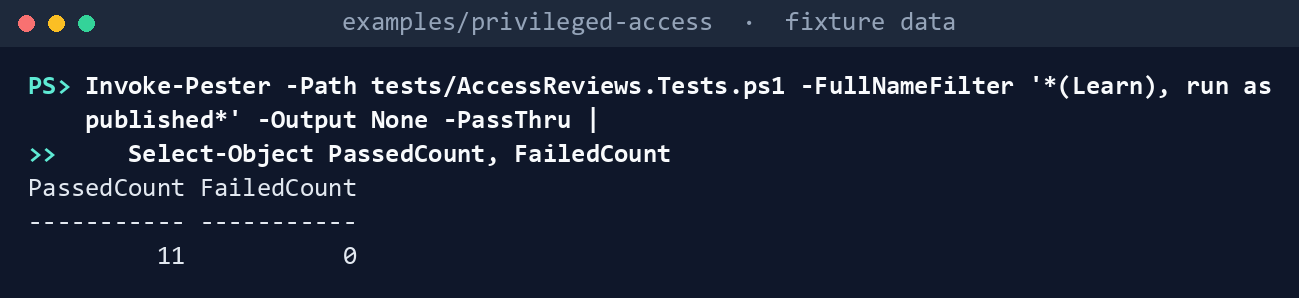
What the terminal shows, run on the kit’s fixtures (the same output as text) PassedCount 11,FailedCount 0. Read the third test: the tutorial’s POST, sent twice, leaves two series with the same name.List each task’s permissions:
Import-Module ./powershell/PaAccessReviews/PaAccessReviews.psm1
'access-reviews-plan', 'access-reviews-apply', 'access-reviews-evidence' | ForEach-Object { Get-PaArRequiredPermission -Task $_ } |
    Format-Table Task, GraphPermissions, AzureRoles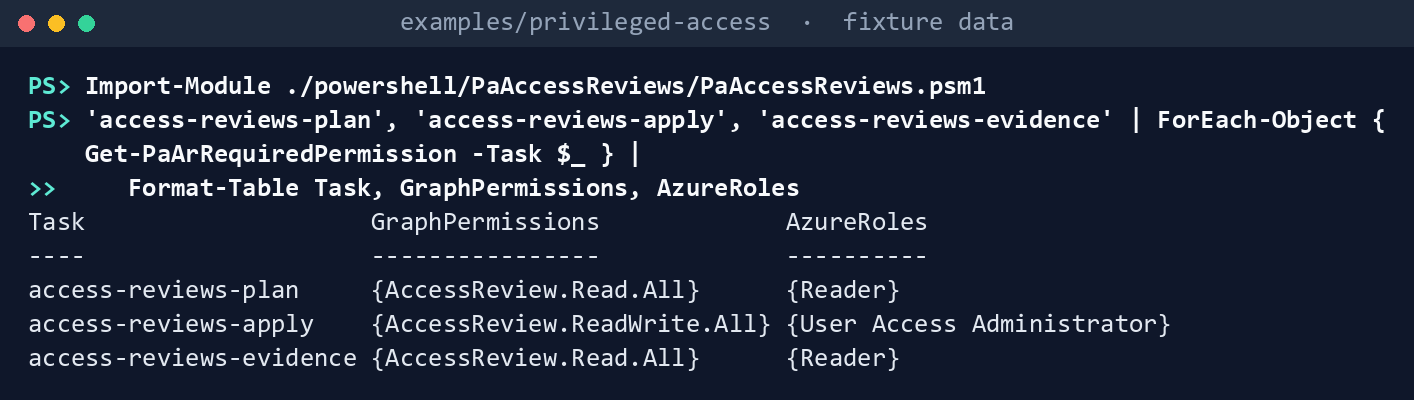
What the terminal shows, run on the kit’s fixtures (the same output as text) AccessReview.Read.Alland Reader for the plan and the evidence;AccessReview.ReadWrite.Alland User Access Administrator for apply.Run the dry run:
./Invoke-PaAccessReviews.ps1 -Cloud gcc -Mode Plan -ConfigPath tests/fixtures/ch07/access-reviews.json `
    -FixturePath tests/fixtures/ch07/tenant.json -AsOf 2026-10-30 -OutputPath out/reviews-plan
Plan: 1 Create, 2 Update, 1 Replace, 3 NoChange, 1 Unmanaged Checks: 0 Finding, 1 Warn, 1 Info Dry run: nothing sent (2 write(s) would be sent with -Apply) Written to out/reviews-plan (manifest.json lists every request and file hash)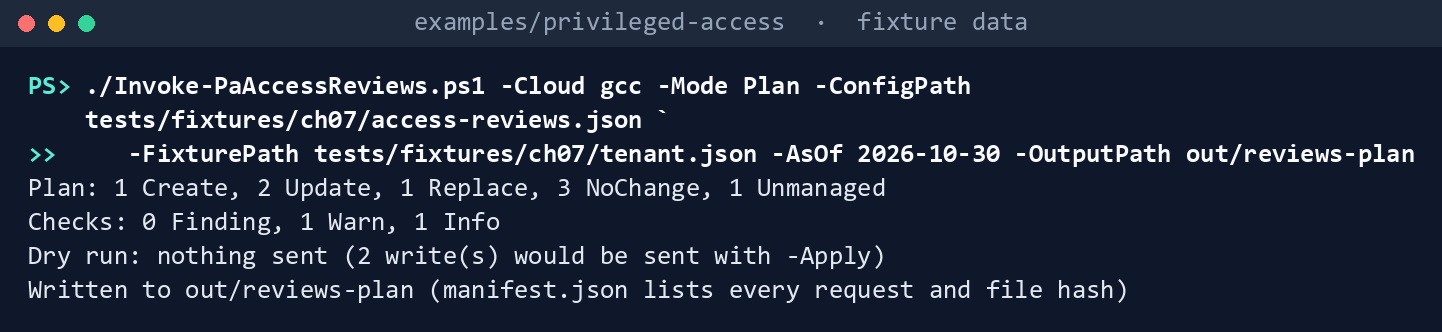
What the terminal shows, run on the kit’s fixtures (the same output as text) Read the diff:
Get-Content out/reviews-plan/plan.json -Raw | ConvertFrom-Json | Format-Table name, action, @{ n = 'changes'; e = { $_.changes -join ', ' } }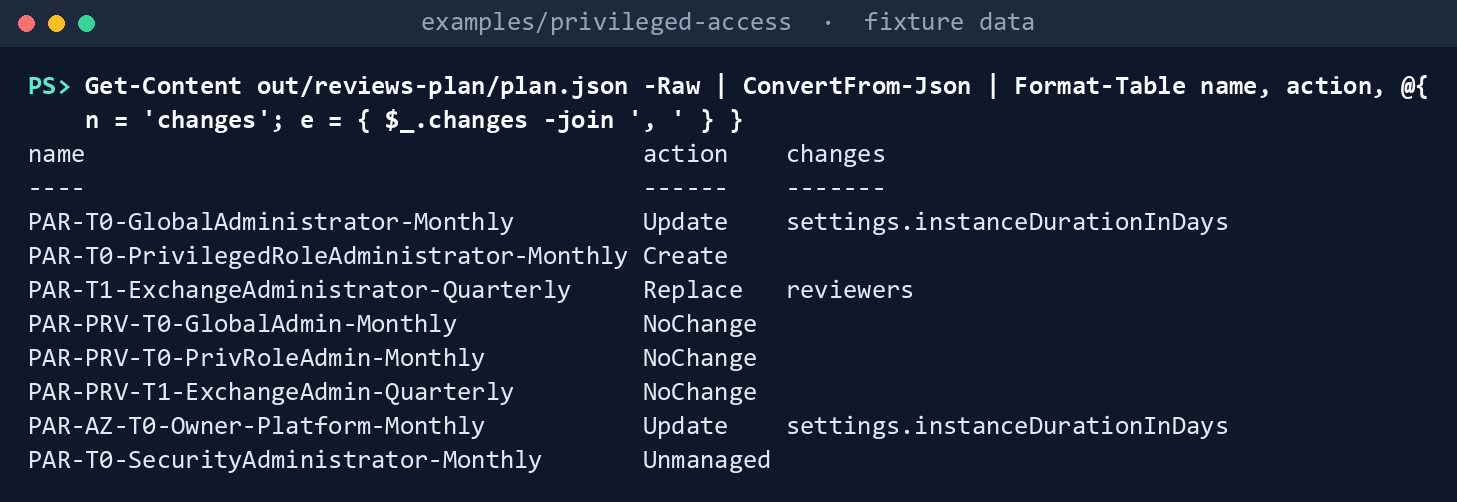
What the terminal shows, run on the kit’s fixtures (the same output as text) Global Administrator and the Azure Owner series: Update,
settings.instanceDurationInDays(the tenant has 7 days, the JSON 14). Privileged Role Administrator: Create. Exchange: Replace,reviewers(an old reviewer group). The threePRV-*membership series: NoChange.PAR-T0-SecurityAdministrator-Monthly, made by hand in the portal: Unmanaged. The application review without the prefix isn’t listed. The two writes the dry run counts are the Graph ones; the Azure update needs-IncludePreview.bodies/holds each request body for review.Check Learn’s body with the example’s rules:
. ./tests/AccessReviewsSampleHarness.ps1
Test-PaArDefinition -Body (Get-ArTutorialCreateRequest).Body -AsOf 2026-10-30 | Format-Table Rule, Severity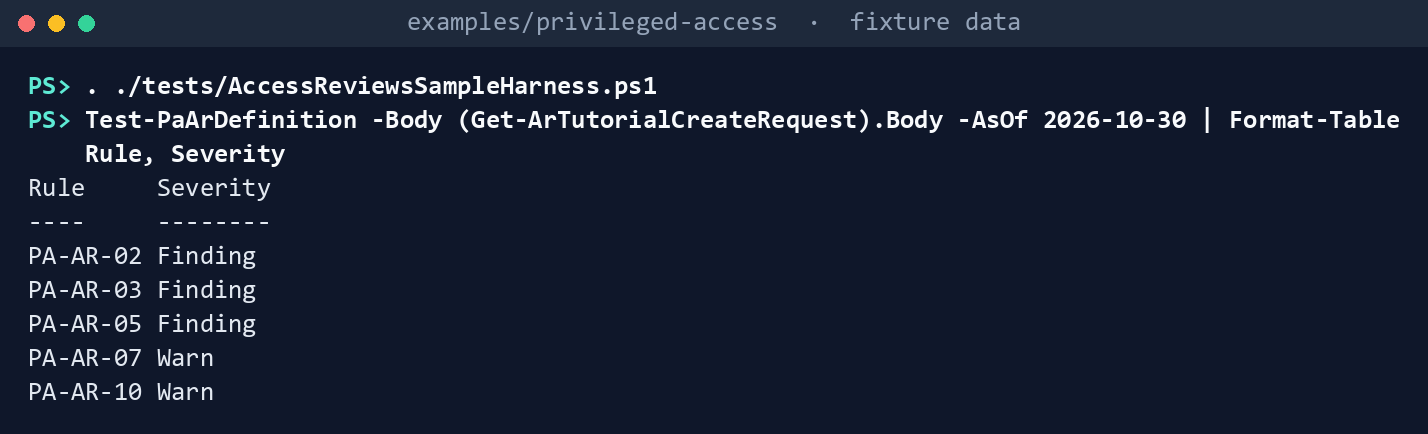
What the terminal shows, run on the kit’s fixtures (the same output as text) PA-AR-02, PA-AR-03 and PA-AR-05 as Findings, PA-AR-07 and PA-AR-10 as Warns.
Apply in the fake:
./Invoke-PaAccessReviews.ps1 -Cloud gcc -Mode Plan -ConfigPath tests/fixtures/ch07/access-reviews.json `
    -FixturePath tests/fixtures/ch07/tenant.json -AsOf 2026-10-30 -OutputPath out/reviews-apply -Apply
Get-Content out/reviews-apply/results.json -Raw | ConvertFrom-Json | Format-Table Name, Action, Result, Note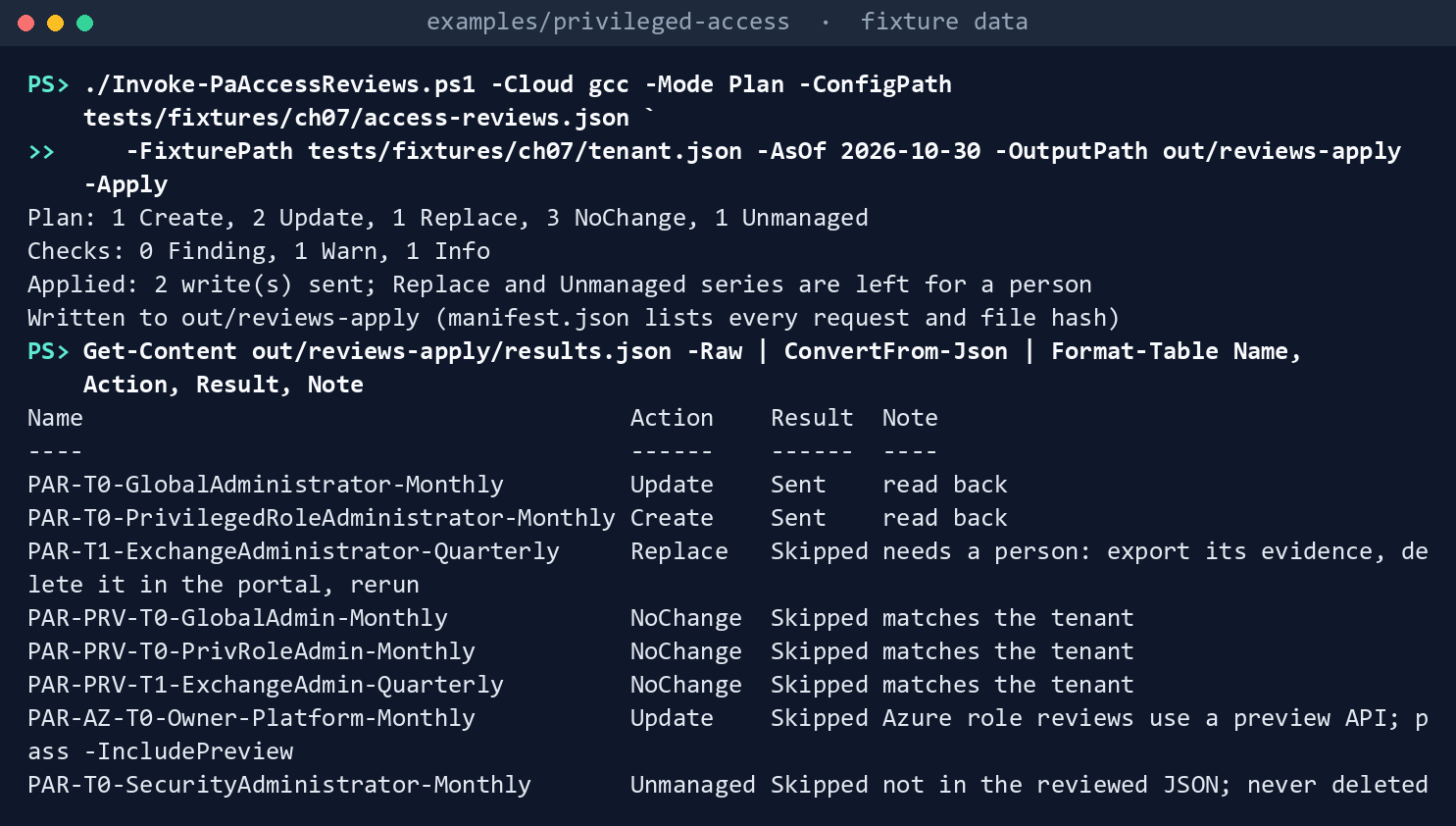
What the terminal shows, run on the kit’s fixtures (the same output as text) Applied: 2 write(s) sent; Replace and Unmanaged series are left for a person. Global Administrator and Privileged Role Administrator areSent,read back; Exchange, the threePRV-*series, the Azure series and the unmanaged one areSkipped, each with its reason. The fake starts from the fixture on every run, so nothing carries over to the next step.Read the evidence:
./Invoke-PaAccessReviews.ps1 -Cloud gcc -Mode Evidence -ConfigPath tests/fixtures/ch07/access-reviews.json `
    -FixturePath tests/fixtures/ch07/tenant.json -AsOf 2026-10-30 -OutputPath out/reviews-evidence
Get-Content out/reviews-evidence/findings.json -Raw | ConvertFrom-Json | Format-Table Rule, Severity, Object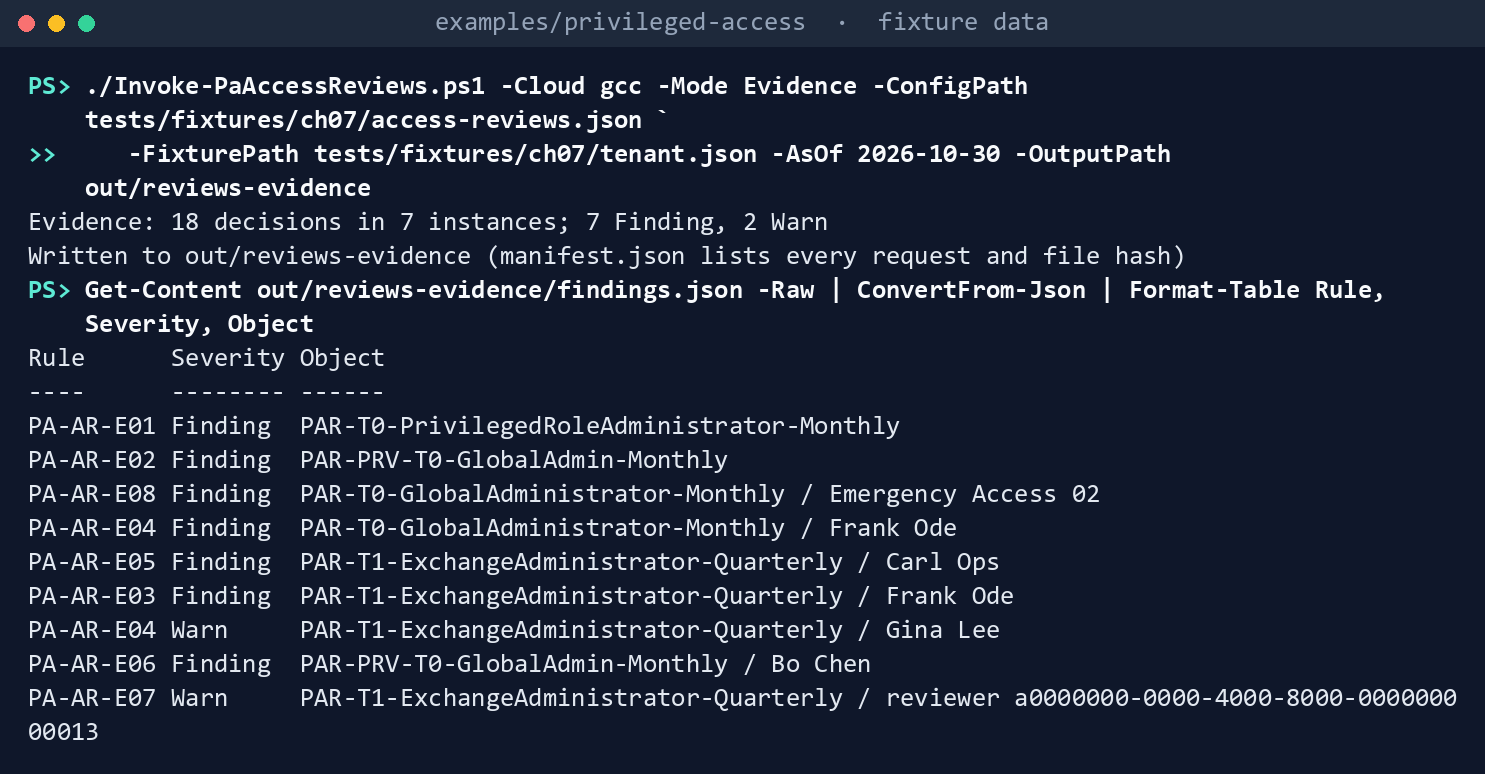
What the terminal shows, run on the kit’s fixtures (the same output as text) Evidence: 18 decisions in 7 instances; 7 Finding, 2 Warn. PA-AR-E01 for Privileged Role Administrator (not in this tenant yet), PA-AR-E02 forPRV-T0-GlobalAdmin(its last review ended September 15), PA-AR-E08 forEmergency Access 02(denied in October), PA-AR-E04 for Frank Ode (unreviewed, Tier 0) and as a Warn for Gina Lee (Tier 1), PA-AR-E05 for Carl Ops, PA-AR-E03 for Frank Ode’s Exchange denial that didn’t apply, PA-AR-E06 for Bo Chen, who approved himself, and PA-AR-E07 for one Exchange reviewer’s five approvals in two minutes.See the lockout guard:
$c = Read-PaArConfig tests/fixtures/ch07/access-reviews.json
($c.reviews | Where-Object name -EQ 'PAR-T0-GlobalAdministrator-Monthly').defaultDecision = 'Deny'
$client = New-PaArClient -Cloud gcc -Task access-reviews-apply -Invoke (New-PaArFake -Path tests/fixtures/ch07/tenant.json).Invoke
Invoke-PaArApply -Client $client -Plan (Get-PaArPlan -Client $client -Config $c -AsOf 2026-10-30) -Apply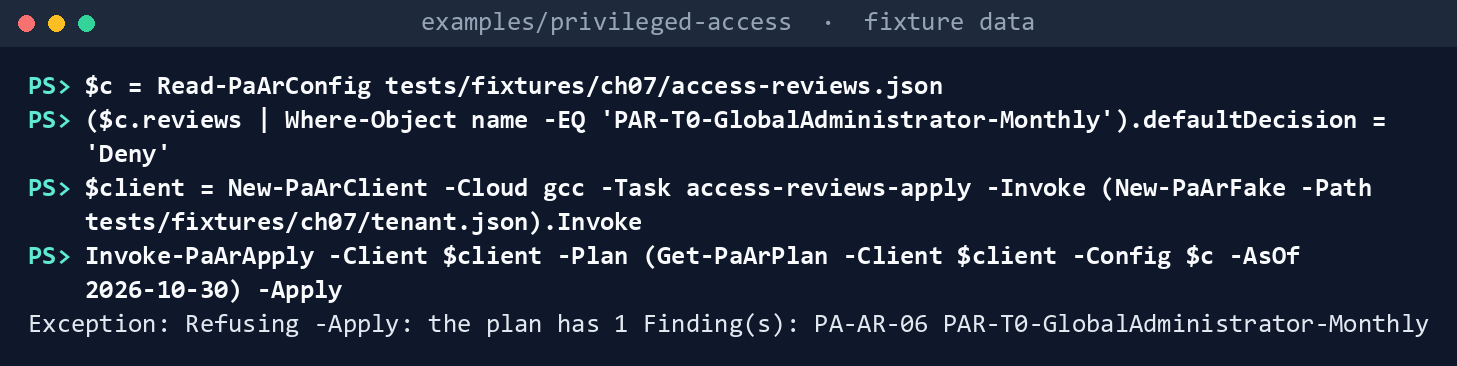
What the terminal shows, run on the kit’s fixtures (the same output as text) Refusing -Apply: the plan has 1 Finding(s): PA-AR-06 PAR-T0-GlobalAdministrator-Monthly. Nothing is sent.Run the tests:
Invoke-Pester -Path tests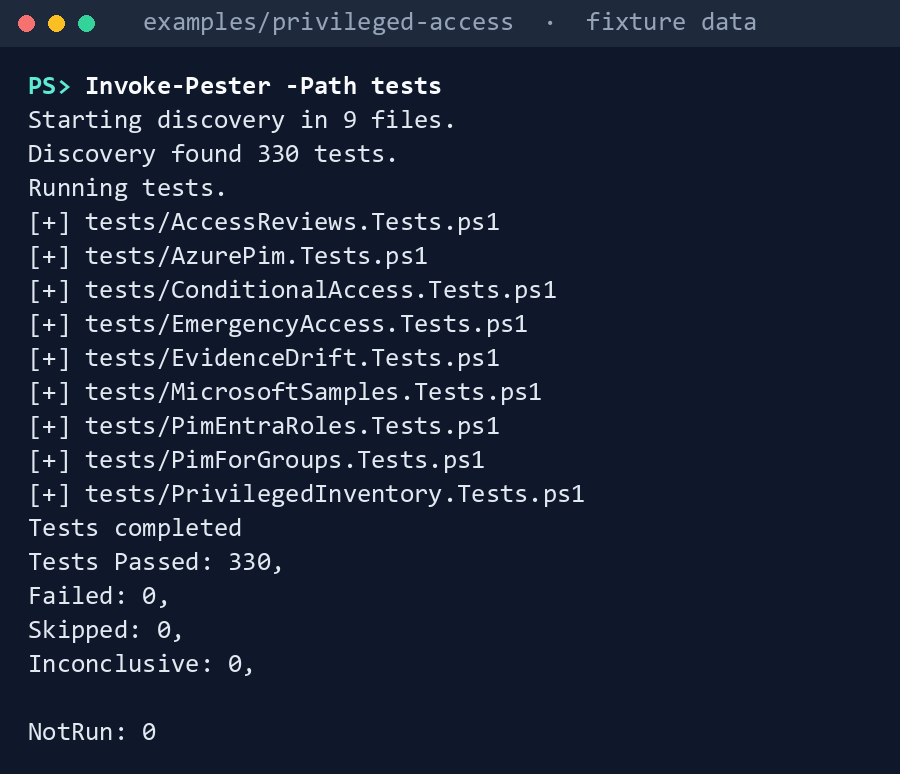
What the terminal shows, run on the kit’s fixtures (the same output as text)
Expected result: 330 tests passing, and each row of the gap table seen with your own eyes.
When you’re done, delete out; the evidence folder names people:
Remove-Item -Recurse -Force out
Lab 2: test tenant
Use a test tenant in the worldwide or GCC cloud with Microsoft Entra ID Governance (a trial will do) and, for step 6, a test Azure subscription. Never production. Pick a role with no real holders, for example a test user made eligible for Reports Reader, not Global Administrator. Work in examples/privileged-access. You’ll replace: <tenant-id> (the test tenant’s ID), <reader-app-id>, <applier-app-id> and <thumbprint> (the two apps from step 1 and the certificate’s thumbprint; if each app has its own certificate, use its thumbprint), <reviewer-group-id> and <fallback-group-id> (the groups from step 1) and <ea1-object-id> and <ea2-object-id> (the test emergency accounts, from Chapter 02, Lab 2).
Every command in this lab, in order, from examples/privileged-access. Each step below says what it does and what to look for.
# Step 2: Write a test JSON
$c = Get-Content tests/fixtures/ch07/access-reviews.json -Raw | ConvertFrom-Json
$c.emergencyAccountIds = @('<ea1-object-id>', '<ea2-object-id>')
$c.defaults.startDate = (Get-Date).ToUniversalTime().ToString('yyyy-MM-dd')
$c.defaults.instanceDurationInDays = 1
$c.reviews = @([pscustomobject]@{ name = 'PAR-RO-ReportsReader-Lab'; kind = 'entraRole'; tier = 'RO'; roleTemplateId = '4a5d8f65-41da-4de4-8968-e035b65339cf'
    eligibleGroupIds = @(); assignments = 'activeAndEligible'; cadence = 'quarterly'
    reviewers = @(@{ group = '<reviewer-group-id>' }); fallbackReviewers = @(@{ group = '<fallback-group-id>' })
    descriptionForReviewers = 'Lab review of the test role. Approve only the test user.' })
$c | ConvertTo-Json -Depth 8 | Set-Content test-reviews.json

# Step 2: Write a test JSON
Connect-MgGraph -Environment Global -TenantId <tenant-id> -ClientId <reader-app-id> -CertificateThumbprint <thumbprint>
./Invoke-PaAccessReviews.ps1 -Cloud gcc -Mode Plan -ConfigPath test-reviews.json -OutputPath out/t-plan -SkipAzure -TenantId <tenant-id>

# Step 3: Apply as the applier
Get-ChildItem out/t-plan/bodies | ForEach-Object { $_.Name; Get-Content $_.FullName }
Connect-MgGraph -Environment Global -TenantId <tenant-id> -ClientId <applier-app-id> -CertificateThumbprint <thumbprint>
./Invoke-PaAccessReviews.ps1 -Cloud gcc -Mode Plan -ConfigPath test-reviews.json -OutputPath out/t-apply -SkipAzure -TenantId <tenant-id> -Apply
Get-Content out/t-apply/results.json -Raw | ConvertFrom-Json | Format-Table Name, Action, Result, Note

# Step 3: Apply as the applier
./Invoke-PaAccessReviews.ps1 -Cloud gcc -Mode Plan -ConfigPath test-reviews.json -OutputPath out/t-plan2 -SkipAzure -TenantId <tenant-id>

# Step 3: Apply as the applier
$c = Get-Content test-reviews.json -Raw | ConvertFrom-Json
$c.defaults.instanceDurationInDays = 2
$c | ConvertTo-Json -Depth 8 | Set-Content test-reviews.json
./Invoke-PaAccessReviews.ps1 -Cloud gcc -Mode Plan -ConfigPath test-reviews.json -OutputPath out/t-apply2 -SkipAzure -TenantId <tenant-id> -Apply

# Step 5: Read the evidence
Connect-MgGraph -Environment Global -TenantId <tenant-id> -ClientId <reader-app-id> -CertificateThumbprint <thumbprint>
./Invoke-PaAccessReviews.ps1 -Cloud gcc -Mode Evidence -ConfigPath test-reviews.json -OutputPath out/t-evidence -SkipAzure -TenantId <tenant-id>
Import-Csv out/t-evidence/decisions.csv | Format-List

# Step 6: Optional, Azure (preview)
Connect-AzAccount -Environment AzureCloud -Tenant <tenant-id>
Connect-MgGraph -Environment Global -TenantId <tenant-id> -ClientId <applier-app-id> -CertificateThumbprint <thumbprint>
./Invoke-PaAccessReviews.ps1 -Cloud gcc -Mode Plan -ConfigPath test-reviews.json -OutputPath out/t-azure -TenantId <tenant-id> -Apply -IncludePreview

# Step 7: Back out
Remove-Item -Recurse -Force out/t-*
Register two apps in the worldwide admin center, each with a certificate: a reader with
AccessReview.Read.All, and an applier withAccessReview.ReadWrite.All, both with admin consent and nothing else. For each app:- Open Entra ID > App registrations > New registration, name the app and select Register.
- In the app, open Certificates & secrets > Certificates > Upload certificate and upload the certificate’s public key.
- Open API permissions > Add a permission > Microsoft Graph > Application permissions, select the app’s one permission, then Add permissions and Grant admin consent for your tenant.
Make a reviewer group and a fallback group with test users in them.
Write a test JSON with one Entra role series for the test role, today’s date as
startDate, a 1-day duration, and your groups’ IDs. The first block starts from the fixture’s file, keeps its defaults, and replaces its series with one quarterly series for Reports Reader (4a5d8f65-41da-4de4-8968-e035b65339cf, tierROinconfig/tiers.json). The second runs the dry run as the reader:$c = Get-Content tests/fixtures/ch07/access-reviews.json -Raw | ConvertFrom-Json $c.emergencyAccountIds = @('<ea1-object-id>', '<ea2-object-id>') $c.defaults.startDate = (Get-Date).ToUniversalTime().ToString('yyyy-MM-dd') $c.defaults.instanceDurationInDays = 1 $c.reviews = @([pscustomobject]@{ name = 'PAR-RO-ReportsReader-Lab'; kind = 'entraRole'; tier = 'RO'; roleTemplateId = '4a5d8f65-41da-4de4-8968-e035b65339cf' eligibleGroupIds = @(); assignments = 'activeAndEligible'; cadence = 'quarterly' reviewers = @(@{ group = '<reviewer-group-id>' }); fallbackReviewers = @(@{ group = '<fallback-group-id>' }) descriptionForReviewers = 'Lab review of the test role. Approve only the test user.' }) $c | ConvertTo-Json -Depth 8 | Set-Content test-reviews.jsonConnect-MgGraph -Environment Global -TenantId <tenant-id> -ClientId <reader-app-id> -CertificateThumbprint <thumbprint> ./Invoke-PaAccessReviews.ps1 -Cloud gcc -Mode Plan -ConfigPath test-reviews.json -OutputPath out/t-plan -SkipAzure -TenantId <tenant-id>Expect
1 Createand a PA-AR-10 Warn if the date has passed in UTC.Apply as the applier, after a second person reads
bodies/:Get-ChildItem out/t-plan/bodies | ForEach-Object { $_.Name; Get-Content $_.FullName } Connect-MgGraph -Environment Global -TenantId <tenant-id> -ClientId <applier-app-id> -CertificateThumbprint <thumbprint> ./Invoke-PaAccessReviews.ps1 -Cloud gcc -Mode Plan -ConfigPath test-reviews.json -OutputPath out/t-apply -SkipAzure -TenantId <tenant-id> -Apply Get-Content out/t-apply/results.json -Raw | ConvertFrom-Json | Format-Table Name, Action, Result, NoteExpect
Sent,read back. Run the dry run again; expectNoChange:./Invoke-PaAccessReviews.ps1 -Cloud gcc -Mode Plan -ConfigPath test-reviews.json -OutputPath out/t-plan2 -SkipAzure -TenantId <tenant-id>Change
instanceDurationInDays(the first three lines set it to 2), apply, and confirm an Update with group reviewers succeeds (research gaps, row 79):$c = Get-Content test-reviews.json -Raw | ConvertFrom-Json $c.defaults.instanceDurationInDays = 2 $c | ConvertTo-Json -Depth 8 | Set-Content test-reviews.json ./Invoke-PaAccessReviews.ps1 -Cloud gcc -Mode Plan -ConfigPath test-reviews.json -OutputPath out/t-apply2 -SkipAzure -TenantId <tenant-id> -ApplyReview and close one instance. As a test reviewer, approve the test user in My Access with a justification;49 then stop the instance in the admin center so it completes and applies.50
Read the evidence as the reader:
Connect-MgGraph -Environment Global -TenantId <tenant-id> -ClientId <reader-app-id> -CertificateThumbprint <thumbprint> ./Invoke-PaAccessReviews.ps1 -Cloud gcc -Mode Evidence -ConfigPath test-reviews.json -OutputPath out/t-evidence -SkipAzure -TenantId <tenant-id> Import-Csv out/t-evidence/decisions.csv | Format-Listdecisions.csvholds one row with your decision and its apply result. Note whether the decisions response carried@odata.nextLink(row 77).Optional, Azure (preview). Add an Azure series for a test role to
test-reviews.json, in the shape of the fixture’sPAR-AZ-T0-Owner-Platform-Monthly, then sign in as User Access Administrator on the test subscription and apply with the preview series included:Connect-AzAccount -Environment AzureCloud -Tenant <tenant-id> Connect-MgGraph -Environment Global -TenantId <tenant-id> -ClientId <applier-app-id> -CertificateThumbprint <thumbprint> ./Invoke-PaAccessReviews.ps1 -Cloud gcc -Mode Plan -ConfigPath test-reviews.json -OutputPath out/t-azure -TenantId <tenant-id> -Apply -IncludePreviewIn PIM, Azure resources, check that the review shows the subscription, the role and eligible assignments (row 71).
Back out. Export the evidence first. Then delete the test series in the admin center (the code never deletes) and the Azure series in PIM; remove the test user’s eligibility; delete both apps, their certificates and the test groups; and delete
out/t-*.Remove-Item -Recurse -Force out/t-*
Verified facts
| Item | Value | US Government clouds | Stage | Source |
|---|---|---|---|---|
| Create a definition | POST /identityGovernance/accessReviews/definitions; AccessReview.ReadWrite.All; descriptionForReviewers required, up to 256 characters in email |
Global, L4, L5 | v1.0 | 51 |
| Update a definition | PUT, the full object; future instances only; reviewers only if individual users; no scope in the updatable list |
Global, L4, L5 | v1.0 | 52 |
| List definitions, instances, decisions | AccessReview.Read.All; role reviews readable by Security Reader, Identity Governance Administrator, Privileged Role Administrator, Security Administrator; default page 100, $skip and $top |
Global, L4, L5 | v1.0 | 53 54 55 |
$filter on definitions |
contains on the scope query; not supported on principalResourceMembershipsScope |
— | v1.0 | 56 |
| Role review scopes | Users and groups, active and eligible (tutorial); eligible-only and active-only for users (Example 12.2); group transitive members (Example 1) | — | v1.0 | 57 58 |
| Reviewers | Empty is a self-review; group members as reviewers (/groups/{id}/transitiveMembers) |
— | v1.0 | 59 |
| Settings | Auto-apply defaults to false; default decision Approve, Deny or Recommendation; caution that both together can revoke all access; recurrence supports type, interval, dayOfMonth only |
— | v1.0 | 60 |
| Decision item | decision: Approve, Deny, NotReviewed, DontKnow; applyResult: New, AppliedSuccessfully, AppliedWithUnknownFailure, AppliedSuccessfullyButObjectNotFound, ApplyNotSupported |
— | v1.0 | 61 |
| PIM role reviews | One review per role; monthly duration at most 27 days; Entra role reviews need at least Privileged Role Administrator, Azure ones Owner or User Access Administrator; groups on Entra roles shown unexpanded; Azure groups expanded but denied members stay in the group | — | GA | 62 |
| PIM for Groups reviews | Eligible and active members; owners as reviewers need a fallback | Not stated | Preview | 63 |
| Azure role review definitions | Microsoft.Authorization/accessReviewScheduleDefinitions, PUT by ID at a subscription; reviewers users or service principals; scope assignmentState eligible or active |
Not confirmed | Preview (2021-12-01-preview; every listed version is a preview) |
64 65 66 |
| Azure instances and decisions | List at the definition and instance; decisions have applyResult and reviewedBy.principalId |
Not confirmed | Preview | 67 68 |
| Licenses | ID Governance for member users who review or are reviewed; some capabilities on P2; PIM for Groups reviews need Governance; service principal reviews also need Workload ID Premium | ID Governance in GCC, GCC High, DoD | — | 69 70 71 |
| Graph hosts | graph.microsoft.com (global and GCC), graph.microsoft.us (GCC High), dod-graph.microsoft.us (DoD) |
— | — | 72 |
| Azure roles | Reader holds */read; User Access Administrator holds Microsoft.Authorization/* |
— | — | 73 74 |
Four places where Learn’s pages differ, recorded so a later edit doesn’t loosen the code:
- The role that creates a role review. The tutorial says at least Identity Governance Administrator;75 the API overview says User Administrator for create, update or delete;76 the PIM page says at least Privileged Role Administrator for reviews of Microsoft Entra roles.77 The program follows the PIM page, as Book 04, Chapter 08 does, and runs
-Applyas an app with the application permission (research gaps, row 78). - The role that reads a role review. The API overview lists Global Reader for reads;78 the list pages don’t list Global Reader for reviews of Microsoft Entra roles.79 The code’s delegated reader is Security Reader.
- The license. The tutorial asks for P2 or Governance;80 the licensing page asks for Governance for everyone who reviews or is reviewed.81 The program follows the licensing page.
- The longest review. The PIM page caps a monthly review at 27 days;82 the Graph settings page sets no cap.83 PA-AR-04 applies the cap to every monthly series.
Federal requirements and evidence
The review series and their decisions are the evidence for the plan’s tasks A2.7 and A3.7. Each row names the command or file that shows it. Every control named is in the NIST SP 800-53B Moderate baseline.84 AC-6(7) and AC-2 leave the review frequency to the organization; monthly for Tier 0 and quarterly for the rest is the program’s decision D-A6 (design guidance).
| What the output proves | Requirement it supports | KSI it aligns to | Who keeps it |
|---|---|---|---|
Learn’s tutorial runs against the fake as published, and the kit’s own code passes its tests: Lab 1, steps 1 and 9 (Invoke-Pester) |
CM-3(2), testing and validation of changes | KSI-CMT-VTD | The repository’s test runs |
Planning and evidence need AccessReview.Read.All and Reader; only applying needs the write permission and User Access Administrator: Lab 1, step 2 (Get-PaArRequiredPermission) |
AC-6, least privilege for each identity | KSI-IAM-ELP | Identity engineering, with each app’s consent record |
What a run would create or update, the exact bodies, and the series it leaves to a person: plan.json, findings.json, results.json and bodies/ from Lab 1, step 3, read in step 4 |
CM-3, configuration change control: the change is reviewed before it is made | KSI-CMT-LMC, KSI-CMT-RMV | The pull request, with the bodies attached |
Every privileged role and PRV group has a series with reviewers who aren’t the assignees, a fallback, auto-apply, justification, and the tier’s cadence: PA-AR-01, 02, 05, 08, 09 and 14 in findings.json |
AC-6(7), review of user privileges; AC-2, account review | KSI-IAM-AAM, KSI-IAM-JIT | Identity engineering, in the repository |
Learn’s tutorial body fails the program’s rules, starting with no reviewers, which Graph treats as a self-review: Lab 1, step 5 (Test-PaArDefinition) |
AC-6(7); AC-5, separation of duties | KSI-IAM-JIT | Identity engineering |
An apply creates and updates series and never deletes: Lab 1, step 6, out/reviews-apply/results.json |
CM-3, approved changes implemented and recorded | KSI-CMT-LMC | The ISSO, beside the files the manifest lists |
Each decision with its reviewer, justification and apply result, each instance, and what went wrong: missing series, overdue instances, denials not applied, silent defaults, approvals without a reason, self-reviews, bulk decisions, a denied emergency account: decisions.csv, instances.json and PA-AR-E01 to E08 in findings.json from Lab 1, step 7 |
AC-6(7); AC-2, accounts removed when access is no longer needed; AC-5 (PA-AR-E06) | KSI-IAM-AAM, KSI-IAM-JIT | The ISSO; the rows name people, so the folder goes to the access-controlled evidence store |
| A review that would remove the emergency accounts’ Global Administrator on silence is refused: Lab 1, step 8, PA-AR-06 | AC-2: the emergency accounts stay usable (design guidance, research gaps row 74) | KSI-IAM-JIT | The repository’s test runs |
A live dry run of one test series, as the reader app: Lab 2, step 2, out/t-plan |
CM-3 | KSI-CMT-LMC | Identity engineering |
A second person reads the bodies, the applier creates the series, a rerun finds no change, and an update is a PUT: Lab 2, step 3, out/t-apply/results.json, out/t-plan2 and out/t-apply2 |
CM-3; AC-5, a reader and an applier that are different identities | KSI-CMT-LMC, KSI-IAM-JIT | The ISSO |
A real closed instance, with the reviewer’s decision and justification: Lab 2, step 5, out/t-evidence/decisions.csv |
AC-6(7); AC-2 | KSI-IAM-AAM, KSI-IAM-JIT | The ISSO |
An Azure role series, through the preview API: Lab 2, step 6, out/t-azure |
AC-6(7) for Azure roles | KSI-IAM-AAM, KSI-IAM-JIT | Identity engineering |
| The evidence is exported before the series is deleted, then the lab folders are removed: Lab 2, step 7 | AU-11, audit record retention: deleting a definition deletes its decisions | KSI-MLA-OSM | The ISSO, in the evidence store |
KSIs are FedRAMP 20x indicators for cloud service providers.85 The agency authorizes its own system and lines this evidence up with what its providers report against those indicators; it doesn’t report KSIs itself (Book 00, Appendix B). Book 04, Chapter 10 carries the control-by-control mapping.
Dangers
| Danger | What happens | The guard |
|---|---|---|
| “Remove access” on silence over the emergency accounts’ Global Administrator | One missed month removes the accounts the program keeps for the day everything else fails | PA-AR-06 refuses -Apply; PA-AR-E08 flags a denial; Chapter 02’s PA-EA-05 sees the loss on the next run |
| A self-review | Assignees approve themselves; role-assignable groups drop out of a self-review of an Entra role86 | PA-AR-01; PA-AR-E06 |
| One reviewer, no fallback | The review stalls when that person leaves | Reviewer groups; PA-AR-02 |
| Auto-apply off | Denials change nothing | PA-AR-05; PA-AR-E03 for denials that didn’t apply |
| A rerun of a POST | Two series with one name, split evidence | The dry run reads first; PA-AR-12 stops -Apply |
| A scope change sent as an update | Learn’s update API doesn’t list scope among the properties it takes, so the change can’t be made in place | Replace, left to a person |
| Deleting a series to replace it | Its instances and decisions go with it | The code never deletes; Lab 2 exports evidence first |
| A role held by a group | A role review would approve the group, not its members | Role series cover users; each PRV-* group has its own membership series, and PA-AR-14 flags one that’s missing |
| An Azure role held by a group | A denied user stays in the group87 | PA-AR-E03 doesn’t see it; Chapter 01’s inventory and the group’s owner do |
| Bulk approval | Decisions without reading | PA-AR-E07; justification required (PA-AR-08) |
| A preview API changes | Azure series fail or change shape | -IncludePreview only; Lab 2 step 6; the source watch on the tutorial |
| A write permission on a read-only job | A compromised reader can change reviews | Separate tasks and identities; tests pin the permissions |
| Evidence names people | decisions.csv holds names and UPNs |
Treat the output folder as evidence; delete lab copies |
Checklist
Footnotes
Microsoft Learn, “Complete an access review of Azure resource and Microsoft Entra roles in PIM,” stop and apply an access review, and the results note on role-assignable groups, https://learn.microsoft.com/entra/id-governance/privileged-identity-management/pim-complete-roles-and-resource-roles-review (accessed Nov 9, 2026).↩︎
Microsoft Learn, “Plan a Microsoft Entra access reviews deployment,” plan review of Microsoft Entra ID and Azure resource roles; use the access reviews API, https://learn.microsoft.com/entra/id-governance/deploy-access-reviews (accessed Oct 30, 2026).↩︎
Microsoft Learn, “Overview of access reviews APIs,” role and application permission authorization checks, https://learn.microsoft.com/graph/api/resources/accessreviewsv2-overview?view=graph-rest-1.0 (accessed Oct 30, 2026).↩︎
Microsoft Learn, “Microsoft Entra ID Governance licensing fundamentals,” features by license and access reviews, https://learn.microsoft.com/entra/id-governance/licensing-fundamentals (accessed Oct 30, 2026).↩︎
Microsoft Learn, “Review access to administrative roles using access reviews APIs,” https://learn.microsoft.com/graph/tutorial-accessreviews-roleassignments (accessed Oct 30, 2026).↩︎
Microsoft Learn, “Create an access review of Azure resource and Microsoft Entra roles in PIM,” https://learn.microsoft.com/entra/id-governance/privileged-identity-management/pim-create-roles-and-resource-roles-review (accessed Oct 30, 2026).↩︎
Microsoft Learn, “Microsoft Entra feature availability,” other Microsoft Entra products, https://learn.microsoft.com/entra/identity/authentication/feature-availability (accessed Oct 30, 2026).↩︎
Microsoft Learn, “Create definitions,” permissions and request body, https://learn.microsoft.com/graph/api/accessreviewset-post-definitions?view=graph-rest-1.0 (accessed Oct 30, 2026).↩︎
Microsoft Learn, “List decisions,” https://learn.microsoft.com/graph/api/accessreviewinstance-list-decisions?view=graph-rest-1.0 (accessed Oct 30, 2026).↩︎
Microsoft Learn, “Microsoft Graph national cloud deployments,” https://learn.microsoft.com/graph/deployments (accessed Oct 30, 2026).↩︎
Microsoft Learn, “Microsoft.Authorization accessReviewScheduleDefinitions 2021-12-01-preview” (ARM template reference, version list), https://learn.microsoft.com/azure/templates/microsoft.authorization/2021-12-01-preview/accessreviewscheduledefinitions (accessed Oct 30, 2026).↩︎
Microsoft Learn, “Review access to administrative roles using access reviews APIs,” https://learn.microsoft.com/graph/tutorial-accessreviews-roleassignments (accessed Oct 30, 2026).↩︎
Microsoft Learn, “Configure access review scope by using Microsoft Graph APIs,” examples 1, 11 and 12, https://learn.microsoft.com/graph/accessreviews-scope-concept (accessed Oct 30, 2026).↩︎
Microsoft Learn, “Configure access reviewers using access reviews APIs,” https://learn.microsoft.com/graph/accessreviews-reviewers-concept (accessed Oct 30, 2026).↩︎
Microsoft, microsoftgraph/microsoft-graph-docs-contrib,
concepts/tutorial-accessreviews-roleassignments.mdat commita69303123e9701eecbf56568d152ece936a97f1e(October 30, 2026; the page last changed July 3, 2026), CC BY 4.0 (documentation) and MIT (code), https://github.com/microsoftgraph/microsoft-graph-docs-contrib/blob/a69303123e9701eecbf56568d152ece936a97f1e/concepts/tutorial-accessreviews-roleassignments.md (accessed Oct 30, 2026); pinned copy inexamples/third_party/graph-access-reviews-roles-tutorial.↩︎Microsoft Learn, “Create definitions,” permissions and request body, https://learn.microsoft.com/graph/api/accessreviewset-post-definitions?view=graph-rest-1.0 (accessed Oct 30, 2026).↩︎
Microsoft Learn, “Configure access review scope by using Microsoft Graph APIs,” examples 1, 11 and 12, https://learn.microsoft.com/graph/accessreviews-scope-concept (accessed Oct 30, 2026).↩︎
Microsoft Learn, “Create an access review of PIM for Groups in Microsoft Entra ID (preview),” https://learn.microsoft.com/entra/id-governance/create-access-review-pim-for-groups (accessed Oct 30, 2026).↩︎
Microsoft Learn, “Configure access reviewers using access reviews APIs,” https://learn.microsoft.com/graph/accessreviews-reviewers-concept (accessed Oct 30, 2026).↩︎
Microsoft Learn, “accessReviewScheduleSettings resource type,” https://learn.microsoft.com/graph/api/resources/accessreviewschedulesettings?view=graph-rest-1.0 (accessed Oct 30, 2026).↩︎
Microsoft Learn, “accessReviewScheduleSettings resource type,” https://learn.microsoft.com/graph/api/resources/accessreviewschedulesettings?view=graph-rest-1.0 (accessed Oct 30, 2026).↩︎
Microsoft Learn, “Access Review Schedule Definitions - Create Or Update By Id” (REST, Authorization, 2021-12-01-preview), https://learn.microsoft.com/rest/api/authorization/access-review-schedule-definitions/create-or-update-by-id?view=rest-authorization-2021-12-01-preview (accessed Oct 31, 2026).↩︎
Microsoft Learn, “Microsoft.Authorization accessReviewScheduleDefinitions 2021-12-01-preview” (ARM template reference, version list), https://learn.microsoft.com/azure/templates/microsoft.authorization/2021-12-01-preview/accessreviewscheduledefinitions (accessed Oct 30, 2026).↩︎
Microsoft Learn, “Access Review Schedule Definitions - List” (REST, Authorization, 2021-12-01-preview), https://learn.microsoft.com/rest/api/authorization/access-review-schedule-definitions/list?view=rest-authorization-2021-12-01-preview (accessed Oct 30, 2026).↩︎
Microsoft Learn, “Access Review Schedule Definitions - Create Or Update By Id” (REST, Authorization, 2021-12-01-preview), https://learn.microsoft.com/rest/api/authorization/access-review-schedule-definitions/create-or-update-by-id?view=rest-authorization-2021-12-01-preview (accessed Oct 31, 2026).↩︎
Microsoft Learn, “Configure access reviewers using access reviews APIs,” https://learn.microsoft.com/graph/accessreviews-reviewers-concept (accessed Oct 30, 2026).↩︎
Microsoft Learn, “Create an access review of PIM for Groups in Microsoft Entra ID (preview),” https://learn.microsoft.com/entra/id-governance/create-access-review-pim-for-groups (accessed Oct 30, 2026).↩︎
Microsoft Learn, “Create definitions,” permissions and request body, https://learn.microsoft.com/graph/api/accessreviewset-post-definitions?view=graph-rest-1.0 (accessed Oct 30, 2026).↩︎
Microsoft Learn, “Create an access review of Azure resource and Microsoft Entra roles in PIM,” https://learn.microsoft.com/entra/id-governance/privileged-identity-management/pim-create-roles-and-resource-roles-review (accessed Oct 30, 2026).↩︎
Microsoft Learn, “accessReviewScheduleSettings resource type,” https://learn.microsoft.com/graph/api/resources/accessreviewschedulesettings?view=graph-rest-1.0 (accessed Oct 30, 2026).↩︎
Microsoft Learn, “Access Review Schedule Definitions - List” (REST, Authorization, 2021-12-01-preview), https://learn.microsoft.com/rest/api/authorization/access-review-schedule-definitions/list?view=rest-authorization-2021-12-01-preview (accessed Oct 30, 2026).↩︎
Microsoft Learn, “List definitions,” permissions and the
$filterquery parameter, https://learn.microsoft.com/graph/api/accessreviewset-list-definitions?view=graph-rest-1.0 (accessed Oct 30, 2026).↩︎Microsoft Learn, “Update accessReviewScheduleDefinition,” https://learn.microsoft.com/graph/api/accessreviewscheduledefinition-update?view=graph-rest-1.0 (accessed Oct 30, 2026).↩︎
Microsoft Learn, “Update accessReviewScheduleDefinition,” https://learn.microsoft.com/graph/api/accessreviewscheduledefinition-update?view=graph-rest-1.0 (accessed Oct 30, 2026).↩︎
Microsoft Learn, “Review access to administrative roles using access reviews APIs,” https://learn.microsoft.com/graph/tutorial-accessreviews-roleassignments (accessed Oct 30, 2026).↩︎
Microsoft Learn, “List definitions,” permissions and the
$filterquery parameter, https://learn.microsoft.com/graph/api/accessreviewset-list-definitions?view=graph-rest-1.0 (accessed Oct 30, 2026).↩︎Microsoft Learn, “List instances,” https://learn.microsoft.com/graph/api/accessreviewscheduledefinition-list-instances?view=graph-rest-1.0 (accessed Oct 30, 2026).↩︎
Microsoft Learn, “List decisions,” https://learn.microsoft.com/graph/api/accessreviewinstance-list-decisions?view=graph-rest-1.0 (accessed Oct 30, 2026).↩︎
Microsoft Learn, “Create definitions,” permissions and request body, https://learn.microsoft.com/graph/api/accessreviewset-post-definitions?view=graph-rest-1.0 (accessed Oct 30, 2026).↩︎
Microsoft Learn, “Create an access review of Azure resource and Microsoft Entra roles in PIM,” https://learn.microsoft.com/entra/id-governance/privileged-identity-management/pim-create-roles-and-resource-roles-review (accessed Oct 30, 2026).↩︎
Microsoft Learn, “Update accessReviewScheduleDefinition,” https://learn.microsoft.com/graph/api/accessreviewscheduledefinition-update?view=graph-rest-1.0 (accessed Oct 30, 2026).↩︎
Microsoft Learn, “Azure built-in roles for General,” Reader, https://learn.microsoft.com/azure/role-based-access-control/built-in-roles/general (accessed Oct 30, 2026).↩︎
Microsoft Learn, “Create an access review of Azure resource and Microsoft Entra roles in PIM,” https://learn.microsoft.com/entra/id-governance/privileged-identity-management/pim-create-roles-and-resource-roles-review (accessed Oct 30, 2026).↩︎
Microsoft Learn, “Azure built-in roles for Privileged,” User Access Administrator, https://learn.microsoft.com/azure/role-based-access-control/built-in-roles/privileged (accessed Oct 30, 2026).↩︎
Microsoft Learn, “Plan a Microsoft Entra access reviews deployment,” plan review of Microsoft Entra ID and Azure resource roles; use the access reviews API, https://learn.microsoft.com/entra/id-governance/deploy-access-reviews (accessed Oct 30, 2026).↩︎
Microsoft Learn, “List decisions,” https://learn.microsoft.com/graph/api/accessreviewinstance-list-decisions?view=graph-rest-1.0 (accessed Oct 30, 2026).↩︎
Microsoft Learn, “accessReviewInstanceDecisionItem resource type,” https://learn.microsoft.com/graph/api/resources/accessreviewinstancedecisionitem?view=graph-rest-1.0 (accessed Oct 30, 2026).↩︎
Microsoft Learn, “Access Review Instance Decisions - List” (REST, Authorization, 2021-12-01-preview), https://learn.microsoft.com/rest/api/authorization/access-review-instance-decisions/list?view=rest-authorization-2021-12-01-preview (accessed Oct 30, 2026).↩︎
Microsoft Learn, “Review access to groups & applications in access reviews,” review access for one or more users in My Access, https://learn.microsoft.com/entra/id-governance/perform-access-review (accessed Nov 9, 2026).↩︎
Microsoft Learn, “Complete an access review of Azure resource and Microsoft Entra roles in PIM,” stop and apply an access review, and the results note on role-assignable groups, https://learn.microsoft.com/entra/id-governance/privileged-identity-management/pim-complete-roles-and-resource-roles-review (accessed Nov 9, 2026).↩︎
Microsoft Learn, “Create definitions,” permissions and request body, https://learn.microsoft.com/graph/api/accessreviewset-post-definitions?view=graph-rest-1.0 (accessed Oct 30, 2026).↩︎
Microsoft Learn, “Update accessReviewScheduleDefinition,” https://learn.microsoft.com/graph/api/accessreviewscheduledefinition-update?view=graph-rest-1.0 (accessed Oct 30, 2026).↩︎
Microsoft Learn, “List definitions,” permissions and the
$filterquery parameter, https://learn.microsoft.com/graph/api/accessreviewset-list-definitions?view=graph-rest-1.0 (accessed Oct 30, 2026).↩︎Microsoft Learn, “List instances,” https://learn.microsoft.com/graph/api/accessreviewscheduledefinition-list-instances?view=graph-rest-1.0 (accessed Oct 30, 2026).↩︎
Microsoft Learn, “List decisions,” https://learn.microsoft.com/graph/api/accessreviewinstance-list-decisions?view=graph-rest-1.0 (accessed Oct 30, 2026).↩︎
Microsoft Learn, “List definitions,” permissions and the
$filterquery parameter, https://learn.microsoft.com/graph/api/accessreviewset-list-definitions?view=graph-rest-1.0 (accessed Oct 30, 2026).↩︎Microsoft Learn, “Review access to administrative roles using access reviews APIs,” https://learn.microsoft.com/graph/tutorial-accessreviews-roleassignments (accessed Oct 30, 2026).↩︎
Microsoft Learn, “Configure access review scope by using Microsoft Graph APIs,” examples 1, 11 and 12, https://learn.microsoft.com/graph/accessreviews-scope-concept (accessed Oct 30, 2026).↩︎
Microsoft Learn, “Configure access reviewers using access reviews APIs,” https://learn.microsoft.com/graph/accessreviews-reviewers-concept (accessed Oct 30, 2026).↩︎
Microsoft Learn, “accessReviewScheduleSettings resource type,” https://learn.microsoft.com/graph/api/resources/accessreviewschedulesettings?view=graph-rest-1.0 (accessed Oct 30, 2026).↩︎
Microsoft Learn, “accessReviewInstanceDecisionItem resource type,” https://learn.microsoft.com/graph/api/resources/accessreviewinstancedecisionitem?view=graph-rest-1.0 (accessed Oct 30, 2026).↩︎
Microsoft Learn, “Create an access review of Azure resource and Microsoft Entra roles in PIM,” https://learn.microsoft.com/entra/id-governance/privileged-identity-management/pim-create-roles-and-resource-roles-review (accessed Oct 30, 2026).↩︎
Microsoft Learn, “Create an access review of PIM for Groups in Microsoft Entra ID (preview),” https://learn.microsoft.com/entra/id-governance/create-access-review-pim-for-groups (accessed Oct 30, 2026).↩︎
Microsoft Learn, “Access Review Schedule Definitions - Create Or Update By Id” (REST, Authorization, 2021-12-01-preview), https://learn.microsoft.com/rest/api/authorization/access-review-schedule-definitions/create-or-update-by-id?view=rest-authorization-2021-12-01-preview (accessed Oct 31, 2026).↩︎
Microsoft Learn, “Access Review Schedule Definitions - List” (REST, Authorization, 2021-12-01-preview), https://learn.microsoft.com/rest/api/authorization/access-review-schedule-definitions/list?view=rest-authorization-2021-12-01-preview (accessed Oct 30, 2026).↩︎
Microsoft Learn, “Microsoft.Authorization accessReviewScheduleDefinitions 2021-12-01-preview” (ARM template reference, version list), https://learn.microsoft.com/azure/templates/microsoft.authorization/2021-12-01-preview/accessreviewscheduledefinitions (accessed Oct 30, 2026).↩︎
Microsoft Learn, “Access Review Instances - List” (REST, Authorization, 2021-12-01-preview), https://learn.microsoft.com/rest/api/authorization/access-review-instances/list?view=rest-authorization-2021-12-01-preview (accessed Oct 30, 2026).↩︎
Microsoft Learn, “Access Review Instance Decisions - List” (REST, Authorization, 2021-12-01-preview), https://learn.microsoft.com/rest/api/authorization/access-review-instance-decisions/list?view=rest-authorization-2021-12-01-preview (accessed Oct 30, 2026).↩︎
Microsoft Learn, “Microsoft Entra ID Governance licensing fundamentals,” features by license and access reviews, https://learn.microsoft.com/entra/id-governance/licensing-fundamentals (accessed Oct 30, 2026).↩︎
Microsoft Learn, “Create an access review of Azure resource and Microsoft Entra roles in PIM,” https://learn.microsoft.com/entra/id-governance/privileged-identity-management/pim-create-roles-and-resource-roles-review (accessed Oct 30, 2026).↩︎
Microsoft Learn, “Microsoft Entra feature availability,” other Microsoft Entra products, https://learn.microsoft.com/entra/identity/authentication/feature-availability (accessed Oct 30, 2026).↩︎
Microsoft Learn, “Microsoft Graph national cloud deployments,” https://learn.microsoft.com/graph/deployments (accessed Oct 30, 2026).↩︎
Microsoft Learn, “Azure built-in roles for General,” Reader, https://learn.microsoft.com/azure/role-based-access-control/built-in-roles/general (accessed Oct 30, 2026).↩︎
Microsoft Learn, “Azure built-in roles for Privileged,” User Access Administrator, https://learn.microsoft.com/azure/role-based-access-control/built-in-roles/privileged (accessed Oct 30, 2026).↩︎
Microsoft Learn, “Review access to administrative roles using access reviews APIs,” https://learn.microsoft.com/graph/tutorial-accessreviews-roleassignments (accessed Oct 30, 2026).↩︎
Microsoft Learn, “Overview of access reviews APIs,” role and application permission authorization checks, https://learn.microsoft.com/graph/api/resources/accessreviewsv2-overview?view=graph-rest-1.0 (accessed Oct 30, 2026).↩︎
Microsoft Learn, “Create an access review of Azure resource and Microsoft Entra roles in PIM,” https://learn.microsoft.com/entra/id-governance/privileged-identity-management/pim-create-roles-and-resource-roles-review (accessed Oct 30, 2026).↩︎
Microsoft Learn, “Overview of access reviews APIs,” role and application permission authorization checks, https://learn.microsoft.com/graph/api/resources/accessreviewsv2-overview?view=graph-rest-1.0 (accessed Oct 30, 2026).↩︎
Microsoft Learn, “List definitions,” permissions and the
$filterquery parameter, https://learn.microsoft.com/graph/api/accessreviewset-list-definitions?view=graph-rest-1.0 (accessed Oct 30, 2026).↩︎Microsoft Learn, “Review access to administrative roles using access reviews APIs,” https://learn.microsoft.com/graph/tutorial-accessreviews-roleassignments (accessed Oct 30, 2026).↩︎
Microsoft Learn, “Microsoft Entra ID Governance licensing fundamentals,” features by license and access reviews, https://learn.microsoft.com/entra/id-governance/licensing-fundamentals (accessed Oct 30, 2026).↩︎
Microsoft Learn, “Create an access review of Azure resource and Microsoft Entra roles in PIM,” https://learn.microsoft.com/entra/id-governance/privileged-identity-management/pim-create-roles-and-resource-roles-review (accessed Oct 30, 2026).↩︎
Microsoft Learn, “accessReviewScheduleSettings resource type,” https://learn.microsoft.com/graph/api/resources/accessreviewschedulesettings?view=graph-rest-1.0 (accessed Oct 30, 2026).↩︎
National Institute of Standards and Technology, SP 800-53B Moderate baseline, release 5.2.0 OSCAL profile (includes AC-2, AC-5, AC-6, AC-6(7), AU-11, CM-3 and CM-3(2)), https://github.com/usnistgov/oscal-content/blob/main/nist.gov/SP800-53/rev5/json/NIST_SP-800-53_rev5_MODERATE-baseline_profile.json (accessed Nov 2, 2026).↩︎
FedRAMP, “Key Security Indicators,” FedRAMP Consolidated Rules for 2026, indicator statements and “Related SP 800-53 Controls” for KSI-CMT-LMC, KSI-CMT-RMV, KSI-CMT-VTD, KSI-IAM-AAM, KSI-IAM-ELP, KSI-IAM-JIT and KSI-MLA-OSM, https://www.fedramp.gov/2026/reference/key-security-indicators/ (accessed Nov 2, 2026).↩︎
Microsoft Learn, “Create an access review of Azure resource and Microsoft Entra roles in PIM,” https://learn.microsoft.com/entra/id-governance/privileged-identity-management/pim-create-roles-and-resource-roles-review (accessed Oct 30, 2026).↩︎
Microsoft Learn, “Create an access review of Azure resource and Microsoft Entra roles in PIM,” https://learn.microsoft.com/entra/id-governance/privileged-identity-management/pim-create-roles-and-resource-roles-review (accessed Oct 30, 2026).↩︎