Federal Modernization Workbook
Chapter 01 — The Writer Register as Code
A rule that reads an attribute hands the decision to whoever can write it. The register names that writer; the audit log says whether anyone else did.
The code behind the guide’s Gate 1 and the plan’s tasks I1.2 and I1.4: one recorded writer for every account-state transition and every HR-mastered value, the other write paths removed, and an audit query saved for each protected value. You start with Learn’s directoryAudits API and its list of audit activities, which tell you what the log records and how to read it. Then you use examples/hr-lifecycle for what they leave to you: the register as reviewed JSON, a check of its shape, a scan that tests every protected write against the register, and the saved queries. Lab 1 runs on a laptop with no tenant; Lab 2 uses a test tenant.
Jump to a slide (18)
Deck · Narrated deck (about 11 minutes, captions) · Script · Captions. Recorded on November 2, 2026 from the approved chapter.
Goal and audience
Goal. By the end of this chapter you can keep the lifecycle rows of the writer register as a reviewed file, prove the file is well formed, and show, from the directory audit log, every write to a protected value that didn’t come from the named writer or its backstop. For each rule you can say whether it is Learn’s contract, Book 03’s design or the program’s own guidance.
Audience. Developers who build the HR lifecycle’s checks, the data architect who owns the register, and the identity engineers who remove the other write paths. You should read Python and JSON. You don’t need a tenant until Lab 2.
Why this gate comes first
The guide’s Step 1 names one writer for every state and value, and every later gate leans on it: a late active true from the pipeline undoes a workflow’s disable, and a help desk edit to an organization code moves a person’s access without HR knowing. Book 03 explains why: the pipeline’s active value and Lifecycle Workflows’ enable, disable and delete tasks can both write account state (Book 03, Chapter 04), and whoever can write a slot decides what a rule on it grants (Book 03, Chapter 06). The unauthorized-write drift class reads the audit log for exactly this (Book 03, Chapter 11). This chapter doesn’t restate the design; it makes it checkable.
Which cloud, for this read
The scan reads two Graph collections: GET /auditLogs/directoryAudits and GET /auditLogs/provisioning. Both are listed for the global service, US Government L4 (GCC High) and US Government L5 (DoD).12 GCC uses graph.microsoft.com; GCC High uses graph.microsoft.us and DoD dod-graph.microsoft.us.3 graph_export.py takes the cloud as an argument and has no default. Entra keeps audit records for 30 days with P1 or P2, so the export has to run on a schedule well inside that window, and the logs should already be leaving Entra for the agency’s store, as the guide’s prerequisites require (Book 03, Chapter 11).
Start with Microsoft’s procedure
What Microsoft gives you
Learn’s List directoryAudits page gives the read: GET /auditLogs/directoryAudits, least-privileged permission AuditLog.Read.All for delegated and application access, Reports Reader, Security Reader or Security Administrator for a delegated caller, and $filter with eq, ge, le and startswith.4 Its example shows the record: activityDisplayName, activityDateTime, result, initiatedBy with either an app (with servicePrincipalId) or a user, and targetResources with modifiedProperties. Learn’s audit activity reference names the Core Directory user activities this chapter watches: Add user, Update user, Enable account, Disable account, Delete user and Set user manager.5 List provisioningObjectSummary gives the provisioning log, with AuditLog.Read.All and Directory.Read.All.6
There is no Microsoft sample for this task: Learn gives the API and the activity names, not a test of who may write what. None is pinned.
What it leaves to you
Each row is pinned by a test in tests/test_writers_and_contractors.py or tests/test_core.py.
| Learn gives | What it leaves to you | What examples/hr-lifecycle adds |
Test |
|---|---|---|---|
| Every write, with its initiator | Which identity may write which value | config/writer-register.json: one writer and a backstop per row, writers as groups of service principal IDs |
test_the_shipped_register_is_clean, test_register_shape_rules |
One Enable account activity |
Two lifecycle rows (enable at hire, re-enable on cancellation) that must agree on one writer | WR-07, and a record counted once | test_rows_for_one_audited_change_must_agree_on_the_writer, test_one_enable_record_counts_once |
| Records for every change, successful or not | The test of each successful protected write against the register | WS-01 (second writer), WS-02 (backstop acted), WS-04 (forbidden writer) | test_scan_finds_second_writers_and_the_forbidden_delete |
Update user for any property |
Which property changes are protected | Rows matched on modifiedProperties; failures, unprotected properties and records outside the window ignored |
test_scan_ignores_failures_unprotected_changes_and_the_window |
$filter operators |
The saved audit query per protected value, for Gate 7 | queries.json, one directoryAudits filter per row |
test_saved_queries_use_the_filters_learn_lists |
| A permission per API page | Least privilege per task, GET only | config/calls.json, checked against each task’s declaration |
test_every_call_is_a_get_and_every_task_declares_exactly_its_calls |
| A response | Evidence nobody edited | An output folder with a SHA-256 per file, written once | test_output_is_written_once_with_a_hash_per_file |
The verdict. Use Learn’s API and activity names as they are; build the register and the test of each record against it.
The code: what examples/hr-lifecycle adds
What exists already isn’t rebuilt. The feed that sets active and the date carriers is the middleware of Book 19, Chapter 01 in examples/hcm-entra. The values themselves are measured by the validation kit: VK-HR-04 (duplicate employeeId) and VK-HR-07 (fill rate of the key, worker type, manager and coded slots), whose anatomy is Book 19, Chapter 03. Neither says who wrote a value, which is what this chapter adds: config/writer-register.json, python/writer_register.py and the writers-scan task in config/calls.json. The client pattern, one cloud table and a declared call list with no default cloud, is Book 19, Chapter 02.
The register
The file holds the guide’s lifecycle rows. Each row has an id, the audited activity, an optional auditProperty (the modifiedProperties name for an Update user record), one writer, an optional backstop, and, for deletion, a forbidden list. Writers are named groups: inbound-provisioning (the HR app and the contractor-source app, through one middleware), lifecycle-workflows, cms-integration (Gate 5’s binding writer) and the interim ad-sync. The file also records the register’s version, who signed it and when, and the versioned scope filter, as the guide’s Gate 1, step 2 asks.
The auditProperty names (EmployeeHireDate, EmployeeLeaveDateTime, ExtensionAttribute10, ExtensionAttribute11, CertificateUserIds) aren’t documented on Learn. They are the program’s best reading, and Lab 2 confirms them against real records before the scan is trusted (verification log, row 9).
The checks
| Rule | Severity | What it flags | Source |
|---|---|---|---|
| WR-01 | Finding | A row with no single writer (a list or nothing), or a row twice | Book 03, Chapter 06: one writer per value |
| WR-02 | Finding | A writer or backstop not defined under writers |
Design guidance |
| WR-03 | Warn | A writer with no identities, so its writes can’t be attributed | Design guidance |
| WR-04 | Finding | A required account-state transition with no row | The guide’s Step 1 table |
| WR-05 | Finding | Deletion written by inbound provisioning | The guide: delete through the post-separation workflow, never /bulkUpload |
| WR-06 | Finding | A backstop that is the writer itself | Design guidance |
| WR-07 | Finding | Rows for the same audited change that name different writers | Design guidance |
| WR-08 | Warn | The register isn’t recorded as signed | The guide: the ISSO keeps the signed register |
| WR-09 | Warn | The scope filter has no version | The guide’s Gate 1, step 2 |
| WS-01 | Finding | A protected write by an identity that is neither writer nor backstop | Book 03, Chapter 11: unauthorized write |
| WS-02 | Warn | A protected write by the backstop | Design guidance: the writer should have acted first |
| WS-04 | Finding | A write by a writer the row forbids | The guide’s Step 1 table |
The scan reads only successful records inside the window, takes the first app.servicePrincipalId or user.id as the initiator, and matches an activity-only row (enable, disable, delete, manager) once per record, so an enable isn’t counted against both the hire and the cancellation rows.
The writers-scan task needs two permissions, each the least-privileged for its call:
| Call | Least-privileged permission | Delegated role |
|---|---|---|
GET /auditLogs/directoryAudits |
AuditLog.Read.All7 |
Reports Reader, Security Reader or Security Administrator |
GET /auditLogs/provisioning |
AuditLog.Read.All and Directory.Read.All8 |
Reports Reader, Security Reader, Global Reader and others Learn lists |
What the scan doesn’t see
The Entra audit log records writes made in Entra ID. For synced users, the slots are mastered in Active Directory, and AD writes are seen only by AD change auditing; the register names the provisioning agent’s gMSA as ad-sync and the guide’s interim path reviews the OU ACLs every quarter. This scan doesn’t read AD. Design guidance.
The tests
This chapter’s tests are the nine Chapter 01 tests in tests/test_writers_and_contractors.py, with the ten shared tests in tests/test_core.py (the call list, the cloud table, the output folder and the GET-only export). All 57 tests in the kit pass under Python 3.10 or later, with no package, tenant or network.
The commands below run the example against fictional audit records shaped like Learn’s example. They show what the code does, not that a tenant writes the same property names. Review the code and the register, and run Lab 2 in a test tenant, before the scan is trusted as evidence.
Lab 1: fixtures, no tenant
You need Python 3.10 or later. Work in examples/hr-lifecycle.
Every command in this lab, in order, from examples/hr-lifecycle. Each step below says what it does and what to look for.
# Step 1: List what the scan reads, and with what permission
python python/graph_export.py --task writers-scan --list

# Step 2: Check the register
python python/writer_register.py check --register config/writer-register.json

# Step 3: Scan October's audit records
python python/writer_register.py scan --register config/writer-register.json --audit tests/fixtures/ch01/directory-audits.json \
    --since 2026-10-01 --until 2026-10-31 --cloud gcc --out out/ch01

# Step 4: Read the findings
python -c "import json; [print(r['Rule'], r['Severity'], r['Object'], '|', r['Issue']) for r in json.load(open('out/ch01/findings.json'))]"

# Step 5: Read one saved query
python -c "import json; print(json.load(open('out/ch01/queries.json'))[2])"

# Step 6: Run the tests
python -m pytest tests -q

# After the steps
rm -rf out
List what the scan reads, and with what permission:
python python/graph_export.py --task writers-scan --listTask writers-scan: AuditLog.Read.All, Directory.Read.All GET /auditLogs/directoryAudits [AuditLog.Read.All] GET /auditLogs/provisioning [AuditLog.Read.All, Directory.Read.All]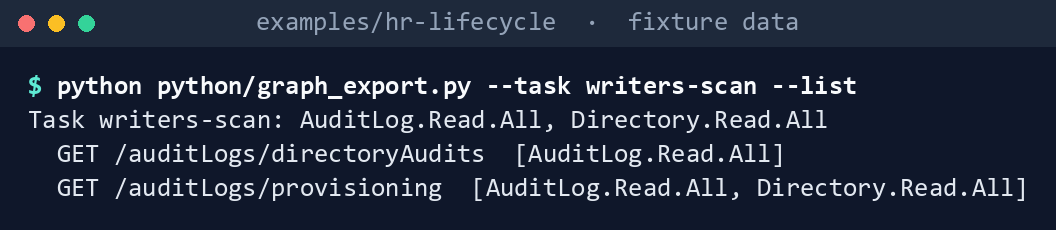
What the terminal shows, run on the kit’s fixtures (the same output as text) Check the register:
python python/writer_register.py check --register config/writer-register.json
What the terminal shows, run on the kit’s fixtures (the same output as text) Register: 0 Finding, 0 Warn, 0 Info, exit code 0.Scan October’s audit records:
python python/writer_register.py scan --register config/writer-register.json --audit tests/fixtures/ch01/directory-audits.json \
    --since 2026-10-01 --until 2026-10-31 --cloud gcc --out out/ch01
Protected writes: 11 (writer 5, backstop 1, second writer 4, forbidden 1) Writers: 5 Finding, 1 Warn, 0 Info Written to out/ch01 (manifest.json lists every file's SHA-256)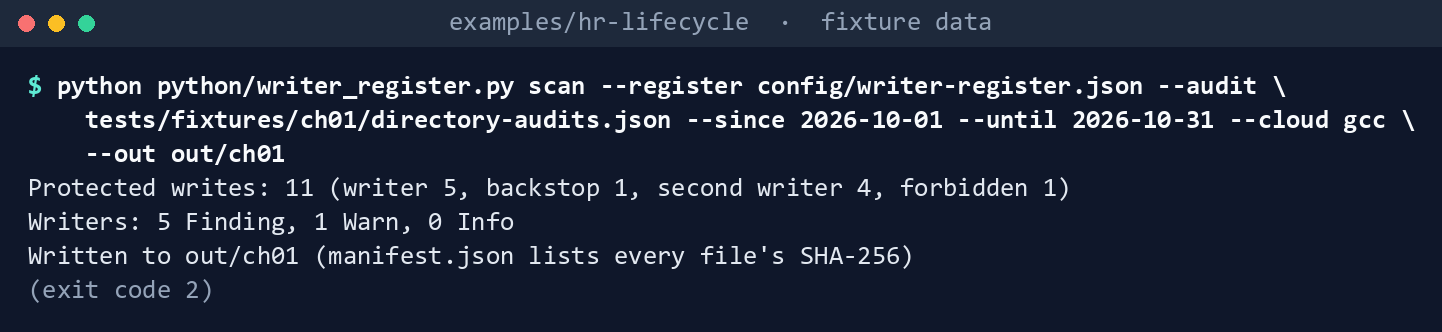
What the terminal shows, run on the kit’s fixtures (the same output as text) The exit code is 2. The folder holds
findings.json,writes.json(every protected write with its verdict) andqueries.json.Read the findings:
python -c "import json; [print(r['Rule'], r['Severity'], r['Object'], '|', r['Issue']) for r in json.load(open('out/ch01/findings.json'))]"WS-01 Finding casey.ng@contoso.example | disabled-at-separation written by pat.helpdesk@contoso.example, not by inbound-provisioning WS-01 Finding morgan.lee@contoso.example | employeeLeaveDateTime written by sam.exchange@contoso.example, not by inbound-provisioning WS-01 Finding drew.park@contoso.example | manager written by pat.helpdesk@contoso.example, not by inbound-provisioning WS-01 Finding quinn.ross@contoso.example | orgCode written by OrgCode fix-up script, not by inbound-provisioning WS-04 Finding blake.ito@contoso.example | deleted-at-disposition written by inbound-provisioning, which the register forbids WS-02 Warn jordan.diaz@contoso.example | enabled-at-hire written by the backstop (lifecycle-workflows); confirm the writer (inbound-provisioning) acted or was late![Terminal window showing python -c 'import json; [print(r['Rule'], r['Severity'], r['Object'], '|', r[… and what it printed](captures/01-4.png)
What the terminal shows, run on the kit’s fixtures (the same output as text) Three records in the fixture aren’t counted: a help desk
Update userthat changed only the department and job title (not protected in this register), a failed disable, and a November disable outside the window.Read one saved query:
python -c "import json; print(json.load(open('out/ch01/queries.json'))[2])"{'allowed': ['inbound-provisioning', 'lifecycle-workflows'], 'graphFilter': "activityDateTime ge 2026-10-01T00:00:00Z and activityDateTime le 2026-10-31T23:59:59Z and activityDisplayName eq 'Disable account'", 'matchProperty': None, 'row': 'disabled-at-separation'}
What the terminal shows, run on the kit’s fixtures (the same output as text) Run the tests:
python -m pytest tests -q
What the terminal shows, run on the kit’s fixtures (the same output as text)
Expected result: 57 passed. Delete out when you’re done:
rm -rf out
Lab 2: test tenant
Not run by the authors. Use a test tenant in the worldwide or GCC cloud, never production. Work in examples/hr-lifecycle. You’ll replace: <graph-token> (a bearer token for graph.microsoft.com issued to the reader app), <row-id> and <audit-property-name> (a register row whose auditProperty doesn’t match the tenant’s records, and the name the records use), and <hr-provisioning-sp-id>, <contractor-provisioning-sp-id> and <lifecycle-workflows-sp-id> (the provisioning apps’ and Lifecycle Workflows’ service principal IDs, read from the records in step 5).
Every command in this lab, in order, from examples/hr-lifecycle. Each step below says what it does and what to look for.
# Step 3: Export the window
export HRLC_GRAPH_TOKEN='<graph-token>'
python python/graph_export.py --task writers-scan --cloud gcc --param since=2026-11-01T00:00:00Z --param until=2026-11-02T00:00:00Z --out exports/ch01

# Step 4: Confirm the property names
python -c "import json; [print(r['activityDateTime'], r['activityDisplayName'], t.get('userPrincipalName'), [p['displayName'] for p in t.get('modifiedProperties') or []]) for r in json.load(open('exports/ch01/directory-audits.json'))['value'] for t in r['targetResources']]"

# Step 4: Confirm the property names
cp config/writer-register.json my-register.json
python -c "import json; p='my-register.json'; d=json.load(open(p)); next(r for r in d['rows'] if r['id'] == '<row-id>')['auditProperty'] = '<audit-property-name>'; json.dump(d, open(p, 'w'), indent=2)"

# Step 5: Put the test tenant's identities in your register copy
python -c "import json; apps = {r['initiatedBy']['app']['servicePrincipalId']: r['initiatedBy']['app'].get('displayName') for r in json.load(open('exports/ch01/directory-audits.json'))['value'] if r['initiatedBy'].get('app')}; [print(k, v) for k, v in apps.items()]"

# Step 5: Put the test tenant's identities in your register copy
python -c "import json; p='my-register.json'; d=json.load(open(p)); d['writers']['inbound-provisioning']['servicePrincipalIds'] = ['<hr-provisioning-sp-id>', '<contractor-provisioning-sp-id>']; d['writers']['lifecycle-workflows']['servicePrincipalIds'] = ['<lifecycle-workflows-sp-id>']; json.dump(d, open(p, 'w'), indent=2)"
python python/writer_register.py scan --register my-register.json --audit exports/ch01/directory-audits.json --since 2026-11-01 --until 2026-11-02 --cloud gcc --out out/ch01-test

# Step 6: Back it out
rm -rf exports/ch01 out/ch01-test
Register the reader app with a certificate, and grant
AuditLog.Read.AllandDirectory.Read.Allas application permissions with admin consent, and nothing else.Make a known write. In the admin center, as a test administrator, change a test user’s employee hire date and disable another test user. Wait for both records to appear in the audit log.
Export the window, with a token for
graph.microsoft.cominHRLC_GRAPH_TOKEN:export HRLC_GRAPH_TOKEN='<graph-token>' python python/graph_export.py --task writers-scan --cloud gcc --param since=2026-11-01T00:00:00Z --param until=2026-11-02T00:00:00Z --out exports/ch01Confirm the property names. Print each record’s time, activity, target and
modifiedPropertiesdisplay names:python -c "import json; [print(r['activityDateTime'], r['activityDisplayName'], t.get('userPrincipalName'), [p['displayName'] for p in t.get('modifiedProperties') or []]) for r in json.load(open('exports/ch01/directory-audits.json'))['value'] for t in r['targetResources']]"Find the hire-date change and read its
modifiedPropertiesdisplayName. If it isn’tEmployeeHireDate, correctauditPropertyin your copy of the register by a reviewed change. Do the same for the other protected values (every row with anauditProperty) before relying on the scan. The first command makes your copy; the second sets one row’sauditProperty, so run it once for each row whose name differs:cp config/writer-register.json my-register.json python -c "import json; p='my-register.json'; d=json.load(open(p)); next(r for r in d['rows'] if r['id'] == '<row-id>')['auditProperty'] = '<audit-property-name>'; json.dump(d, open(p, 'w'), indent=2)"Put the test tenant’s identities in your register copy. Print every app that initiated a record, with its service principal ID:
python -c "import json; apps = {r['initiatedBy']['app']['servicePrincipalId']: r['initiatedBy']['app'].get('displayName') for r in json.load(open('exports/ch01/directory-audits.json'))['value'] if r['initiatedBy'].get('app')}; [print(k, v) for k, v in apps.items()]"Write the provisioning apps’ and Lifecycle Workflows’ IDs into the copy (list one provisioning ID if the tenant has one provisioning app), then scan:
python -c "import json; p='my-register.json'; d=json.load(open(p)); d['writers']['inbound-provisioning']['servicePrincipalIds'] = ['<hr-provisioning-sp-id>', '<contractor-provisioning-sp-id>']; d['writers']['lifecycle-workflows']['servicePrincipalIds'] = ['<lifecycle-workflows-sp-id>']; json.dump(d, open(p, 'w'), indent=2)"
python python/writer_register.py scan --register my-register.json --audit exports/ch01/directory-audits.json --since 2026-11-01 --until 2026-11-02 --cloud gcc --out out/ch01-test
Both admin center changes should appear as WS-01.
Back it out. Restore the test users’ values, remove the two permissions, and delete the reader app and its certificate. Then delete the export and the scan:
rm -rf exports/ch01 out/ch01-test
Verified facts
| Item | Value | US Government clouds | Stage | Source |
|---|---|---|---|---|
| List directoryAudits | GET /auditLogs/directoryAudits; AuditLog.Read.All (delegated and application); $filter with eq, ge, le, startswith |
L4 and L5 | v1.0 | 9 |
| Record shape | activityDisplayName, activityDateTime, result, initiatedBy.app.servicePrincipalId or initiatedBy.user.id, targetResources[].modifiedProperties |
— | v1.0 | 10 |
| User activities | Add user, Update user, Enable account, Disable account, Delete user, Set user manager (Core Directory, UserManagement) |
— | — | 11 |
| List provisioningObjectSummary | GET /auditLogs/provisioning; AuditLog.Read.All and Directory.Read.All |
L4 and L5 | v1.0 | 12 |
| Graph hosts | GCC graph.microsoft.com; GCC High graph.microsoft.us; DoD dod-graph.microsoft.us |
— | — | 13 |
| Audit retention | 30 days with P1 or P2; not retroactive | — | — | Book 03, Chapter 11 |
| Directory synchronization | Available in Azure Government; commercial service in GCC | Available | GA | 14 |
Places Learn’s pages say nothing, recorded so a later edit doesn’t loosen the code:
- Property names in
modifiedProperties. Learn’s example shows the shape but doesn’t list the display name each user property gets. The register’s names are confirmed in Lab 2. - The initiator for Lifecycle Workflows and provisioning. Learn doesn’t document the service principal each service writes as. The register takes them from the tenant’s own records, never from a published list.
Federal requirements and evidence
This chapter helps prove the guide’s Gate 1; its requirements table is the source, and the federal framework crosswalk lists every federal source.
| Requirement | KSI | What this code gives | What the ISSO keeps |
|---|---|---|---|
| NIST SP 800-53 AC-2 and IA-4, Moderate | KSI-IAM-ELP, KSI-IAM-JIT | The register’s rows, version, signature and scope filter, checked by WR-01 to WR-09 | The signed register file and the check output |
| AU-6, for writes outside the named writer | KSI-MLA-RVL | The scan’s findings and writes.json for the window |
The scan’s output folder with its manifest, the saved queries.json, and the AD auditing settings, which this code doesn’t read |
Each scripted step in the labs, and each file the code writes, with the evidence it leaves:
| Lab step | What it runs or writes | Requirement | KSI | Evidence |
|---|---|---|---|---|
| Lab 1, step 1 | graph_export.py --task writers-scan --list |
AC-6, least privilege: GET calls only, each with its least-privileged permission | KSI-IAM-ELP | The printed list, and config/calls.json as reviewed |
| Lab 1, step 2 | writer_register.py check on config/writer-register.json |
AC-2 and IA-4; CM-3 for each reviewed change to the register | KSI-IAM-ELP, KSI-IAM-JIT; KSI-CMT-LMC | Register: 0 Finding, 0 Warn, 0 Info and exit code 0, filed with the signed register |
| Lab 1, steps 3 and 4 | writer_register.py scan, writing findings.json |
AU-6; AC-2 for writes by an unnamed writer | KSI-MLA-RVL; KSI-IAM-SUS | out/ch01/findings.json: each WS-01, WS-02 and WS-04 row |
| Lab 1, step 3 | writes.json |
AU-6 | KSI-MLA-RVL | Every protected write in the window, with its verdict |
| Lab 1, steps 3 and 5 | queries.json |
AU-6; AU-2 for the events the queries read | KSI-MLA-RVL, KSI-MLA-LET | One directoryAudits filter per register row, which Gate 7 runs again |
| Lab 1, step 3 | manifest.json |
AU-9, protection of audit information; SI-7, information integrity | KSI-MLA-OSM; KSI-SVC-VRI | A SHA-256 per file; the tool refuses to write into a folder that already holds one |
| Lab 1, step 6 | python -m pytest tests -q |
CM-3(2), test and validate changes (design guidance) | KSI-CMT-VTD | 57 passed, kept with the change that edited the code or the register |
| Lab 1, clean-up | rm -rf out |
None: fixture output isn’t evidence | — | — |
| Lab 2, step 3 | graph_export.py --task writers-scan --cloud gcc, writing directory-audits.json, provisioning-logs.json and export.json |
AU-2 and AU-12 for the records read; AC-6 for GET only | KSI-MLA-LET; KSI-IAM-ELP | exports/ch01/export.json: the task, the cloud, and each call’s URL and record count |
| Lab 2, step 4 | Print each record’s properties; copy the register and correct an auditProperty |
CM-3, a reviewed change to the register | KSI-CMT-LMC | The pull request that changed auditProperty, with the record that showed the name |
| Lab 2, step 5 | List the initiating apps; write their IDs into the copy; scan into out/ch01-test |
AU-6; AC-2 | KSI-MLA-RVL; KSI-IAM-SUS | out/ch01-test/findings.json with both admin center changes as WS-01, and its manifest.json |
| Lab 2, step 6 | Remove the permissions and the reader app; rm -rf exports/ch01 out/ch01-test |
AC-6: no reader permissions left after the test | KSI-IAM-ELP | The app’s deletion in the directory audit log |
KSIs are FedRAMP 20x indicators for cloud service providers: the agency authorizes its own system and lines this evidence up with what its providers report against them, and it doesn’t report KSIs itself (Book 00, Appendix B). Each KSI shown lists the row’s control among its related SP 800-53 controls on FedRAMP’s page;15 which file supports which indicator is the program’s mapping (design guidance). Controls the guide’s table doesn’t name (AC-6, AU-2, AU-9, AU-12, CM-3, CM-3(2), SI-7) are in the Moderate baseline (Book 13, Appendix A; Book 14, Appendix A).
The privacy basis for the feed is the privacy office’s determination; no code produces it.
Dangers
| Danger | What happens | The guard |
|---|---|---|
| Two writers of account state | A late active true undoes a workflow’s disable |
One writer per row (WR-01), agreement across rows (WR-07), WS-02 when the backstop acts |
| A property name that doesn’t match | The scan reports no writes for that value, and silence looks clean | Lab 2 confirms each auditProperty before the scan is evidence |
| Logs expire before the scan runs | Entra keeps 30 days; nothing before can be recovered | Scheduled export; logs routed to the agency’s store from day one |
| AD writes for synced users | The Entra log doesn’t see them | ad-sync named as the interim writer; AD change auditing and quarterly OU ACL reviews |
| Deletion by the provisioning app | An object disposed of before devices and evidence are handled | WR-05 in the register, WS-04 in the log |
| Names in the evidence | Findings name users and administrators | The output folder is evidence under access control; delete lab copies |
Checklist
Footnotes
Microsoft Learn, “List directoryAudits,” permissions, HTTP request, query parameters and examples, https://learn.microsoft.com/graph/api/directoryaudit-list?view=graph-rest-1.0 (read November 1, 2026).↩︎
Microsoft Learn, “List provisioningObjectSummary,” permissions, https://learn.microsoft.com/graph/api/provisioningobjectsummary-list?view=graph-rest-1.0 (read November 1, 2026).↩︎
Microsoft Learn, “Microsoft Graph national cloud deployments,” https://learn.microsoft.com/graph/deployments (read November 1, 2026; carried from Book 19, Chapter 02).↩︎
Microsoft Learn, “List directoryAudits,” permissions, HTTP request, query parameters and examples, https://learn.microsoft.com/graph/api/directoryaudit-list?view=graph-rest-1.0 (read November 1, 2026).↩︎
Microsoft Learn, “Microsoft Entra audit log categories and activities,” Core Directory, https://learn.microsoft.com/entra/identity/monitoring-health/reference-audit-activities (read November 1, 2026).↩︎
Microsoft Learn, “List provisioningObjectSummary,” permissions, https://learn.microsoft.com/graph/api/provisioningobjectsummary-list?view=graph-rest-1.0 (read November 1, 2026).↩︎
Microsoft Learn, “List directoryAudits,” permissions, HTTP request, query parameters and examples, https://learn.microsoft.com/graph/api/directoryaudit-list?view=graph-rest-1.0 (read November 1, 2026).↩︎
Microsoft Learn, “List provisioningObjectSummary,” permissions, https://learn.microsoft.com/graph/api/provisioningobjectsummary-list?view=graph-rest-1.0 (read November 1, 2026).↩︎
Microsoft Learn, “List directoryAudits,” permissions, HTTP request, query parameters and examples, https://learn.microsoft.com/graph/api/directoryaudit-list?view=graph-rest-1.0 (read November 1, 2026).↩︎
Microsoft Learn, “List directoryAudits,” permissions, HTTP request, query parameters and examples, https://learn.microsoft.com/graph/api/directoryaudit-list?view=graph-rest-1.0 (read November 1, 2026).↩︎
Microsoft Learn, “Microsoft Entra audit log categories and activities,” Core Directory, https://learn.microsoft.com/entra/identity/monitoring-health/reference-audit-activities (read November 1, 2026).↩︎
Microsoft Learn, “List provisioningObjectSummary,” permissions, https://learn.microsoft.com/graph/api/provisioningobjectsummary-list?view=graph-rest-1.0 (read November 1, 2026).↩︎
Microsoft Learn, “Microsoft Graph national cloud deployments,” https://learn.microsoft.com/graph/deployments (read November 1, 2026; carried from Book 19, Chapter 02).↩︎
Microsoft Learn, “Microsoft Entra feature availability,” https://learn.microsoft.com/entra/identity/authentication/feature-availability (read November 1, 2026; carried from the HR-driven identity implementation guide’s verification log).↩︎
FedRAMP, “Key Security Indicators,” FedRAMP Consolidated Rules for 2026, indicator titles and “Related SP 800-53 Controls,” including the mapping updates of October 13, 2026, https://www.fedramp.gov/2026/reference/key-security-indicators/ (read November 2, 2026; the indicator IDs are carried from Book 13, Appendix A and Book 14, Chapter 03).↩︎