Federal Modernization Workbook
Chapter 06 — Routing to Owners and Ticket-to-Machine Tasks
A notice nobody owns is a notice nobody reads. Routing gives each one an owner once, and never twice.
The router behind the guide’s G6 Routing. You start with the pattern it implements: the Ticket-to-Machine typed task of Book 13, Chapter 10 and its finding contract. Then you read the routing file and its checks, how a rule is chosen, what a task payload holds, and how the state file makes the router de-duplicate across runs and ask for a re-read when a provider stops listing a notice. Lab 1 routes both fixture weeks from all five providers, shows a re-run writing nothing, and reads a payload; Lab 2 sends one payload to a ServiceNow developer instance and deletes it.
Goal and audience
Goal. By the end of this chapter you can write and check a routing file, route a collection as a dry run, read every payload it would send, and explain why a re-run writes nothing and why a task closes only on the re-read.
Audience. Developers who maintain the kit, the change manager who owns G6, the ISSO for the security route, and whoever builds the ServiceNow side. You should know Chapter 01’s record and the Ticket-to-Machine reference.
Start with the pattern
What the program gives you
Ticket-to-Machine turns a finding into a typed task with an owner, a lane and a request chain of five clauses: where it came from (C1), who approves (C2), what to do (C3), the re-read check that proves it was done (C4) and the evidence kept (C5) (Book 13, Appendix B). The finding contract in examples/servicenow-sailpoint/clients/python/finding_contract.py sets the severities and their response windows: P1 immediate, P2 one hour, P3 24 hours, P4 72 hours. Those windows are program design, not a federal requirement. Building Ticket-to-Machine builds the ServiceNow and SailPoint side. Book 15’s Chapter 14 says who owns each kind of notice and how a notice becomes a task and closes; the routing file is where the agency writes that down.
What it leaves to you
Each row is pinned by a test in tests/Router.Tests.ps1.
| What the pattern gives | Why it isn’t enough for notices | What the kit adds |
|---|---|---|
| A typed task with severity and response window | A provider’s own deadline is a different date from the agency’s response window | response_due from the severity; action_due from the provider, kept apart |
| Findings raised once per check | A provider repeats the same notice every week | State keyed by <provider>:<sourceId> with each notice’s fingerprint; unchanged notices write nothing |
| A task closes when its work is done | A provider closing its notice isn’t the agency’s work being done | A close payload says to run the re-read (C4); an open notice the provider stops listing gets an update asking for the same |
| One owner per finding type | Five providers, six kinds, many owners | A routing file of ordered rules, first match wins, with defaults |
| Contingency planning elsewhere | A retirement or maintenance that names the agency’s resources is a plan change | contingencyReview on a rule marks the payload, and the evidence step adds CP-2 |
The verdict. Keep the contract’s severities and windows exactly (a test reads finding_contract.py and fails if they drift). Build the routing file, the state and the re-read handling.
The code
The routing file
The agency’s routing is a JSON file written at work from templates/routing.template.json, or from the worksheet with the kit’s Copilot prompts, and kept inside the agency’s boundary. The lab’s is config/routing.json, with fictional teams. Each rule has an id, a match, a route (task, digest or ignore) and, for a task, a severity, an assignmentGroup, an approverRole and contingencyReview.
| Match key | Matches |
|---|---|
provider, kind, status |
Any of the listed values |
actionRequired, hasResources |
true or false |
servicePattern, regionPattern |
A regular expression against any service or region |
Read-PnRouting refuses an unknown match key, a route other than the three, a task without a severity of P1 to P4 or an assignment group, and any <placeholder> left in. Rules are tried in order: put security advisories and retirements before the general “anything that needs action” rule (design guidance).
The payload
New-PnTaskPayload writes one ServiceNow-shaped task: kind provider_notice, action (create, update or close), dedupe_key (<provider>|<sourceId>), severity, priority, response_window_seconds, response_due, action_required, action_due, assignment_group, short_description, description (title, window, action date with its basis, services, regions, resources, source link, summary), contingency_review, origin (the notice and the rule), ticket_to_machine (the Human decision lane, an event trigger and the five clauses), and the controls and ksis the step supports. Test-PnTaskPayload checks every payload before it is written.
Runs and state
Invoke-PnRouting compares each notice with the state: new, changed (a different fingerprint) or unchanged. A task-routed notice gets create the first time it is open, update when it changes or its rule changes, and close when the provider closes it. An open notice from a provider read in this run that is no longer listed is marked absent and its task gets an update asking for the re-read. A provider that wasn’t read this run never has its notices marked absent. The run writes tasks/ (one file per payload), tasks.json, routing.csv, the state and a manifest. It is a dry run: nothing is sent unless deploy/Invoke-PnScheduledRun.ps1 -Send runs with the settings’ routing.send true (Chapter 08).
The tests
tests/Router.Tests.ps1: day 1, the payload, de-duplication across runs, sending, and the routing file’s checks, including the test that reads the finding contract.
Lab 1 routes fictional notices with fictional teams and sends nothing. The payload’s shape on the ServiceNow side is the agency’s to build and is not yet specified here. Review the routing at work, and run Lab 2 against a developer instance, before anything reaches a real queue.
Lab 1: fixtures, no tenant
You need PowerShell 7.1 or later with Pester 5. Work in examples/provider-notices. The finding contract the router mirrors is in examples/servicenow-sailpoint, which the download includes.
Every command in this lab, in order, from examples/provider-notices. Each step below says what it does and what to look for.
# Step 1: Check the lab's routing
Import-Module ./powershell/ProviderNotices/ProviderNotices.psm1
(Read-PnRouting -Path config/routing.json).rules | ForEach-Object { [pscustomobject]@{ id = $_.id; route = $_.route; severity = $_.severity; group = $_.assignmentGroup } } | Format-Table

# Step 2: Try the template as it ships
Read-PnRouting -Path templates/routing.template.json

# Step 3: Collect every provider from the day-one fixtures
./Invoke-PnCollect.ps1 -SettingsPath tests/fixtures/settings.lab.json -FixturePath tests/fixtures/day1 -AsOf 2026-11-09T12:00:00Z -OutputPath out/day1

# Step 4: Route them, as a dry run
./Invoke-PnRoute.ps1 -NoticesPath out/day1/notices.json -RoutingPath config/routing.json -StatePath out/state.json -OutputPath out/day1-route -AsOf 2026-11-09T12:00:00Z

# Step 5: Read one payload
$p = Read-PnJson -Path out/day1-route/tasks/create-azure-RT5J-6KL.json
[pscustomobject]$p | Format-List action, dedupe_key, severity, priority, response_window_seconds, response_due, action_required, action_due, assignment_group, contingency_review, controls, ksis
[pscustomobject]$p.ticket_to_machine | Format-List lane, c1_origin, c2_approver_role, c3_action, c4_reread_check, c5_evidence_kept

# Step 6: Route the same collection again, on a copy of the state
Copy-Item out/state.json out/state-rerun.json
./Invoke-PnRoute.ps1 -NoticesPath out/day1/notices.json -RoutingPath config/routing.json -StatePath out/state-rerun.json -OutputPath out/day1-rerun -AsOf 2026-11-09T13:00:00Z

# Step 7: Collect and route the second week
./Invoke-PnCollect.ps1 -SettingsPath tests/fixtures/settings.lab.json -FixturePath tests/fixtures/day2 -AsOf 2026-11-16T12:00:00Z -OutputPath out/day2
./Invoke-PnRoute.ps1 -NoticesPath out/day2/notices.json -RoutingPath config/routing.json -StatePath out/state.json -OutputPath out/day2-route -AsOf 2026-11-16T12:00:00Z

# Step 8: Read what each payload is for
Import-Csv out/day2-route/routing.csv | Where-Object action | Format-Table change, ruleId, action, severity, noticeId

# Step 9: Run the router's tests
Invoke-Pester -Path tests/Router.Tests.ps1 -Output None -PassThru | Select-Object PassedCount, FailedCount

# After the steps
Remove-Item -Recurse -Force out
Check the lab’s routing. Six rules, in the order they are tried:
Import-Module ./powershell/ProviderNotices/ProviderNotices.psm1
(Read-PnRouting -Path config/routing.json).rules | ForEach-Object { [pscustomobject]@{ id = $_.id; route = $_.route; severity = $_.severity; group = $_.assignmentGroup } } | Format-Table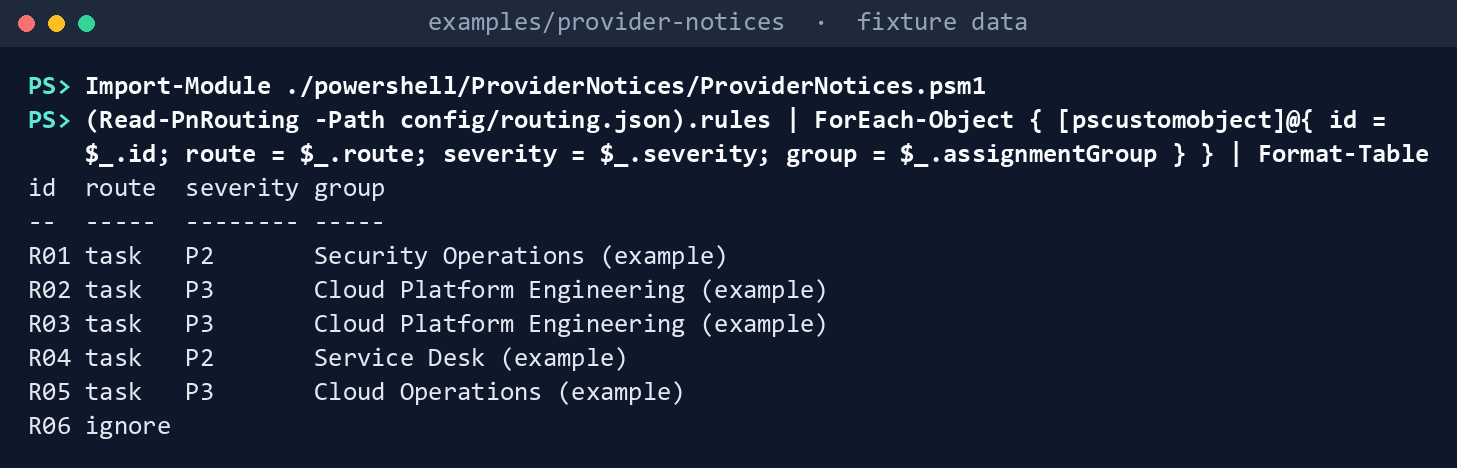
What the terminal shows, run on the kit’s fixtures (the same output as text) Try the template as it ships. It is refused until every placeholder is filled at work:
Read-PnRouting -Path templates/routing.template.json
What the terminal shows, run on the kit’s fixtures (the same output as text) Collect every provider from the day-one fixtures:
./Invoke-PnCollect.ps1 -SettingsPath tests/fixtures/settings.lab.json -FixturePath tests/fixtures/day1 -AsOf 2026-11-09T12:00:00Z -OutputPath out/day1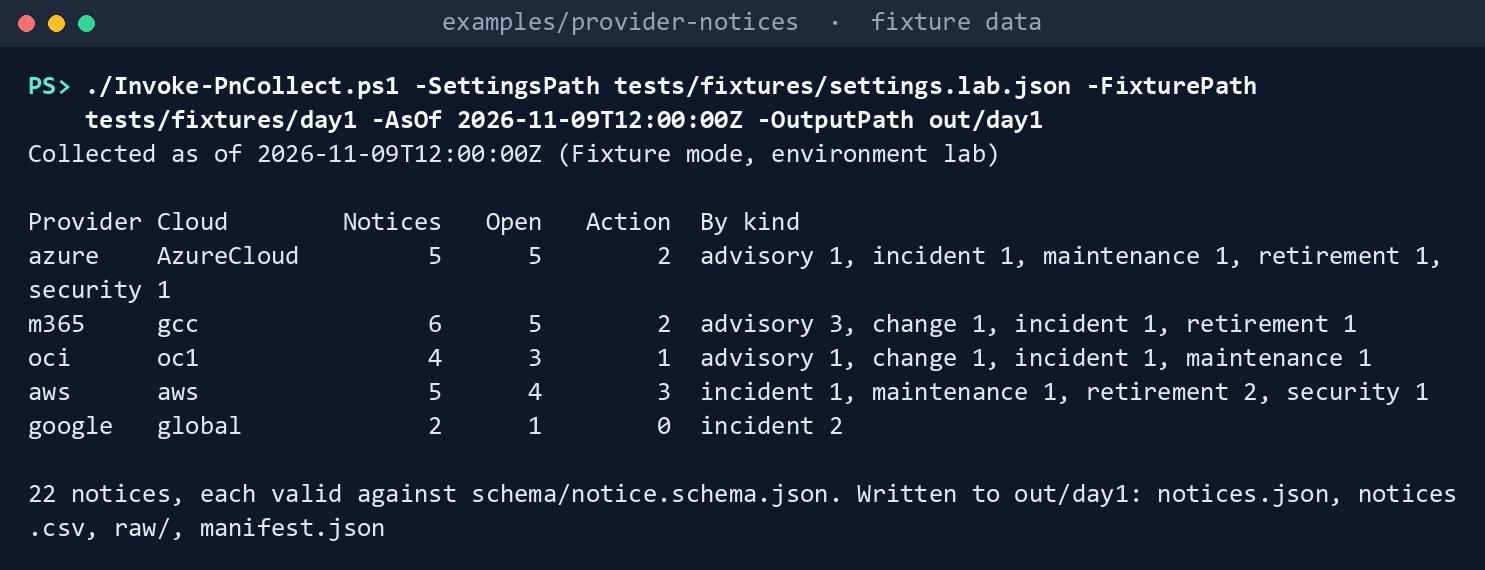
What the terminal shows, run on the kit’s fixtures (the same output as text) 22 notices from five providers.
Route them, as a dry run:
./Invoke-PnRoute.ps1 -NoticesPath out/day1/notices.json -RoutingPath config/routing.json -StatePath out/state.json -OutputPath out/day1-route -AsOf 2026-11-09T12:00:00ZNotices: 22 new, 0 changed, 0 unchanged, 0 no longer listed Routes: 12 task, 9 digest only, 1 ignored Payloads: 12 create, 0 update, 0 close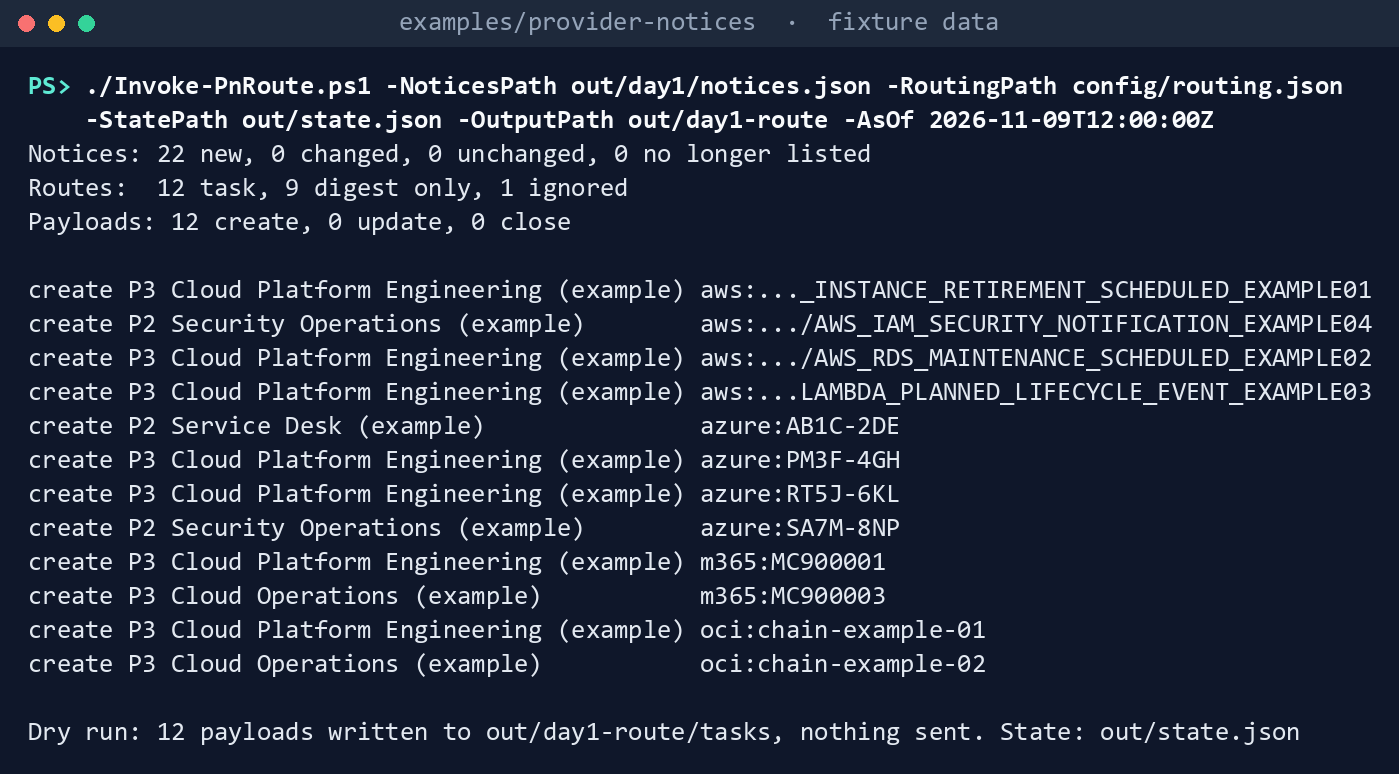
What the terminal shows, run on the kit’s fixtures (the same output as text) The Microsoft Viva post is ignored by R06; the rest that need no task go to the digest.
Read one payload. The Azure retirement: P3 with a 24-hour response window, the provider’s action date kept in
action_due, a contingency review, and the five clauses:$p = Read-PnJson -Path out/day1-route/tasks/create-azure-RT5J-6KL.json [pscustomobject]$p | Format-List action, dedupe_key, severity, priority, response_window_seconds, response_due, action_required, action_due, assignment_group, contingency_review, controls, ksis [pscustomobject]$p.ticket_to_machine | Format-List lane, c1_origin, c2_approver_role, c3_action, c4_reread_check, c5_evidence_kept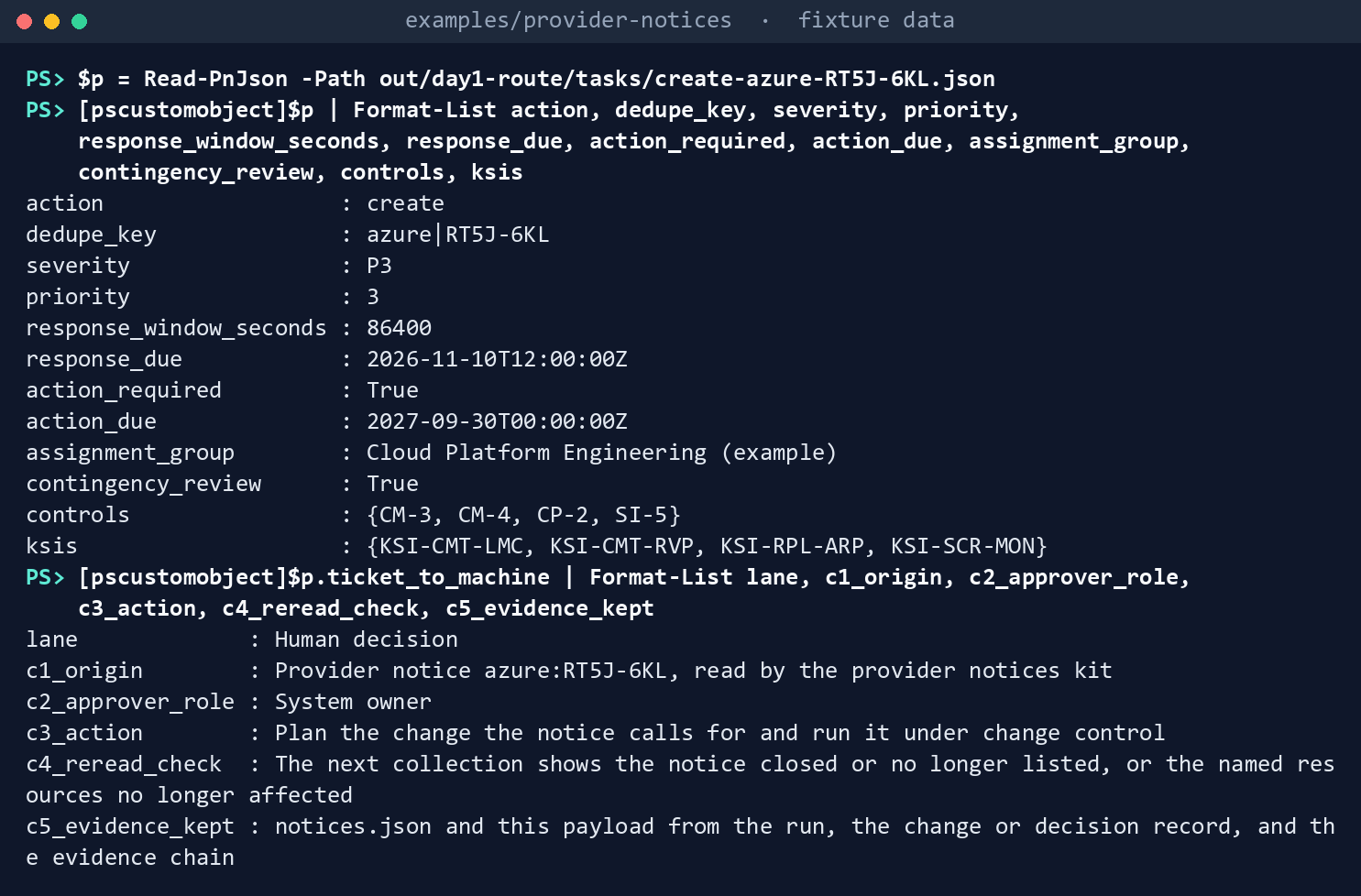
What the terminal shows, run on the kit’s fixtures (the same output as text) Route the same collection again, on a copy of the state. Nothing changed, so nothing is written:
Copy-Item out/state.json out/state-rerun.json
./Invoke-PnRoute.ps1 -NoticesPath out/day1/notices.json -RoutingPath config/routing.json -StatePath out/state-rerun.json -OutputPath out/day1-rerun -AsOf 2026-11-09T13:00:00Z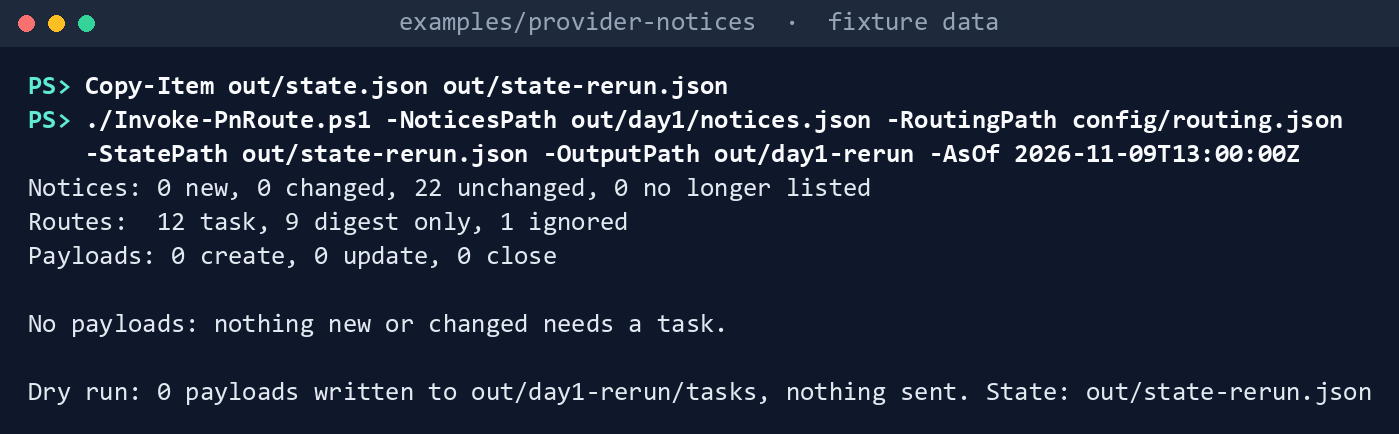
What the terminal shows, run on the kit’s fixtures (the same output as text) Payloads: 0 create, 0 update, 0 closeandNo payloads: nothing new or changed needs a task.Collect and route the second week:
./Invoke-PnCollect.ps1 -SettingsPath tests/fixtures/settings.lab.json -FixturePath tests/fixtures/day2 -AsOf 2026-11-16T12:00:00Z -OutputPath out/day2
./Invoke-PnRoute.ps1 -NoticesPath out/day2/notices.json -RoutingPath config/routing.json -StatePath out/state.json -OutputPath out/day2-route -AsOf 2026-11-16T12:00:00Z
Notices: 2 new, 6 changed, 15 unchanged, 1 no longer listed Routes: 12 task, 10 digest only, 1 ignored Payloads: 1 create, 4 update, 1 close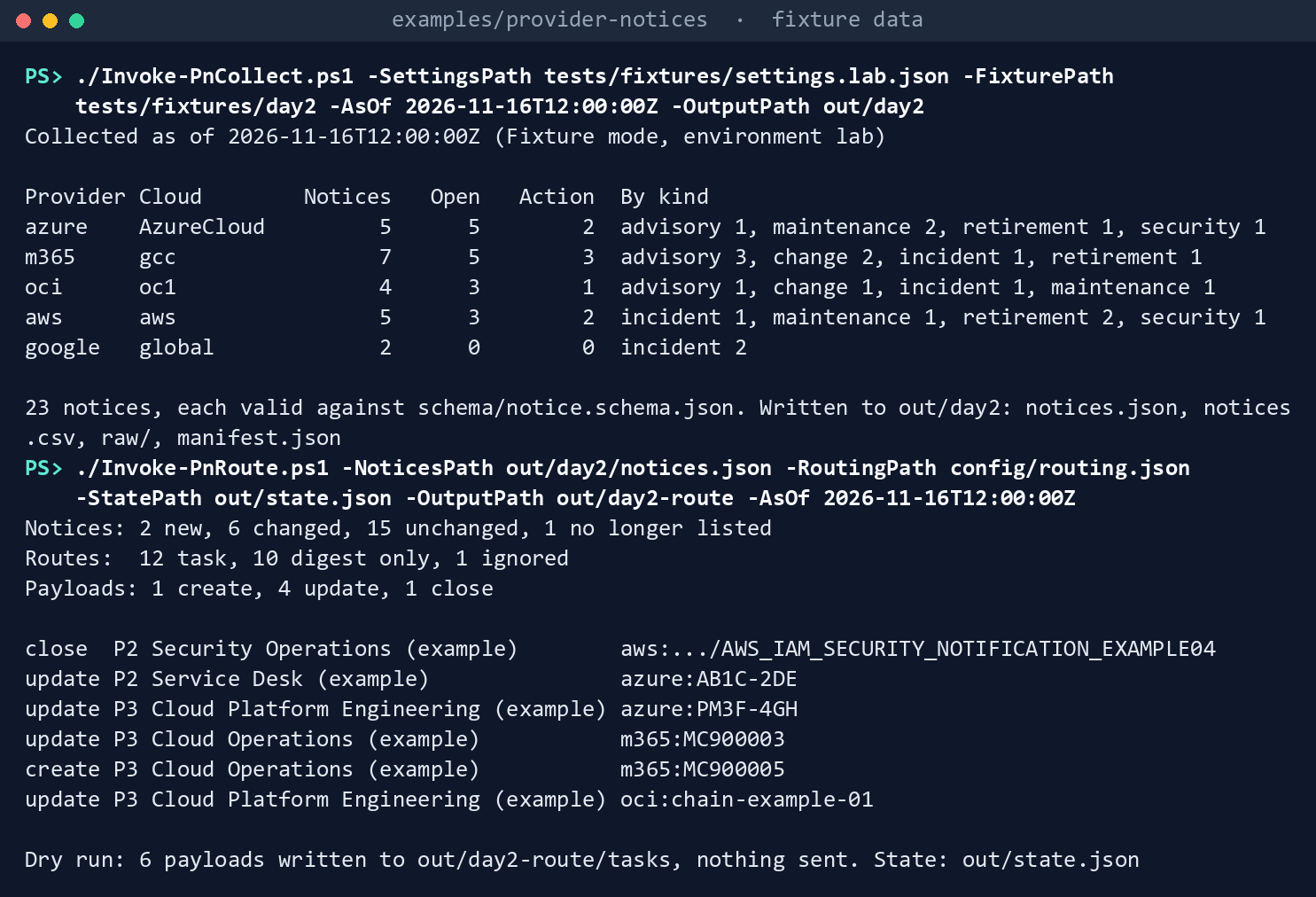
What the terminal shows, run on the kit’s fixtures (the same output as text) Read what each payload is for:
Import-Csv out/day2-route/routing.csv | Where-Object action | Format-Table change, ruleId, action, severity, noticeId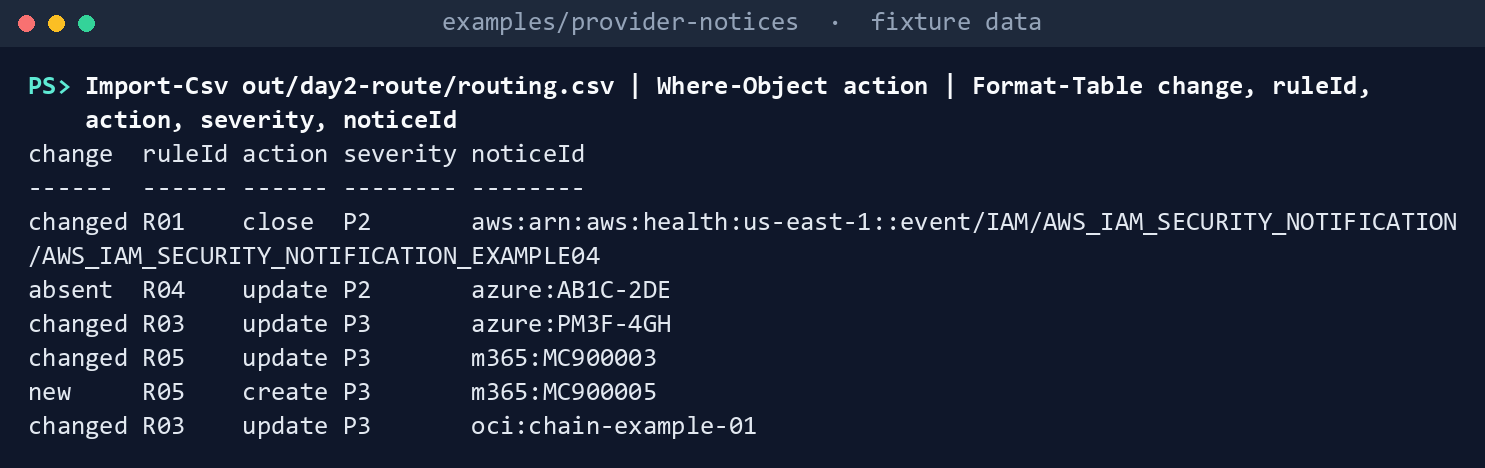
What the terminal shows, run on the kit’s fixtures (the same output as text) Two rescheduled maintenance windows (Azure and OCI) and an updated post are updates; the Azure incident the provider no longer lists is an
absentupdate asking for the re-read; the new Microsoft 365 post is a create; the AWS security notification AWS closed is aclosethat also asks for the re-read.Run the router’s tests, including the one that reads the finding contract:
Invoke-Pester -Path tests/Router.Tests.ps1 -Output None -PassThru | Select-Object PassedCount, FailedCount
What the terminal shows, run on the kit’s fixtures (the same output as text)
Expected result: PassedCount 31 and FailedCount 0, out/day2-route/tasks holding six payloads, and out/state.json holding every notice with its first-seen time. Delete out when you’re done:
Remove-Item -Recurse -Force out
Lab 2: a ServiceNow developer instance
Use a ServiceNow Personal Developer Instance or a sub-production instance, never production, with an endpoint you build to accept the payload (a Scripted REST resource or an import set; its shape is the agency’s and not yet specified here). Work in examples/provider-notices, after Lab 1’s steps 3 and 4. You’ll replace: <endpoint-url> (the endpoint’s https URL) and <token> (a token for a test integration user that can create records only through that endpoint).
Every command in this lab, in order, from examples/provider-notices. Each step below says what it does and what to look for.
# Step 1: Put the token in the environment for this session only
$env:PN_SERVICENOW_TOKEN = '<token>'

# Step 2: Send one payload through the kit's sender
Import-Module ./deploy/PnDeploy.psm1 -Force
$send = New-PnServiceNowSender -Settings @{ routing = @{ endpoint = '<endpoint-url>'; tokenVariable = 'PN_SERVICENOW_TOKEN' } }
& $send (Read-PnJson -Path out/day1-route/tasks/create-azure-RT5J-6KL.json)

# Step 3: Back it out
Remove-Item Env:PN_SERVICENOW_TOKEN
Remove-Item -Recurse -Force out
Put the token in the environment for this session only, never in a file:
$env:PN_SERVICENOW_TOKEN = '<token>'Send one payload through the kit’s sender. The sender posts the payload as JSON with the token as a bearer token, and returns the record’s
sys_idif the endpoint gives one:Import-Module ./deploy/PnDeploy.psm1 -Force $send = New-PnServiceNowSender -Settings @{ routing = @{ endpoint = '<endpoint-url>'; tokenVariable = 'PN_SERVICENOW_TOKEN' } } & $send (Read-PnJson -Path out/day1-route/tasks/create-azure-RT5J-6KL.json)Open the record in the instance and check the assignment group, the priority, the description and the five clauses.
Back it out. Delete the test record in the instance, clear the token and delete
out:Remove-Item Env:PN_SERVICENOW_TOKEN Remove-Item -Recurse -Force out
Verified facts
| Item | Value | Source |
|---|---|---|
| Severities and windows | P1 immediate, P2 one hour, P3 24 hours, P4 72 hours; program design | finding_contract.py; Book 13, Appendix B |
| The request chain | C1 origin, C2 approver, C3 action, C4 re-read check, C5 evidence kept | Book 13, Chapter 10 |
| Today’s intake | Microsoft’s service health email to the help desk supervisor; nothing approved on the strength of an email | Book 15, Chapter 03 |
This chapter adds no provider fact: routing runs on the operator’s workstation or a scheduler and calls no cloud. Not yet specified: the ServiceNow side of the endpoint.
Federal requirements and evidence
Routing is what the guide’s G6 checks. The mappings are the kit’s config/requirements.json.1 2
| What the output proves | Requirement it supports | KSI it aligns to | Who keeps it |
|---|---|---|---|
| The routing was checked before it ran, and the template can’t run with placeholders (Lab 1, steps 1 and 2) | CM-3 b (review proposed changes) | KSI-CMT-LMC, KSI-CMT-RVP | The change manager |
Every notice that needs action has a task with an owner, a severity and a response window (Lab 1, steps 4 and 5: tasks/, tasks.json, routing.csv) |
SI-5 c, d (disseminate; implement in the established time frames) | KSI-SCR-MON | The change manager; the ISSO for the security route |
| A change, retirement or maintenance is reviewed before it lands (the payloads and the change records they open) | CM-3 b, f; CM-4 (impact analyses) | KSI-CMT-LMC, KSI-CMT-RVP | The change manager |
Retirements and maintenance that name the agency’s resources ask for a contingency plan review (contingency_review: true) |
CP-2 e | KSI-RPL-ARP | The system owner |
A notice is routed once; a re-run writes nothing; a provider’s closure asks for the re-read (Lab 1, steps 6 to 8: state.json, routing.csv) |
SI-5 d; CM-3 f | KSI-SCR-MON, KSI-CMT-LMC | The ISSO, with the run folders |
| The payload reached a queue, through a token kept out of files (Lab 2, step 2) | SI-5 c | KSI-SCR-MON | The service desk |
No KSI cites base CM-4; KSI-CMT-LMC and KSI-CMT-VTD cite CM-4(2), as the guide records. KSIs are FedRAMP 20x indicators for cloud service providers; the agency lines its evidence up with them and doesn’t report them (Book 00, Appendix B). The kit’s records support these controls; the agency’s assessor decides them. Which output supports which indicator is the program’s mapping (design guidance).
Dangers
| Danger | What happens | The guard |
|---|---|---|
| A task resolved because the provider resolved its notice | A retirement shows done while the resource still runs the retired SKU | close and absent payloads ask for the re-read (C4); the task is resolved on the agency’s own check (design guidance) |
| The same notice ticketed every week | The queue fills and people stop reading it | State with fingerprints; unchanged notices write nothing |
| A broad rule first | Security advisories land in the general queue | Rules tried in order; the template puts security and retirements first |
| The routing in a public repository | Owners, assignment groups and which clouds matter, published | Templates and fictional examples only; the agency’s routing stays at work |
| A token in the settings file | A secret in a file that gets filed with the change record | Read-PnSettings refuses secret-like values; the sender reads the token from an environment variable |
| The provider’s date confused with the response window | A P3 task looks due in a year, or a retirement due tomorrow | response_due and action_due are separate fields |
| The finding contract changes and the kit doesn’t | Priorities differ between the kit and the queue | A test reads finding_contract.py and fails on drift |
Checklist
Footnotes
National Institute of Standards and Technology, SP 800-53 Rev. 5 OSCAL catalog, release 5.2.0, https://github.com/usnistgov/oscal-content/blob/main/nist.gov/SP800-53/rev5/json/NIST_SP-800-53_rev5_catalog.json (read November 9, 2026).↩︎
FedRAMP, “Key Security Indicators,” FedRAMP Consolidated Rules for 2026, https://www.fedramp.gov/2026/providers/20x/key-security-indicators/ (read November 9, 2026).↩︎