Federal Modernization Workbook
Chapter 05 — Google Cloud Personalized Service Health
The smallest collector, with the largest gaps. Saying plainly what it can’t see is part of the job.
The Google Cloud collector behind the guide’s G5 Google Cloud. You start with what Google documents: the Personalized Service Health events API for a project or an organization, the viewer role, and the Event resource, whose only category is INCIDENT. Then you read how the kit fills Chapter 01’s record from an event’s impacts and updates, and which two gaps it records instead of hiding: no planned maintenance in the API, and no Personalized Service Health in the Assured Workloads FedRAMP or IL packages. Lab 1 collects both fixture weeks and shows the unverified organization call being refused; Lab 2 reads a test project and removes the role afterwards.
Goal and audience
Goal. By the end of this chapter you can read a project’s or organization’s Personalized Service Health incidents with the viewer role, into records the router and digest treat like any other provider’s, and you can tell the ISSO exactly what Google’s notices don’t cover.
Audience. Developers who maintain the kit, the Google Cloud project owner who owns G5, and the ISSO who records the gaps. You should know Chapter 01’s record.
Start with Google’s documentation
What Google gives you
Google’s REST reference documents projects.locations.events.list (permission servicehealth.events.list) and the organization equivalent.1 The Event resource has a category whose only value is INCIDENT, a state, a detailed category, relevance, impacts (product and location) and updates; planned maintenance isn’t in it.2 The API is enabled once per project (servicehealth.googleapis.com),3 and roles/servicehealth.viewer, Personalized Service Health Viewer, reads it.4 gcloud service-health events list --project --location=global lists a project’s events.5 Assured Workloads’ supported-products page lists Personalized Service Health under 25 regional packages, including US Data Boundary, but not under FedRAMP Moderate, FedRAMP High, IL2, IL4, IL5, CJIS or ITAR.6
What it leaves to you
Each row is pinned by a test in the Google Cloud Personalized Service Health block of tests/Collectors.Tests.ps1, or in tests/Live.Tests.ps1.
| Google’s material, as published | Why it matters | What the kit adds |
|---|---|---|
One category, INCIDENT |
Maintenance and retirements never arrive here | Every Google notice is an incident; the gap is in the guide, this chapter and the ISSO’s record, not papered over |
| Impacts as product and location objects | Services and regions are nested | Products and locations become the record’s services and regions |
| Updates over time, the description sometimes empty | A task with no text | The latest update’s description when the event has none |
| No field that says action is required | — | No action rule for Google: an open incident that names resources routes by the agency’s rule (Chapter 06) |
| The REST organization call verified, the gcloud flags for it not read | A command run on a guess | The call is marked unverified in config/calls.json; the live invoker refuses it without -AllowUnverified |
| A REST response object or gcloud’s bare list | Two shapes for one answer | Both accepted |
| Not in the Assured Workloads FedRAMP or IL packages | A workload in one of them has nothing to read | Recorded as a gap with the ISSO (design guidance) |
The verdict. Use Google’s project call and viewer role as published. Build the mapping, and write the gaps down where the ISSO will read them.
The code
Get-PnProviderNotice -Provider google makes google-events, or google-organization-events when the settings’ providers.google.scope is organization. ConvertTo-PnGoogleNotice keeps only INCIDENT events (anything else would be left out and counted), closes those whose state is CLOSED, takes products and locations from eventImpacts, and records detailedCategory and relevance as the provider’s severity. The source link is the event on servicehealth.googleapis.com. Personalized Service Health has no separate government endpoint in the kit’s table; the cloud is global.
The tests
The Google Cloud Personalized Service Health block of tests/Collectors.Tests.ps1 (6 tests), and in tests/Live.Tests.ps1 the gcloud project command and the refusal of an unverified call.
Lab 1 reads fictional incidents for a fictional project; nothing signs in. The live reader has been tested against stand-in CLI output, not a live project. Review it, and run Lab 2 in a test project, before it reads a real one.
Lab 1: fixtures, no tenant
You need PowerShell 7.1 or later with Pester 5. Work in examples/provider-notices. The lab settings name a fictional project, contoso-example-prod.
Every command in this lab, in order, from examples/provider-notices. Each step below says what it does and what to look for.
# Step 1: List what Google Cloud needs
Import-Module ./powershell/ProviderNotices/ProviderNotices.psm1
Get-PnRequiredPermission -Provider google | Format-List Call, Permissions, Verified

# Step 2: Collect Google Cloud from the day-one fixtures
./Invoke-PnCollect.ps1 -SettingsPath tests/fixtures/settings.lab.json -FixturePath tests/fixtures/day1 -Provider google -AsOf 2026-11-09T12:00:00Z -OutputPath out/google

# Step 3: Read the records
Import-Csv out/google/notices.csv | Format-Table kind, status, title, services, regions

# Step 4: Collect the second week
./Invoke-PnCollect.ps1 -SettingsPath tests/fixtures/settings.lab.json -FixturePath tests/fixtures/day2 -Provider google -AsOf 2026-11-16T12:00:00Z -OutputPath out/google-day2
Import-Csv out/google-day2/notices.csv | Format-Table kind, status, title, windowEnd

# Step 5: See what kinds Google can send
Import-Csv out/google/notices.csv, out/google-day2/notices.csv | Group-Object kind | Format-Table Name, Count

# Step 6: Ask the live invoker for the organization call
$s = Read-PnSettings -Path tests/fixtures/settings.lab.json
$s.providers.google.scope = 'organization'; $s.providers.google.organization = '123456789012'
Invoke-PnCall -Invoker (New-PnLiveInvoker -Settings $s -SkipContextCheck) -CallId google-organization-events

# Step 7: Build the project command without running it
(Get-PnLiveCommand -CallId google-events -Settings $s).Arguments -join ' '

# Step 8: Run this chapter's tests
Invoke-Pester -Path tests/Collectors.Tests.ps1, tests/Live.Tests.ps1 -FullNameFilter 'Google Cloud Personalized Service Health*', '*Google*', '*unverified*' -Output None -PassThru | Select-Object PassedCount, FailedCount

# After the steps
Remove-Item -Recurse -Force out
List what Google Cloud needs. The organization call carries its reason for being unverified:
Import-Module ./powershell/ProviderNotices/ProviderNotices.psm1
Get-PnRequiredPermission -Provider google | Format-List Call, Permissions, Verified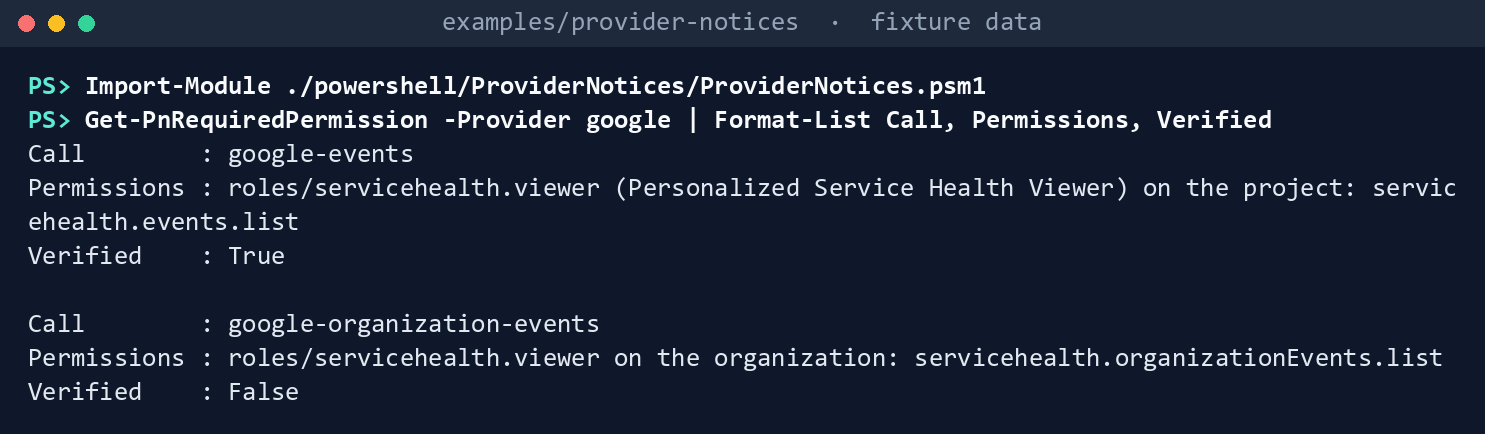
What the terminal shows, run on the kit’s fixtures (the same output as text) Collect Google Cloud from the day-one fixtures:
./Invoke-PnCollect.ps1 -SettingsPath tests/fixtures/settings.lab.json -FixturePath tests/fixtures/day1 -Provider google -AsOf 2026-11-09T12:00:00Z -OutputPath out/google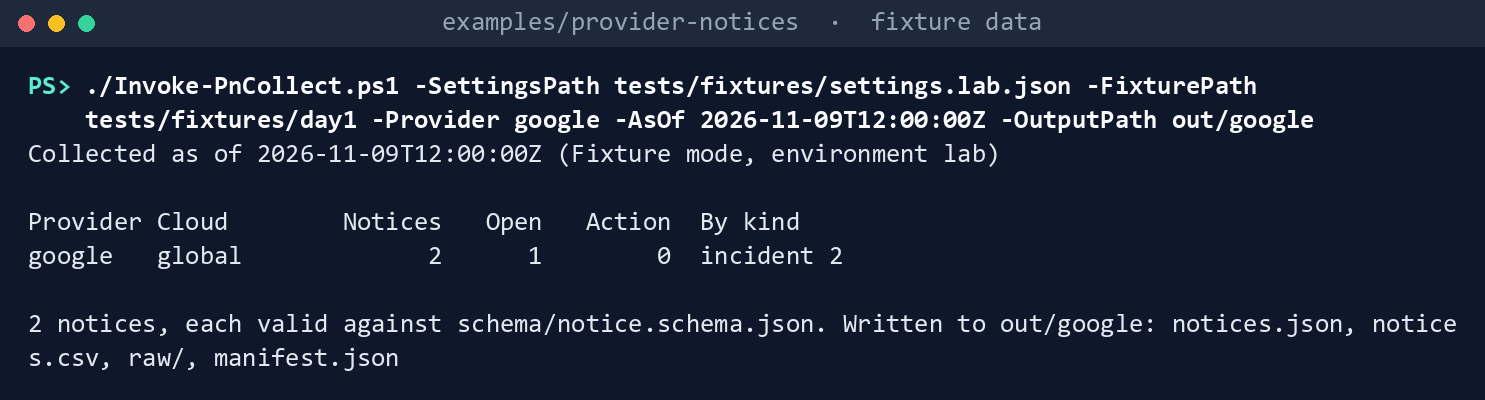
What the terminal shows, run on the kit’s fixtures (the same output as text) Read the records. Two incidents, one open and one closed, with products and locations from their impacts:
Import-Csv out/google/notices.csv | Format-Table kind, status, title, services, regions
What the terminal shows, run on the kit’s fixtures (the same output as text) Collect the second week. The open incident closed:
./Invoke-PnCollect.ps1 -SettingsPath tests/fixtures/settings.lab.json -FixturePath tests/fixtures/day2 -Provider google -AsOf 2026-11-16T12:00:00Z -OutputPath out/google-day2
Import-Csv out/google-day2/notices.csv | Format-Table kind, status, title, windowEnd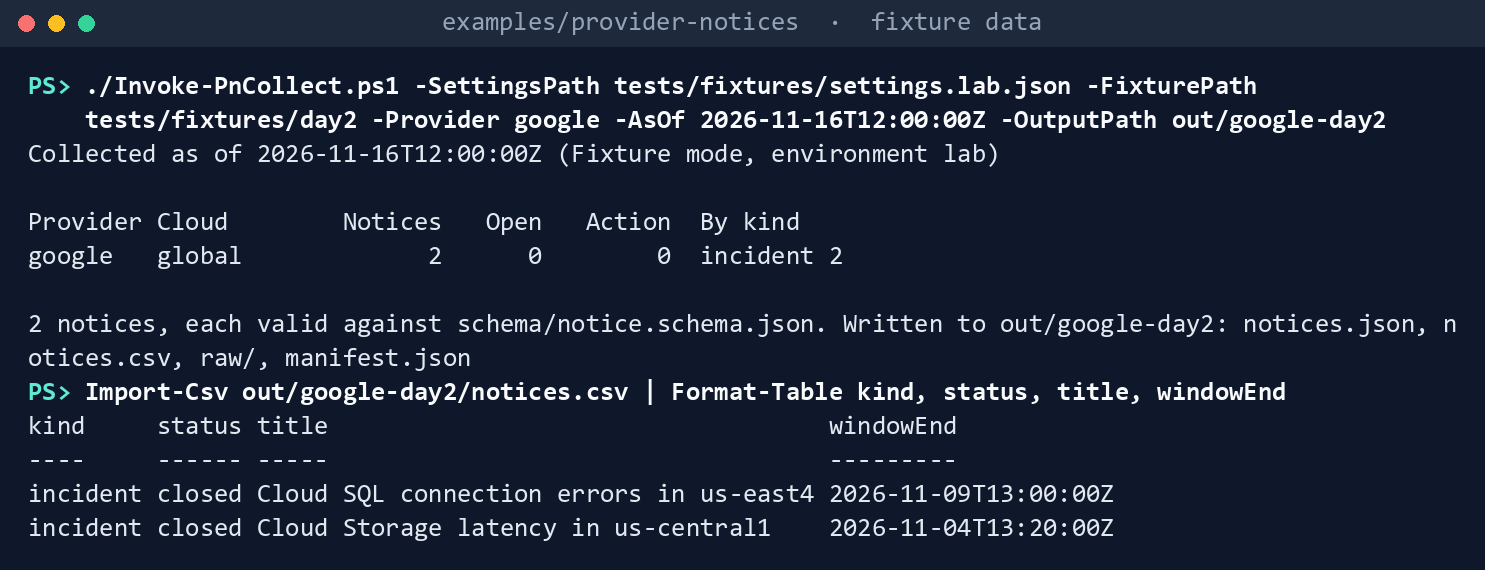
What the terminal shows, run on the kit’s fixtures (the same output as text) See what kinds Google can send. Group both weeks by kind; there is only one:
Import-Csv out/google/notices.csv, out/google-day2/notices.csv | Group-Object kind | Format-Table Name, Count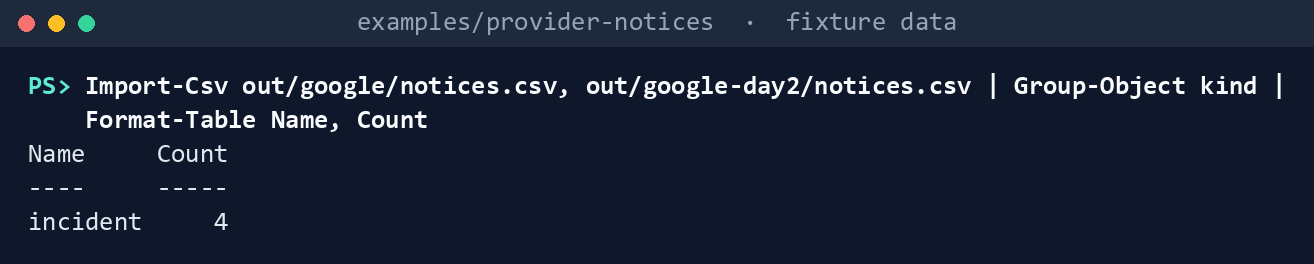
What the terminal shows, run on the kit’s fixtures (the same output as text) Ask the live invoker for the organization call. Switch the scope in memory; the invoker refuses before it starts
gcloud, because the call isn’t verified:$s = Read-PnSettings -Path tests/fixtures/settings.lab.json $s.providers.google.scope = 'organization'; $s.providers.google.organization = '123456789012' Invoke-PnCall -Invoker (New-PnLiveInvoker -Settings $s -SkipContextCheck) -CallId google-organization-events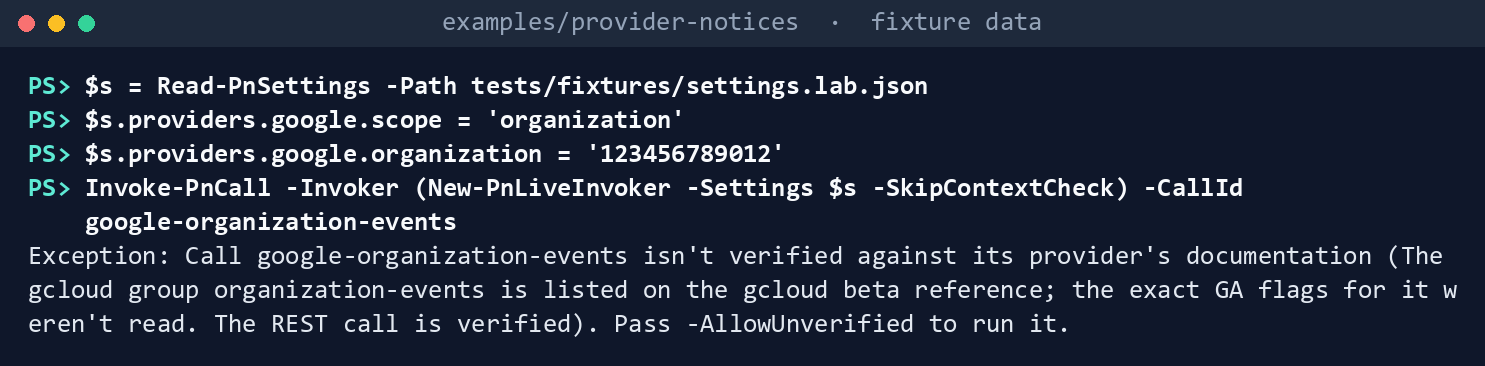
What the terminal shows, run on the kit’s fixtures (the same output as text) Build the project command without running it:
(Get-PnLiveCommand -CallId google-events -Settings $s).Arguments -join ' '
What the terminal shows, run on the kit’s fixtures (the same output as text) Run this chapter’s tests:
Invoke-Pester -Path tests/Collectors.Tests.ps1, tests/Live.Tests.ps1 -FullNameFilter 'Google Cloud Personalized Service Health*', '*Google*', '*unverified*' -Output None -PassThru | Select-Object PassedCount, FailedCount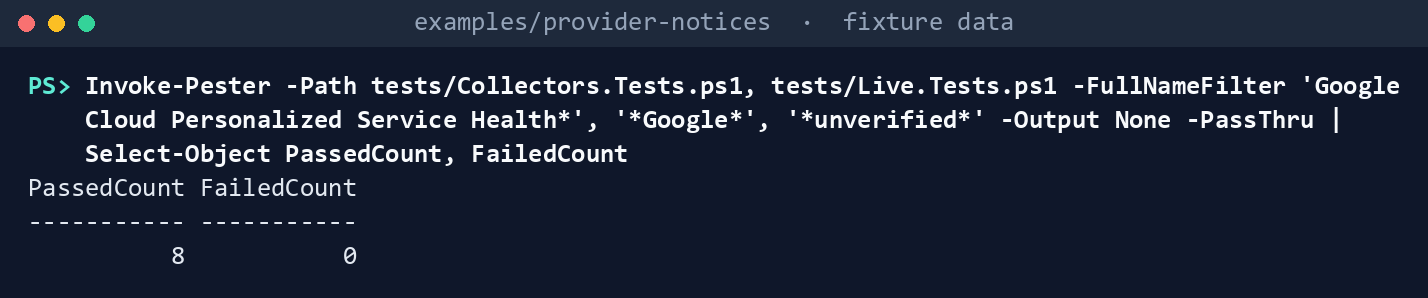
What the terminal shows, run on the kit’s fixtures (the same output as text)
Expected result: PassedCount 8 and FailedCount 0, and out/google/raw/google.json holding the events as read. Delete out when you’re done:
Remove-Item -Recurse -Force out
Lab 2: a test project
Use a Google Cloud test project, never production; it may have no incidents, which is a valid result. Work in examples/provider-notices. You’ll replace: <project-id> (the test project), <group-email> (the Google group the reader belongs to) and <settings-file> (your copy of deploy/settings.template.json with environment test, only google enabled, scope project and the project ID).
Every command in this lab, in order, from examples/provider-notices. Each step below says what it does and what to look for.
# Step 1: Enable the API and grant the viewer role
gcloud services enable servicehealth.googleapis.com --project=<project-id>
gcloud projects add-iam-policy-binding <project-id> --member=group:<group-email> --role=roles/servicehealth.viewer

# Step 2: Sign in as the reader
gcloud auth login

# Step 3: Cross-check with Google's command, then collect
gcloud service-health events list --project=<project-id> --location=global --format=json | ConvertFrom-Json | Measure-Object | Select-Object Count
./Invoke-PnCollect.ps1 -SettingsPath <settings-file> -Provider google -OutputPath out/google-test
Import-Csv out/google-test/notices.csv | Format-Table kind, status, title, services, regions

# Step 4: Back it out
gcloud projects remove-iam-policy-binding <project-id> --member=group:<group-email> --role=roles/servicehealth.viewer
Remove-Item -Recurse -Force out/google-test
Enable the API and grant the viewer role, as the project owner:
gcloud services enable servicehealth.googleapis.com --project=<project-id>
gcloud projects add-iam-policy-binding <project-id> --member=group:<group-email> --role=roles/servicehealth.viewer
Sign in as the reader:
gcloud auth loginCross-check with Google’s command, then collect. The counts should agree:
gcloud service-health events list --project=<project-id> --location=global --format=json | ConvertFrom-Json | Measure-Object | Select-Object Count
./Invoke-PnCollect.ps1 -SettingsPath <settings-file> -Provider google -OutputPath out/google-test
Import-Csv out/google-test/notices.csv | Format-Table kind, status, title, services, regions
Then record the gaps with the ISSO: if the project is in an Assured Workloads FedRAMP Moderate, FedRAMP High, IL4 or IL5 folder, Personalized Service Health isn’t in that package; and in every case, Google’s planned maintenance doesn’t come through this API.
Back it out. Remove the role binding and delete the run; leave the API enabled unless the project owner decides otherwise:
gcloud projects remove-iam-policy-binding <project-id> --member=group:<group-email> --role=roles/servicehealth.viewer
Remove-Item -Recurse -Force out/google-test
Verified facts
| Item | Value | US Government | Source |
|---|---|---|---|
| Project events | projects.locations.events.list, servicehealth.events.list |
— | 7 |
| Event | Category INCIDENT only; states; impacts; updates |
— | 8 |
| Enable | servicehealth.googleapis.com |
— | 9 |
| Role | roles/servicehealth.viewer, Personalized Service Health Viewer |
— | 10 |
| gcloud | gcloud service-health events list --project --location=global |
— | 11 |
| Assured Workloads | Not in FedRAMP Moderate, FedRAMP High, IL2, IL4, IL5, CJIS or ITAR | Gap | 12 |
| Sign-in and back-out | gcloud auth login; gcloud projects remove-iam-policy-binding |
— | 13 |
Not yet specified: the gcloud flags for organization events (the REST call is verified; the kit runs the gcloud call only with -AllowUnverified).
Federal requirements and evidence
The collection is what the guide’s G5 checks. The mappings are the kit’s config/requirements.json.14 15
| What the output proves | Requirement it supports | KSI it aligns to | Who keeps it |
|---|---|---|---|
| The reader holds the viewer role and nothing that writes (Lab 1, step 1; Lab 2, step 1) | SA-9 c | KSI-SCR-MIT, KSI-SCR-MON | The project owner; the ISSO keeps the binding |
Every incident for the project was read and recorded (Lab 1, steps 2 and 4; Lab 2, step 3: raw/google.json, notices.json, manifest.json) |
SA-9 c; SI-5 a | KSI-SCR-MIT, KSI-SCR-MON | The ISSO, with the run folder |
| A call nobody verified isn’t run (Lab 1, step 6) | SA-9 c | KSI-SCR-MON | The repository’s tests |
| The gaps (no maintenance; not in the FedRAMP or IL packages) are written down (Lab 2, step 3) | SA-9 c; RA-3 f (update the risk assessment) | KSI-SCR-MON, KSI-SCR-MIT | The ISSO |
KSIs are FedRAMP 20x indicators for cloud service providers; the agency lines its evidence up with them and doesn’t report them (Book 00, Appendix B). The kit’s records support these controls; the agency’s assessor decides them. Which output supports which indicator is the program’s mapping (design guidance).
Dangers
| Danger | What happens | The guard |
|---|---|---|
| Google maintenance assumed covered | A maintenance window lands with nobody told | The gap is in the record, the digest’s provider table and the ISSO’s file; Google’s maintenance reaches the project by other channels |
| A FedRAMP or IL workload expected to have Personalized Service Health | Nothing to read, and an empty list looks like good news | Lab 2, step 3 records the package; the ISSO decides the compensating channel |
| An unverified call run in production | A command whose flags nobody read | Marked unverified; refused without -AllowUnverified |
| The viewer role granted at the organization for a project read | More read scope than needed | Grant at the project unless the settings’ scope is organization |
Checklist
Footnotes
Google Cloud, Personalized Service Health REST reference,
projects.locations.events.list, https://docs.cloud.google.com/service-health/docs/reference/rest/v1/projects.locations.events/list (read November 9, 2026; carried from the provider notices guide’s verification log).↩︎Google Cloud, Personalized Service Health REST reference, the Event resource, https://docs.cloud.google.com/service-health/docs/reference/rest/v1/projects.locations.events (read November 9, 2026).↩︎
Google Cloud, “List events,” https://docs.cloud.google.com/service-health/docs/list-events (read November 9, 2026).↩︎
Google Cloud, “Personalized Service Health roles and permissions,” https://docs.cloud.google.com/iam/docs/roles-permissions/servicehealth (read November 9, 2026).↩︎
Google Cloud, gcloud reference,
gcloud service-health events list, https://docs.cloud.google.com/sdk/gcloud/reference/service-health/events/list (read November 9, 2026).↩︎Google Cloud, Assured Workloads, “Supported products,” https://docs.cloud.google.com/assured-workloads/docs/supported-products (read November 9, 2026).↩︎
Google Cloud, Personalized Service Health REST reference,
projects.locations.events.list, https://docs.cloud.google.com/service-health/docs/reference/rest/v1/projects.locations.events/list (read November 9, 2026; carried from the provider notices guide’s verification log).↩︎Google Cloud, Personalized Service Health REST reference, the Event resource, https://docs.cloud.google.com/service-health/docs/reference/rest/v1/projects.locations.events (read November 9, 2026).↩︎
Google Cloud, “List events,” https://docs.cloud.google.com/service-health/docs/list-events (read November 9, 2026).↩︎
Google Cloud, “Personalized Service Health roles and permissions,” https://docs.cloud.google.com/iam/docs/roles-permissions/servicehealth (read November 9, 2026).↩︎
Google Cloud, gcloud reference,
gcloud service-health events list, https://docs.cloud.google.com/sdk/gcloud/reference/service-health/events/list (read November 9, 2026).↩︎Google Cloud, Assured Workloads, “Supported products,” https://docs.cloud.google.com/assured-workloads/docs/supported-products (read November 9, 2026).↩︎
Google Cloud, gcloud reference,
gcloud auth login, https://docs.cloud.google.com/sdk/gcloud/reference/auth/login, andgcloud projects remove-iam-policy-binding, https://docs.cloud.google.com/sdk/gcloud/reference/projects/remove-iam-policy-binding (read November 9, 2026).↩︎National Institute of Standards and Technology, SP 800-53 Rev. 5 OSCAL catalog, release 5.2.0, https://github.com/usnistgov/oscal-content/blob/main/nist.gov/SP800-53/rev5/json/NIST_SP-800-53_rev5_catalog.json (read November 9, 2026).↩︎
FedRAMP, “Key Security Indicators,” FedRAMP Consolidated Rules for 2026, https://www.fedramp.gov/2026/providers/20x/key-security-indicators/ (read November 9, 2026).↩︎